Courier Claims
The purpose of this SOP is to give an idea about the process of doing Courier Claims.
Overview#
Purpose: The purpose of this SOP is to give an idea about the process of doing Courier Claims.
Scope: This applies to customer service representative staff and all staff personnel who is in charge of this process.
Responsibility: It is the responsibility of all staff to follow the standard operating procedure of Courier Claims.
Objective: The objective of this procedure is:
- to guide employees on how is the process of submitting courier claims.
Submit Courier Claims
Procedure#
Important Note:
Upon receiving a damage item complaint forward this immediately to the respective courier as damage claims are time sensitive. You can then proceed to processing the claim after you forward the email complaint of the customer.
All damage courier claims MUST have supporting images – It is important that we have all this supporting material when submitting a claim. When a customer has said that their item has been damaged - follow SOP on Handling Damage Item Complain and ask for pictures if they haven't already sent some. Tag or label these emails as Courier Claim, Claims Processing and Un-Happy Customer Comments.
For lost items there is no need for pictures. Tag these emails as Courier Claim, Claims Processing, Item Not Received and Un-Happy Customer Comments.
For courier claims worth less than 20 pounds there is no need to process claim.
Fill-out Courier Claim Trello Card#
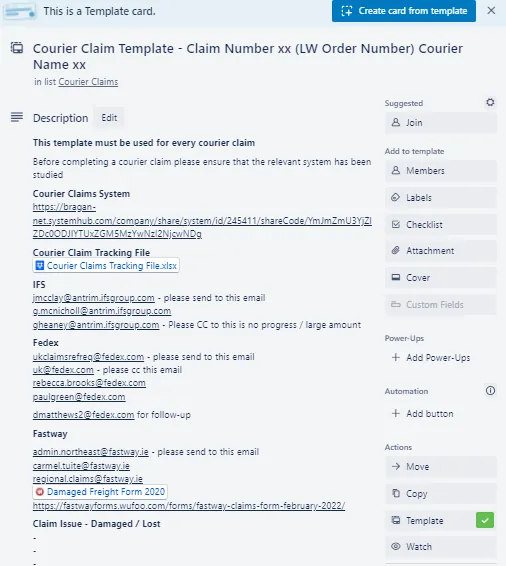
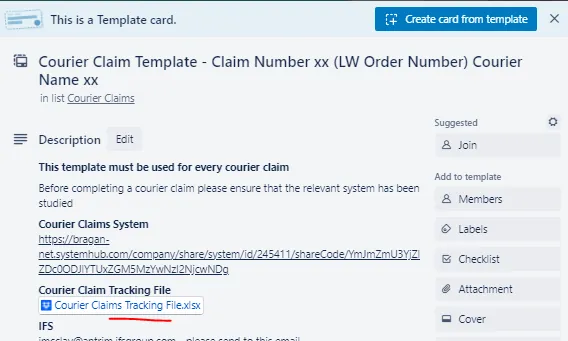
Follow the check-list from top to bottom for proper guidelines. This should be done first for all courier claims. See this link for the Courier Claim Template.
Courier Claim Template (Trello) - Description Part
Here you can see the link to the SOP and the contact emails for whom you are going to send the courier claim email.
At the last part for Claim Issue - Damaged/Lost - please state here the reason for the claim.
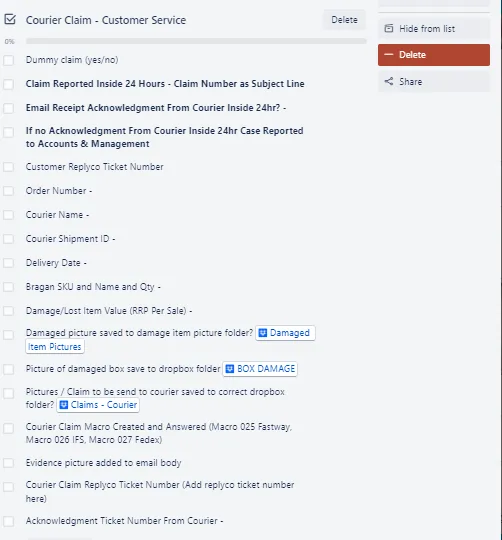
Courier Claim Checklist for Customer Service Agents
CS agents needs to fill out this part first and make the initial contact with the courier. Once the courier acknowledged the claim this is now passed to Accounts for filling-out the claim forms from courier and submission of supporting documents.
If the claim is a dummy claim, write yes and tick the checklist. To know how to process Dummy Claims see this SOP.
To know how and where to save damage picture of item and box damage see this SOP on Handling Damage Item Complain.
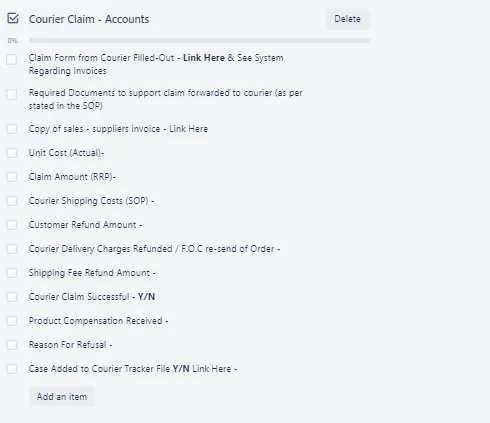
Courier Claim Checklist for Accounts
In IFS case, once they acknowledged the claim they will send the claim form and state the required documents. See IFS claims below for more detailed process.
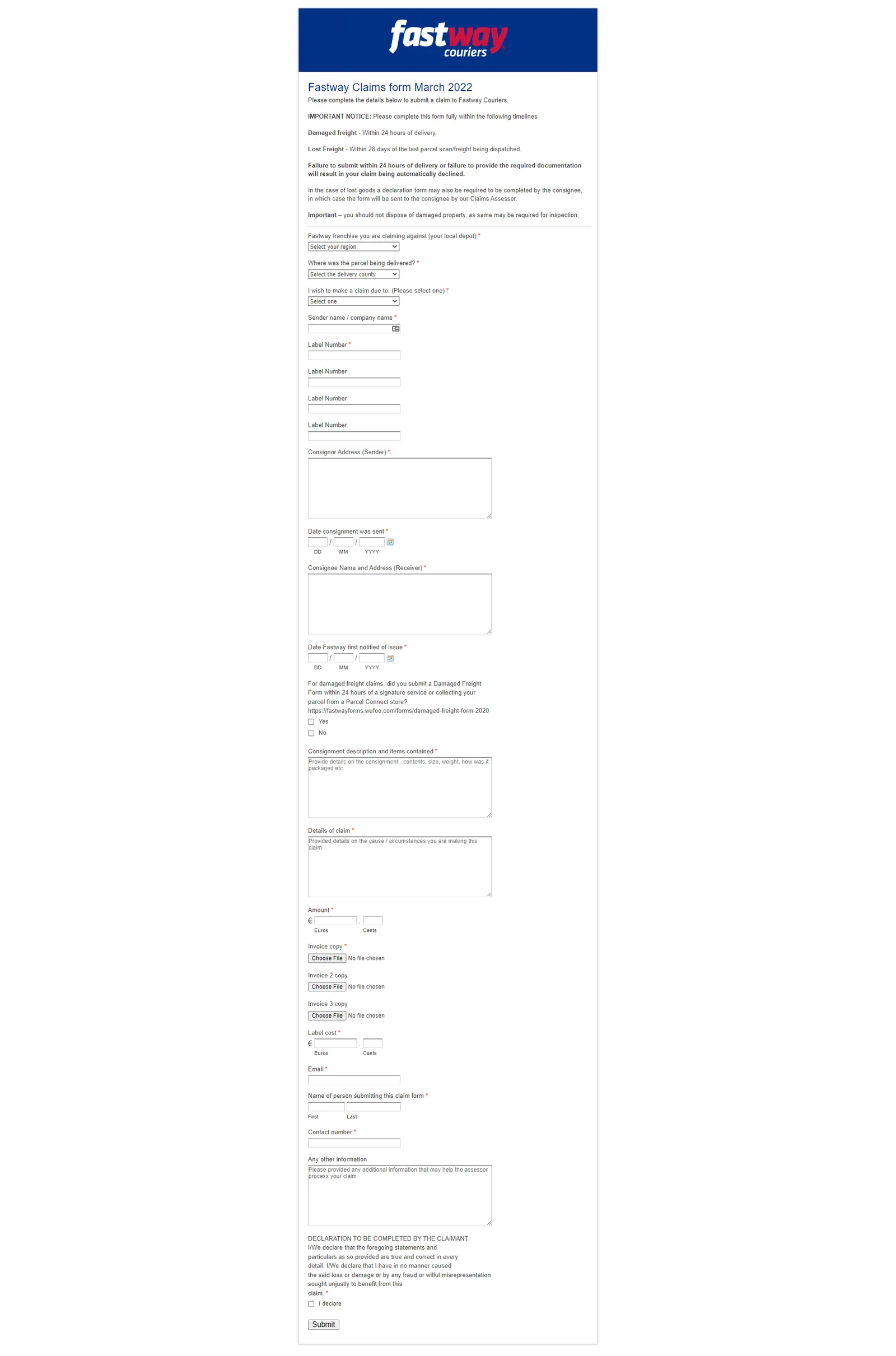
In Fastway you need to fill-out their online claim. See process below.
For FedEx you also need to do it online. See process below.
Accounts will be the one to complete all these requirements. Follow-ups will also be done by Accounts.
IFS Claims#
Note:
Do courier claim after investigating with them. If courier cannot provide anymore update then process the claim. For the investigation part, please contact the following: Lee Close, [email protected] or [email protected]
Courier Claims must be done immediately after confirming that the issue is with the courier. Courier only gives us a limited time to do the claim (14 days). Beyond this they will not acknowledge or accept our claim.
- Fill-out courier claim trello card.
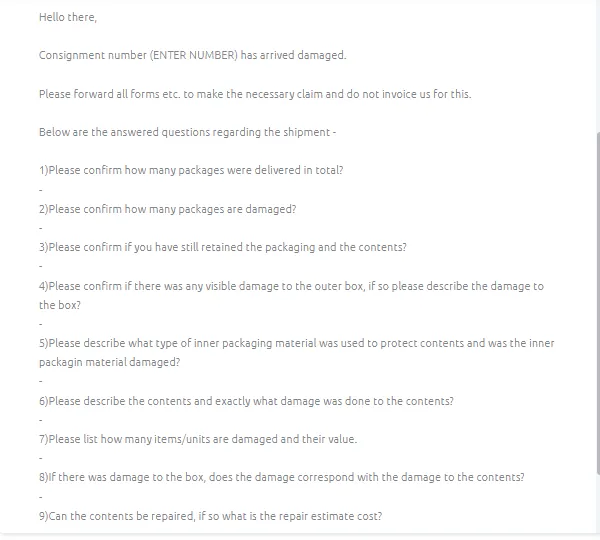
- Forward the customer complaints to IFS and use Macro 026. Answer the questions in the Macro and send to Joy McClay email address. Make sure to attach all relevant pictures. Consignment number is the tracking number of the parcel. Make sure that the email is tagged or labelled as Claims Processing. Subject of the email should be: "Claim for" + tracking number.
Note:
If item is lost please make sure to edit the macro: "Consignment number [ENTER NUMBER] has arrived damaged" it should now be "Consignment number [ENTER NUMBER] is lost.
For Question 3 usual answer is NO since the item is with the customer already.
For Question 4 add the dropbox link of the damaged picture, better to have the courier check it than explain it. You can just put a brief description of the damage, make the story simple. For example, you can just say box is ripped please see attached link for the pictures. To know where to save the pictures please see process below:
Saving damaged pictures for courier
- You need to have access to the Claims - Courier Dropbox Folder - please request management to invite you to this folder. See snipe below for the content of this folder.
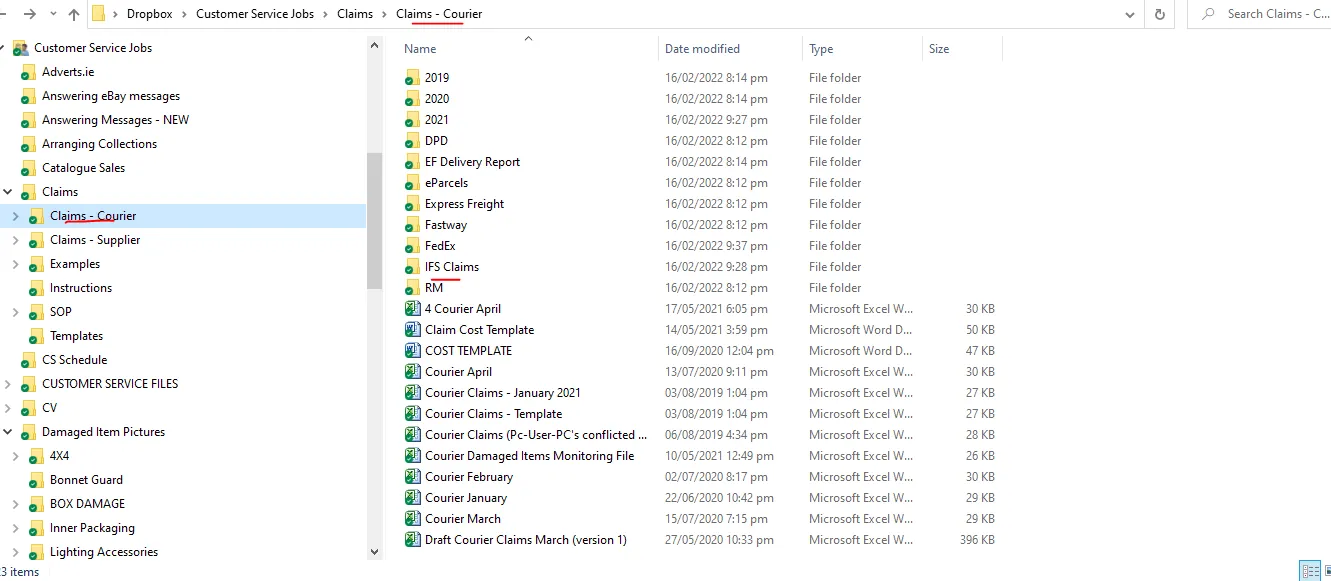
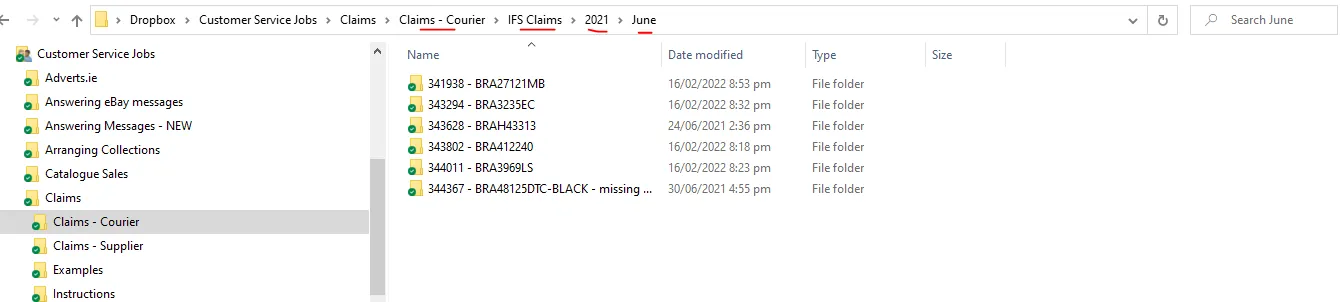
- Since this is an IFS claim, select the IFS Claims Folder, then the select the folder with the correct year. If its a new year then create a new folder for the new year. Then select the correct month (create folder if its a new month) and then create a folder with the Order Number - SKU Code and save it here. The link of this folder is the one you are going to add in Question No 4 of the macro.
For Question 5 you can ask this to warehouse but most of the time it is Styrofoam and bubble wrap or plastic wrap. You can also check the picture from customer since sometimes the inner packaging is shown.
For Question 6 just say please see link in Question 4 for the damage pictures, add a brief description of the damage, keep it simple also. Example, dent on the roof bar please see link in Question 4. Also make sure to describe the content. When describing the content, write it in a way that you mention the main item first so it won't be confusing to the courier. Example, if the lost item is 1pc BRA2141171LW New Gen Scania 2017+ R & S Series High Roof Bar + Jumbo Spots x6 - you can say 1pc High roof bar with jumbo spots for new gen scania truck (easier to understand).
For Question No. 8 answer should always be YES
For Question No. 9 in the Macro where it ask if contents can be repaired - answer should always be a No, it can't be repaired.
In the trello card checklist for Accounts, courier shipping cost is asked. You will also need this in order to fill-out the Claim Form of IFS (See Attachment Section for the sample form). In their form, this is called the Freight Charge. To get the value for this, follow these steps.
How to get courier shipping cost for IFS
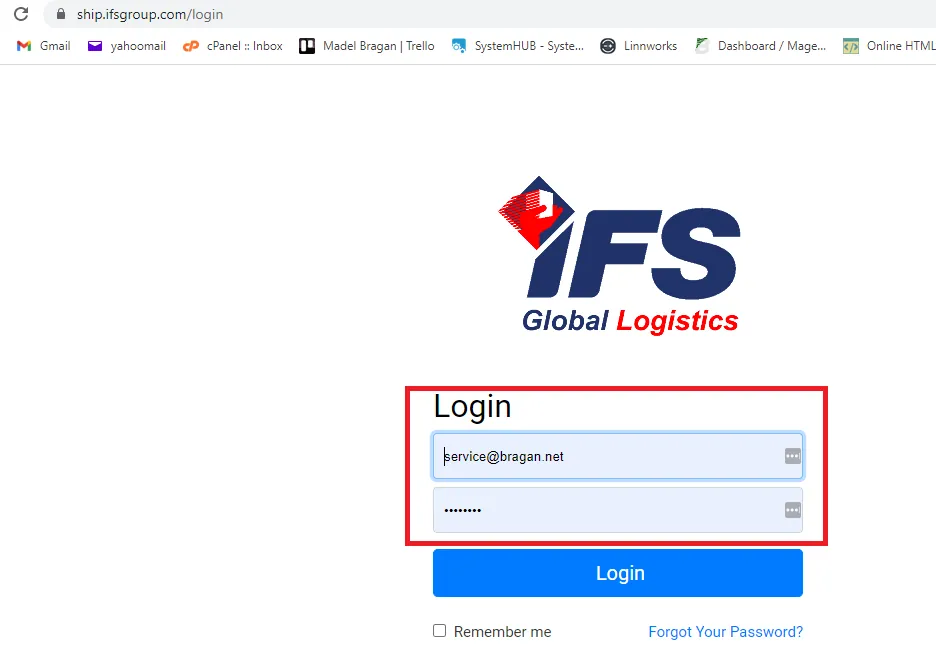
- Log in to IFS group website. See snipes below on how to get to log-in page. Get the credentials from management.
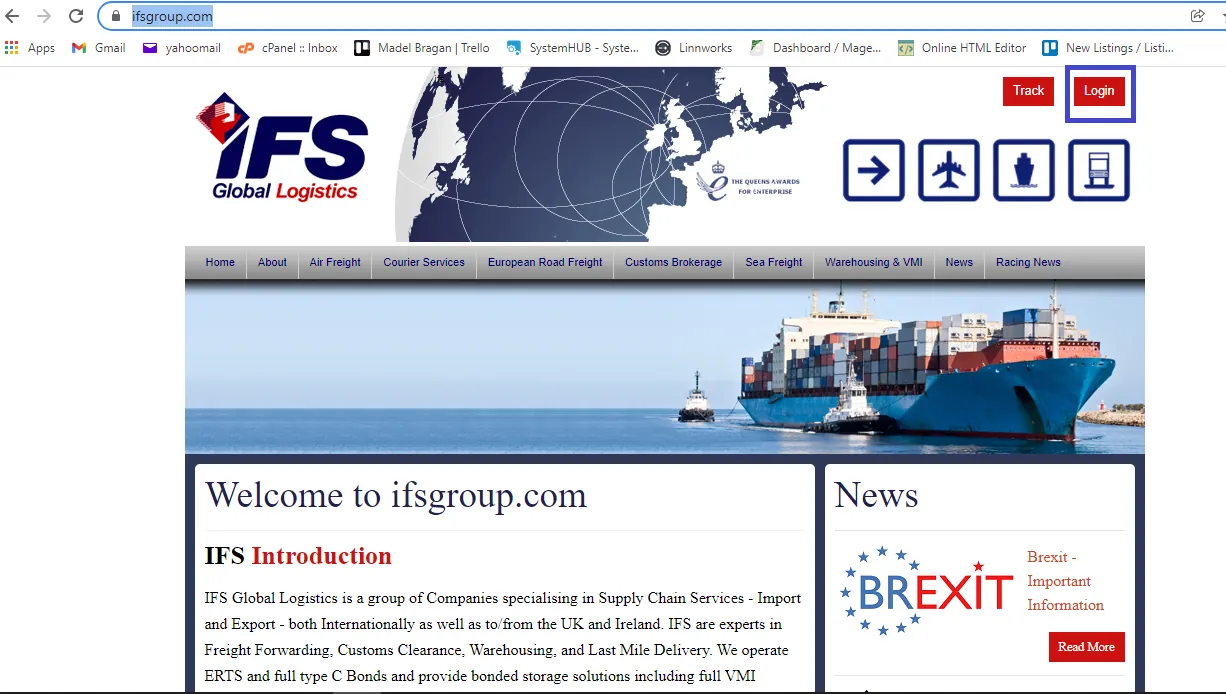
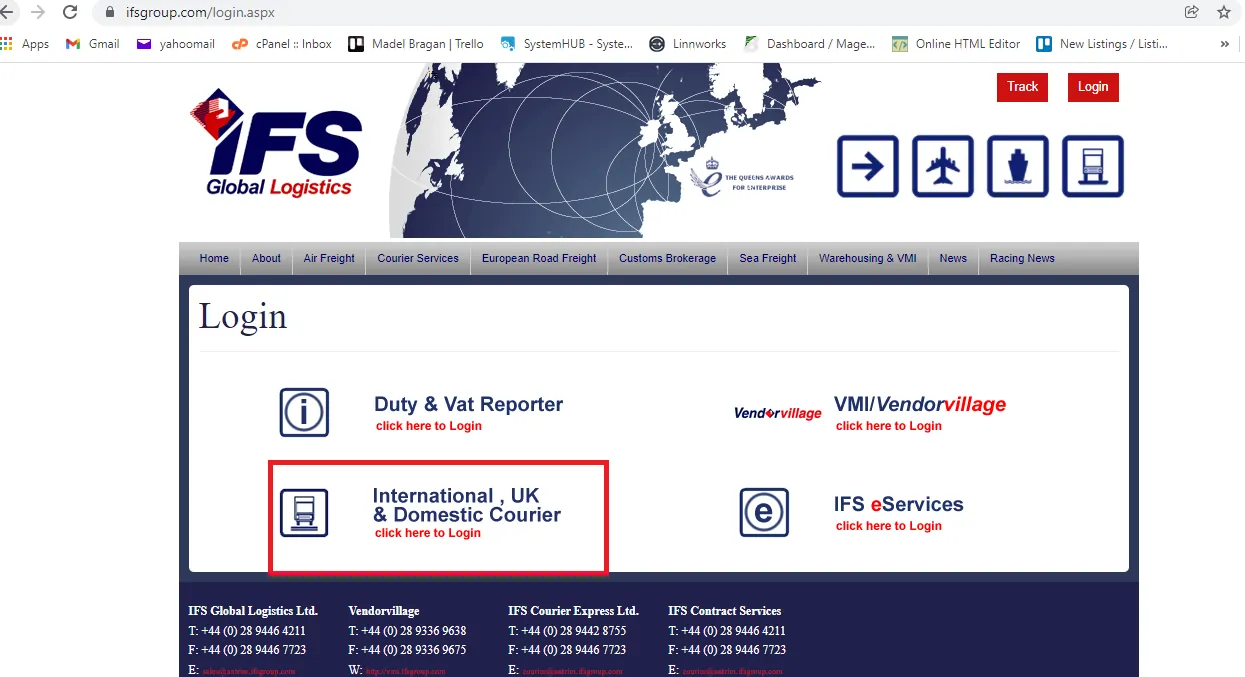
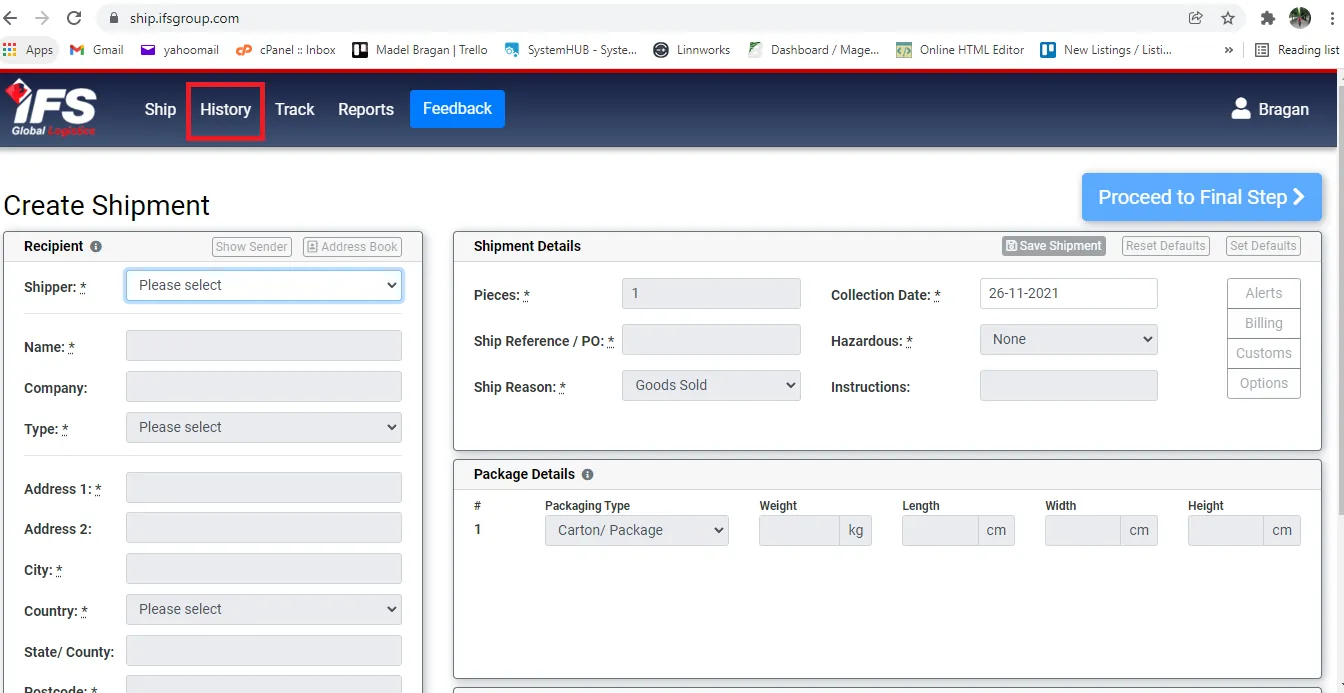
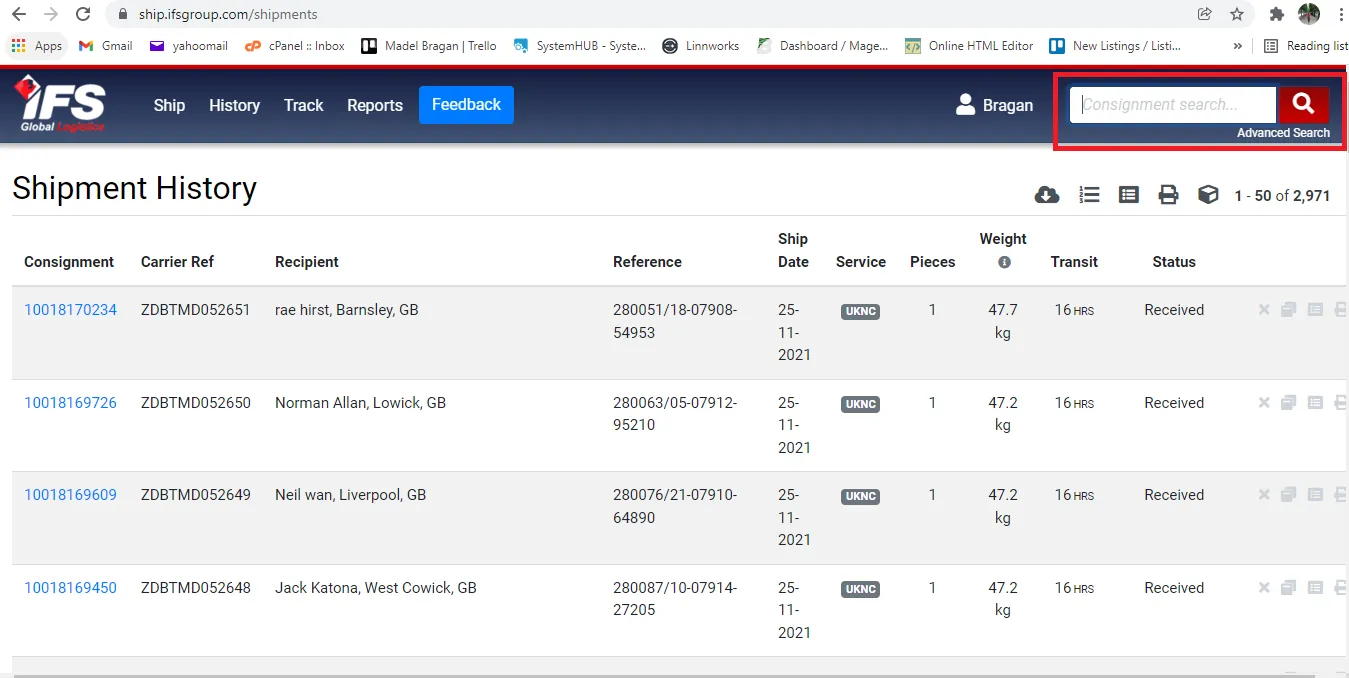
- Once logged-in click on history and search the tracking number or consignment number.
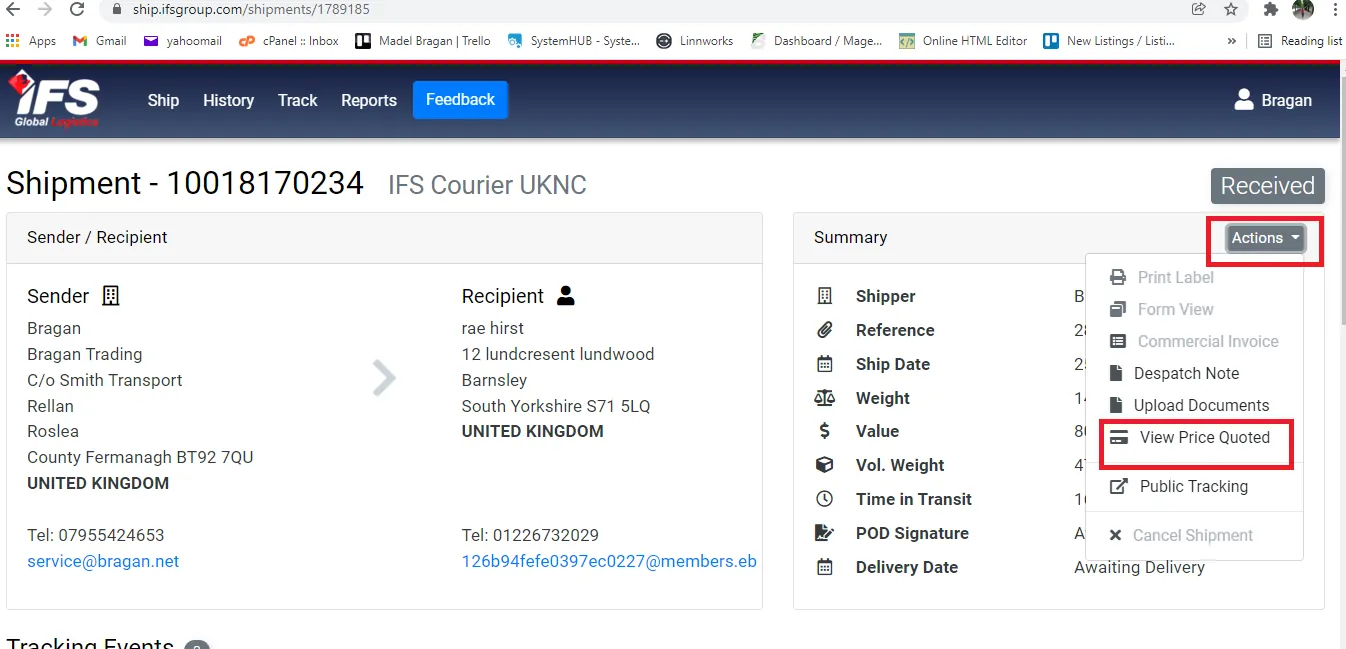
- Click on Actions and select View Price Quoted. You can now see the courier shipping cost.
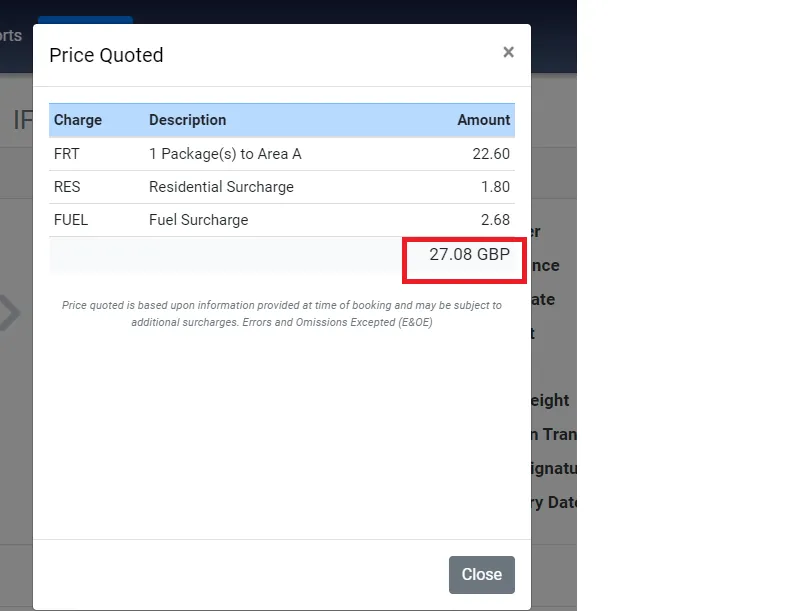
- If courier did not acknowledge the claim in 24hours, Accounts will be the one to do the follow-up. If still no acknowledgement, do another follow-up email or call the courier. Please note that these claims should be addressed in timely manner, especially if the customer open an eBay/Amazon case. eBay/Amazon cases needs to be resolved in a specific timeframe.
- Joy McClay will acknowledge the claim along with a claim form attachment (See Attachment Section for a sample Claim Form of IFS). Accounts will fill-out this form and send it back to Joy along with a copy of sales and cost invoice.
Note:
Copy of Sales - supplier invoice (invoice to show cost of the item) - this needs to be edited. The prices should be marked-up so that the purchase price is near to the retail price (RRP). Each supplier has its own format for their invoice, some of this already has an editable template (please see attachments) but some still do not. If there is no format yet, Account personnel will create an editable template of the invoice. You can get copy of the supplier invoice in these folders (ask management to invite you to these folders: China Suppliers, Europe/Turkey Suppliers. See attachment for sample supplier invoice template.
Note: Make sure not to send the original copy of the supplier invoice as the purchase price needs to be edited.
Cost Invoice - sales invoice of the purchased item (get it in Xero) - see SOP on Handling Customer Invoice Request to get this. See below for sample of a cost invoice.
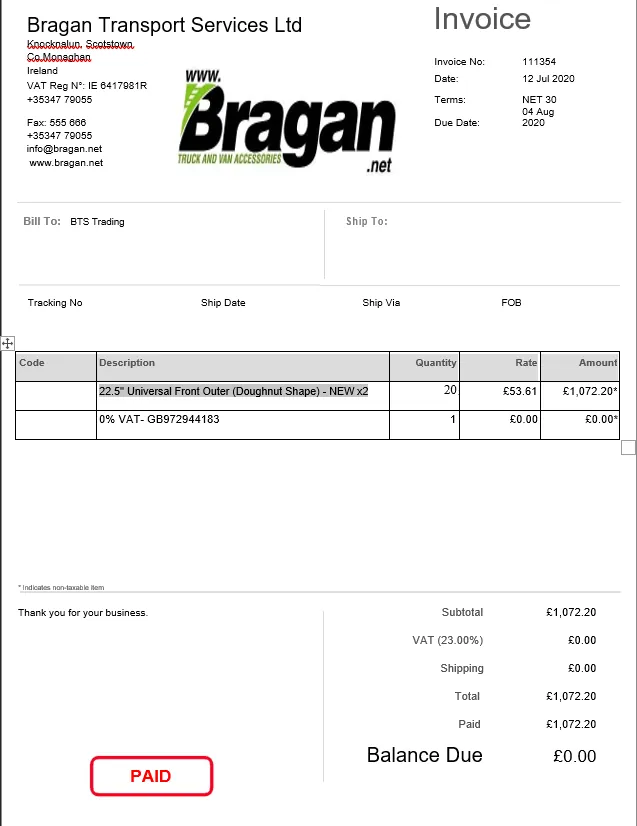
- Once sent, Joy will acknowledge that they received the required forms and to wait for their feedback.
Note: See Courier Claim Tracking Section below on how to do proper monitoring of claims so we can have a timely follow-up with the couriers.
- For damage claims and courier replies that they cannot process the claim since customer signs it in good condition upon delivery of item, update the customer and send Macro 043. This macro contains a Dropbox link of the snipe showing the couriers reply (see Figure 15)
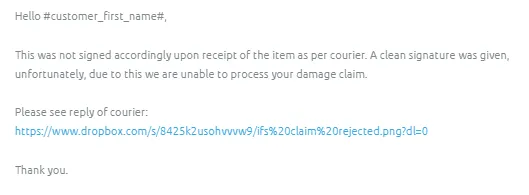
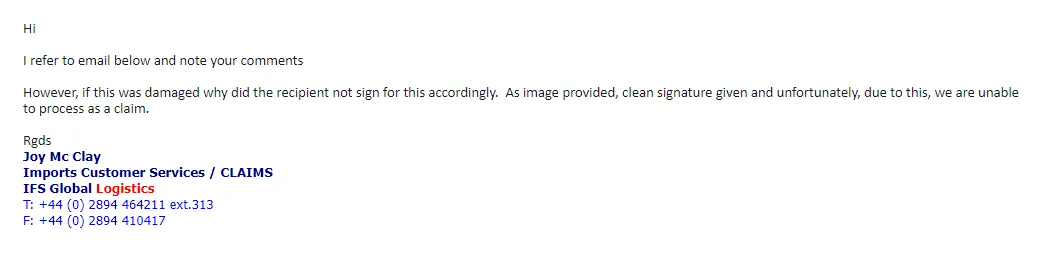
Fastway Claims#
Note:
Damaged freight - Within 24 hours of delivery, need to tag accounts personnel in Claims Skype Group in order for him to fill-out the online claim form and submit needed documents like Invoices. Lost Freight - Within 28 days of the last parcel scan/freight being dispatched. Failure to submit within 24 hours of delivery or failure to provide the required documentation will result in your claim being automatically declined.
In the case of lost goods a declaration form may also be required to be completed by the consignee, in which case the form will be sent to the consignee by our Claims Assessor.
Do not dispose of damaged property, as same may be required for inspection.
- Fill-out Courier Claim Trello Card
- Forward the customer complaints to Fastway and use Macro 025, attached all relevant photos. Make sure that the email is tagged or labelled as Claims Processing. Subject of the email should be: "Claim for" + tracking number. Send this email to [email protected] or [email protected] or [email protected]. Choose the admin.northeast then cc the other two.
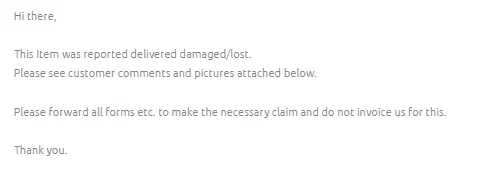
- Make sure to attach the dropbox link of the damaged pictures sent by customer.
Saving damaged pictures for courier
- You need to have access to the Claims - Courier Dropbox Folder - please request management to invite you to this folder. See snipe below for the content of this folder. Select the Fastway Folder.
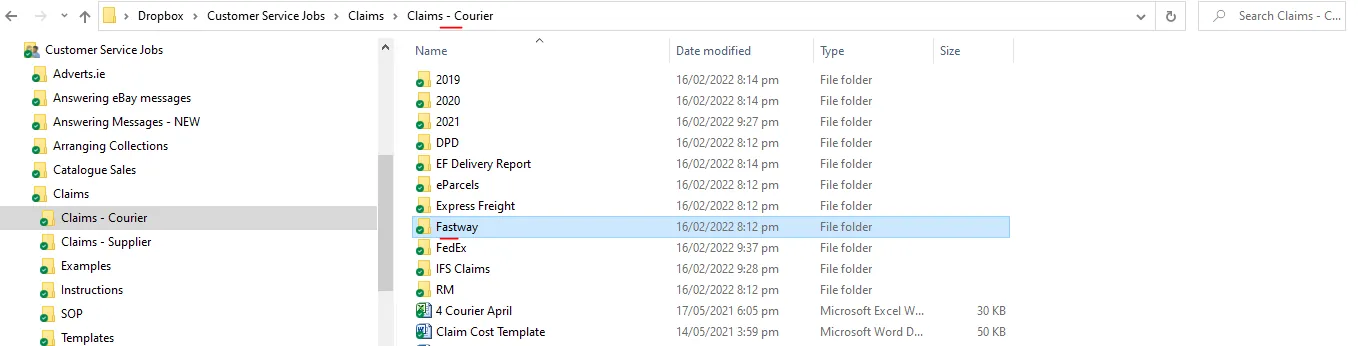
- Then the select the folder with the correct year. If its a new year then create a new folder for the new year. Then select the correct month (create folder if its a new month) and then create a folder with the Order Number - SKU Code and save it here. The link of this folder is the one you are going to add in the macro.
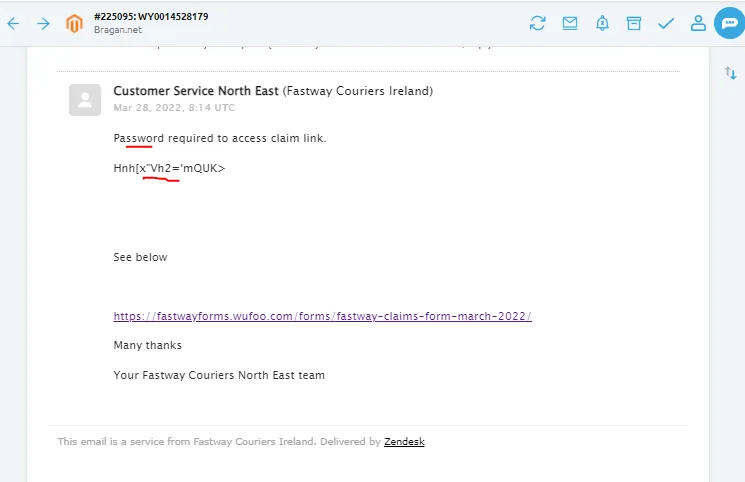
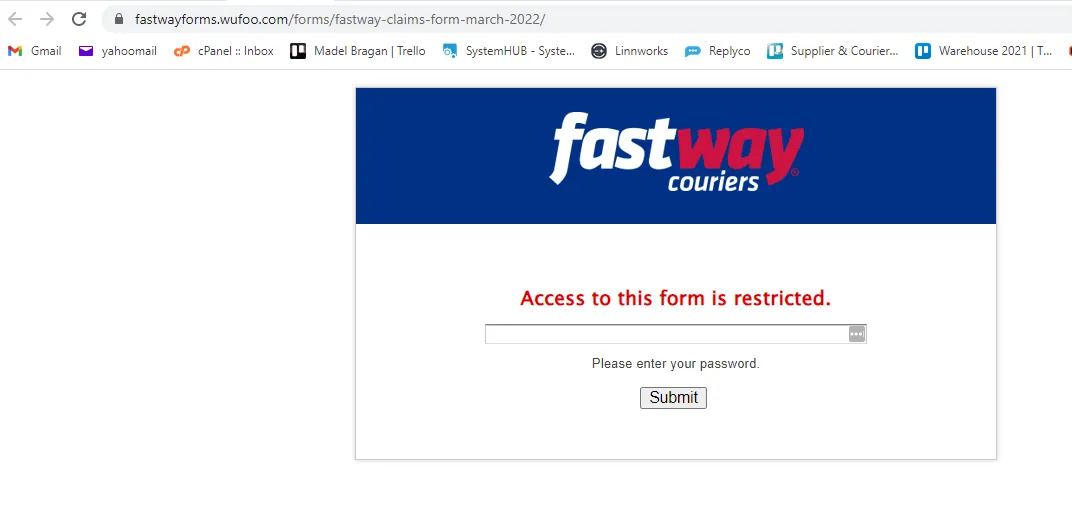
- Fastway will acknowledge the claim by sending a link to their online claim form along with the password in order to access the claim link (Figure 19). If the password is not working, please reply to the courier and inform them of the error. Courier will reply and provide a new password. Accounts personnel will be the one to fill-out this online claim form so make sure to tag accounts in the Claims Skype group so that it will be processed in a timely manner.
If courier did not acknowledge the claim in 24hours, Accounts will be the one to do the follow-up. If still no acknowledgement, do another follow-up email or call the courier. Please note that these claims should be addressed in timely manner, especially if the customer open an eBay/Amazon case. eBay/Amazon cases needs to be resolved in a specific timeframe.
Note:
See Courier Claim Tracking Section below on how to do proper monitoring of claims so we can have a timely follow-up with the couriers.
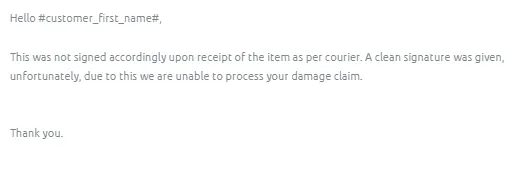
- For damage claims and courier replies that they cannot process the claim since customer signs it in good condition upon delivery of item, update the customer and send Macro 042 then attach a snipe of the courier's claim rejection.
FedEx Claims#
- Fill-out Courier Claim Trello Card. Then tag immediately Accounts personnel in the Supplier Claims/Courier Claims chat group to process the online claim form.
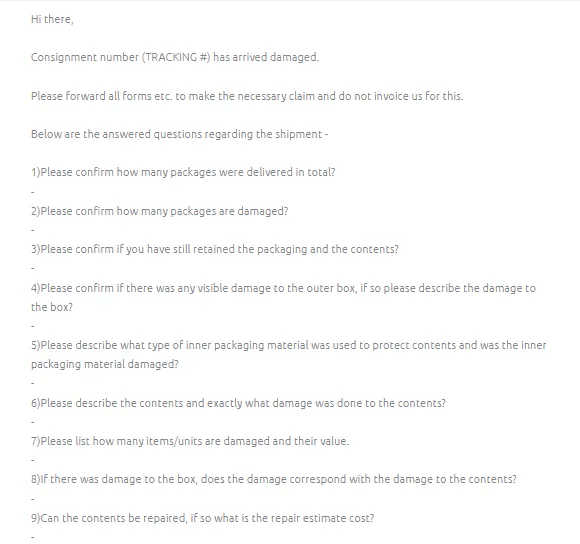
- Forward the customer complaints to FedEx and use Macro 027. Answer the questions in the Macro and send to [email protected], and [email protected]. Make sure to attach all relevant pictures. Consignment number is the tracking number of the parcel. Make sure that the email is tagged or labelled as Claims Processing. Subject of the email should be: "Claim for" + tracking number.
Note:
If item is lost please make sure to edit the macro: "Consignment number [ENTER NUMBER] has arrived damaged" it should now be "Consignment number [ENTER NUMBER] is lost.
For Question 3 usual answer is NO since the item is with the customer already.
For Question 4 add the dropbox link of the damaged picture, better to have the courier check it than explain it. You can just put a brief description of the damage, make the story simple. For example, you can just say box is ripped please see attached link for the pictures.
Saving damaged pictures for courier
- You need to have access to the Claims - Courier Dropbox Folder - please request management to invite you to this folder. See snipe below for the content of this folder. Select the FedEx Folder.
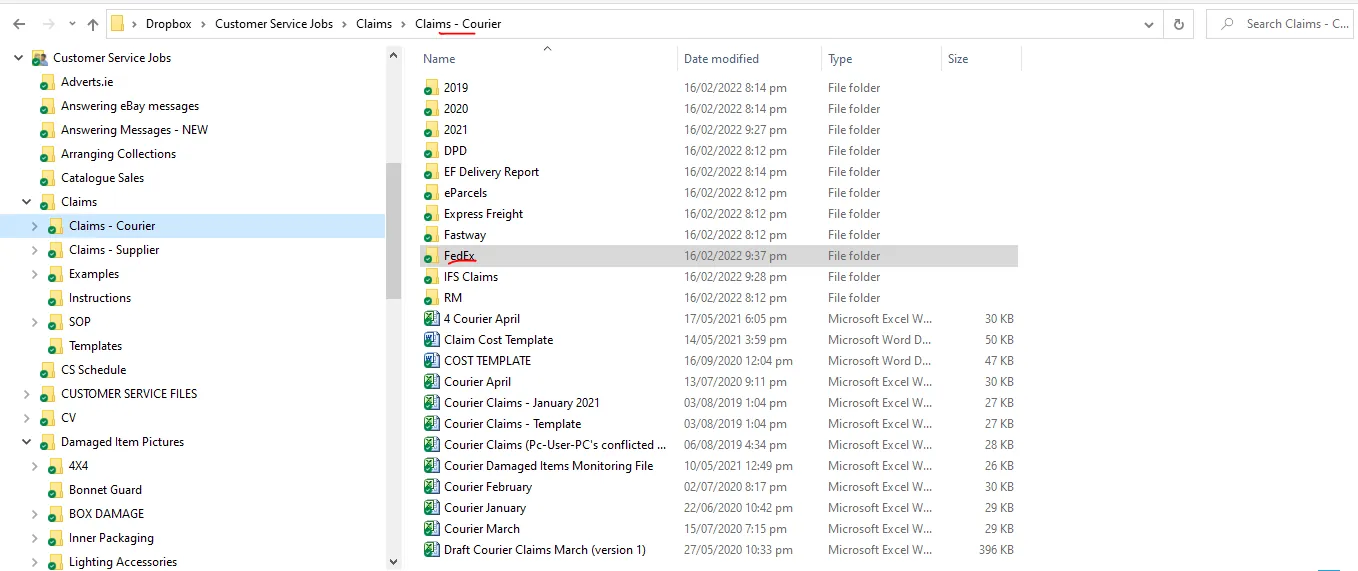
- Then the select the folder with the correct year. If its a new year then create a new folder for the new year. Then select the correct month (create folder if its a new month) and then create a folder with the Order Number - SKU Code and save it here. The link of this folder is the one you are going to add in Question No 4 of the macro.

For Question 5 you can ask this to warehouse but most of the time it is Styrofoam and bubble wrap or plastic wrap. You can also check the picture from customer since sometimes the inner packaging is shown.
For Question 6 just say please see link in Question 4 for the damage pictures, add a brief description of the damage, keep it simple also. Example, dent on the roof bar please see link in Question 4. Also make sure to describe the content. When describing the content, write it in a way that you mention the main item first so it won't be confusing to the courier. Example, if the lost item is 1pc BRA2141171LW New Gen Scania 2017+ R & S Series High Roof Bar + Jumbo Spots x6 - you can say 1pc High roof bar with jumbo spots for new gen scania truck (easier to understand).
For Question No. 8 answer should always be YES
For Question No. 9 in the Macro where it ask if contents can be repaired - answer should always be a No, it can't be repaired.
- If courier did not acknowledge the claim in 24hours, Accounts will be the one to do the follow-up. If still no acknowledgement, do another follow-up email or call the courier. Please note that these claims should be addressed in timely manner, especially if the customer open an eBay/Amazon case. eBay/Amazon cases needs to be resolved in a specific timeframe. Customer Service number of FedEx is +443456070809.
- Process online claim only if requested by FedEx. See this link to their claim process and fill out required form. The process below is for Lost Item/Shipment not Received.
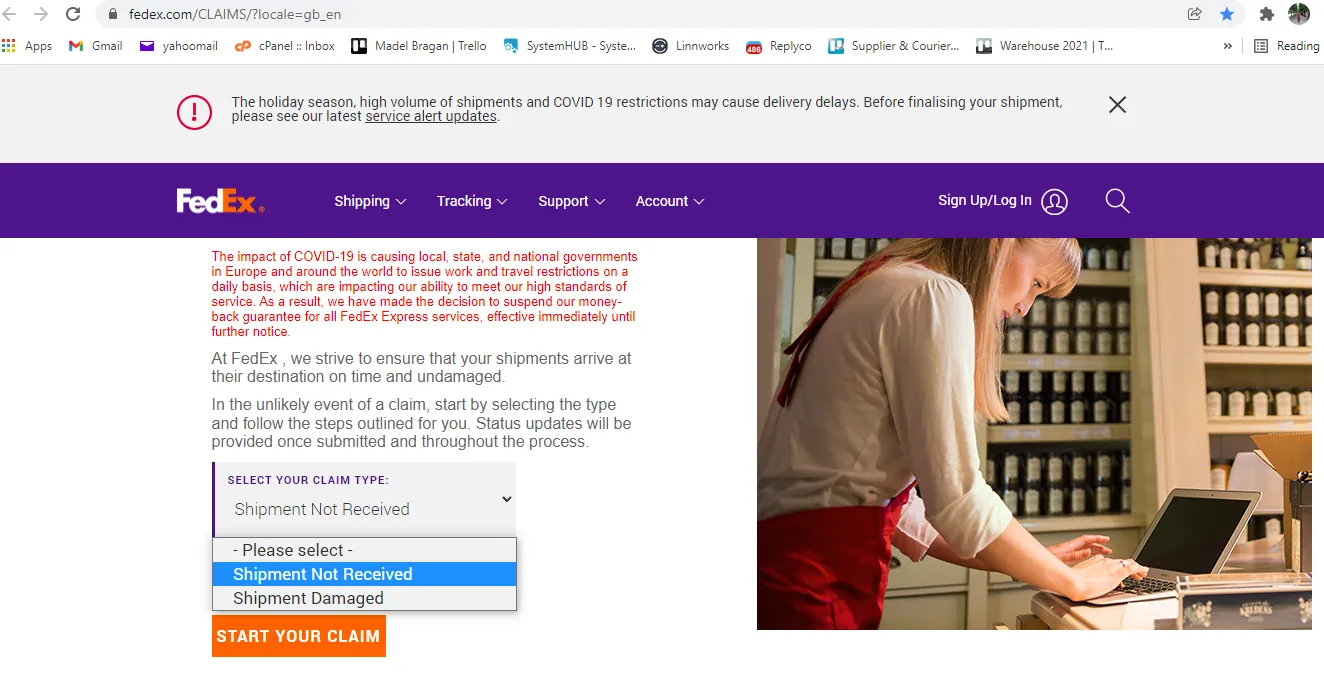
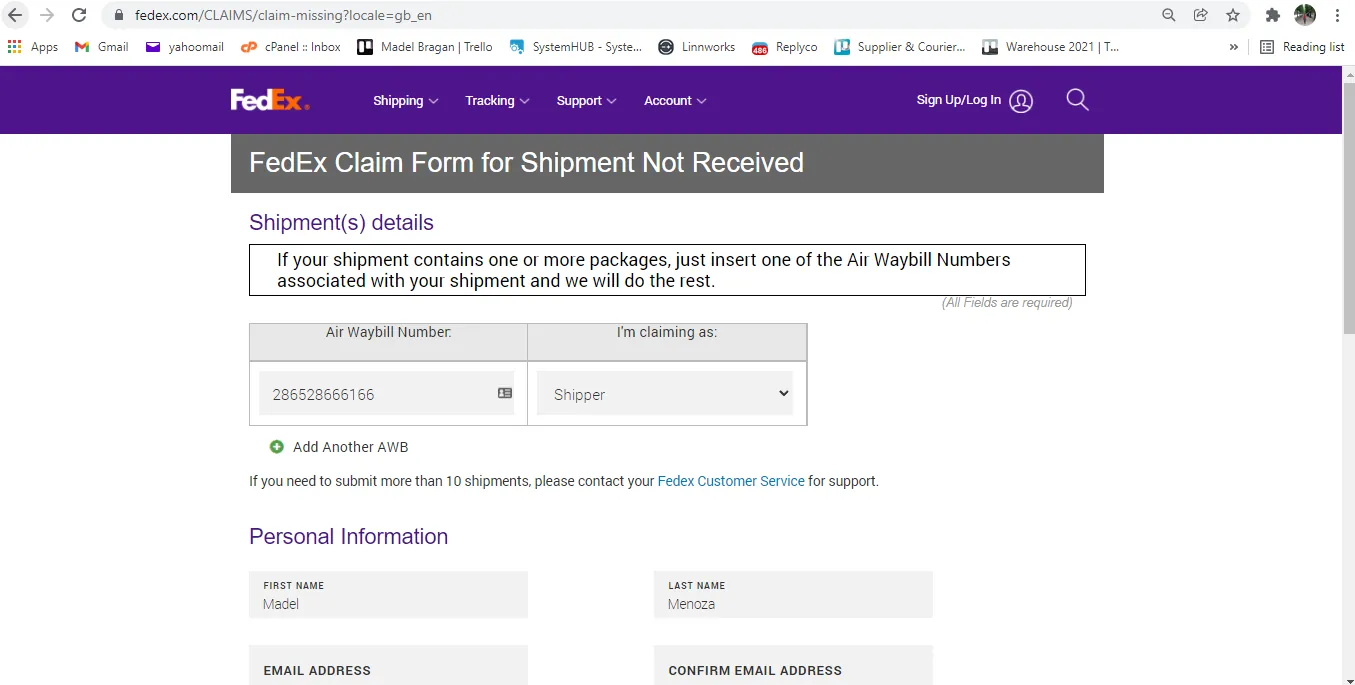
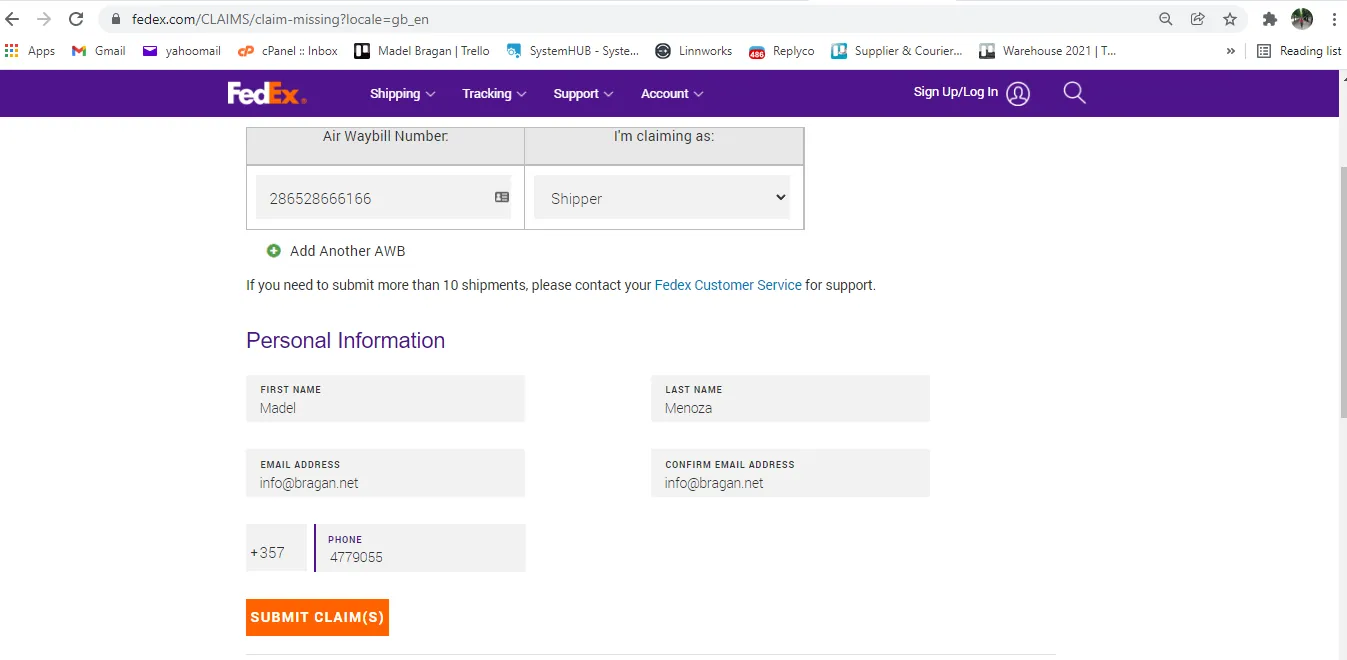
- For Shipment Damaged, have accounts fill out the Claim Form of Fedex for Damage Item (Please see attachment for the form) and follow the instructions written.
- For follow-up on important account processes please send to Danny Matthews [([email protected])](https://bragan-net.systemshub.com/embedded/manuals/74c1f46b-04a4-4e0b-afad-6cc89be3abd7/([email protected])
- For damage claims and courier replies that they cannot process the claim since customer signs it in good condition upon delivery of item, update the customer and send Macro 042 then attach a snipe of the courier's claim rejection.
How to Get FeDex Freight Charge#
In filling out the FedEx claim forms, it would require the freight charge information. To get this, please follow the steps below.
- Go to FedEx website and log in using the credentials provided by management. Step 1
- Click on Profile (top left) then select FedEx Billing Online. Step 2
- A new page will open, click Search/Download then New Search or Download
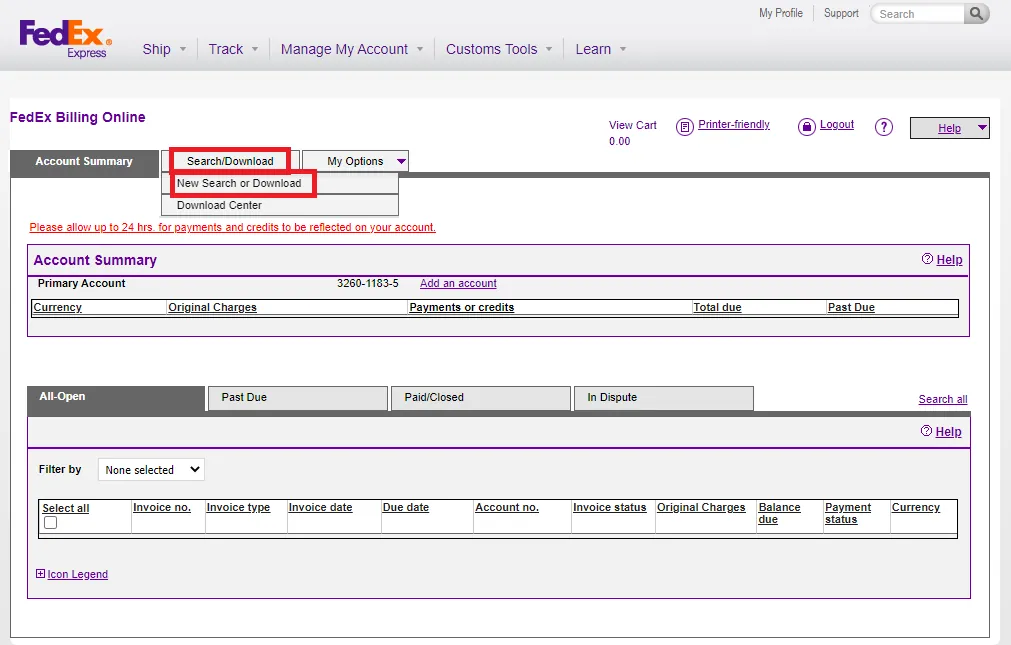
- On the right side of the page, you will see Quick Search click the drop down menu and select Tracking ID. Enter tracking ID of the claim you are processing then click Quick Search. Step 3
- The tracking details will now be shown and you can see the freight charges at the bottom right. Final Step
Packaging Description#
There are instances wherein the courier will ask for the packaging description of the item (how the item was packed). Please refer to this SOP on Picking - Packing - Wrapping Process Section 3.3 to see some Packing Images. Section 6 of the SOP also gives the link to some videos on how the items were wrapped or just click here to see the videos.
Follow-up of Claims/ Courier Claim Tracking#
Accounts personnel will be the one to follow-up these claims. Ensure urgency in doing the follow-up especially when it is clear that it is our fault (or courier / supplier) and customer complaints is true. Our objective is to avoid the customer to open an eBay/Amazon case against us (that effect metrics straight away and lead to lower listing page rankings) and for website sales they may leave negative review on Trust Pilot or facebook groups. Also we want our claim to be granted so make sure to process it within the courier's timeframe.
For cases that have been opened on the seller channel (eBay or Amazon) we need to ensure these are followed up on daily / as reply is given and that management is notified, if reply is not forthcoming it is up to agent to ask multiple times (such is importance of metrices to our selling channels). If possible call the courier. We must follow process and not give refunds unnecessarily.
Accounts will also send a weekly report of the courier claim status. See this file for the tracking of courier claims. This file needs to updated and submitted weekly to management. Please update this online, do not download the file and update since this file is shared and therefore needs to be updated for all. You can also see the link of this file in the Courier Claim Template.
When the courier refuses to grant the claim (even when tried to contest the refusal), we should at least get refund on carriage/shipping cost.
Video & Media#
Notes#
This section is important so Adhoc points and issues can be logged. Also, Q&A can be logged for suggestions for potential issues encountered. Also, log important notes needed for this system. Additional Notes:
- Weekly report of courier claim update and status should be submitted to management by Account Personnel.
- Ensure urgency in doing the follow-up especially when it is clear that it is our fault (or courier / supplier) and customer complaints is true.
- CS Agent will be the first to populate the trello card and make first contact with the courier. Accounts will do the follow-ups.
- For courier claims worth less than 20 pounds there is no need to process claim.
Potential Issues:
1 - ISSUE ENCOUNTERED: Stuck on Loading
RESOLUTION: Refresh Browser
2 - ISSUE ENCOUNTERED: Broken Links
RESOLUTION: Get the external link as this will allow other people to access the SOP without the need for login credentials and avoid broken links.
Attachments#
Claim_Form_Fedex_Damaged_I… 16/12/2025
Claim_Form_IFS.docx 16/12/2025
DLAA_Supplier_Invoice_Templ… 16/12/2025
Ko_Chou_Supplier_Invoice_Te… 16/12/2025