Courier Claims
The purpose of this SOP is to give an idea about the process of doing Courier Claims.
Overview#
Purpose: The purpose of this SOP is to give an idea about the process of doing Courier Claims.
Scope: This applies to customer service representative staff and all staff personnel who is in charge of this process.
Responsibility: It is the responsibility of all staff to follow the standard operating procedure of Courier Claims.
Objective: The objective of this procedure is:
- to guide employees on how is the process of submitting courier claims.
INDEX:
- Courier Claim Trello Card
- IFS Claims
2.1. Fill-out Courier Claim Trello Card (if necessary, not compulsory)
2.2. Save the pictures of damaged item for courier
2.3. Forward the customer email to IFS
2.4. How to get courier shipping cost for IFS
2.5. Add to tracker file
2.6. IFS Acknowledgement
2.6a. How to Get Sales Invoice
2.6b. How to Prepare Cost Invoice
- Fastway Claims
3.1. Fill-out Courier Claim Trello Card (if necessary, not compulsory)
3.2. Save the pictures of damaged item for courier
3.3. Forward the customer complaints to Fastway
3.4. Add to tracker file
3.5. Fastway Acknowledgement
3.5a. Fastway Claims form
3.5b. Damaged Freight Form
- FedEx Claims
4.1. Fill-out Courier Claim Trello Card (if necessary, not compulsory)
4.2. Save the pictures of damaged item for courier
4.3. Forward the customer complaints to FedEx
4.4. How to Get FedEx Freight Charge
4.5. Add to tracker file
4.6. FedEx Acknowledgement
4.6.1. FedEx Online Claim Form
4.6.2. Potential Request From FedEx as Part of their Claim
- Packaging Description
- Follow-up of Claims/ Courier Claim Tracking
Procedure#
Important Note:
Upon receiving a damage item complaint forward this immediately to the respective courier as damage claims are time sensitive. You can then proceed to processing the claim after you forward the email complaint of the customer.
All damage courier claims MUST have supporting images – It is important that we have all this supporting material when submitting a claim. When a customer has said that their item has been damaged - follow SOP on Handling Damage Item Complain and ask for pictures if they haven't already sent some. Tag or label these emails as - Claims Processing, Un-Happy Customer Comments and to specific Courier i.e. Courier Claims (Fastway) or Courier Claims (IFS) or Courier Claims (FedEx).
For lost items there is no need for pictures. Tag these emails as - Claims Processing, Item Not Received, Un-Happy Customer Comments and to specific Courier i.e. Courier Claims (Fastway) or Courier Claims (IFS) or Courier Claims (FedEx).
For courier claims worth less than 20 pounds there is no need to process claim.
- Courier Claim Trello Card
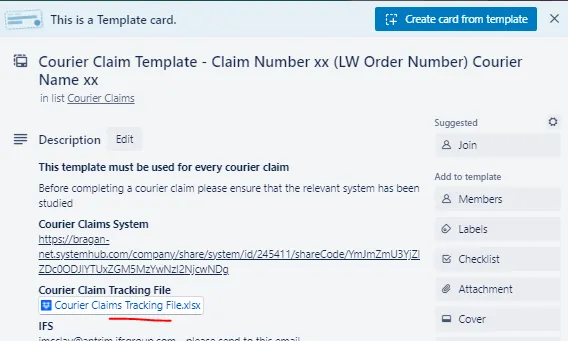
Follow the check-list from top to bottom for proper guidelines in filling out the card. See this link for the Courier Claim Template.
Note: Card is not compulsory in processing Courier Claim. The most important thing to do and to remember is to report the issue to the courier straight away because this is time sensitive. Next thing to do is to add it to the tracker file for weekly reporting to management and account's visibility. Make sure that damaged item pictures are saved in relevant folders
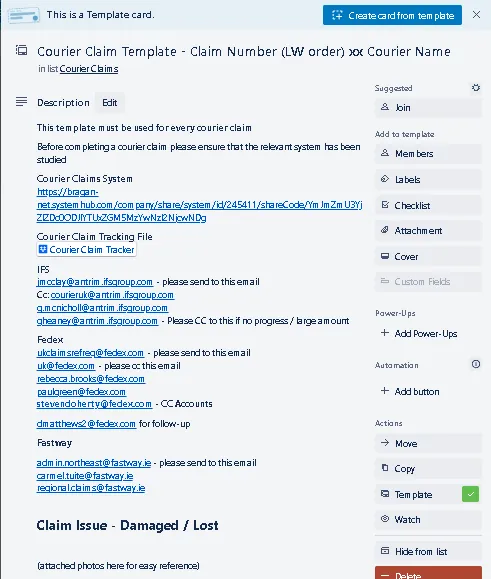
1.1. Courier Claim Template (Trello) - Description Part
Here you can see the link to the SOP and the contact emails for whom you are going to send the courier claim email.

At the last part for Claim Issue - Damaged/Lost - please state here the reason for the claim.
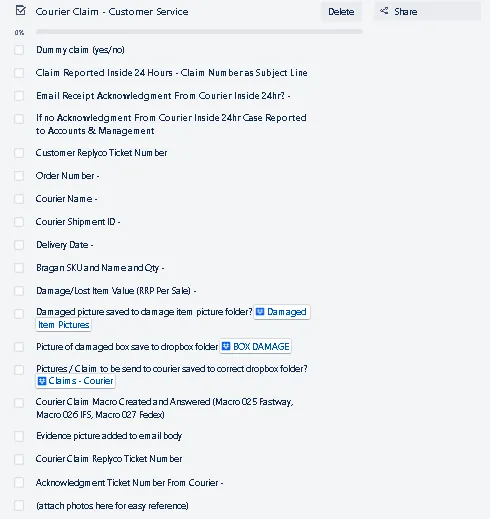
1.2. Courier Claim Checklist for Customer Service Agents
CS agents needs to fill out this part first and make the initial contact with the courier. Once the courier acknowledged the claim, this is now passed to Accounts for filling-out the claim forms from courier and submission of supporting documents. CS agent can also process the claim forms if Accounts personnel is not available, ask for management's approval.
If the claim is a dummy claim, write yes and tick the checklist. To know how to process Dummy Claims see this SOP.
To know how and where to save damage picture of item and box damage see this SOP on Handling Damage Item Complain.
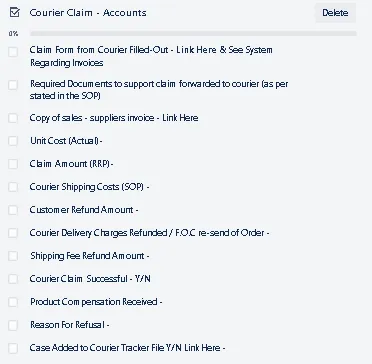
1.3. Courier Claim Checklist for Accounts
In IFS case, once they acknowledged the claim they will send the claim form and state the required documents. See IFS claims below for more detailed process.
In Fastway, you need to fill-out their online claim. See process below.
For FedEx, there are two ways, depending on their request stated in their email. See process below.
Accounts will be the one to complete all these requirements. Follow-ups will also be done by Accounts. CS agent can also process and submit requirements as approved by management.
- IFS Claims
Note:
Do courier claim after investigating with them. If courier cannot provide anymore update then process the claim. For the investigation part, please contact the following: Lee Close ([email protected]), [email protected].
Courier Claims must be done immediately after confirming that the issue is with the courier. Courier only gives us a limited time to do the claim (14 days). Beyond this they will not acknowledge or accept our claim.
2.1. Fill-out Courier Claim Trello Card (if necessary, not compulsory)
2.2. Save the pictures of damaged item for courier
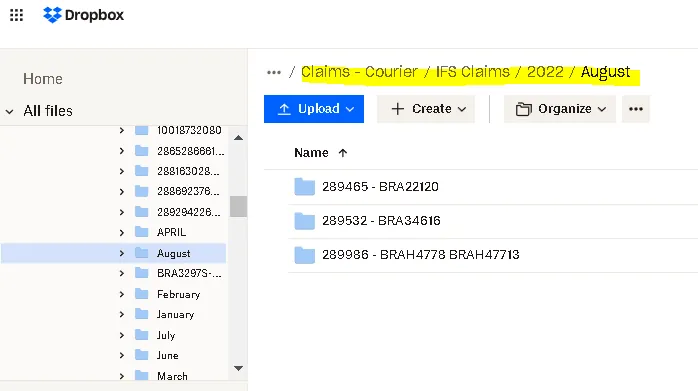
2.2a. You need to have access to the Claims - Courier Dropbox Folder - please request management to invite you to this folder. See snipe below for the content of this folder.
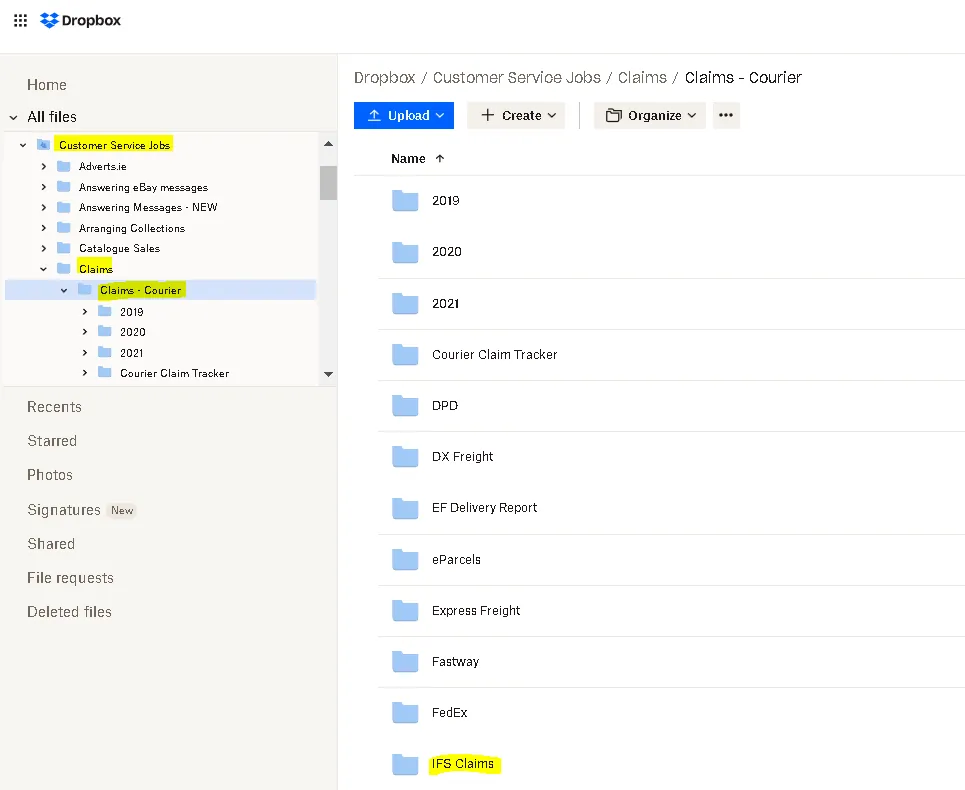
2.2b. Since this is an IFS claim, select the IFS Claims Folder, then choose the folder of the present year and month. If there's none, create a new folder for the current year and month. Then, create a new folder using this format: [Order Number - SKU Code] and save the pictures here. The link of this folder is the one you are going to add in Question No. 4 of the macro.

2.3. Forward the customer email to IFS
To: [email protected]; Cc: [email protected]
Subject of the email should be: "Claim for" + tracking number (Consignment number is the tracking number of the parcel)
[email protected] - Please CC to this if no progress / large amount
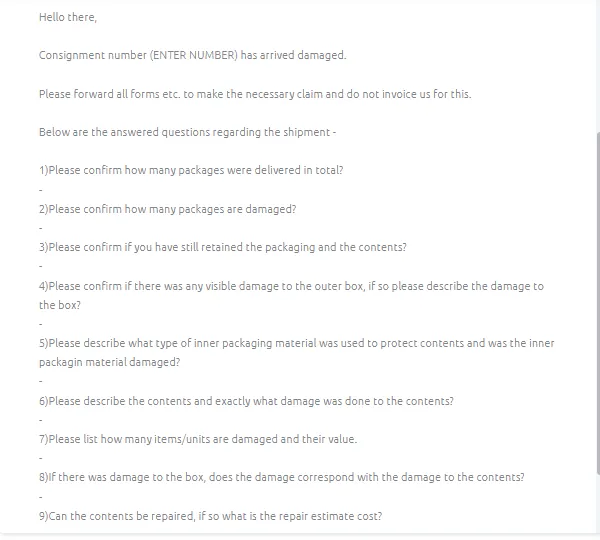
Use Macro 026 then fill-out the questionnaire and attach the dropbox link of the damaged item picture.
Make sure to tag or label the email - Claims Processing and Courier Claims (IFS)
Note:
If item is LOST, please make sure to edit the macro: "Consignment number [ENTER NUMBER] has arrived damaged" it should now be "Consignment number
[ENTER NUMBER] is lost. Answers to all Questions are “N/A”. For Question 3, usual answer is “No, it’s with the customer already.”
For Question 4, add the dropbox link of the damaged item picture, better to have the courier check it than explain it. You can just put a brief description of the damage, make the story simple. For example, you can just say “Box is ripped
- please see dropbox link for the pictures”. To know where to save the pictures, please see section No. 2.2.
For Question 5, you can ask this to warehouse but most of the time it is Styrofoam and bubble wrap or plastic wrap. You can also check the picture from customer since sometimes the inner packaging is shown.
For Question 6, Add a brief description of the damage, keep it simple also. Example, “Dent on the roof bar - please see dropbox link in Question 4”. Also make sure to describe the content. When describing the content, write it in a way that you mention the main item first so it won't be confusing to the courier. Example, if the damaged item is 1pc BRA2141171LW New Gen Scania 2017+ R & S Series High Roof Bar + Jumbo Spots x6, you can say “1pc High Roof Bar with Jumbo Spots for New Gen Scania truck” that is easier to understand.
For Question No. 8, answer should always be “Yes, the damage corresponds with the damage to the contents.”
For Question No. 9, where it asked if contents can be repaired - answer should always be “No, it can't be repaired.”
2.4. How to get courier shipping cost for IFS
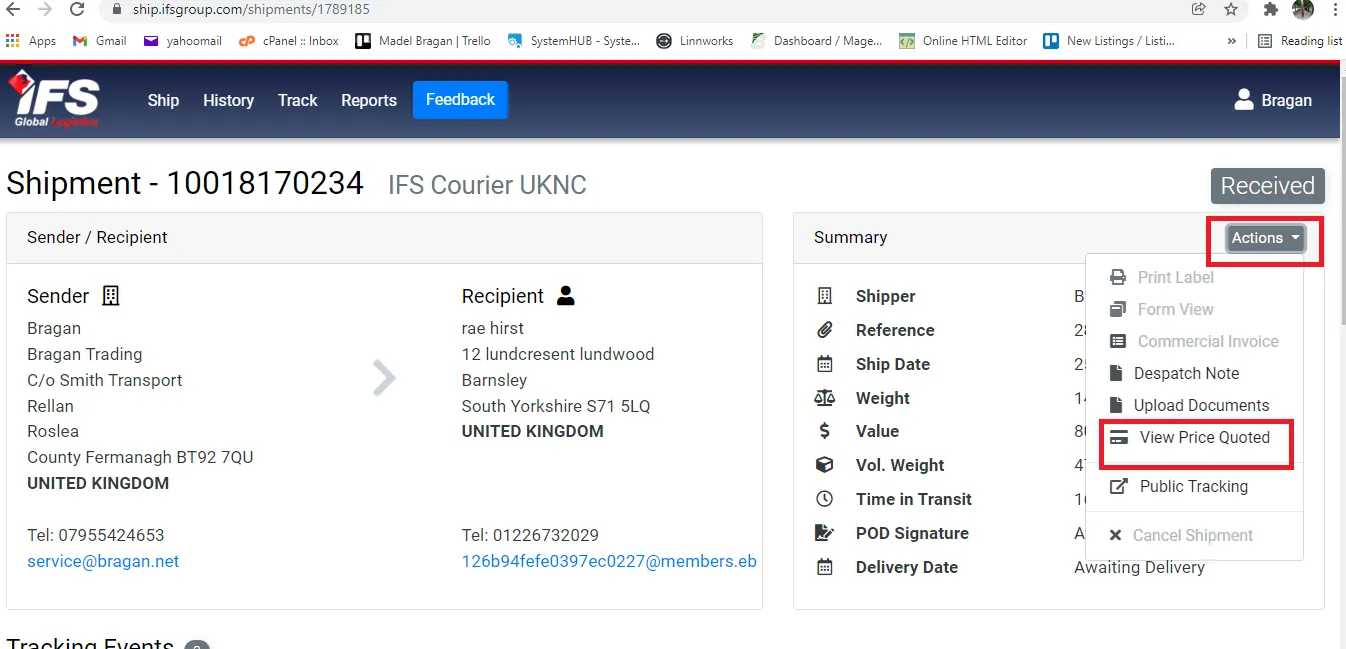
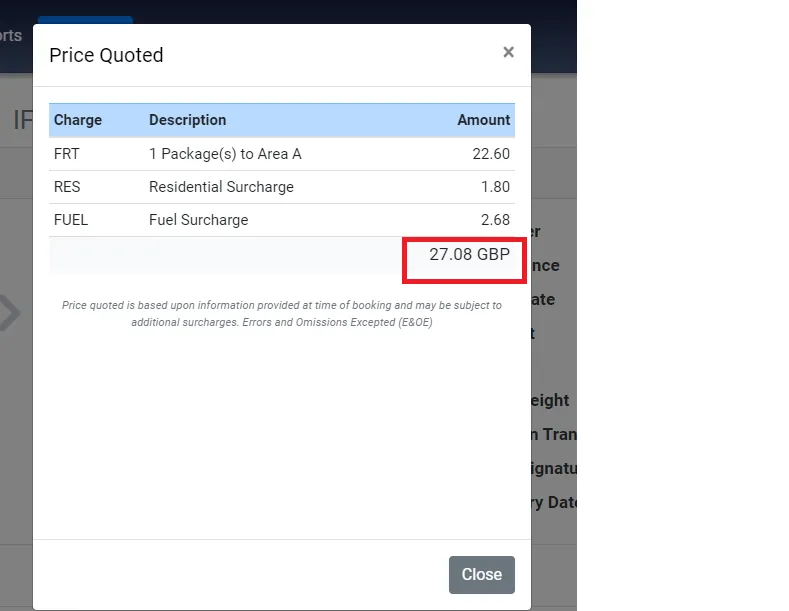
In the trello card checklist for Accounts, courier shipping cost is asked. You will also need this in order to fill-out the Claim Form of IFS (See Attachment Section for the sample form) and in the tracker file. In their form, this is called the Freight Charge. To get the value for this, follow these steps.
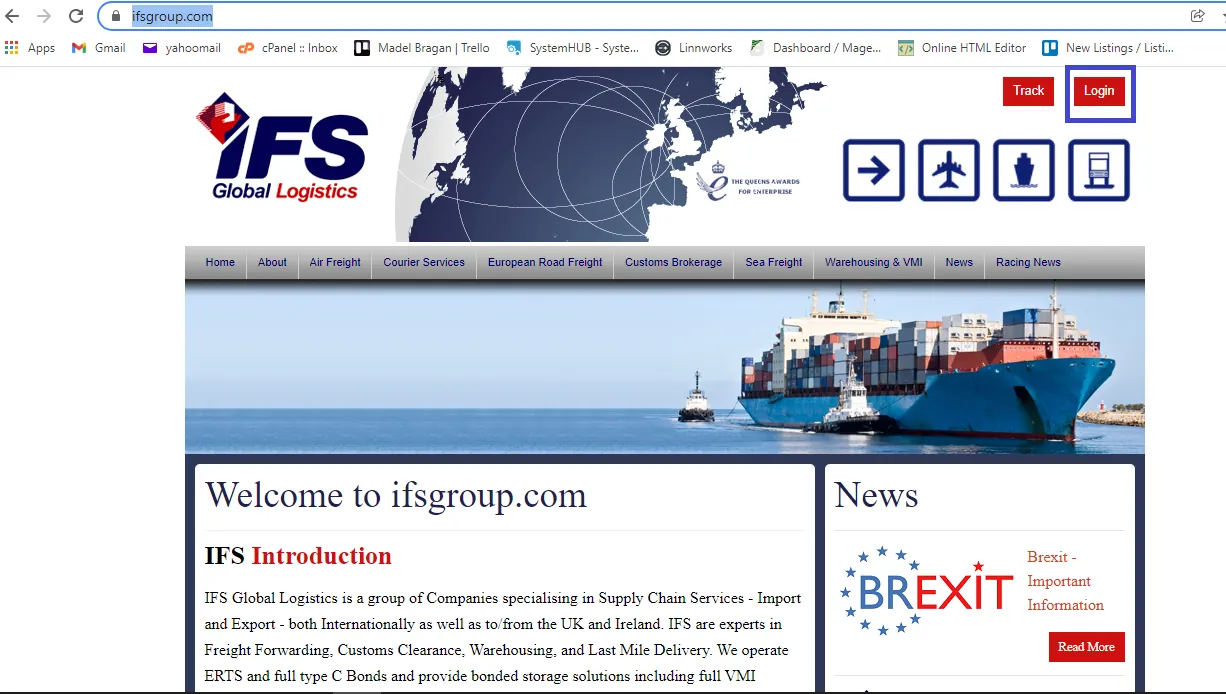
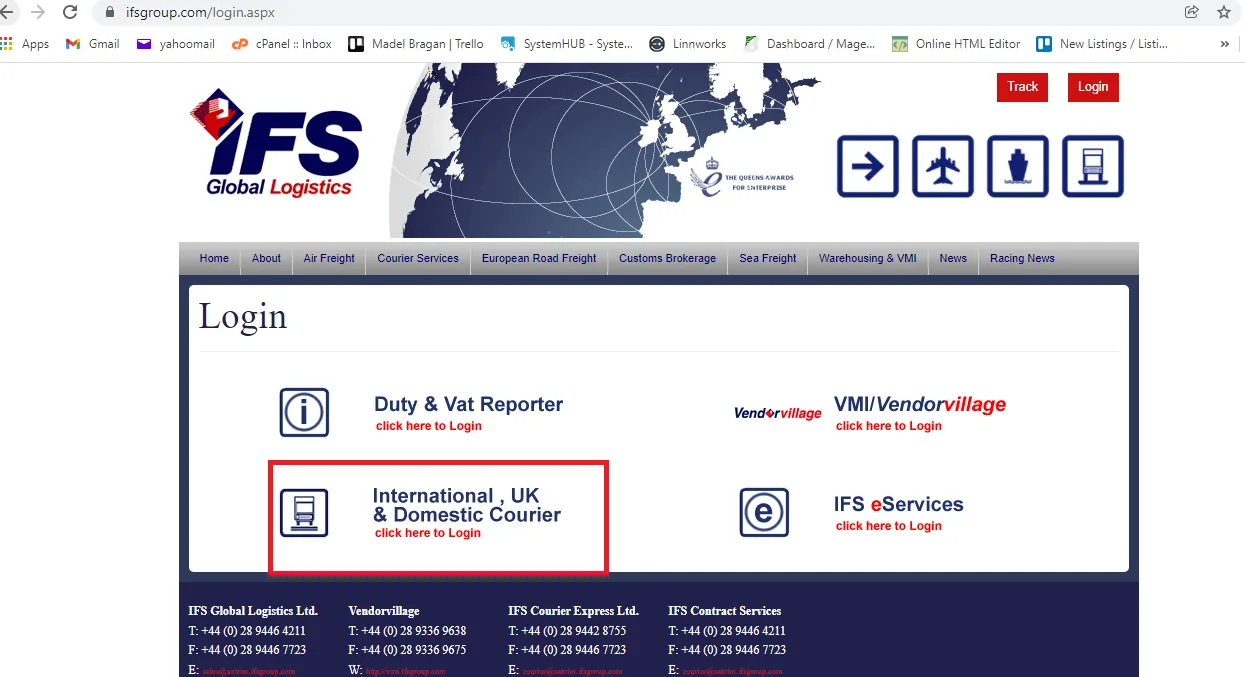
2.4a. Log in to IFS group website. See snipes below on how to get to log-in page. Get the credentials from management.
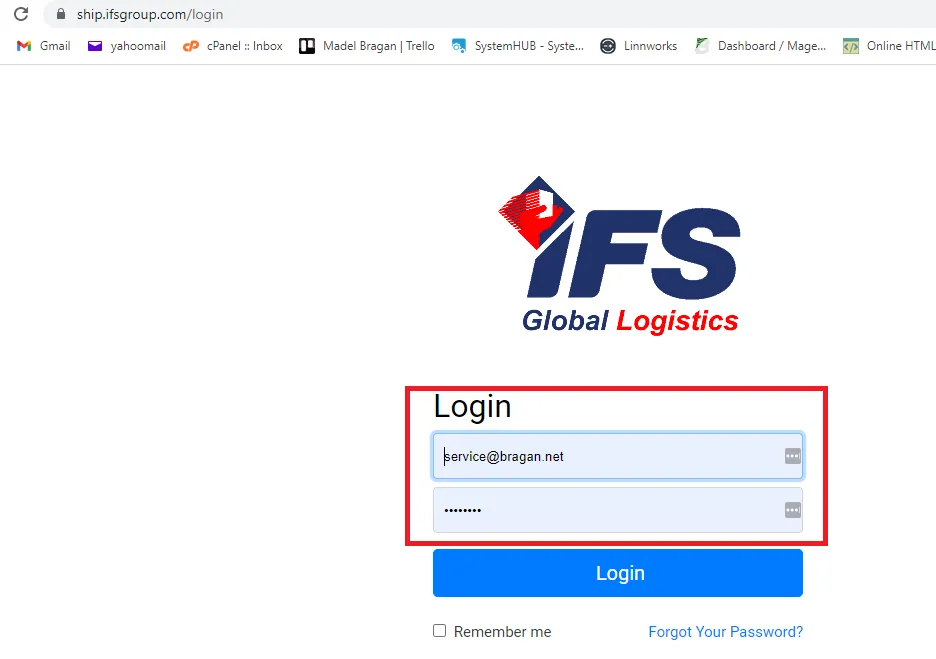
2.4b. Once logged-in click on history and search the tracking number or consignment number.
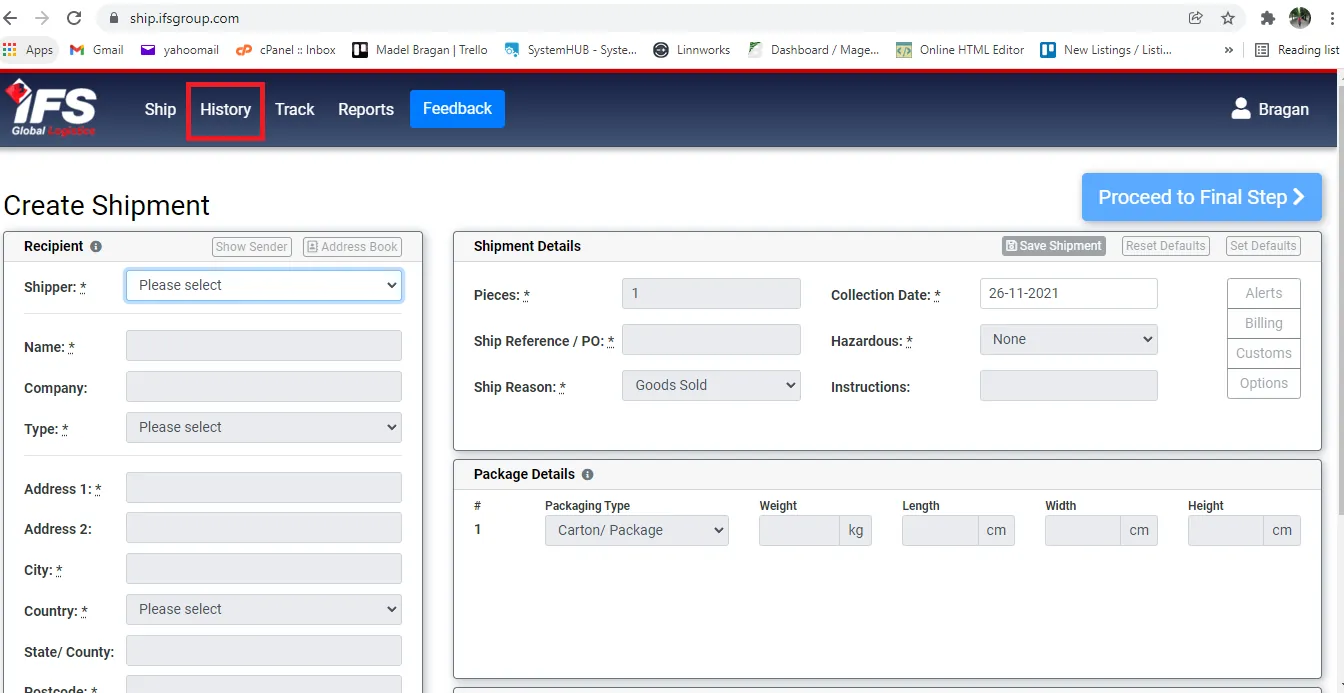
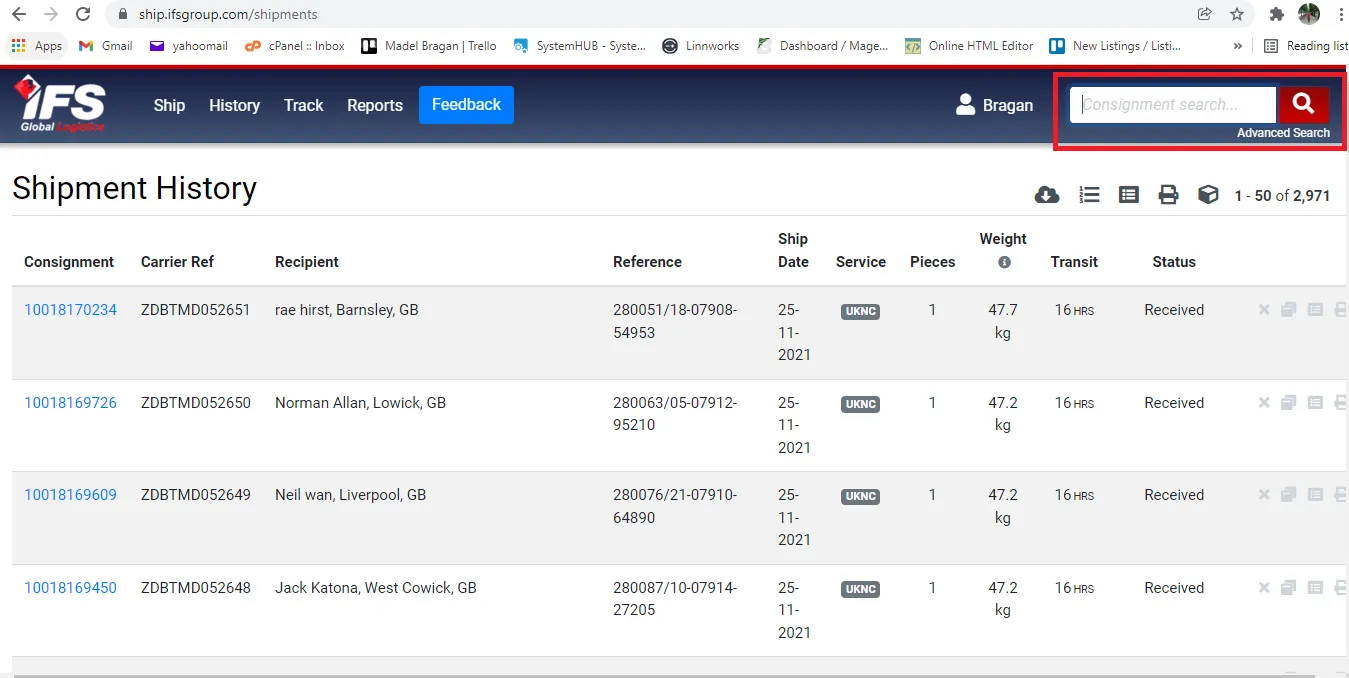
2.4c. Click on Actions and select View Price Quoted. You can now see the courier shipping cost.
2.5. Add to tracker file
2.5a. Go to Customer Service Jobs > Claims > Claims – Courier > Courier Claim Tracker dropbox folder
2.5b. Go to relevant Courier Tab. For IFS, there’s a specific tab for each month to utilize.
2.5c. Populate all necessary fields under green header.

2.5d. Once all fields are filled-out, copy the entire row and paste it to the last row under Column B "Date of Claim (DD/MM/YYYY)" in “IFS – YTD tab” so it is consolidated.
2.5e. This tracker will be used for weekly reporting. CS agent should notify Accounts Personnel to fill-out the blue header fields and notify the management in Accounts/Finance Skype Group of outstanding claims.
Note: If courier did not acknowledge the claim in 24hours, Accounts will be the one to do the follow-up. If still no acknowledgement, do another follow-up email or call the courier. Please note that these claims should be addressed in timely manner, especially if the customer open an eBay/Amazon case. eBay/Amazon cases needs to be resolved in a specific timeframe.
2.6. IFS Acknowledgement
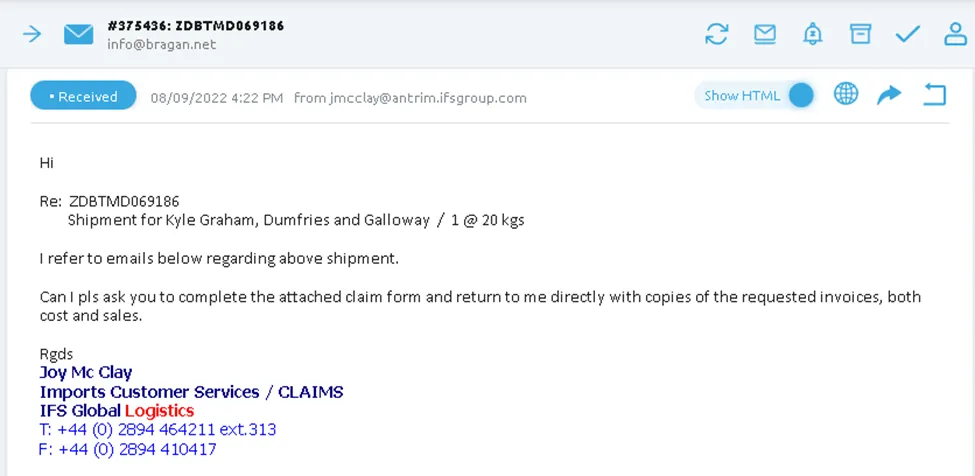
Joy McClay will acknowledge the claim (See Figure 16) along with a claim form attachment (See Attachment Section for a sample Claim Form of IFS). Accounts or CS agent (if Accounts Personnel is not available) will fill-out this form and send it back to Joy along with a copy of sales and cost invoice.
2.6a. How to Get Sales Invoice
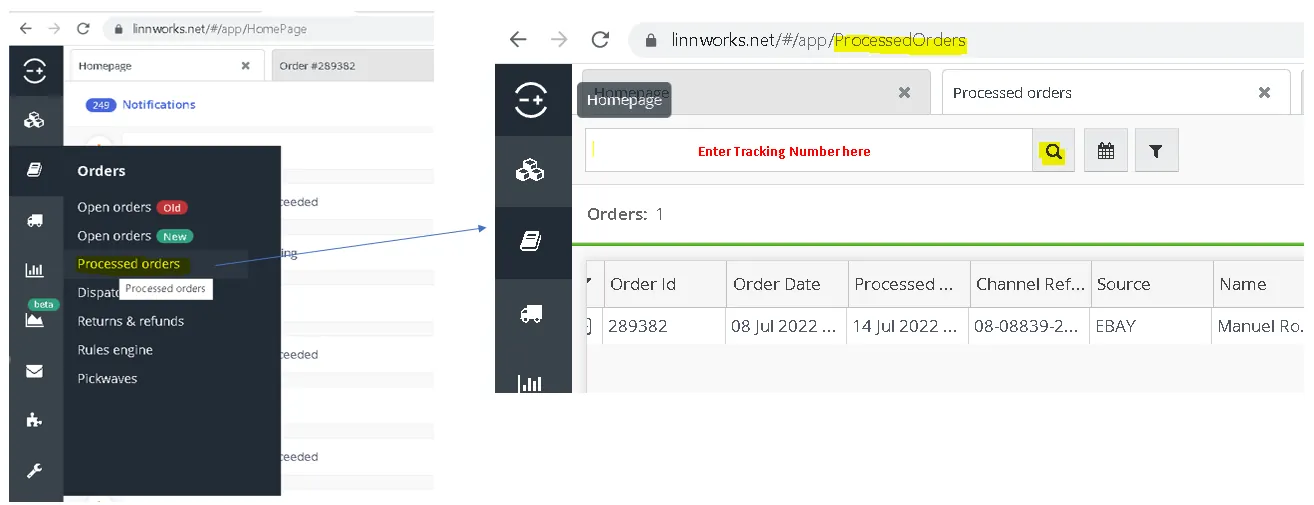
Step 1. In Linnworks, go to Orders > Processed Orders > Enter the tracking number in the Search bar (you can use different searching variations but this is the fast approach). Click the magnifying glass icon.
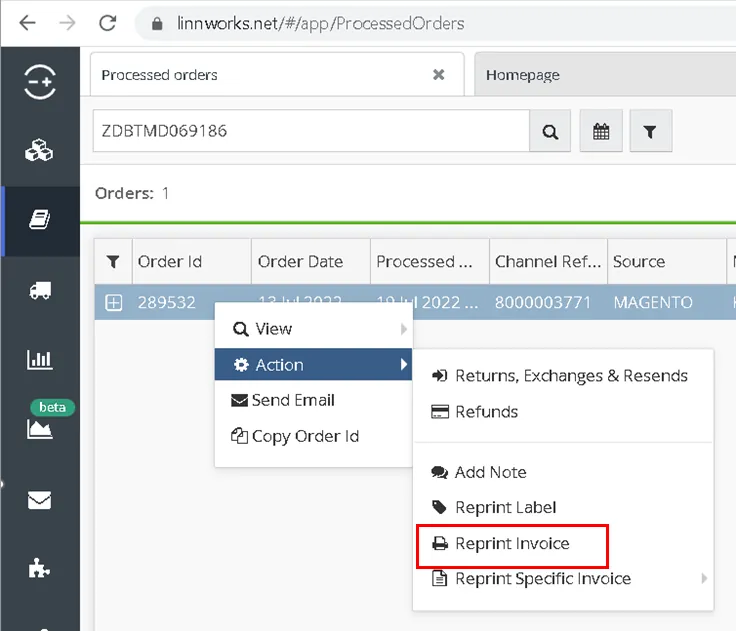
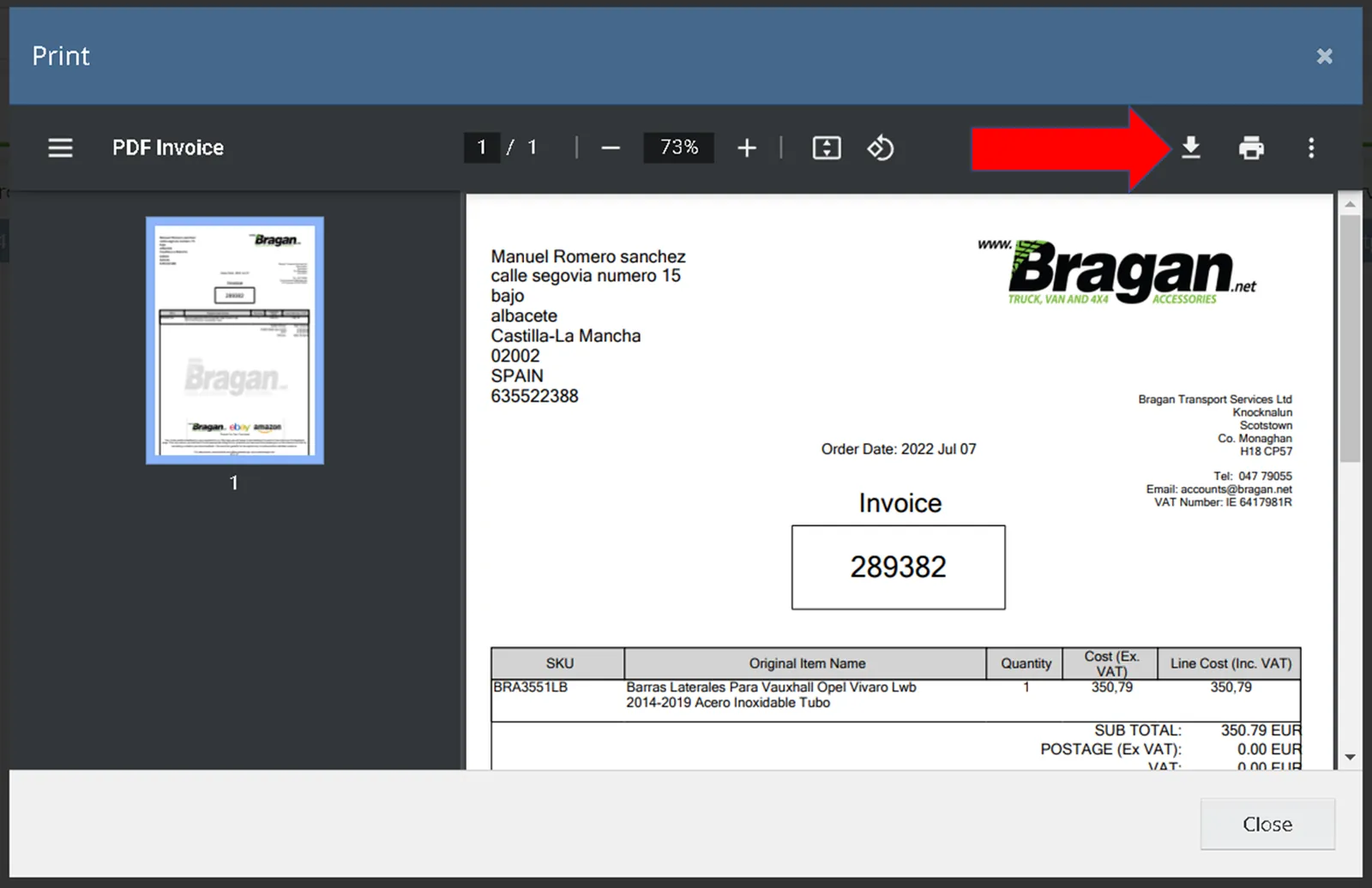
Step 2. Click the order to highlight the entire row then right-click. Select Action > Reprint Invoice.
Step 3. Download the file and save it using "Sales Invoice - [Linnworks Order Number] [Customer's Name]" as filename.
2.6b. How to Prepare Cost Invoice
Step 1. Download the Cost Invoice Template from the dropbox folder or in the Attachment section below.
In the dropbox folder, go to Customer Service Jobs > Claims > Templates > Cost and Sales Invoice Templates 2022 > Supplier Cost Invoice Templates > Select the appropriate template.
Note: If end-customer is from UK, use "Supplier Cost Invoice Claim for BTS Trading". Otherwise, use "Supplier Cost Invoice Claim for Bragan 4x4"
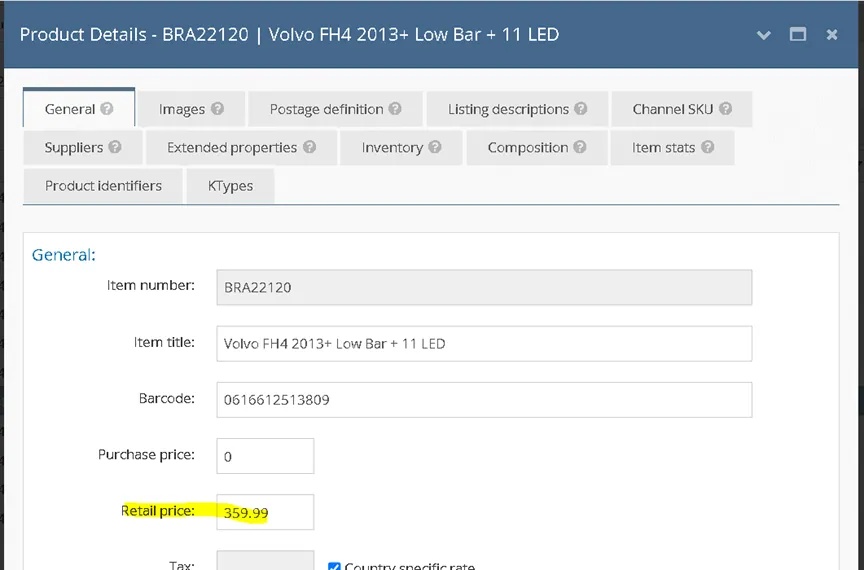
Step 2. Check the Retail Price of the item in Linnworks.
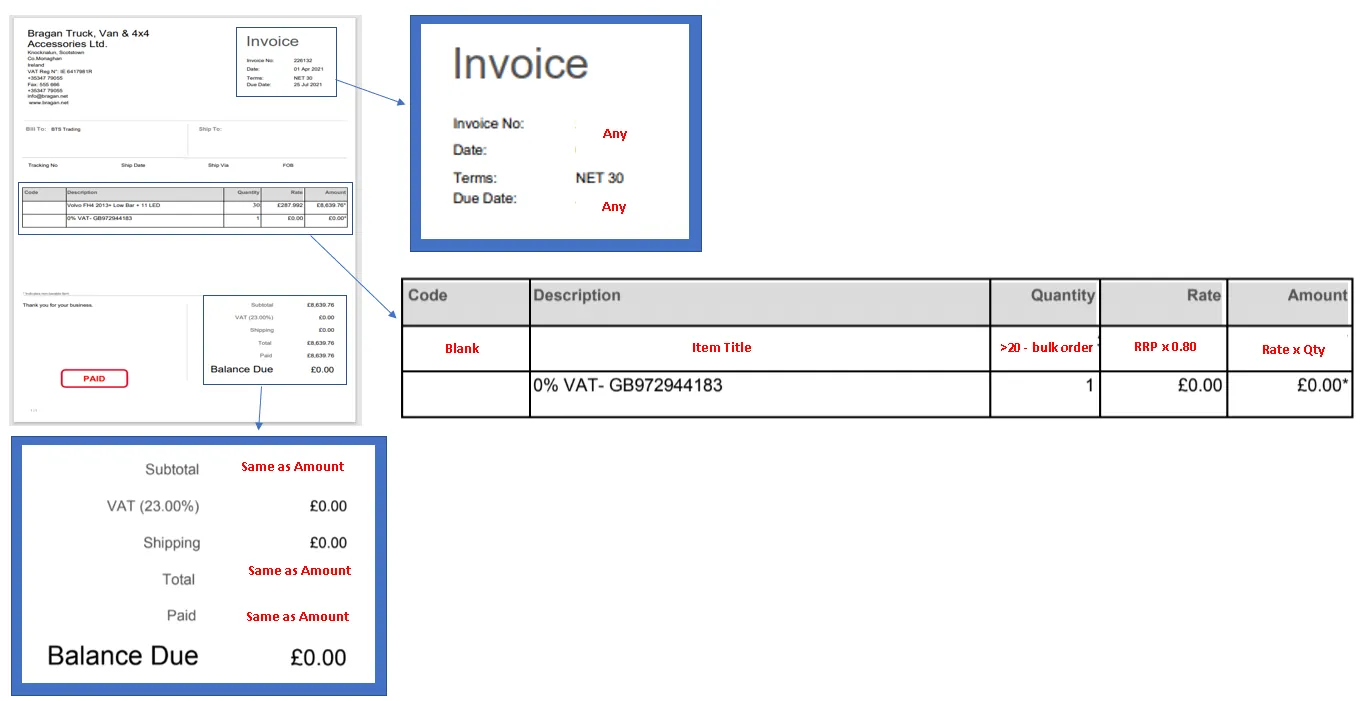
Step 3. Fill-out the template. Save the file using "Supplier Cost Invoice - [SKU]" as filename.
Note: Ensure to save both Sales and Cost invoice to relevant Courier Claims folder along with the damaged pictures for documentation and easier referencing on claims (see section No. 2.2. Save the pictures of damaged item for courier)
Once sent, Joy will acknowledge that they received the required forms and to wait for their feedback.
Note:
See Courier Claim Tracking Section below on how to do proper monitoring of claims so we can have a timely follow-up with the couriers.
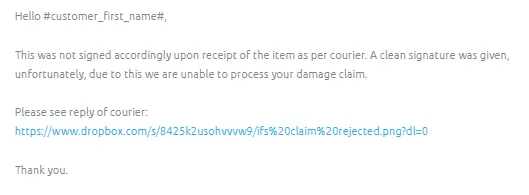
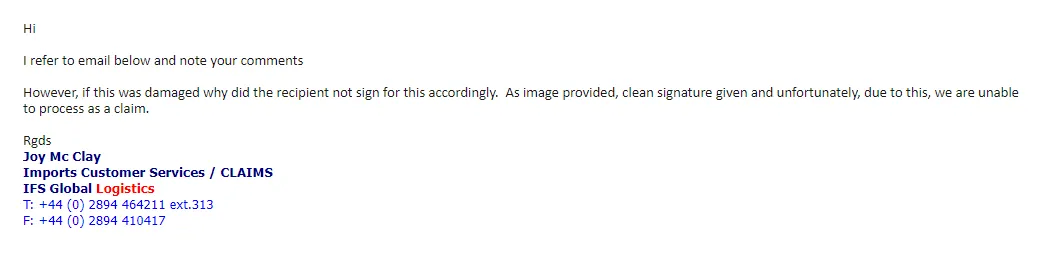
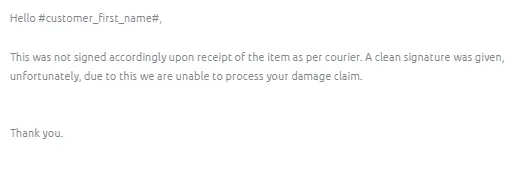
For damage claims and courier replies that they cannot process the claim since customer signs it in good condition upon delivery of item, update the customer and send Macro 043. This macro contains a Dropbox link of the snipe showing the couriers reply (see Figure 23)
- Fastway Claims
Note:
Damaged freight - Within 24 hours of delivery. CS agent/Accounts staff should accomplish the online claim form and submit needed documents, like invoices, once courier replied. Lost Freight - Within 28 days of the last parcel scan/freight being dispatched. Failure to submit within 24 hours of delivery or failure to provide the required documentation will result in your claim being automatically declined.
In the case of lost goods a declaration form may also be required to be completed by the consignee, in which case the form will be sent to the consignee by our Claims Assessor.
Do not dispose of damaged property, as same may be required for inspection.
3.1. Fill-out Courier Claim Trello Card (if necessary, not compulsory)
3.2. Save the pictures of damaged item for courier
3.2a. You need to have access to the Claims - Courier Dropbox Folder - please request management to invite you to this folder. See snipe below for the content of this folder.
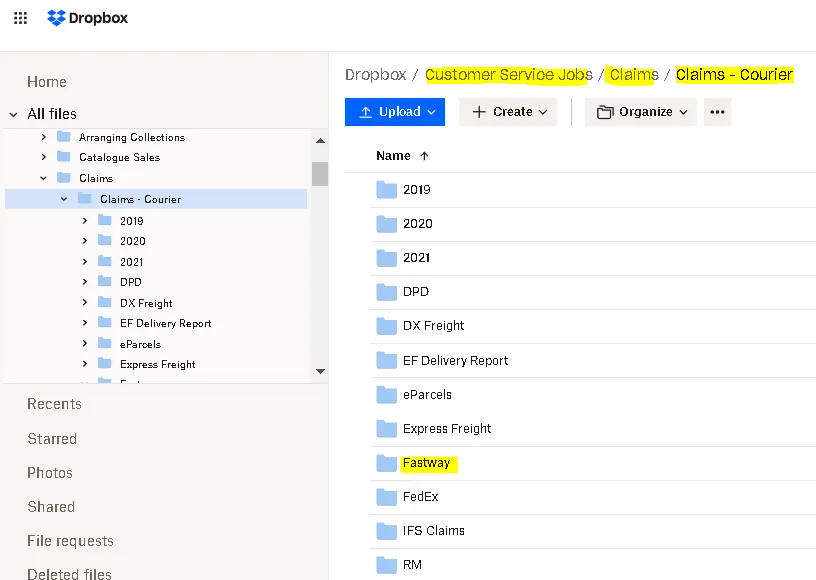
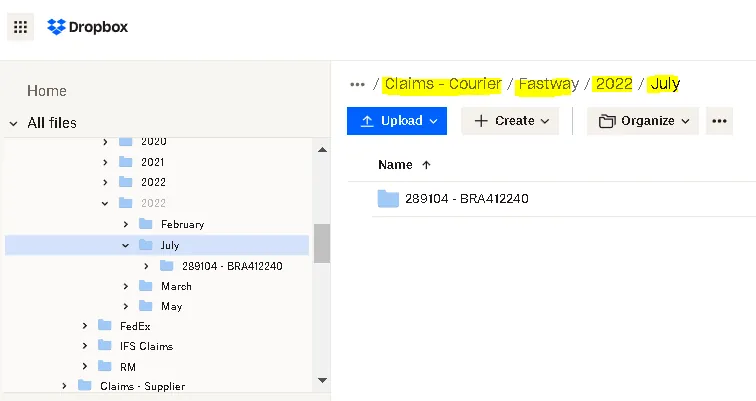
3.2b. Select Fastway Folder, then choose the folder of the present year and month. If there's none, create a new folder for the current year and month. Then, create a new folder using this format: [Order Number - SKU Code] and save the pictures here. The link of this folder is the one you are going to add in the macro.
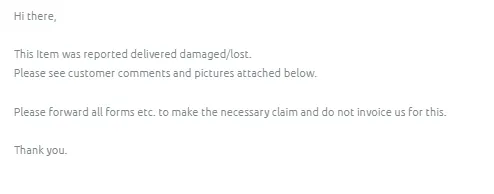
3.3. Forward the customer complaints to Fastway
Cc: [email protected]; [email protected]; [email protected]
Subject of the email should be: "Claim for" + [tracking number]
Use Macro 025 and attach all relevant photos and dropbox link of the damaged item pictures
Make sure to tag or label the email as - Claims Processing and Courier Claims (Fastway)
3.4. Add to tracker file
3.4a. Go to Customer Service Jobs > Claims > Claims – Courier > Courier Claim Tracker dropbox folder
3.4b. Go to relevant Courier Tab.
3.4c. Populate all necessary fields under green header.
3.4d. This tracker will be used for weekly reporting. CS agent should notify Accounts Personnel to fill-out the blue header fields and notify the management in Accounts/Finance Skype Group of outstanding claims.
3.5. Fastway Acknowledgement
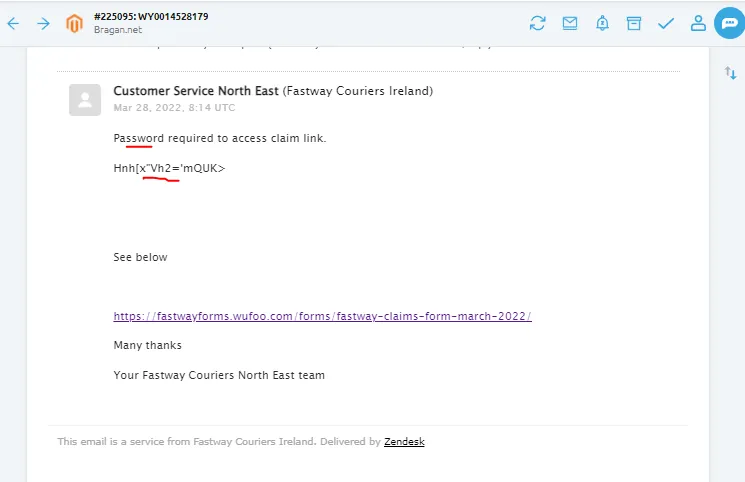
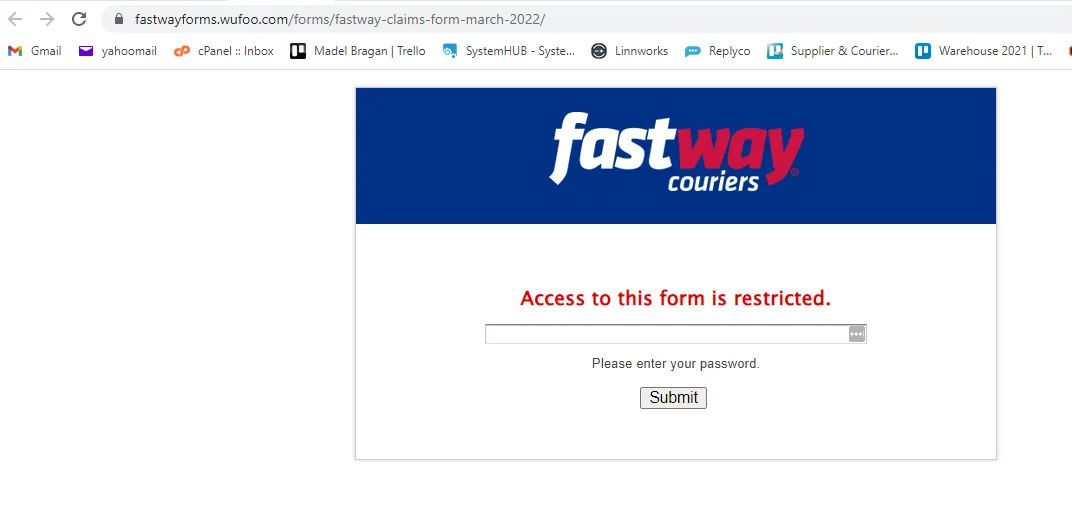
Fastway will acknowledge the claim by sending a link to their online claim form along with the password in order to access the claim link (Figure 31). If the password is not working, please reply to the courier and inform them of the error. Courier will reply and provide a new password. Accounts personnel will be the one to fill-out this online claim form so make sure to tag accounts in the Claims Skype group so that it will be processed in a timely manner. Otherwise, CS agent will have to do it if Accounts is not available.
If courier did not acknowledge the claim in 24hours, Accounts will be the one to do the follow-up. If still no acknowledgement, do another follow-up email or call the courier. Please note that these claims should be addressed in timely manner, especially if the customer open an eBay/Amazon case. eBay/Amazon cases needs to be resolved in a specific timeframe.
Note:
See Courier Claim Tracking Section below on how to do proper monitoring of claims so we can have a timely follow-up with the couriers. For damage claims and courier replies that they cannot process the claim since customer signs it in good condition upon delivery of item, update the customer and send Macro 042 then attach a snipe of the courier's claim rejection.
3.5a. Fastway Claims form
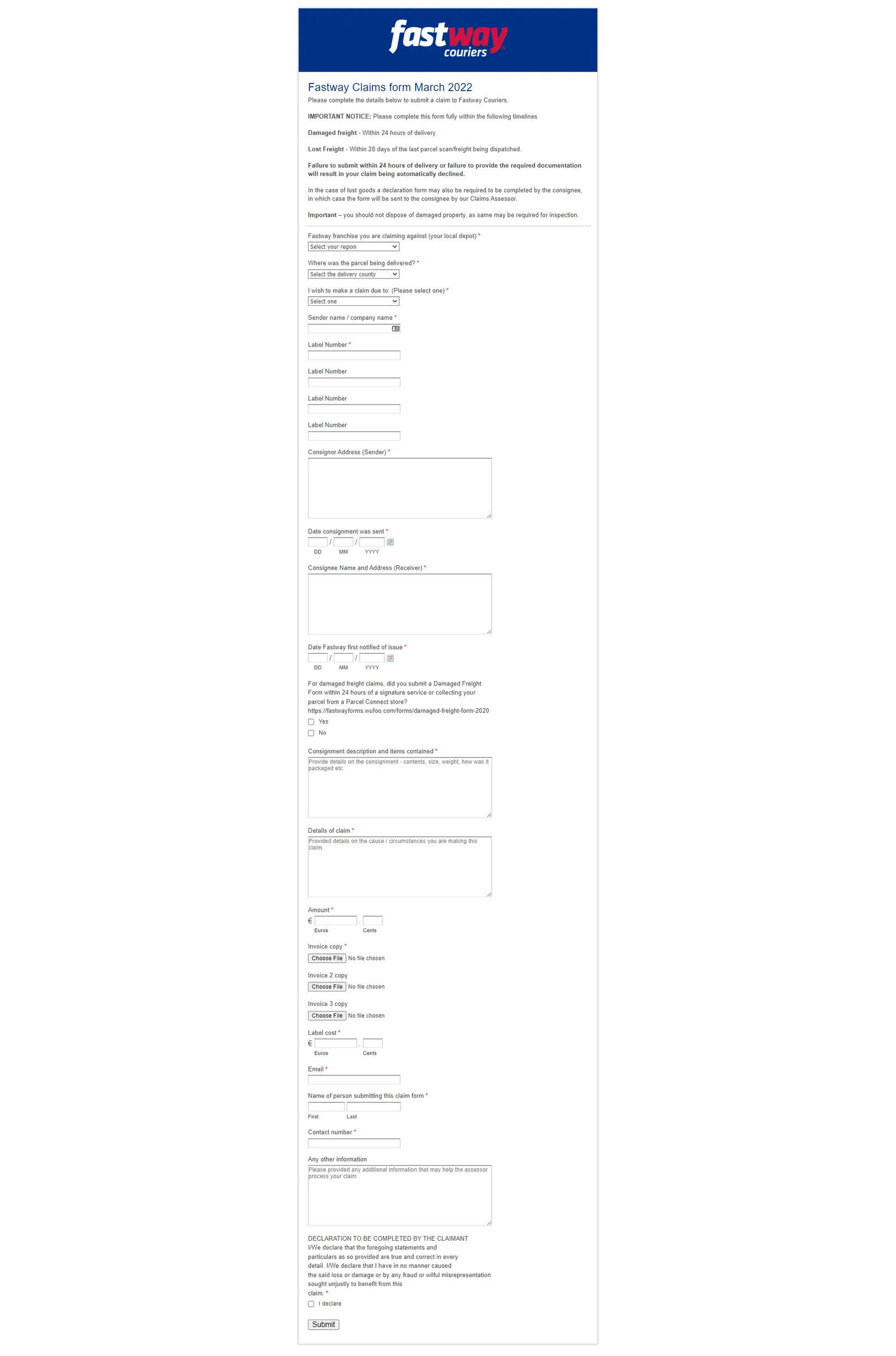
Guide in filling-out the form:
Fastway franchise you are claiming against (your local depot): North East Where was the parcel being delivered? [Select customer's location/county] I wish to make a claim due to: (Please select one): [Lost/Damaged] Sender name / company name: Bragan Label Number: [Add Tracking No. here] Consignor Address (Sender): Knocknalun, Scotstown, MONAGHAN, IE Date consignment was sent: [Check history in Fastway website and enter it here] Consignee Name and Address (Receiver): [Customer's address from Linnworks Order Details under the 'Shipping Address' section – see this link as a reference] Date Fastway first notified of issue: [Date reported to courier] Consignment description and items contained: [Answer the following]
SKU and Item Name – [Check info in Linnworks Order Details under ‘Item’ section - see this link as a reference]
Size and Weight - [Check info in Linnworks Postage Definition - see this link as a reference]
How was the parcel packaged: [Enter these details: “Heavy foam on item
- Then boxed with heavy cardboard and secured with Heavy duty parcel tape.”]
Details of claim: Parcel is lost / For Damaged Item – add description of the damaged item Amount: [Total Cost] Invoice copy: [see above section No. 2.6a. How to Get Sales Invoice] Label cost: [Check info in Linnworks Order Details – “Shipping (ex. Tax)” - see this link as a reference] Email: [email protected] Name of person submitting this claim form: [Agent's Name] Contact number: +353 04779055
3.5b. Damaged Freight Form
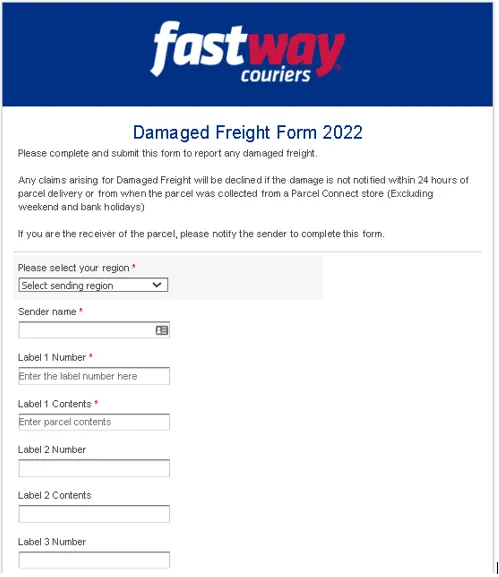
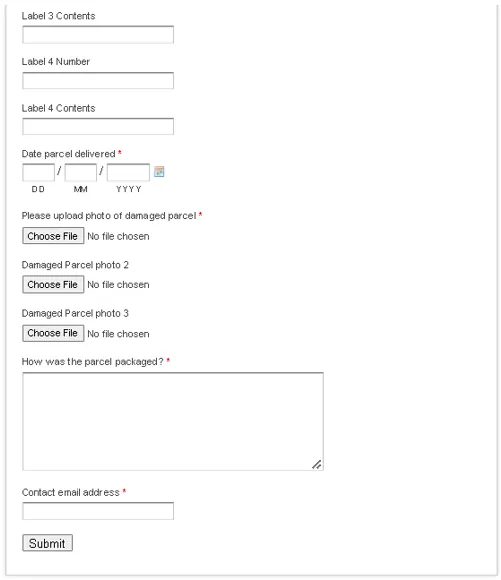
Guide in filling-out the form:
Please select your region: North East Sender name: Bragan Label 1 Number: [Add Tracking No. here] Label 1 Contents: [Add SKU and Item Title here] Date parcel delivered: [Check history in Fastway website and enter it here] Please upload photo of damaged parcel: [Pictures of damaged item from customer] How was the parcel packaged: "Heavy foam on item - Then boxed with heavy cardboard and secured with Heavy duty parcel tape” Contact email address: [email protected]
Note: Ensure to save the documents to relevant Courier Claims folder along with the damaged pictures for documentation and easier referencing on claims (see section No. 3.2. Save the pictures of damaged item for courier)
- FedEx Claims 4.1. Fill-out Courier Claim Trello Card (if necessary, not compulsory)
4.2. Save the pictures of damaged item for courier
4.2a. You need to have access to the Claims - Courier Dropbox Folder - please request management to invite you to this folder. See snipe below for the content of this folder.
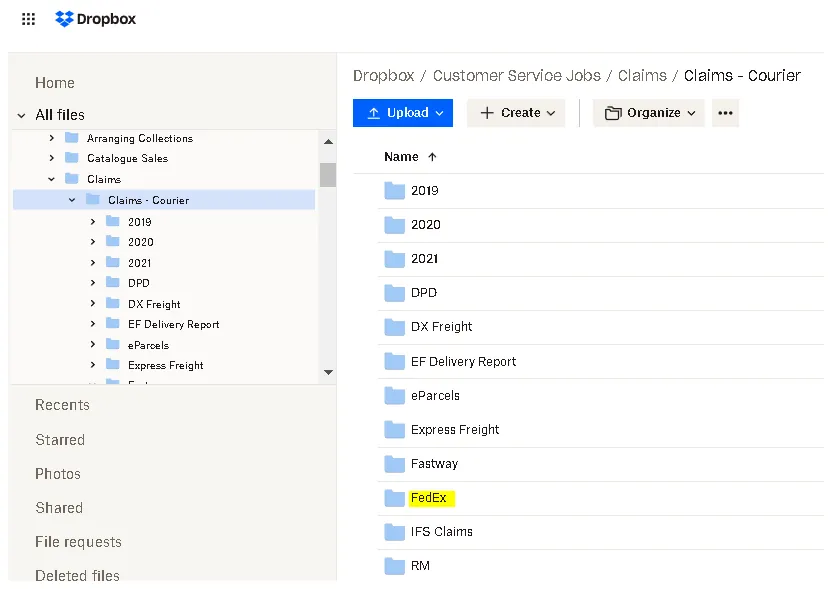
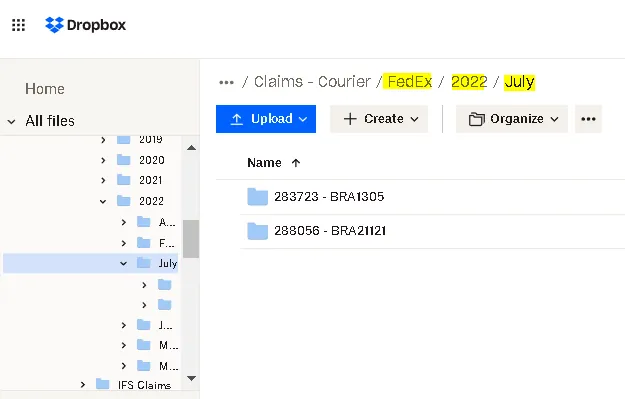
4.2b. Select FedEx Folder, then choose the folder of the present year and month. If there's none, create a new folder for the current year and month. Then, create a new folder using this format: [Order Number - SKU Code] and save the pictures here. The link of this folder is the one you are going to add in the macro.
4.3. Forward the customer complaints to FedEx
To: [email protected]; Cc: [email protected]
Subject of the email should be: "Claim for" + [tracking number]
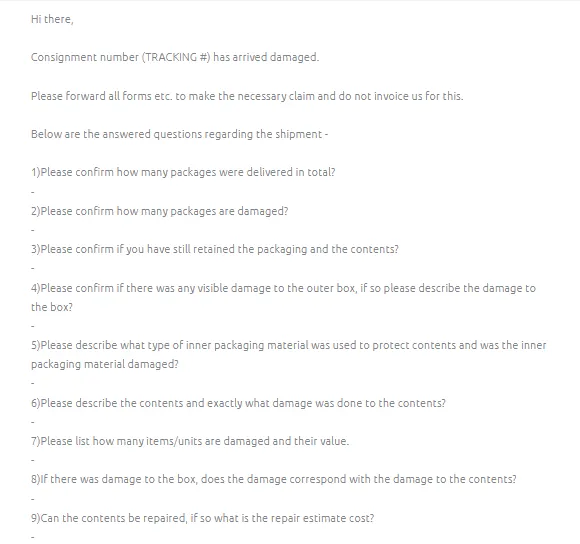
Use Macro 027 then fill out the questionnaire and attach the dropbox link of damaged item pictures
Make sure to tag or label the email as - Claims Processing and Courier Claims (FedEx)
Note:
If item is LOST, please make sure to edit the macro: "Consignment number [ENTER NUMBER] has arrived damaged", it should now be "Consignment number [ENTER NUMBER] is lost. Answers to all Questions are “N/A”.
For Question 3, usual answer is “No, it’s with the customer already.”
For Question 4, add the dropbox link of the damaged item pictures, better to have the courier check it than explain it. You can just put a brief description of the damage, make the story simple. For example, you can just say "box is ripped
- please see attached link for the pictures". To know where to save the pictures please see No. 4.2.
For Question 5, you can ask this to warehouse, but most of the time, it is Styrofoam and bubble wrap or plastic wrap. You can also check the picture from customer since sometimes the inner packaging is shown.
For Question 6, just say "please see link in Question 4 for the pictures of damaged item", add a brief description of the damage, keep it simple also. Example, “dent on the roof bar - please see link in Question 4”. Also make sure to describe the content. When describing the content, write it in a way that you mention the main item first so it won't be confusing to the courier. Example, if the damaged item is 1pc BRA2141171LW New Gen Scania 2017+ R & S Series High Roof Bar + Jumbo Spots x6, you can say “1pc High Roof Bar with Jumbo Spots for New Gen Scania truck” that is easier to understand.
For Question No. 8, answer should always be “Yes, the damage corresponds with the damage to the contents.”
For Question No. 9, where it asked if contents can be repaired - answer should always be a “No, it can't be repaired.”
4.4. How to Get FeDex Freight Charge
In filling out the FedEx claim forms and adding to tracker file, freight charge information is necessary. To get this, please follow the steps below.
Step 1. Go to FedEx website and log in using the credentials provided by management. Step 1
Step 2. Click on Profile (top left) then select FedEx Billing Online. Step 2
Step 3. A new page will open, click Search/Download then New Search or Download
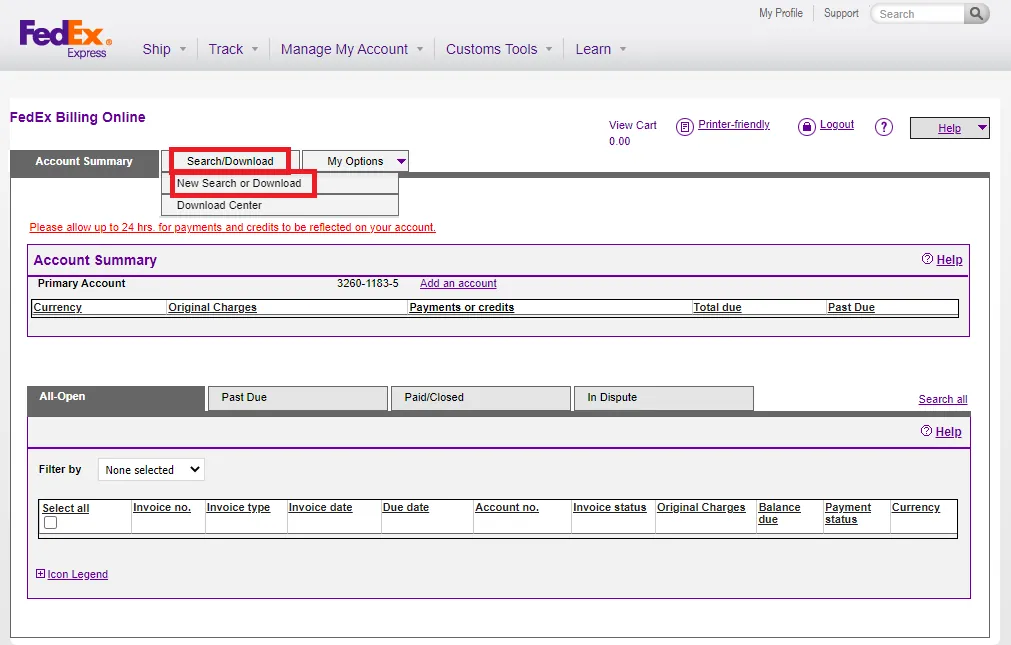
Step 4. On the right side of the page, you will see Quick Search click the drop down menu and select Tracking ID. Enter tracking ID of the claim you are processing then click Quick Search. Step 3
FIGURE
Step 5. The tracking details will now be shown and you can see the freight charges at the bottom right. Final Step
4.5. Add to tracker file
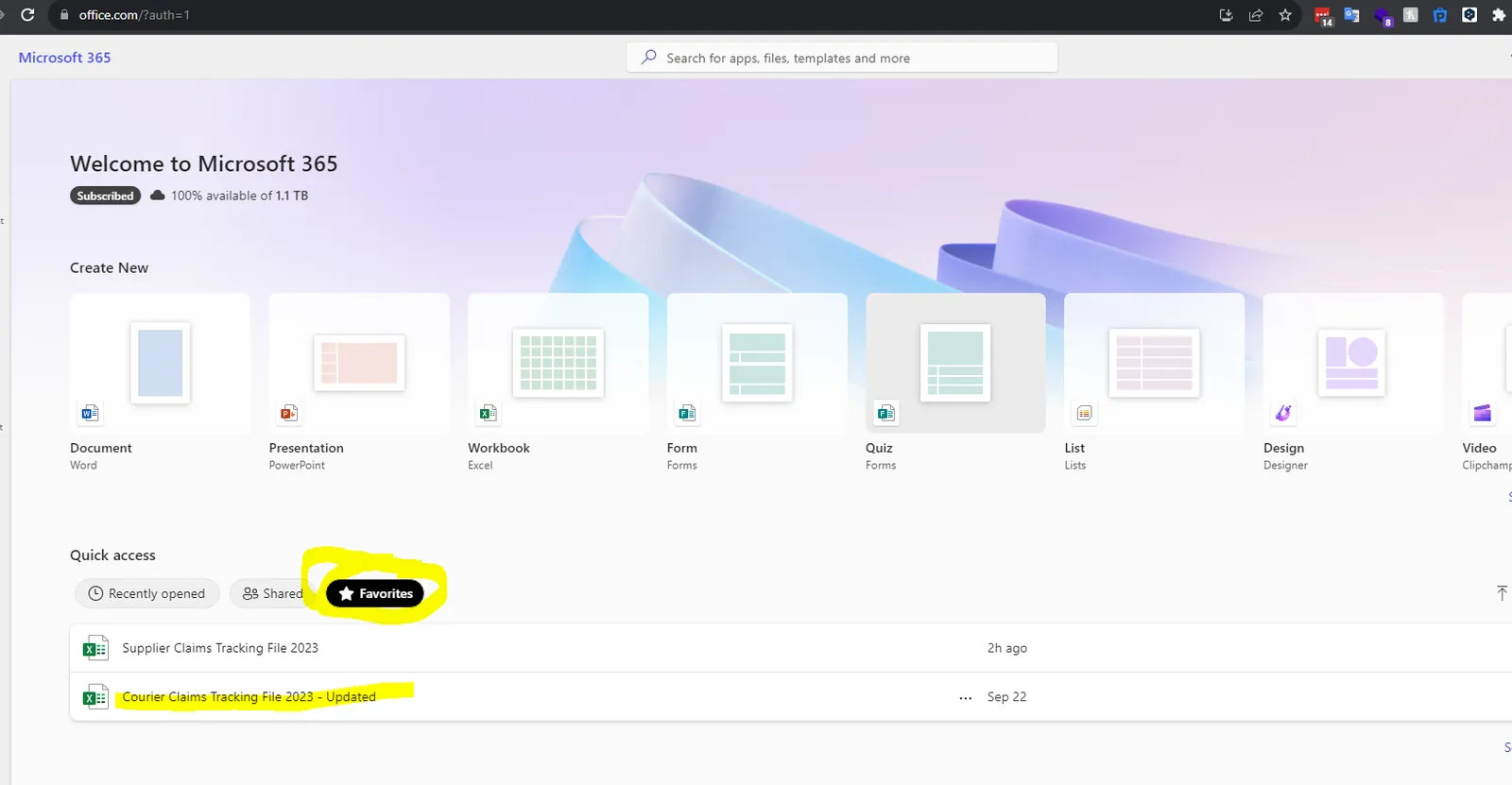
4.5a. Go www.office.com and use credentials provided by Managment, click on Favourites and then Courier Claim Tracking FIle
4.5b. The first tab is for the summary, this is automatically updated from the formulas in the other sheets and does not need to be touched.
Select the correct tab at the bottom depending on the courier you are processing a claim with.
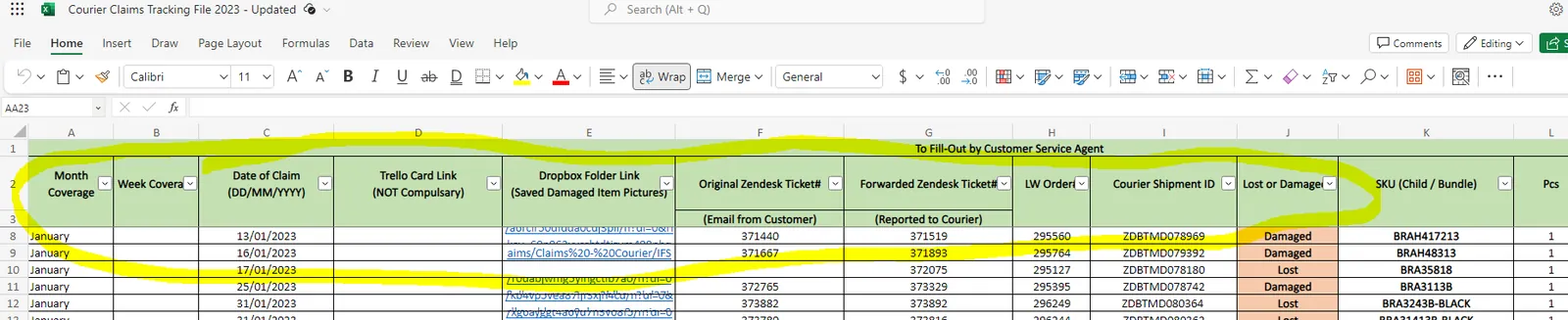
4.5c. You will need to populate a new row on the courier sheet, this data you will have already collected on the Trello card checklist earlier and can be transferred to here. Some of the cells will be locked and do not need to be edited as they will auto-populate with formulas. The following cells need to be filled in and must follow the same format as all the other claims for numbers and dates. For example 01/01/2023 and not 01/01/23.
Month Coverage
Date of Claim
Trello card link
Dropbox folder link
Original Zendesk ticket
Forwarded Zendesk Ticket
LWorder
Courier Shipment ID
Lost or Damaged
SKU
PCs
Customer refund amount
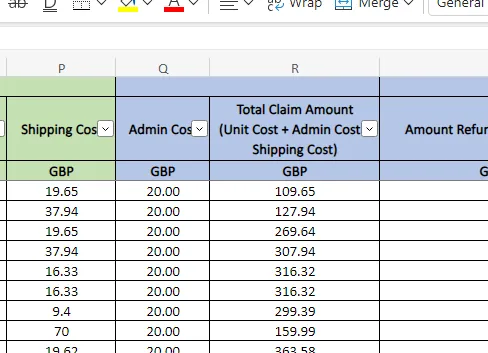
Once this is filled in the file will provide you with your total claim value which can be used in putting the claim to the courier.
4.5d. This tracker will be used for weekly reporting. CS agent should notify Accounts Personnel to fill-out the blue header fields and notify the management in Accounts/Finance Skype Group of outstanding claims.
Note:
If courier did not acknowledge the claim in 24hours, Accounts will be the one to do the follow-up. If still no acknowledgement, do another follow-up email or call the courier. Please note that these claims should be addressed in timely manner, especially if the customer open an eBay/Amazon case. eBay/Amazon cases needs
to be resolved in a specific timeframe. Customer Service number of FedEx is +443456070809. For follow-up on important account processes, please send to Danny Matthews [([email protected])](https://bragan-net.systemshub.com/embedded/manuals/c2031d0b-ce48-44bf-a919-5d084242669a/([email protected]) For damage claims and courier replies that they cannot process the claim since customer signs it in good condition upon delivery of item, update the customer and send Macro 042 then attach a snipe of the courier's claim rejection.
4.6. FedEx Acknowledgement
4.6.1. FedEx Online Claim Form
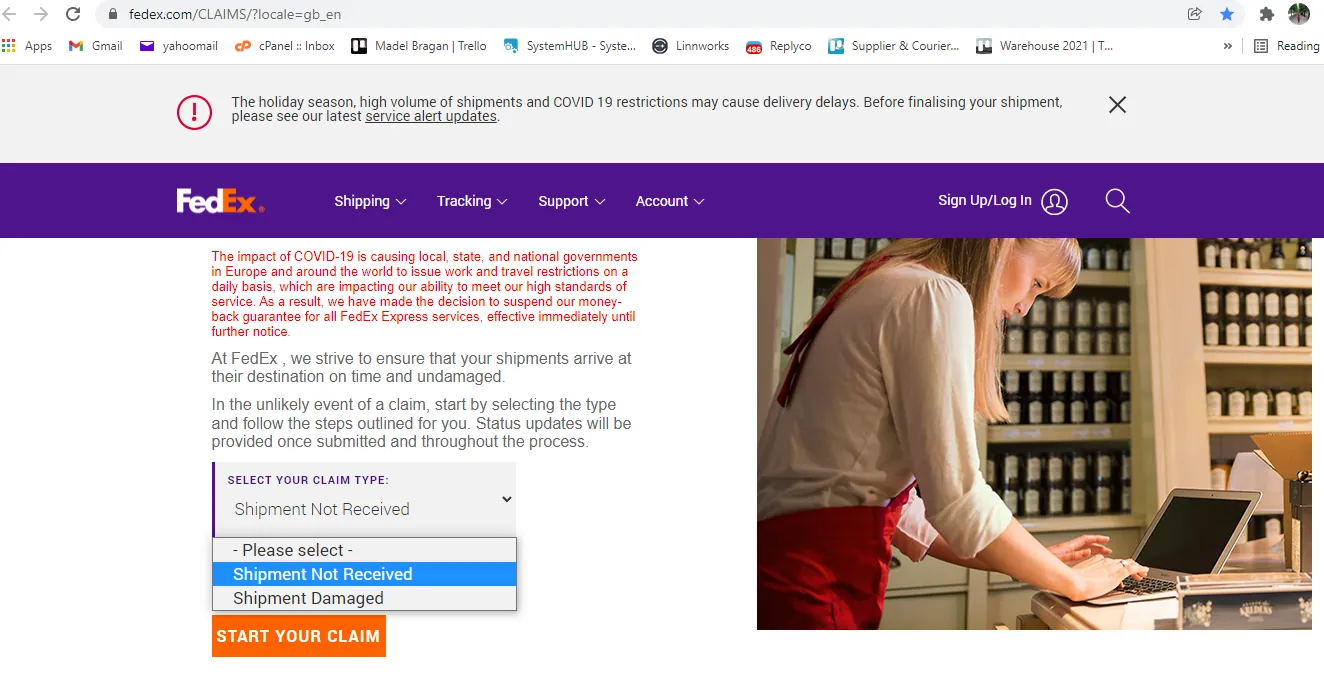
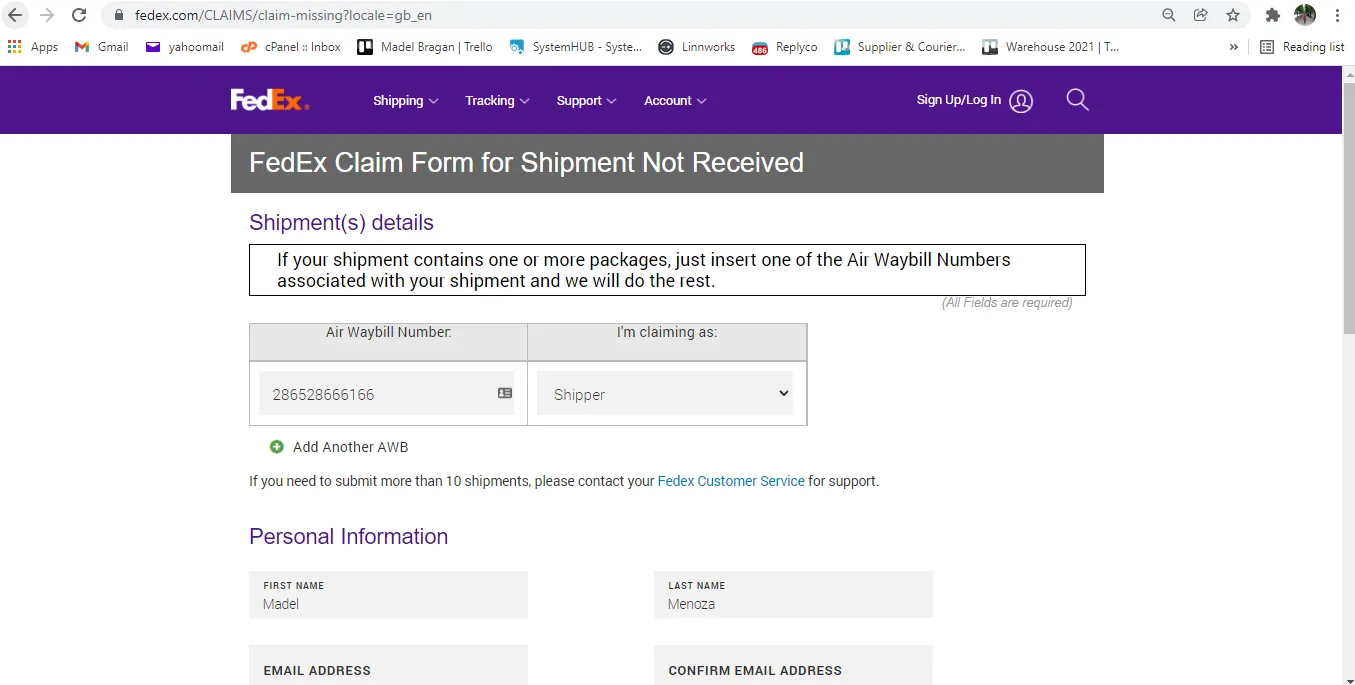
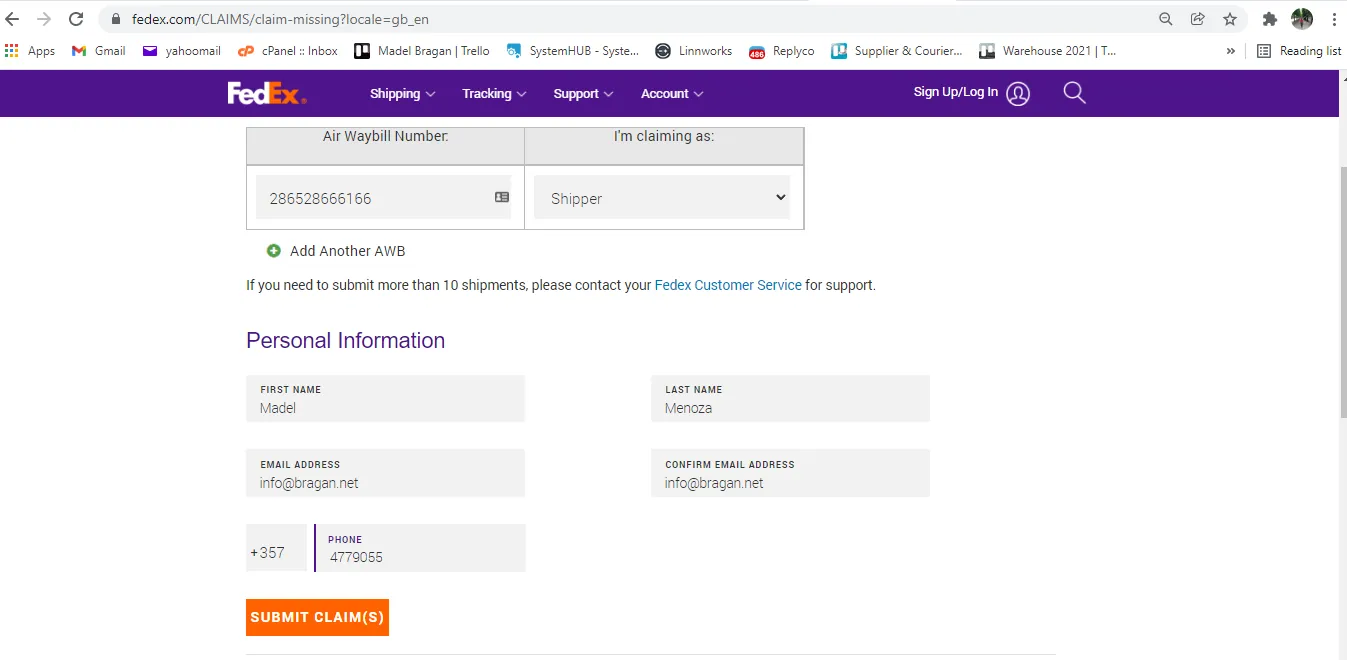
Process online claim only if requested by FedEx. See this link to their claim process and fill out required form.
4.6.1a. Lost Item (Shipment Not Received)
4.6.1b. Damaged Item (Shipment Damaged)
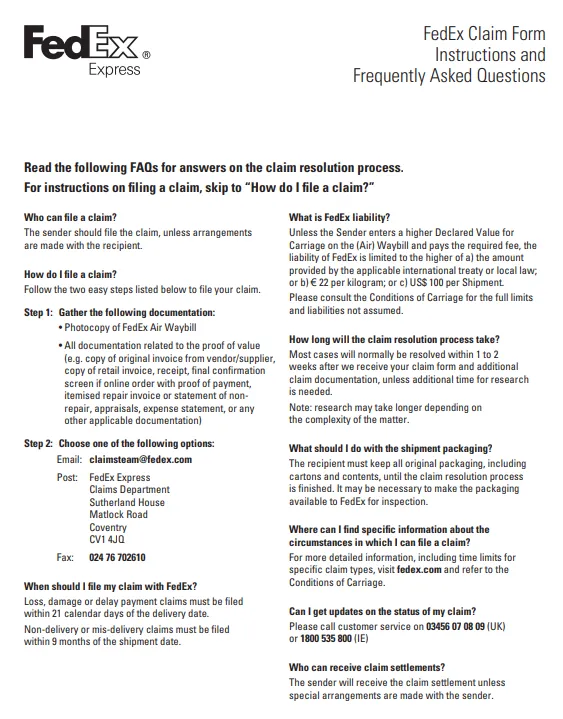
- Page 1 of FedEx Claim Form - Instructions and Frequently Asked Questions
- Page 2 of FedEx Claim Form - Check List
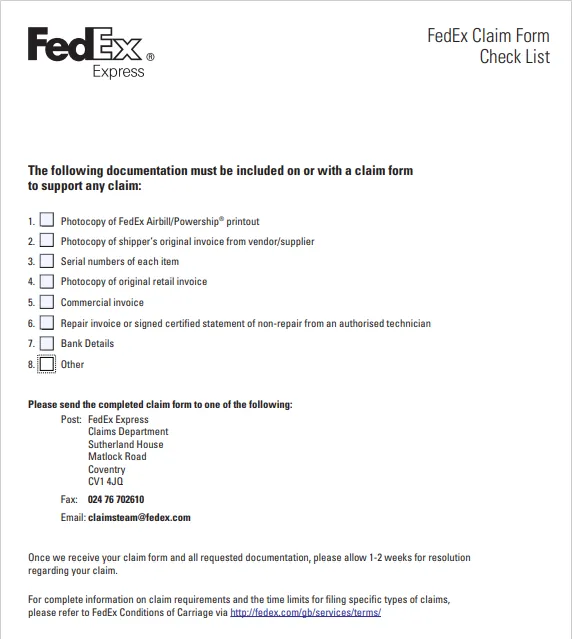
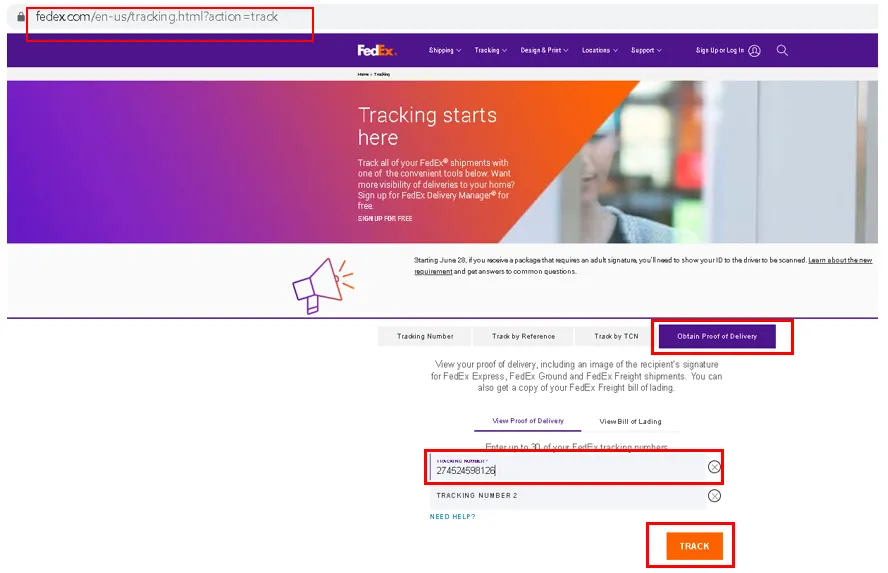
Guide on how to obtain documents in the FedEx Claim Form Checklist:
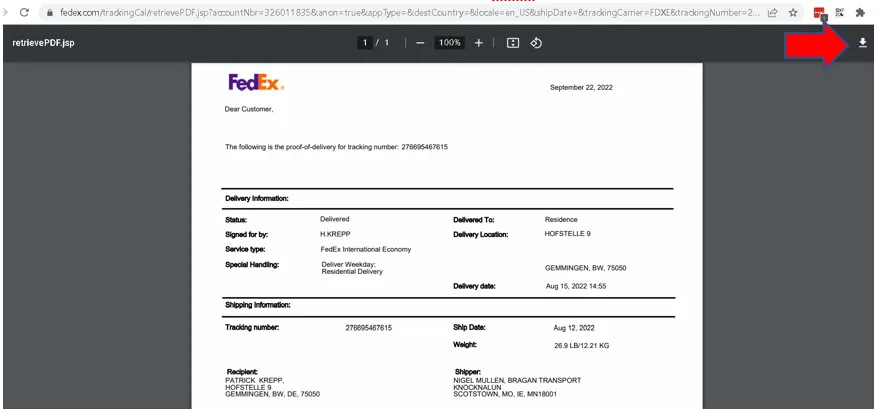
Photocopy of FedEx Airbill/Powership® printout
Step 1. Go to FedEx website > Click Obtain Proof of Delivery > Enter Tracking Number > Click Track
Step 2. Enter FedEx Account Number: “326011835” for detailed proof of delivery
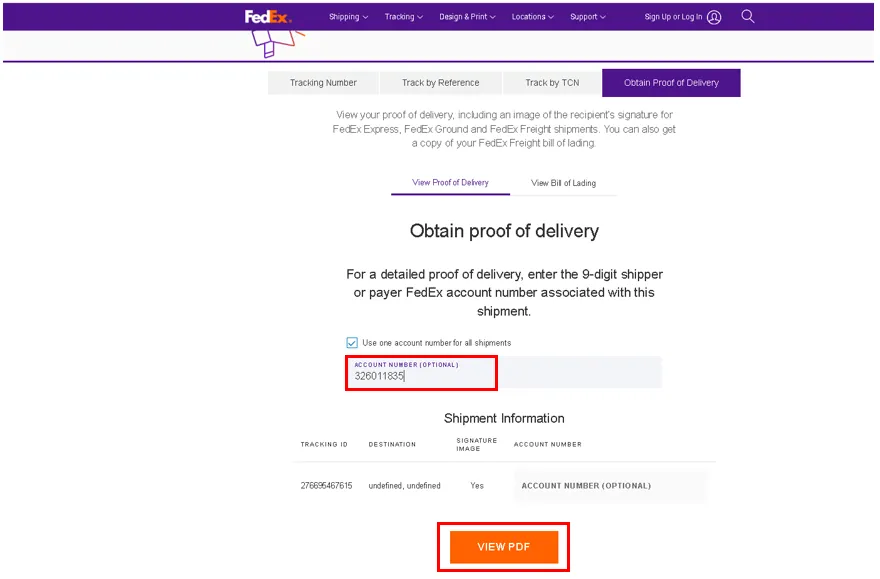
Step 3. Download the PDF file and save it using Filename: FedEx Airbill – [Tracking Number]
Photocopy of shipper’s original invoice from vendor/supplier – Supplier Cost Invoice (see above section No. 2.6b. How to Prepare Cost Invoice) Serial numbers of each item – Add this to the “Any additional comments” in Page 4 of FedEx Online Claim form with this format Serial Number of Item: [Linnworks Order No] [SKU] Photocopy of original retail invoice – Sales Invoice (see above section No. 2.6a. How to Get Sales Invoice) Commercial invoice – same as Sales Invoice, just update the filename to "Commercial Invoice - [Linnworks Order No and Customer’s Name]" Repair invoice or signed certified statement of non-repair from an authorised technician – Not applicable, especially if there’s no repairs done. Bank Details – see below section C. Other – We can include the damaged item pictures along with the claim form when submitting to FedEx.
- Page 3 of FedEx Claim Form - Claimant Bank Details
You will enter the bank details below. You may also find these details in Macro 108 in Replyco.
Note: FedEx Air Waybill Number is the Tracking Number
Name the account is held in (As shown on your bank card): Bragan Truck, Van & 4x4 Accessories Bank name and address: AIB - Monaghan Town, Monaghan, Ireland Bank Sort Code: 93 24 77
Bank Account Number: 32023143 IBAN (Only required for claims in Ireland): IE78 AIBK 9324 7732 0231 43
- Page 4 of FedEx Claim Form - For lost and damaged shipments
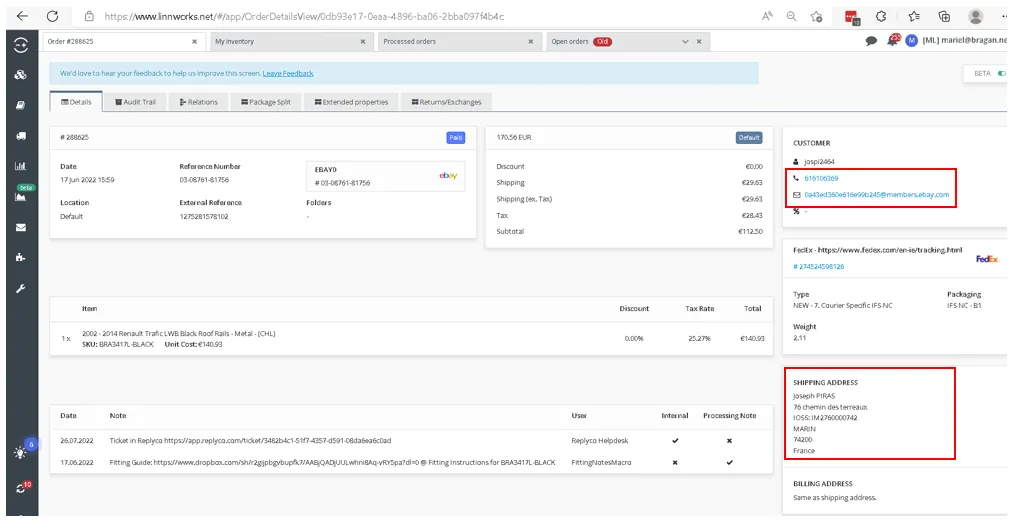
For Sender Information, you can copy and paste the details in the claim form in the Attachment section below. Recipient information can be found in Linnworks Order Details.
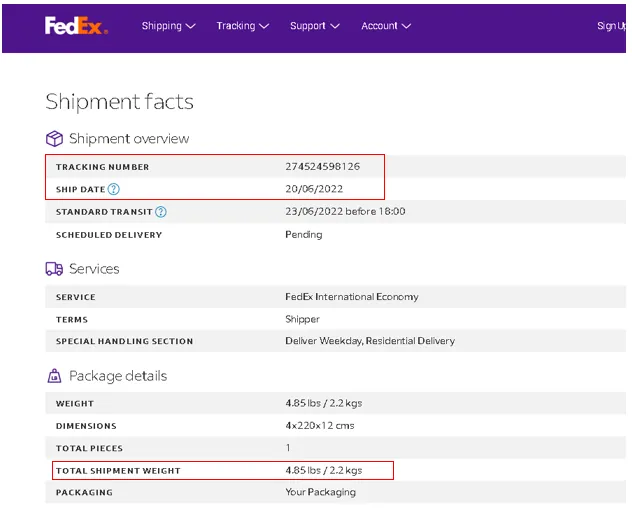
Shipment information can be found in FedEx website > Tracking > scroll down to see “Shipment facts”
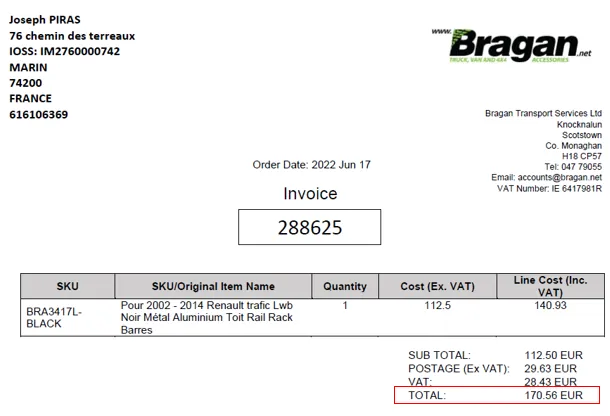
Contents of shipment: [SKU and Item Title] Describe damage to outer packaging: You can just put a brief description of the damage to the box. Describe damage to inner contents: Add a brief description of the damage to the item, keep it simple also. Example, “dent on the roof bar”. Describe inner packaging: You can ask this to warehouse, but most of the time, it is Styrofoam and bubble wrap or plastic wrap. You can also check the picture from the customer since sometimes the inner packaging is shown. Merchandise value (Original purchase price and/or cost to repair): [This is the Rate in Supplier Cost Invoice (Retail Price or RRP x 0.80)] Freight Charge: See above - section No. 4.4. How to Get FedEx Freight Charge Total Claim: [Total Amount in Sales Invoice]
Any additional comments: Add this: “Serial Number of Item:” [Linnworks Order No and SKU] Required signature: You can refer to the claim form in the Attachment section below, only update the “Date”. For signature (ask James for a copy), download the PDF claim form then edit the PDF and paste the snipe of signature.
4.6.1c. Save documents to relevant Courier Claims folder along with the damaged pictures for documentation and easier referencing on claims (see section No. 4.2. Save the pictures of damaged item for courier)
4.6.1d. Sending claim form and supporting documents
Send to: [email protected]
Subject of the email should be: "Claim for" + [tracking number]
Body of the email:
“Hi,
Please see attached claim form and other documents required, also see dropbox link below.
[insert dropbox link here – documents saved to Claim form and Invoices folder]
Thanks.”
4.6.2. Potential Request From Fedex as Part of their Claim
There are some instances that FedEx will email and require to submit documents. See snipe of their email below.
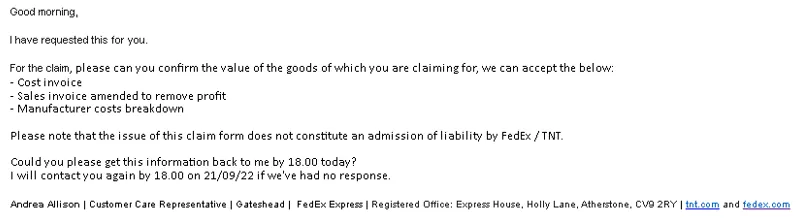
4.6.2a. Cost Invoice - Supplier Cost Invoice (see above - section No. 2.6b. How to Prepare Cost Invoice)
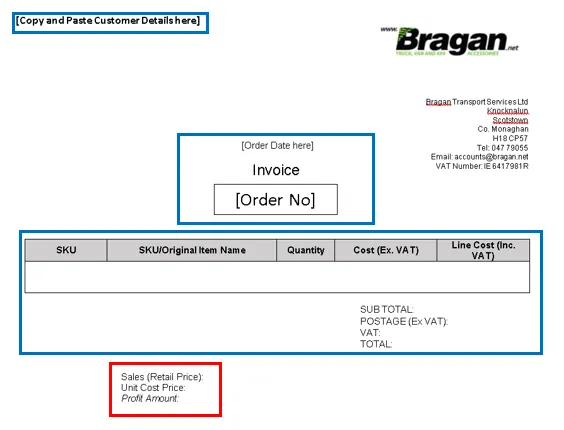
4.6.2b. Sales Invoice amended to remove profit
See procedure above section No. 2.6a. How to Get Sales Invoice Once a copy of Sales Invoice is downloaded, copy and paste the details to the "Sales Invoice Amended to Remove Profit – Template" in the Attachment section below (blue box in the below image). For the red box, just compute the difference of Retail Price/Cost (Ex. VAT) and Unit Cost Price/Rate from Supplier Cost Invoice to get the Profit Amount. Save it as PDF – Filename: Sales Invoice - [Linnworks Order No and Customer’s Name]
4.6.2c. Manufacturer costs breakdown
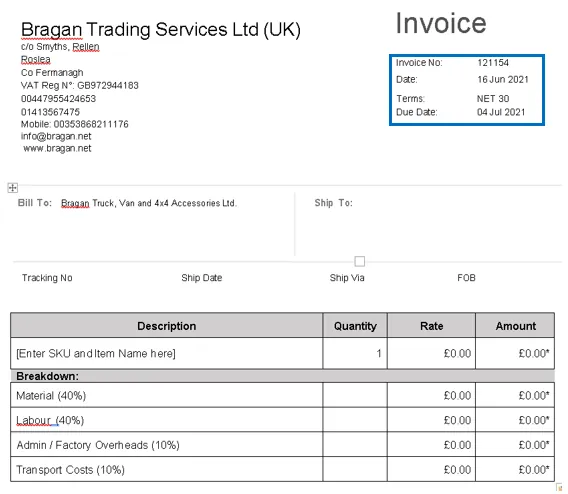
See the 'Manufacturer Costs Invoice Template' in the Attachment section below or in the dropbox folder Cost and Sales Invoice Templates 2022.
Blue box – Invoice No, Date, and Due Date should be changed to any number/date Description – SKU and Item Name Quantity – number of items we are claiming for, normally it’s 1 Rate – same as Supplier Cost Invoice Rate Amount – Rate x Quantity Breakdown Material (40% of the Rate) Labour (40% of the Rate) Admin / Factory Overheads (10% of the Rate) Transport Costs (10% of the Rate)
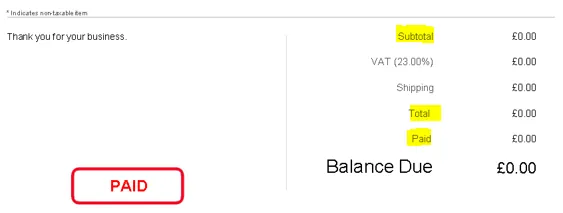
Subtotal, Total, and Paid is the same as the Amount shown in the table above.
- Packaging Description
There are instances wherein the courier will ask for the packaging description of the item (how the item was packed). Please refer to this SOP on Picking - Packing - Wrapping Process Section 3.3 to see some Packing Images. Section 6 of the SOP
also gives the link to some videos on how the items were wrapped or just click here to see the videos.
- Follow-up of Claims/ Courier Claim Tracking
Accounts personnel will be the one to follow-up these claims. Ensure urgency in doing the follow-up especially when it is clear that it is our fault (or courier / supplier) and customer complaints is true. Our objective is to avoid the customer to open an eBay/Amazon case against us (that effect metrics straight away and lead to lower listing page rankings) and for website sales they may leave negative review on Trust Pilot or facebook groups. Also we want our claim to be granted so make sure to process it within the courier's timeframe.
For cases that have been opened on the seller channel (eBay or Amazon) we need to ensure these are followed up on daily / as reply is given and that management is notified, if reply is not forthcoming it is up to agent to ask multiple times (such is importance of metrices to our selling channels). If possible call the courier. We must follow process and not give refunds unnecessarily.
Accounts will also send a weekly report of the courier claim status. See this file for the tracking of courier claims. This file needs to updated and submitted weekly to management. Please update this online, do not download the file and update since this file is shared and therefore needs to be updated for all. You can also see the link of this file in the Courier Claim Template.
When the courier refuses to grant the claim (even when tried to contest the refusal), we should at least get refund on carriage/shipping cost.
- Arrange Refund
To arrange a refund all Customer Service agents must fill out the Customer Refund Request Trello Card which can be found on the Customer Service Trello Board
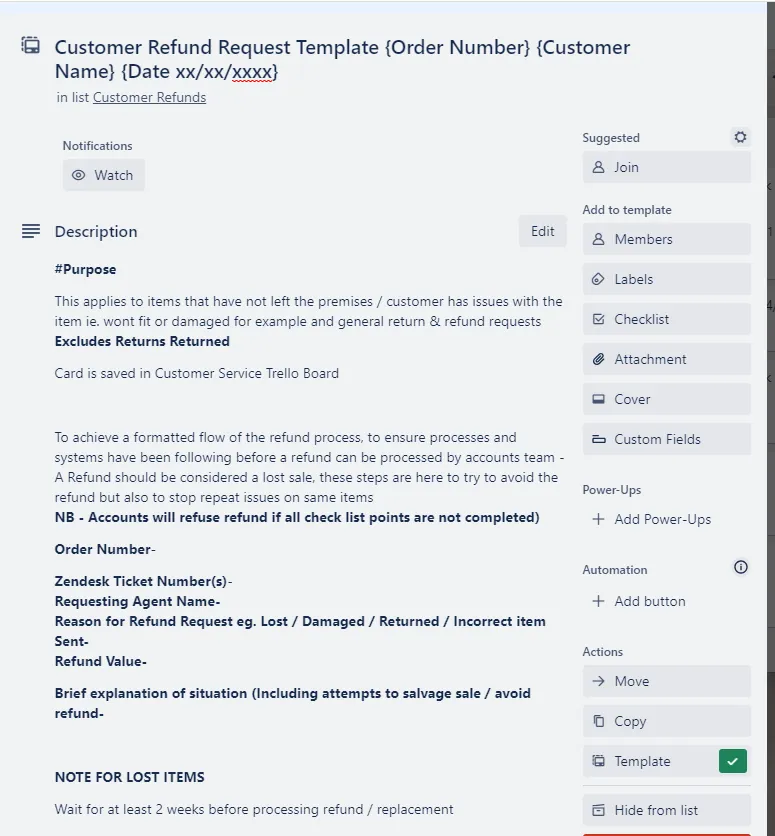
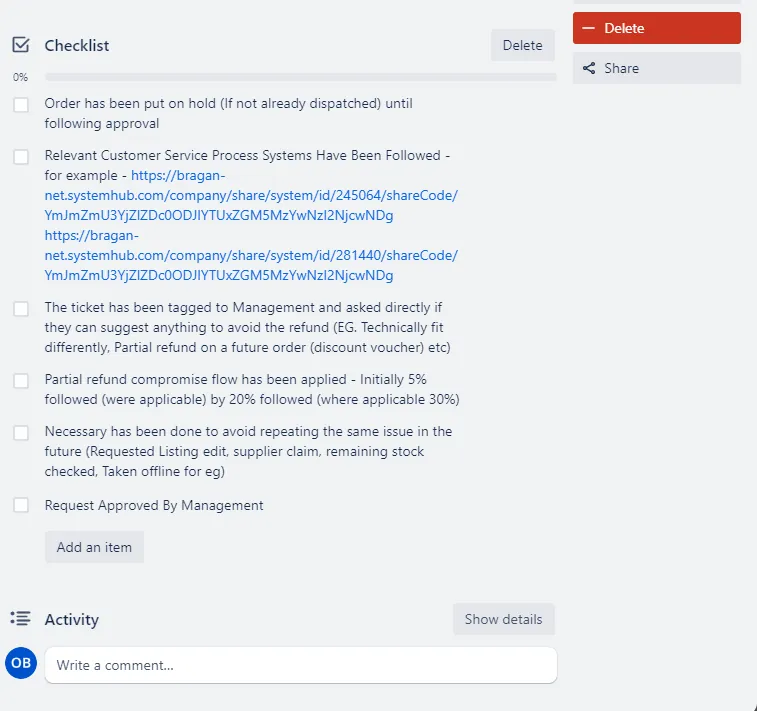
The Customer Service Agent must make sure that all of the checklist has been followed and completed before requesting approval from management for a refund. The CS Agent Must work with the customer in order to salvage the sale before a refund can be agreed.
Once all of the steps have been followed the CS Agent must tag management and ask for approval of the refund. Accounts will then follow up with a refund for the customer.
Video & Media#
Notes#
This section is important so Adhoc points and issues can be logged. Also, Q&A can be logged for suggestions for potential issues encountered. Also, log important notes needed for this system. Additional Notes:
- Weekly report of courier claim update and status should be submitted to management by Account Personnel.
- Ensure urgency in doing the follow-up especially when it is clear that it is our fault (or courier / supplier) and customer complaints is true.
- CS Agent will be the first to populate the trello card and make first contact with the courier. Accounts will do the follow-ups.
- For courier claims worth less than 20 pounds there is no need to process claim.
- Make sure to always save the files to the shared folder using Dropbox in the web browser instead of saving it in your Dropbox Desktop as files automatically deleted in the system once staff is no longer with Bragan.
Potential Issues:
1 - ISSUE ENCOUNTERED: Stuck on Loading
RESOLUTION: Refresh Browser
2 - ISSUE ENCOUNTERED: Broken Links
RESOLUTION: Get the external link as this will allow other people to access the SOP without the need for login credentials and avoid broken links.
3 – ISSUE ENCOUNTERED: Dropbox deleted folders
RESOLUTION: Utilize Dropbox in the web browser instead of Dropbox in desktop to secure that dropbox links will not be deleted for future reference.
Attachments#
Claim_Form_IFS.docx 16/12/2025
Manufacturer_Costs_Invoice_… 16/12/2025
Sales_Invoice_Amended_to_R… 16/12/2025
Sample_Claim_Form_FedEx.pdf 16/12/2025
Supplier_Cost_Invoice_Claim_f… 16/12/2025
Supplier_Cost_Invoice_Claim_f… 16/12/2025