Email - Usage & Process 2020 Update
The purpose of this SOP is to give an idea on how to process Email - Usage &
Overview#
Purpose: The purpose of this SOP is to give an idea on how to process Email - Usage & Process 2020 Update.
Scope: This applies to customer service representative staff and all staff personnel who is in charge of this process.
Responsibility: It is the responsibility of all staff to follow the standard operating procedure of Email
- Usage & Process 2020 Update.
Objective: The objective of this procedure is:
- to guide employees on Email - Usage & Process 2020 Update.
Procedure#
Before even beginning to answer e-mails, you need to be familiar & able to correctly folder e-mails. These functions are as follows:
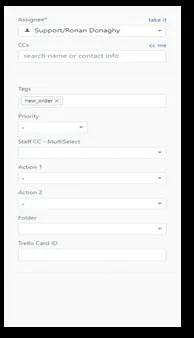
Assignee CCs
NOTE – 1st contact emails MUST be answered with a Macro, 2nd contact emails should be answered using Macro. Some edits to suit a specific customer can be expected.
At 4th Stage response from customer - if you feel this is not being resolved pass to management / experienced member for review and assistance.
-Assignee – This is when you need to move an email to someone else’s folder i.e. – Accounts (for an account related e-mail) - there is a support group & a management group. Accounts (Rosemarie) is part of the support group so you would select support – select Accounts & Submit as open.
*** NOTE *** NEVER SUBMIT AS CLOSED AS THIS WILL CLOSE THE E-MAIL
-CCs – this is when you need to CC someone into the e-mail. If a customer wants you to send them fitting instructions to their e-mail but also their fitters e-mail address for example. Simply enter the e-mail address into the CCs box and hit enter.
Tags – These are used to help identify the contents of the email. i.e. technical support
Please Review all Tags – Supplier claims, Courier Claims, Warehouse Mistakes are
Part of Process for Monday Morning and BEFORE close of business each day is to check Importantly Tagged emails in order of importance – it his is as follows - 1) New Orders. 2) Order change (this needs to be done early - before warehouse pick has been begun 3) Technical Emails
Sales orders should not be left over to the following day as the momentum can be lost and result in losing a sale.
Priority – When an email needs Urgent attention select this option and if it has the potential to upset/incur Negative Feedback.
-Staff CC – This is for internal use, if you have a message in your folder that you need to keep in your folder but want colleague to see it also then you need to select
them on the list & submit as open, so it will also appear in their folder
-Action 1&2 – These actions are used so we know what the email is in relation to. Also allows us to prioritize the emails i.e. New Order which are sales need to be prioritized. Full list on actions are:
Arrange Collection Arrange Exchange Arrange Refund Arrange Replacement Check Returns Customer Query Item Not Received New Order Order Change Send Invoice Technical Support
NEED TO REFERENCE FOLDERS – SUPPLIER CLAIMS, COURIER CLAIMS, PRODUCT REQUEST ETC
3.1 Answering E-mails – Etiquette
**** Always Establish who you are replying to, Trade customer/potential trade customers for example, all need experienced sales member tagged into the email.
Orders over £200 should be made for the attention of the Sales office to ensure these are dealt with correctly.
New Orders
Tag Management/Customer Service Main Folder
Close ticket as Pending – They are important (Large order, potential trade)
Tag as New Order + Potential Sales
Do Not say we can not supply (if out of stock or not listed) ALWAYS offer an alternative.
eBay
*** NOTE *** When replying to eBay messages it is important to adhere to eBay policies when doing so. Follow these instructions to ensure these policies are followed.
- DO NOT attach any contact numbers or email addresses to the email (Advise customers that this can be found on the seller information page)
- Do not reference anything to do with PayPal or any suggestion to a sale being made outside of eBay (through website / over the phone)
- If sending instructions or copies of invoices simply say, 'Instructions sent/Invoice sent'. Do not reference the fact that they have been sent to an email address. Always send instructions through eBay if possible, jpegs can be sent using eBay directly.
- If you are sending the customer a link to an item, they are looking for you MUST ALWAYS send the eBay link, DO NOT send any external links as this is against eBay policies.
Amazon
Process and response for Amazon is similar to eBay however they are a bit more relaxed – always try to keep messaging & links etc relative to Amazon listings.
Outside eBay/Amazon
Anything outside eBay/Amazon we are free to send links from our website & discuss making a phone call or sending PayPal invoices etc
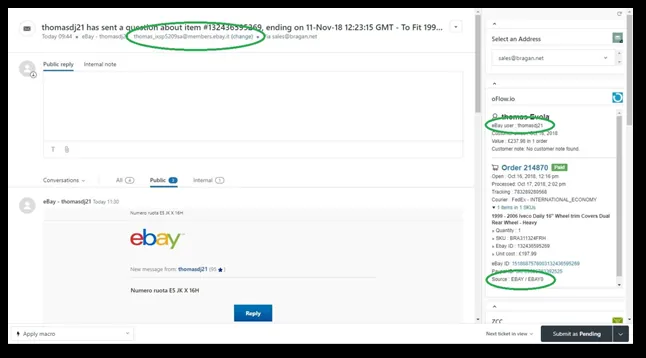
*** NOTE *** ALWAYS BE SURE WHERE THE MESSAGE IS COMING FROM – THIS IS THE NUMBER ONE PRIORITY BEFORE ANSWERING ANY EMAIL AS YOU NEED TO KNOW WHICH POLICIES ETC WE HAVE TO ADHERE TO
Please see the following example showing the source of a message;
There are many different emails that you will encounter – we will focus on the technical emails / item received incorrectly etc first.
3.2 E-mails regarding Damaged Items
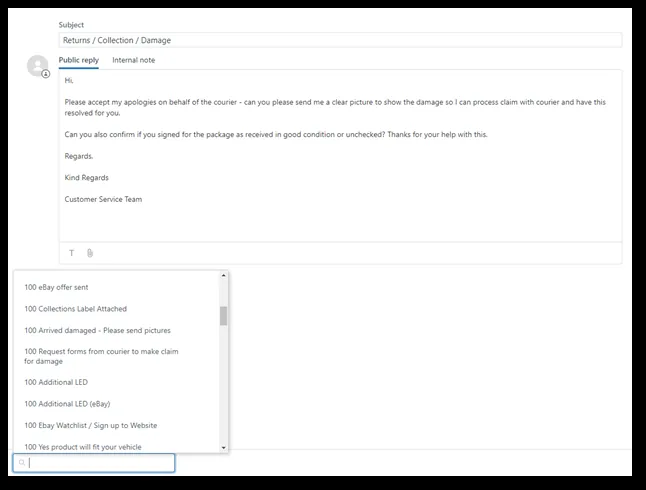
Always apologize for the inconvenience cause and for the damaged caused on behalf of the courier.
*** NOTE *** Ask for pictures of the damaged item & ask if the item was signed for as checked/unchecked (try to always use canned response macro – 511 Arrived Damaged – Please send pictures) Fig 7.
Depending on the damage and the value of the item, offer a partial refund to keep the product as well as a discount on a future order (start of low and give yourself plenty of negotiation room) there is certain items that would not be worth collecting to have to try and sell damaged i.e. window deflectors.
Any item that is damaged check the pictures and if not very noticeable you would ask the customer to potentially keep for some partial refund and reiterate that you do not believe it would be very noticeable when fitted and ask them to advise.
Also, thank them for the co-operation and reassure that we will resolve this is any case.
3.3 Courier Claims – “ALWAYS TAG THE EMAIL SUPPLIER CLAIMS”
IFS
Send claim request to Joy (IFS) with the consignment number (100 Request forms from courier to make claims for damage). Remember to enter the consignment number. [email protected]
Once you receive a reply regarding the case Assign Patrick/Agent to complete the process. A claim form, cost invoice and sales invoice need to be completed and
emailed to Joy. We have freelancer (Patrick/Agent) doing this now so we do not need to do this in house.
Fastway - Follow the process as above - Email - [email protected]
FedEx
Email [email protected] with the consignment number, they will email questions to be answered. Also must send pictures of the damage so same procedure as with any damaged item, ALWAYS GET PICTURES, be sure to save these so that they can be used again (this applies for all damages).
DPD
Email [email protected] with pictures along with the consignment number and ask for the items to be collected and redelivered FOC (free of charge) you will need to send them the consignment number that the replacements (if applicable) that are being sent. This information can be found on Order Details within Linnworks once replacement order has been submitted.
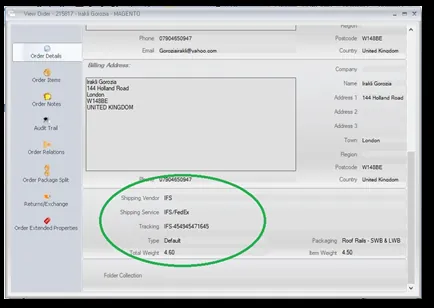
There is also a claims form which is to be completed which is done. If there are a lot of damages for the same items, it is important to make management aware of this so that they can review how they are being packaged. It is vitally important that this is done because if the same damages are occurring all the time this is constantly costing the company money so we have to look at the issue and reasons for the damages occurring.
3.4 E-mails regarding Wrong item
There are 3 questions that need to be answered in every case;
Where did they place the order? (eBay, Amazon & Trade are dealt with a higher priority – eBay & Amazon because they can leave feedbacks if not dealt with efficiently) What did they order? (i.e. Bull bar for 2012-2016 Ford Ranger) What did they receive & what vehicle is it for? (i.e. they received a bull bar for their 2012 Ford Ranger, but their model is the older 2006-2012 model) What should they of ordered?
*** NOTE *** After receiving this information it is VERY IMPORTANT you have the customer send pictures of what they received along with any part numbers on packaging to verify the item. If they believe there is a fitment issue use macro - 513 - Product Fitment Issues - send pictures to show. Always Confirm year, make and model.
Check that the listing on the website/eBay etc. in terms of years are correct, be careful of the crossover years, if unsure of anything ask an experienced colleague.
Remember that our products are top class and that we have sold 100s of them before without issue!! We supply local dealers not only throughout the UK & Ireland, but throughout Europe & the ROW. In some cases, we have the items on our own vans & jeeps.
Customers Mistake
We cannot take the customers word on these things, customers can order the incorrect item & if they send pictures then you have evidence (Macro) You can turn to the customer & say ‘I see from your picture that your model is actually the older 2006-2012 whereas this bar is for the newer 2012-2016 model’. Also check if we have the same item available for their model and suggest the customer keeps & sells locally & we can discount the new item/correct item for the customer or they can send back for an exchange.
If possible, suggest that the item be altered to fit (which has been done previously), return postage will be the responsibility of the sender along with a £30 admin fee for re-delivery (Marco?)
If a customer is exchanging an item, always ensure that they know which products they need. For example, if a customer orders a SWB but thinks they need LWB, best thing to do is to get them to send a picture of their vehicle and measure the wheelbase to ensure the correct item is re-sent. This would apply for all exchanges - Dimensions are Also Noted in Listing Description (Request listing update if not)
If they have purchased for the incorrect year and we don't stock - say that we have sold this item for this year and that previous customers have altered to suit.
Dispatch error
If it is a result of an office mistake or warehouse mistake, mark accordingly – Warehouse Mistakes and record this in Zendesk. If necessary, we can suggest that the item is kept for a discount. If the customer does not agree with this then collect & change
3.5 Missing/defective items - including missing instructions
Items will not be collected unless there is a proven fault with this item. If there is an item missing from the item received, we again ask for a picture of what has been received. With some cases it is better to just send the replacement, i.e. if there is a customer saying that an LED light isn't working , and they have recently purchased the item, Request Picture showing Identification Marks on the item to be able to log supplier claim. Send a replacement (FOC - Free of charge) or if there is a complaint about missing bolts for roof rails i.e. (turkey stock) which we know and have had issues with the Turkey supplier not sending the correct bolts or quantities.
Tag email Supplier claim and send an internal email to [email protected] requesting spares to be ordered and Tag in Zendesk “Requested Item” - also add comments to the procurement Skype group.
If it's a case of an eBay order or Amazon order that doesn't have these bolts and are getting aggressive just send them. If a customer is contacting regarding crossbars that have a different key number than the lock, check with Peter to see if there is a key with that number and if not send clamps and keys with the same number.
With certain purchases you will need to see a picture, (Forward pictures to supplier urgently to show defective item and tag “Supplier Claim”). If a customer is saying that they haven't received the correct number of spotlights or something that has a larger value, this will need to be investigated. Avoid a return in whatever way you can, if this means sending replacements, get them sent ASAP! There are certain items that do have occasional problems, for example clips for the BWM cross bars. There are additional clips to be sent, if there is an issue then chances are this is the problem.
Always send fittings instructions (Macro) (Use BRA # in Drobox to source appropriate files) and add any additional information such as dimensions. If fitting instructions are not available find out the supplier, email for instructions and update the fitting folder. Check previous sales through Gmail or Linnworks, contact previous customers for fitting information they may have received, offer discount for doing so and update fitting folder. Forward new files to the customer having the issue (check for positive feedback from customers).
*** NOTE ***In all cases, read the e-mails 3 or 4 times so you fully understand what the email is asking from you and that you are fully aware of the facts and then you are in the best position to deal with it.(DO NOT fully depend on the Macro)
Always ask for pictures of items received and part number using the Macro 510 if the customer thinks it is incorrect, it is important to look at the photos 5 or 6 times to see if there is something wrong from the customers side. i.e. ordered for 14+ when they should've ordered for 02-14 etc.Please use google images or wikipedia to learn which model it is.
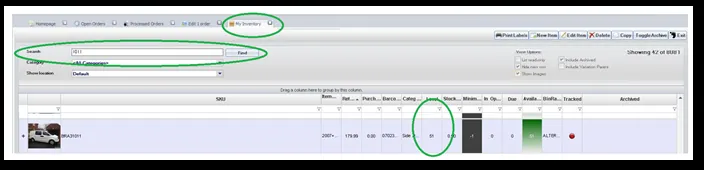
When Pictures received from the Customer, forward to the supplier for confirmation
With certain items it is required that a professional will carry out the work, for example, any roof rails that are bonded to the roof, a professional panel beater will
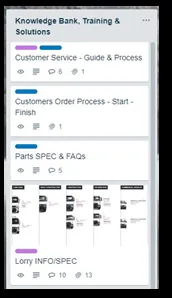
be required. Make a list of potential problem items and the procedure to deal with this. These notes can be added to your Trello board for future reference.
It is very important that this is added to your Knowledge Bank and additional fitting info email to allow this to be dealt with quicker in the future
If the item is out of stock which a customer is asking about, place on Trello for reference of ‘New items’ and add to ‘Potential sales’ in your Zendesk folder and add a comment to Skype procurement group.
3.6 Out of Stock – Customer ordered but out of stock
In any case make sure the stock is at zero so no more can be sold. Depending on when the warehouse gives you the label your story will change;(Ensure Request to Procurement Group on Skype and send email to [email protected] to allow Item to be Tagged for reordering urgently)
If brought up on the same day – you would say ‘the last 5 of these were found damaged as their order was being prepared’ – always suggest an exchange if appropriate or tell the customer, we can send when new inventory has arrived. If a day or 2 has passed – we blame the courier. Example of message below.
‘Hello there (enter customer name)
I have just had the courier on the phone & they are returning your order as they have damaged in transit. Now normally I would send another, but this was the last one we had in stock. (Again, if appropriate – We can send another style we have listed here – (enter link) or send when we have these back in stock?
Please advise & accept my apologies on behalf of the courier for the hassle caused here.’
3.7 Unhappy customers
If there is a customer that is unhappy about the product, they have received the same procedure as normal applies:
Where did they place the order? (eBay/Amazon treat as priority) What they have ordered? What they have received? What should they have ordered?
In a case-by-case basis you must gauge how the other customer is reacting. If an eBay customer is coming across as aggressive or seriously unhappy there needs to be alarm bells ringing. DO NOT send incorrect Macro or repeat messages that have already been sent – Tag Management and IRL to get the customer on the phone and find out what the issue is and deal with it as soon as, whether this is sending replacements or refunds etc. A quick phone call can diminish the chances of negative feedback which is always the number 1 priority.
If replacement/problem is a simple value i.e. missing bolt, plastic cap or LEDs- simply send straight away, no need for pictures.
If they are still unhappy then offer a discount on a future order
You need to be firm, can't be pushed around. This would in many cases come down to experience. If the customer is being unreasonable - stand your ground and always try and state the facts, you need to be authoritative but never stoop to using foul/abusive language even if the customer is using the same. If the situation becomes abusive/difficult pass to management. Some customers like to think that they are speaking to "the boss".
3.7 Fitting Instructions
In all cases – if a customer cannot fit or is having a problem fitting an item the very first thing we do is send them the fitting instructions. Respond to their e-mail with the fitting instructions attached Please see dropbox link here for the fitting folder explained –(use Macro 500)
PLEASE USE MACROS
SOP Updated 07/02/2020 -Nick
Notes#
This section is important so Adhoc points and issues can be logged. Also, Q&A can be logged for suggestions for potential issues encountered. Also, log important notes needed for this system. Additional Notes:
This document is important because this gives an idea about the procedure of Email - Usage & Process 2020 Update.
Potential Issues:
1 - ISSUE ENCOUNTERED: Stuck on Loading
RESOLUTION: Refresh Browser
2 - ISSUE ENCOUNTERED: Broken Links
RESOLUTION: Get the external link as this will allow other people to access the SOP without the need for login credentials and avoid broken links.