Folderise Email (Zendesk)
The purpose of this SOP is to give an idea about the Folderise Email.
Overview#
Purpose: The purpose of this SOP is to give an idea about the Folderise Email.
Scope: This applies to all customer service representative staff and all staff personnel who is in charge of this process.
Responsibility: It is the responsibility of all staff to follow the standard operating procedure of the Folderise Email.
Objective: The objective of this procedure is:
- to guide employees about the process of the Folderise Email.
Folderise Email
Folderise Emails
Assign the Emails to the correct folder
Zendesk location: Unassigned tickets
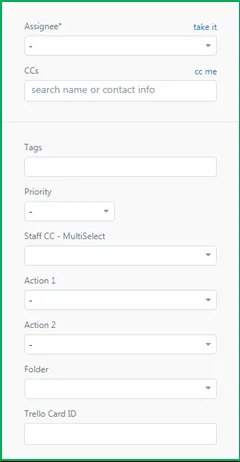
Sales – Andrew Robinson Accounts – Andrea Refund - Andrea Advertisement of new product – Nigel (Folder: Potential Supplier) Advertisement not related vehicle – Nigel (Folder: Advertisement) New Applicant – Nigel (Folder: Potential Employee) Customer Technical Issue - Andrew Robinson (Action 1: Technical Support)
Customer New order – Ronan Donaghy (Action 1: New Order)
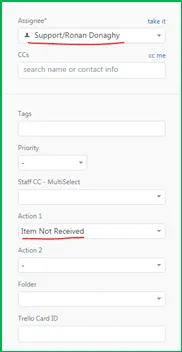
Example: 127431(Customer delivery issue)
Assign to Ronan Donaghy
And Mark (Item Not Received)
Please see picture
- Please see the video link below.
Video & Media#
Notes#
This section is important so Adhoc points and issues can be logged. Also, Q&A can be logged for suggestions for potential issues encountered. Also, log important notes needed for this system. Additional Notes:
This document is important especially to customer service staff because this shows about Folderise Email. This is an old file need update from the owner.
Potential Issues:
1 - ISSUE ENCOUNTERED: Stuck on Loading
RESOLUTION: Refresh Browser
2 - ISSUE ENCOUNTERED: Broken Links
RESOLUTION: Get the external link as this will allow other people to access the SOP without the need for login credentials and avoid broken links.