Handling Damage Item Complain
The purpose of this SOP is to give an idea on handling damage item complain.
Overview#
Purpose: The purpose of this SOP is to give an idea on handling damage item complain.
Scope: This process applies to all Customer Service Members (Team PH & Team IRL).
Responsibility: It is the responsibility of the customer service representative to know what to do in handling damaged item complaints.
Objective: The objective of this material is to standardize the process on how to handle customer emails complaining about receiving the damaged items. This will allow us to efficiently handle the situation and resolve the issue for customer satisfaction.
Process Flow#
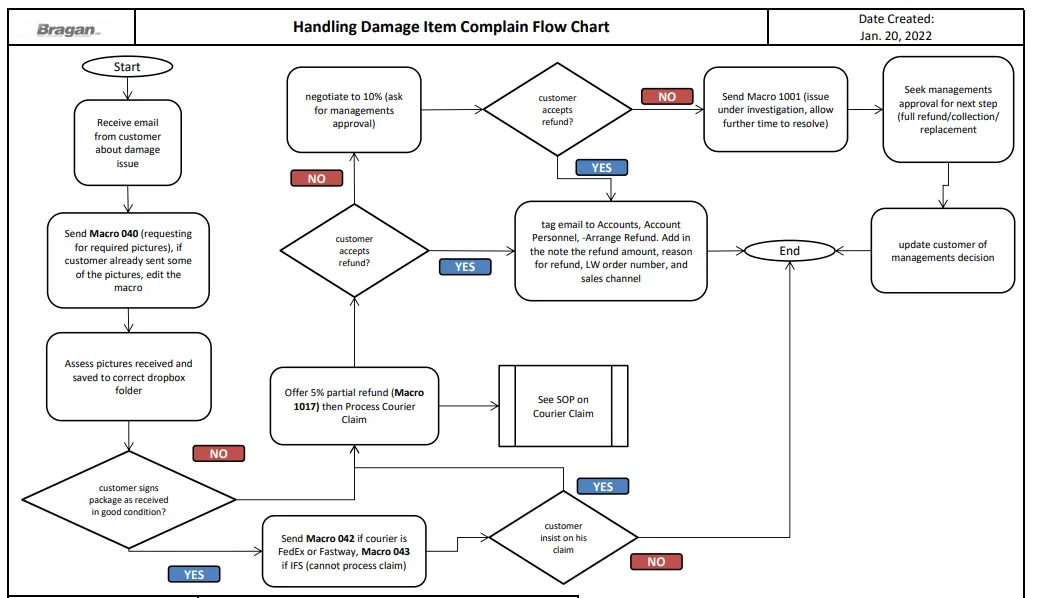
Procedure#
Obtain Required Information#
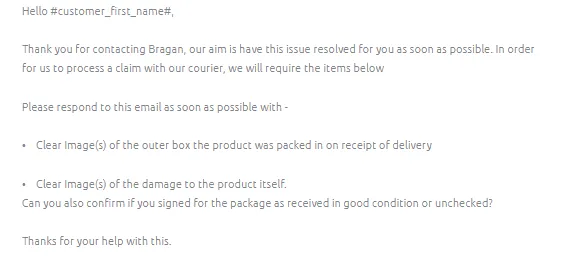
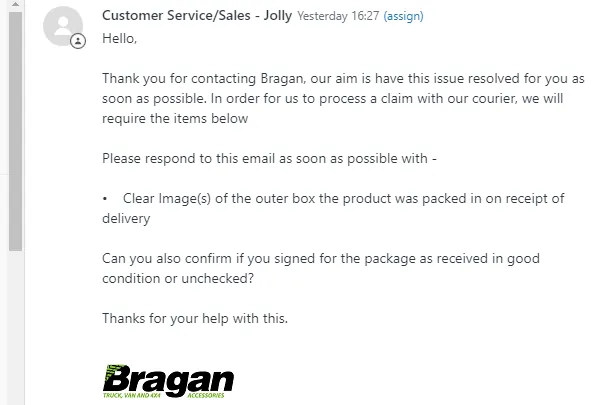
- For customers reporting that the item received was damaged, ALWAYS USE MACRO 040. This macro will request for pictures necessary for us to proceed with the courier claim and sort out the issue.
Clear Image(s) of the outer box the product was packed in on receipt of delivery.
Clear Image(s) of the damage to the product itself.
Confirmation if customer signed for the package as received in good condition or unchecked.
In the event that they already have submitted a picture of the damaged item but it is incomplete, you can still use Macro 040 and request the pictures missing. Tag the email as Un-happy Customer Comments and Courier Claim.
Assess Received Information#
- When customer gets back with the requested information, forward these immediately to the courier as damage item are time sensitive. After you forward it to the courier proceed to processing courier claim, see this SOP. Then assess the damage of the item.
Will the damage be noticeable when fitted?
Can it be easily / cost efficiently repaired?
Is it broken and cannot be repaired or hard to repair?
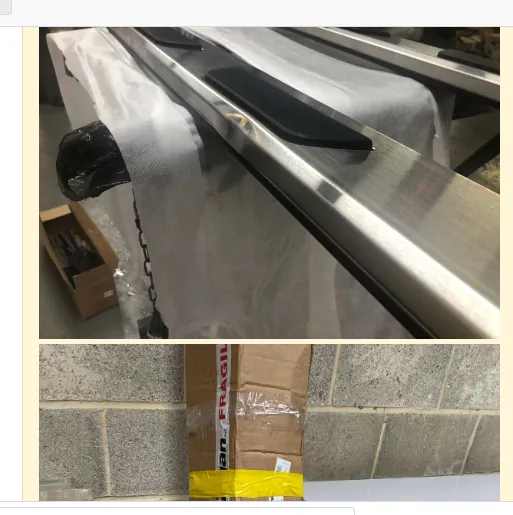
Note: Ensure to add ALL the photos submitted by the customer as an internal note. (incase Zendesk is used, in Replyco we cannot add the actual image, only links)
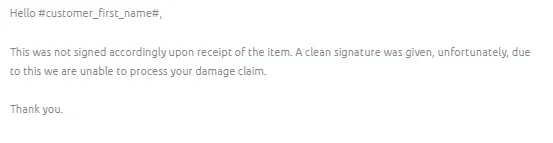
- If customer also replied that he signed for the package as receive in good condition. Send Macro 042 stating that we cannot process his damage claim.
However, if customer did not answer if he signs or not proceed to next step and process Courier Claim and wait for courier acknowledgement.
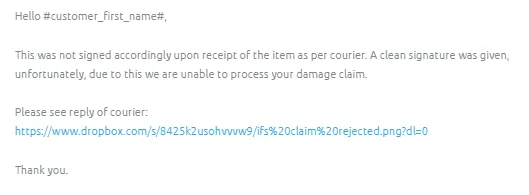
If courier replied that they cannot process the claim, since customer signed it in good condition upon delivery. Send Macro 043 for IFS claims, this macro already contains a snipe of couriers reply found in the link.
For FedEx and Fastway send Macro 042 and attach a snipe of the couriers claim rejection.
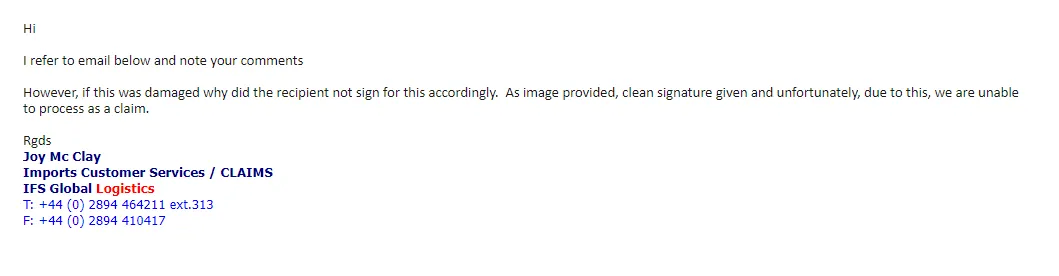
If customer still insist to process his damage claim to us then proceed to the next steps. Please note that if ever customer agrees that his claim won't be processed, still proceed in saving the damaged pictures that he sent since we can use this in processing Dummy Claims.
Saving Received Damaged Pictures#
- You save damaged pictures received in two different folders. (1) Claims - Courier Dropbox Folder and (2) Damaged Item Pictures Dropbox Folder. Please request management to invite you to these folders. To save pictures in the Claims-Courier Dropbox Folder please check this SOP on Courier Claims. To save pictures in the Damaged Item Pictures Dropbox folder, see steps below:
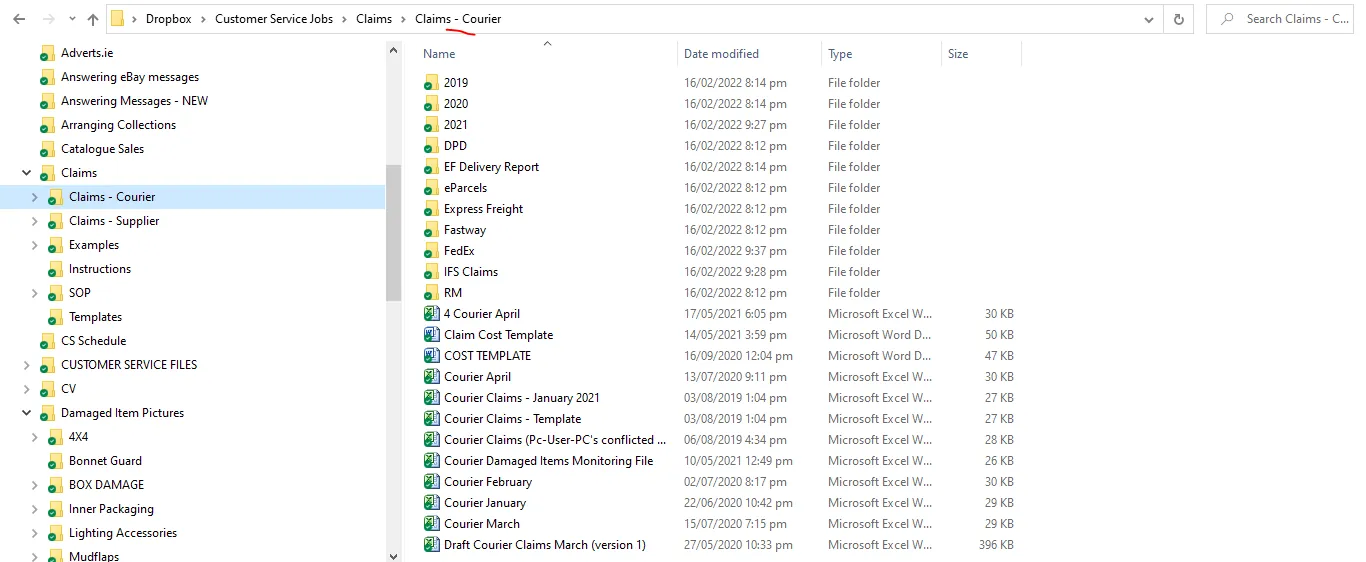
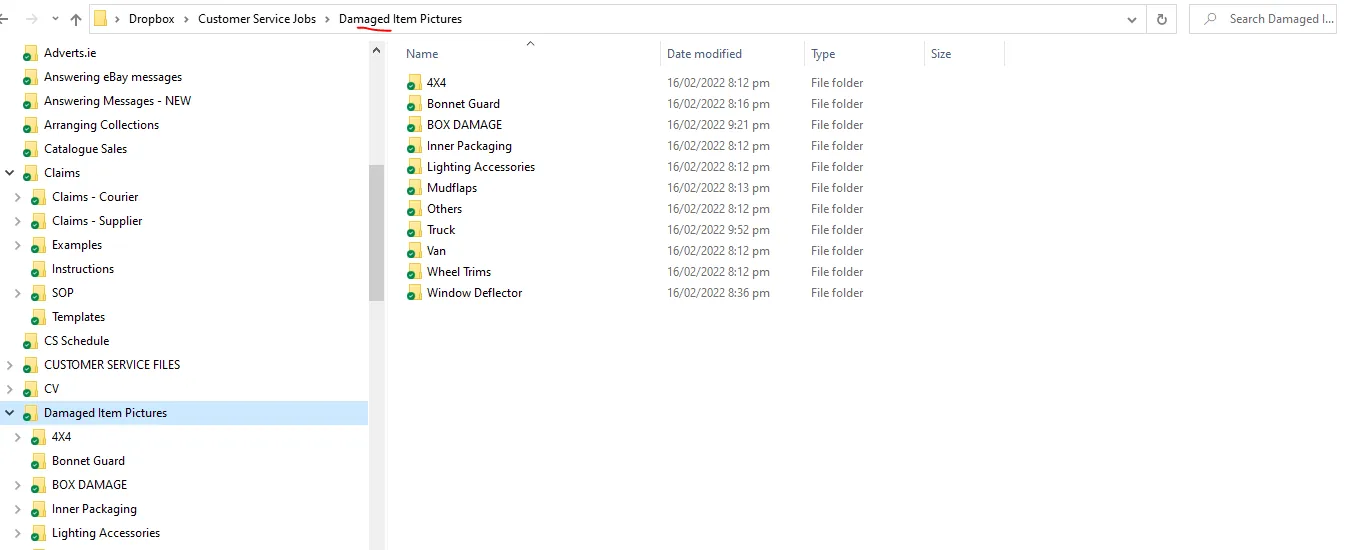
Saving Pictures in the Damaged Item Pictures Dropbox Folder
- Damaged Box Pictures
Select the BOX DAMAGE folder and select the folder that corresponds to the item inside this box. If the item still has no corresponding folder then create one. Then create a folder and name it based on the SKU of the item. Save the picture of the damaged box here. For example the customer sends pictures of damaged running board BRA4132B and its packaging. Save the damaged box picture in Damaged Item Pictures > BOX DAMAGE > Running Boards then create a folder for BRA4132B and save it here.
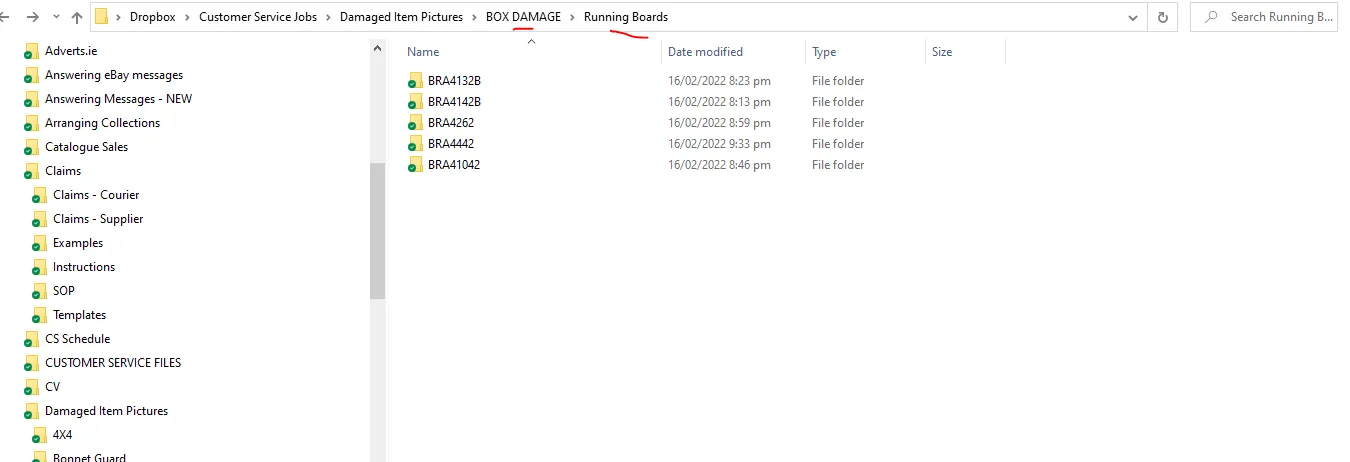
- Damaged Item Pictures
The pictures of the damaged item are saved separately to the damaged box. If the damaged item is for a 4x4, then select the 4x4 folder, then select the Make of the vehicle, then the Model, then the year, then the item name and last the SKU. If the folders are not found, create one. See sample below: The damaged item is BRA414110 2012 - 2016 Honda CRV Aluminium Alloy Roof Rails, therefore save this by going through these folders: Damaged Item Pictures > 4x4 > Honda > CRV > 2012-2016 > Roof Rails > BRA414110.

Note:
The purpose why these pictures are also saved here and not just in the Claims - Courier Dropbox Folder is because these pictures can be used in doing dummy claims. Please see SOP for Dummy Claims here.
Offer Partial Refund#
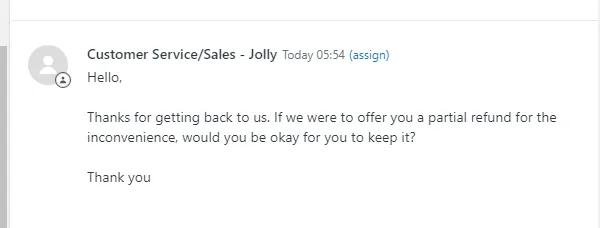
- After assessment, offer a 5% partial refund (Macro 1017) to get the customer to keep the item. If customer won't accept 5%, try to negotiate up to 10% (ask for managements approval for the 10%). Depending on the damage, the refund amount varies.
Note:
In all damaged cases, ALWAYS ask the customer if they would consider keeping the item this is because collecting the item would cost us and also we will have to sell it as a damaged item (price for damage item is really low - not ideal).
Also consider if the item is worth getting it back. if it is a small item like deflectors or mirror covers, these are not worth it. You can confirm with management for the refund amount for this if customer won't accept the initial 5% partial refund.
- If customer accepts the partial refund, request this with Accounts Team by labeling the email:
Accounts,
-Arrange Refund
name of the account personnel
You will have to add the request as an internal note with clear instruction of the amount to refund (calculated already), Linnworks order number, reason for refund and the sales channel.
Notify the customer that you will request a refund. Do not leave the customer unanswered. We should always be the one to have the last reply on the email.
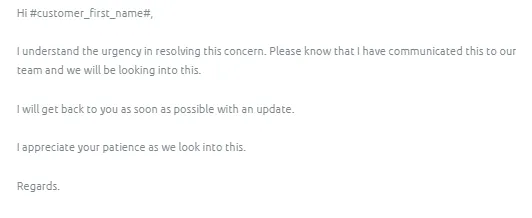
- If customer won't accept the partial refunds, you will need management's approval to proceed with the next action (Collect/Refund/Replacement/credit note voucher). Add in the internal note the issue and the action that has been taken. Ideally, it is best to arrange a refund than replacement as this issue may still possible to happen again with the courier. Then send Macro 1019 while waiting for managements decision.
If management decides to issue a refund then request this with Accounts by tagging Account, -Arrange Refund and the name of the account personnel. Add the request as internal note with the clear instruction of the amount to refund, order number and reason.
If management decides to collect and then arrange replacement after we received the returned item then follow these SOPs. How to Arrange Collection and How to Arrange Replacement.
Then update the customer based on management's decision.
Arrange Refund#
To arrange a refund all Customer Service agents must fill out the Customer Refund Request Trello Card which can be found on the Customer Service Trello Board
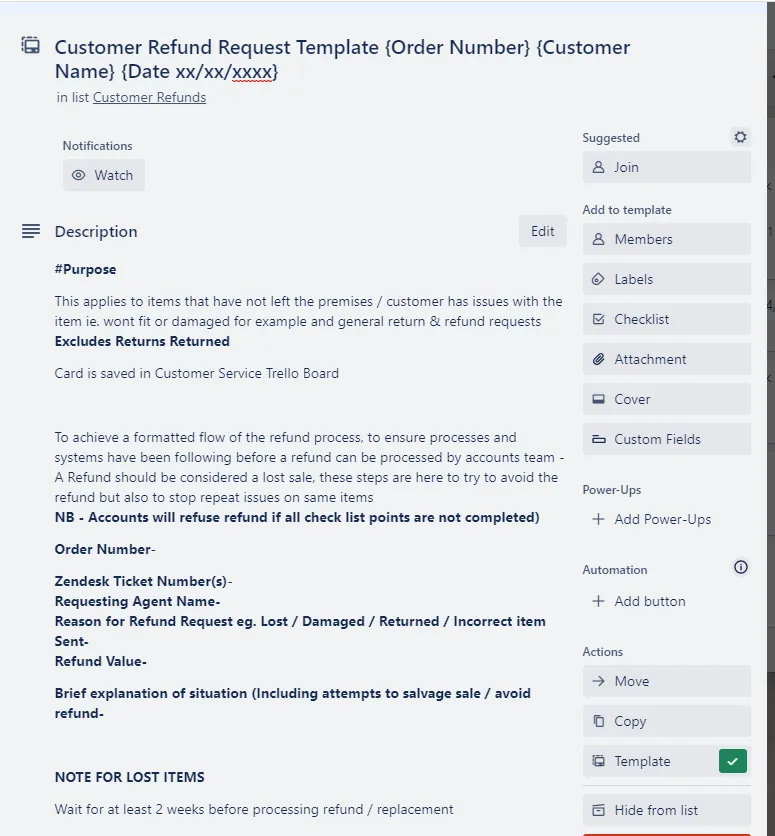
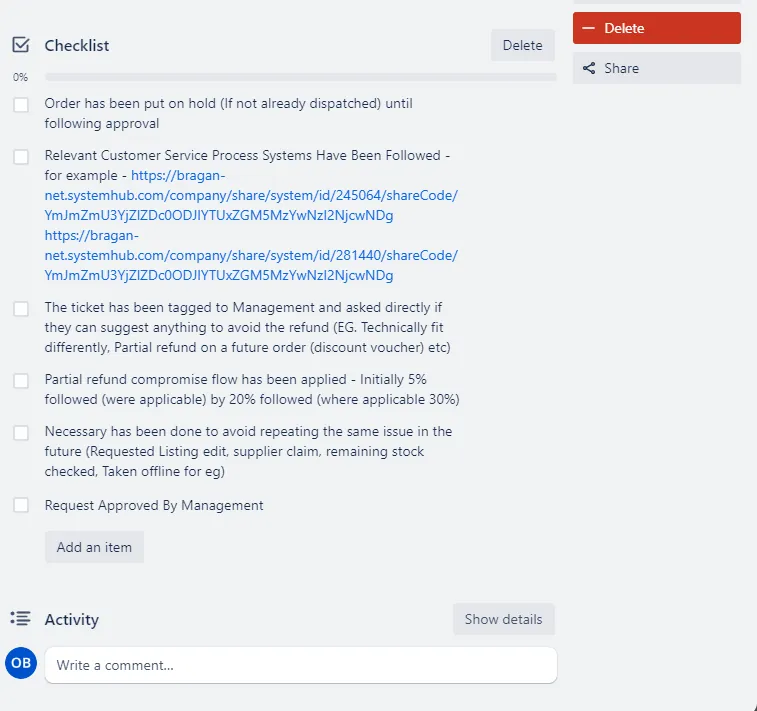
The Customer Service Agent must make sure that all of the checklist has been followed and completed before requesting approval from management for a refund. The CS Agent Must work with the customer in order to salvage the sale before a refund can be agreed.
Once all of the steps have been followed the CS Agent must tag management and ask for approval of the refund. Accounts will then follow up with a refund for the customer.
Courier Claim#
- With ALL damaged item complains, whether customer accepted the partial refund or not, ALWAYS do a courier claim. See SOP here. Add the label Claims Processing when you start to do this. Make sure to do this in real time since couriers only gives us a limited time to do the claim (for IFS - 14 days; for Fastway - within 24hrs of delivery). Beyond this they will not acknowledge or accept our claim. Do not forget to attach all relevant pictures.
Please note:
Accounts personnel will be the one to follow-up these claims. Ensure urgency in doing the follow-up especially when it is clear that it is our fault (or courier / supplier) and customer complaints is true. Our objective is to avoid the customer to open an eBay/Amazon case against us (that effect metrics straight away and lead to lower listing page rankings) and for website sales they may leave negative review on Trust Pilot or facebook groups.
For cases that have been opened on the seller channel (eBay or Amazon) we need to ensure these are followed up on daily / as reply is given and that management is notified, if reply is not forthcoming it is up to agent to ask multiple times (such is importance of metrices to our selling channels). If possible call the courier. We must follow process and not give refunds unnecessarily.
Sample Scenario#
The customer have sent picture to show the damaged on the item that they have received.
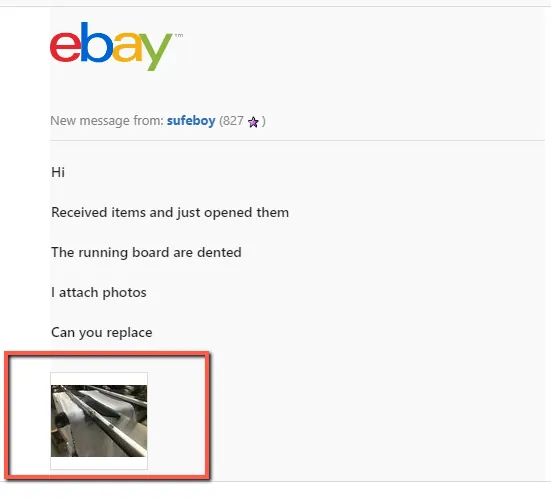
Step 1.
In this case, you will still need a picture of the outer packaging showing damage. Use Macro 040 and do some edits to suit on customer’s situation as shown in the fig below.
Step 2.
When customer gets back with the requested information, assess the damage of the item. Will the damage be noticeable when fitted? Can it be easily / cost efficiently repaired?
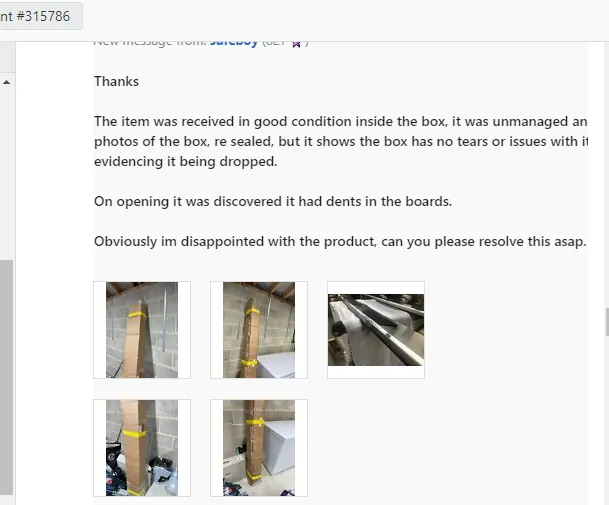
Note: Ensure to add ALL the photos submitted by the customer as an internal note. (When using Zendesk)
Step 3.
Make sure to save the damage pictures in relevant dropbox folder.
Step 4.
Offer a 5% partial refund for the customer to keep it. Please note that in the sample snipe 5% is not mentioned (this is an old snipe), in reality please include 5%. If customer accepts then tag proceed to Step 4 and if not then proceed to Step 5.
Step 7.
Do a courier claim (do it in real time). See SOP.
Notes#
This section is important so Adhoc points and issues can be logged. Also, Q&A can be logged for suggestions for potential issues encountered. Also, log important notes needed for this system. Additional Notes:
Key Points#
If the customer has submitted all required photos, we can then now proceed with the courier claim. This should be done in real time since couriers only give us a limited amount of time to do the claims. (for IFS -14 days; for Fastway - within 24hrs of delivery)
In all damages cases, ALWAYS do a courier claim.
In all damaged cases, ALWAYS ask the customer if they would consider keeping the item and offering a 5% partial refund.
Ensure to add ALL the photos submitted by the customer as an internal note (for Zendesk).
Do not leave the customer unanswered. We should always be the one to have the last reply to the email.
Ensure the email was tagged correctly.
Potential Issues:
1 - ISSUE ENCOUNTERED: Stuck on Loading
RESOLUTION: Refresh Browser
2 - ISSUE ENCOUNTERED: Broken Links
RESOLUTION: Get the external link as this will allow other people to access the SOP without the need for login credentials and avoid broken links.
Attachments#
Handling_Damage_Item_Comp… 16/12/2025