Handling Fitment Issue
The purpose of this SOP is to give an idea on handling the fitment issues from
Overview#
Purpose: The purpose of this SOP is to give an idea on handling the fitment issues from customers.
Scope: This process applies to all Customer Service members both Team PH & Team IRL.
Responsibility: It is the responsibility customer service representative to know how to handle fitment issues.
Objective: The objective of this material is to standardize the process on how to handle customer emails complaining about receiving incorrect items or having fitment issues. This will allow us to efficiently handle the situation and resolve the issue for customer satisfaction.
Process Flow#
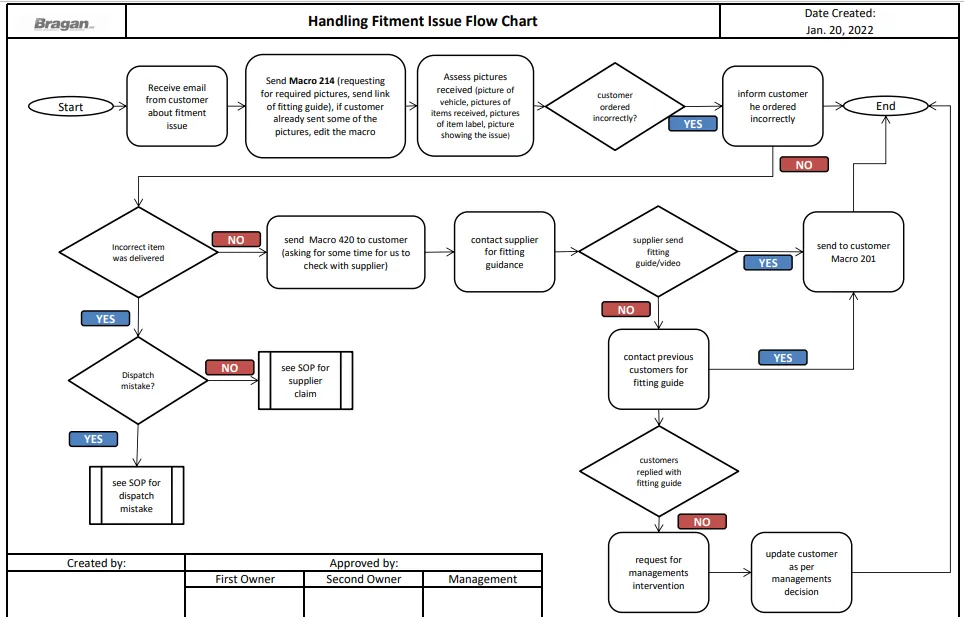
Procedure#
Note: Do not immediately conclude that the item they received is incorrect just because the customer said so. Everything must be checked to efficiently handle this type of issue. Also, tag the email as Un-Happy Customer Comments.
Obtain Necessary Pictures to Resolve the Issue#
There could be several reasons for the customer to think that the item they received is incorrect, so it is imperative to ensure that you obtain the following information to resolve this.
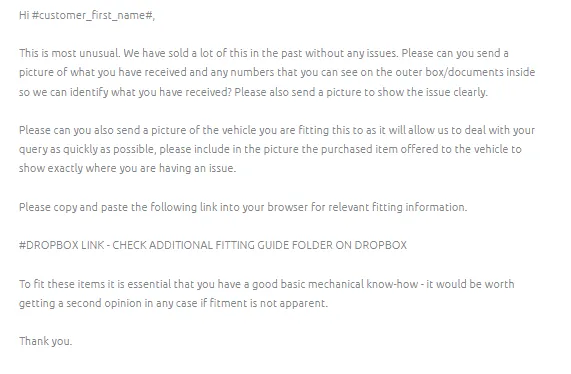
- Send Macro 214 asking the customer to send us the following pictures: - Picture of everything they have received.
The customer may complain that the item he received is not what was described on our advert listing or not what he ordered. To acquire a picture of everything that they have received will help you resolve this efficiently as it will allow you to determine what action you should take next.
Example: The customer ordered chrome side bars but they have received black side bars instead. This is obviously incorrect but you should not stop with this. You should identify why this happened. This could be an error from supplier (do supplier claim if suppliers at fault) or from our Warehouse Team (do Dispatch Mistake), and these pictures are necessary during the process to show as a proof.
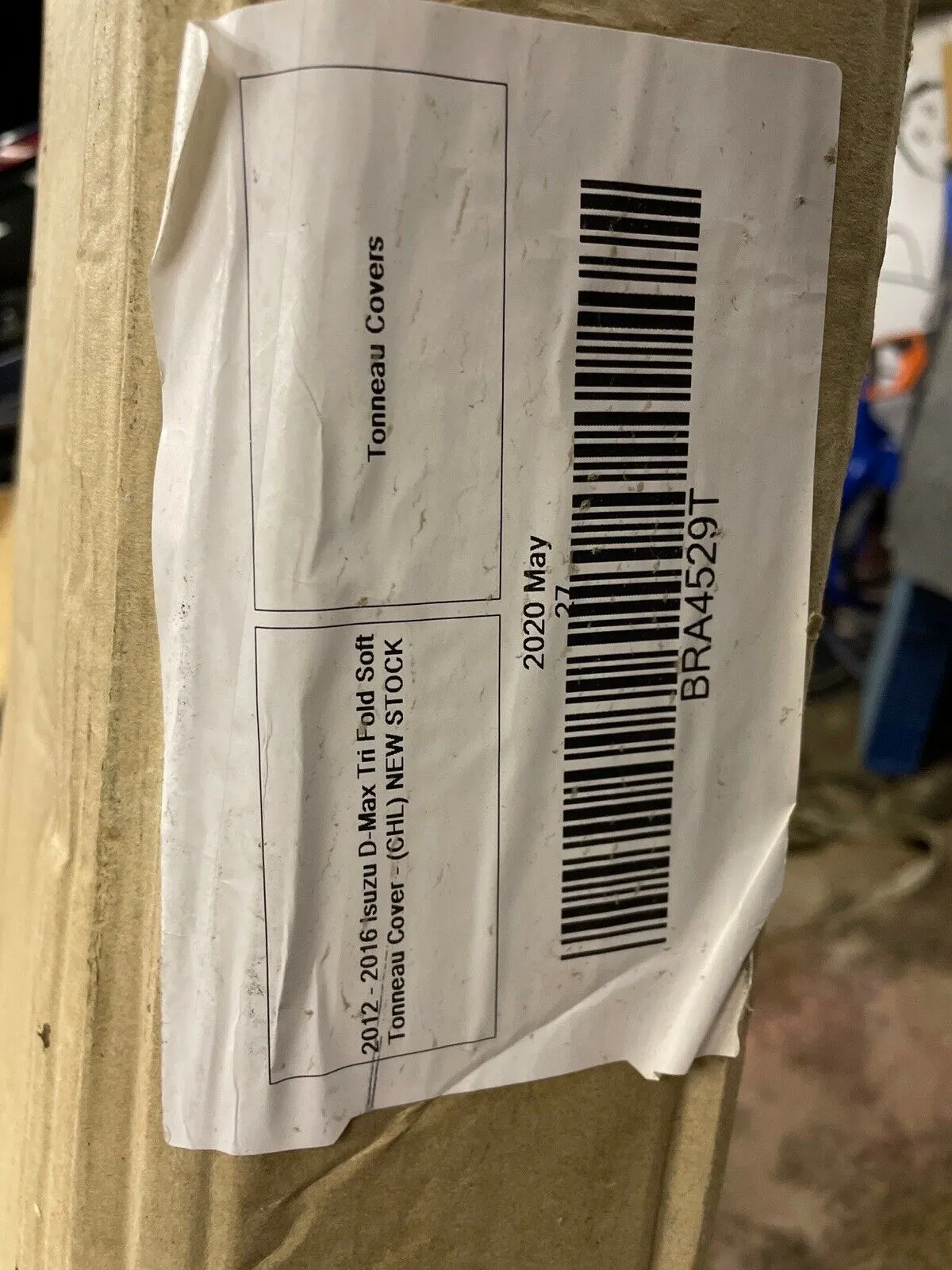
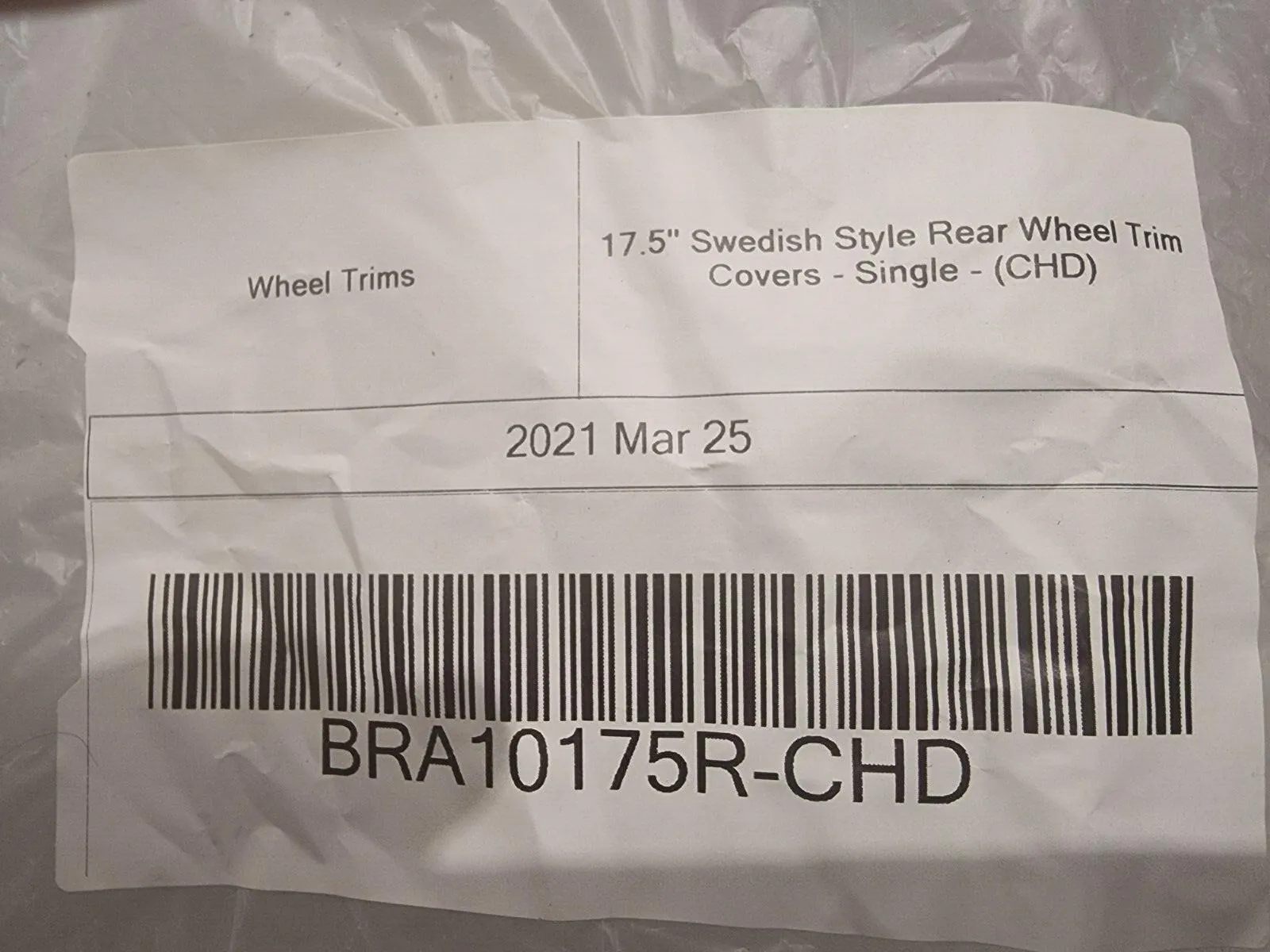
- Picture of the item label and any document inside.
The customer commonly complain that the part number of the item (SKU) he received is different from what he ordered. This does not conclude that the item he received is incorrect. Some vehicle models has the same body platform (example: Citroen Berlingo and Peugeot Partner). Therefore, we offer certain products to other vehicle model that shares the same shape.
You can check this in Linnworks. Copy the SKU of the item he ordered and search it in LW and check the composition tab, see if the composite is the same to the SKU that he received.
It rarely happen that the item does not have any label or might have been ripped off and it would be difficult to resolve the issue without the label so ensure to have them as much as possible.
See SOP on Parent/Child Items for better understanding.
See sample labels:
- Picture of the customer’s vehicle.
The customer may say that the item is incorrect as it does not fit his vehicle. This does not conclude that the item he received is incorrect. It could be that the customer have bought incorrect item.
Example: Customer’s vehicle is Mazda CX-5 2017 and they had purchased Roof Rails for Mazda 2017+ model. Then the customer figured out that this do not fit. It could be because his vehicle is indeed 2017 but the older shape model in which this item does not fit. You would only be able to confirm that if you have the photo of the customer’s vehicle to check on.
This is called the crossover year, customer probably did not check their log book to know their model before purchase - 2017 could be a pre 2017 model or it could also be a new 2017+ model if one was introduced that year.
Or a customer bought a side bar for long wheel base vehicle when in fact his vehicle is a short wheel base.
You can check vehicle models by searching in google, google images, Wikipedia and other seller listing in eBay.
- Picture to show the issue.
The customer may also say that the item is incorrect as it does not fit his vehicle. It could also be because he is not fitting this right. By obtaining the photos to show the issue, you would be available to identify this.
It is also possible that the item is correct and only the components are not. This could be the brackets or fitting pieces are incorrect. You would need the photos
so you can check this against our fitting guide or with the brackets shown in our advert listing if present.
Note:
Sending this macro could also create doubt in the customer since it mentions that we have sold a lot of this item in the past without issues.
If customer already sent of the required photos then edit the macro so that we will only request the missing required pictures.
If there is a previous sale of the item from the same customer and he has no issue about it, then for his next order (same item, correct label as per picture sent) he has issue with the fitting then this is most probably because the customer is not fitting the item right.
Send Fitting Information#
- Sending Macro 214 will also remind you to attach the link of the fitting guide of the item he bought. See Handling Fitting Guide Request from Customers SOP to know how to search for fitting guides.
Sending a copy of the fitting guide could also resolve this issue. As mentioned above, the customer may conclude that the item he received is incorrect because he is not fitting it right. Having them check the fitting guide might clear things up with them.
Example: Fiat Ducato Spoiler Bar – this item mounts directly to the mounting points (no brackets needed) and it uses the existing bolts on the vehicle. Customers who
ordered this often complain that the fitting brackets are missing. Sending them a copy of fitting guide will resolve the issue.
Assess Received Pictures#
- Check and assess all received pictures from customer
3.1 Check if the item received by the customer matches the information in our listing. For example: Check wheelbase, cross-over years, dimensions.
3.2 Check if the SKU of the item received by the customer matches the SKU or the composite SKU on Linnworks.
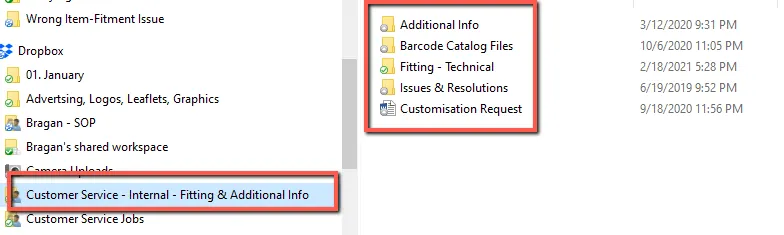
3.3 Check if there is an additional information available in Customer Service – Internal – Fitting & Additional Info. (ask management to give you access to this Dropbox folder)
3.4 If customer ordered incorrectly, then inform the customer that they ordered the wrong item. If customer replies he wants to return the item so he can order the correct one then send Macro 004 (for eBay customers) or Macro 005 (for website customers). You can edit out the swapping part (just delete the first sentence if not applicable). Note: the difference of the two macro is the link of the return form.
Important Note: If the item is an auction item (damaged items) we do not accept returns of this. Inform customer we do not accept return of auction listing (no macro for this).
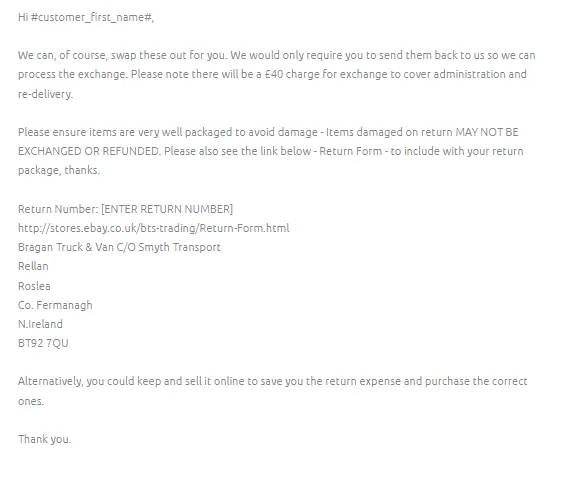
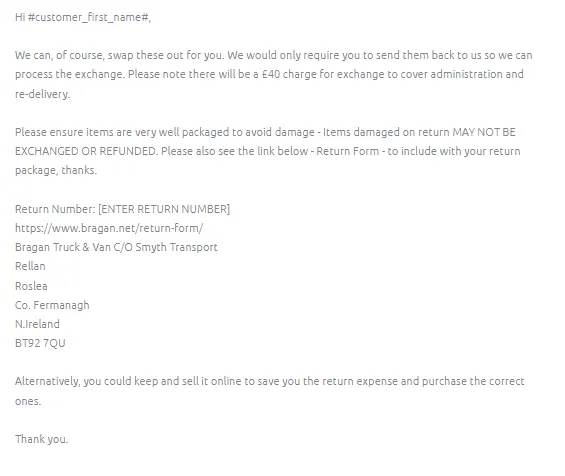
3.5 If customers order is correct, check with Warehouse Team to confirm your assessment and also to check if the item in the remaining stocks are good and matches the information on our listing and Linnworks. And if there is really is a fitment issue we also need to know if this is a supplier claim (supplier delivered to us an incorrect item) or a Dispatch Mistake (warehouse sent the wrong item). Any discrepancies must be amended to prevent the same issue. Follow this SOP on how to inquire with warehouse.
Note: Make sure to do first steps 3.1-3.3 before asking the warehouse team. Do your research first.
3.6 If from the pictures or as per warehouse reply to your query, the items we sent were incorrect then proceed to reporting a Dispatch Mistake (see SOP here) and send Macro 1017 offering customer a 5% partial refund to keep the item and you can also add if they would consider keeping it and selling it locally or to have it checked if it can be altered to fit their vehicle. If customer won't accept the 5% refund try to ask management's permission to offer a 10% refund just to keep the item.
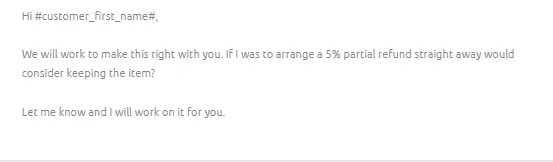
3.7 If customer won’t accept this partial refunds, confirm with management to arrange collection (see SOP here). Then arrange replacement (see SOP here) once returned and checked by WH (returned item should be in good condition). In the meantime you can send Macro 1001 while waiting for management's decision.
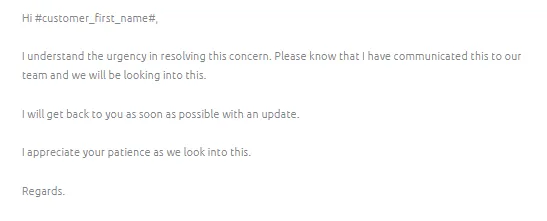
3.8 If customer accepts the partial refund. Label the email as -Arrange Refund, Accounts, Management (Nigel), the name of the account personnel in-charge. In the Internal Notes, put the Linnworks order number and the calculated refund amount and the reason for the refund. For example, customer accepts 5% refund for his order of 49.99 GBP, the note should be: Please arrange refund for order 280065, 2.5 GBP, warehouse mistake and he agrees to keep the item for a refund. Then tag the account personnel.
Contact Supplier#
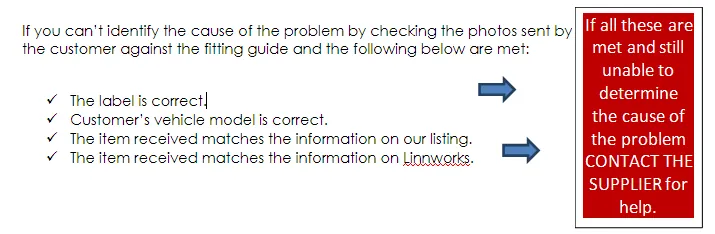
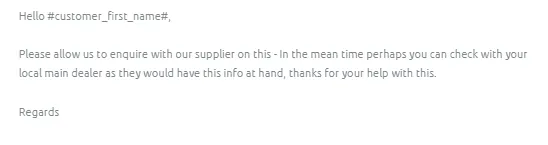
- If you cannot identify the cause of the problem even after checking the pictures, contact the supplier. Request supplier for a better fitting instruction or a fitting video (preferred). In the meantime, send Macro 420 to customer.
Note:
See attachment for the List of Suppliers, you can get the contact email address for each.
For items designed by Bragan, suppliers won't have a fitting guide for this since they were just the one who manufactures it but the design and fitment is originally from Bragan, therefore there is no need to contact suppliers for the fitting guide. Below are the list of items designed by Bragan (but not limited to):
2" Side Bars
All truck and van roof bars
All Truck Visor Bars
All truck Grill Bars
All truck under bumper bars
All truck side bars
All truck perimeter Top Strips
All truck rear roof bar
All truck chassis bar
All truck step bars
Transit Bull Bar
4x4 Roll bar (with LED marker light)
4x4 Rear quarter bar
4x4 & Van rear roof bar (DAF Visor bar)
See SOP on Handling Fitting Guide Request from Customers to know the process of requesting fitting guide videos to supplier. Make sure to attach pictures from the customer to the supplier so they can check.
Ensure to tag the email as Product Problem. This will help us identify product that often to have issues so we can review if we have to discontinue.
Ensure that helpful additional information gathered from the supplier should be saved on Internal Additional Fitting Information (ask management for access to this folder) or be applied on our listing (subject to management approval).
If supplier confirms there is fitment issue with the product, do Supplier Claim. See SOP here.
To check supplier details in LW, see Figure below.
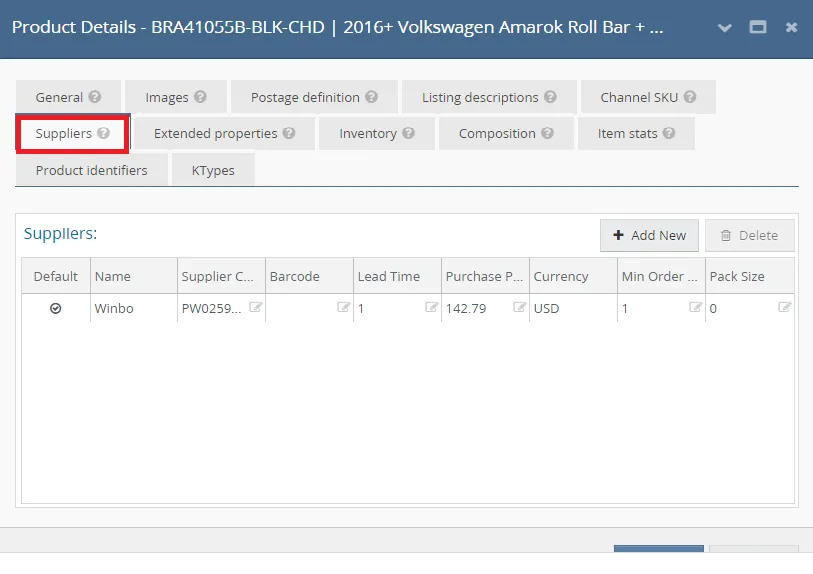
If you click on the suppliers tab and there is no information then the SKU is a parent SKU, you need to determine the child item in order to know the supplier. To know more about parent and child SKU, see SOP here. To know the child item, go to composition tab. Make sure to get the main child item (do not choose child items like lights and brackets since these are not the relevant items). Once you have the child SKU, search it again My Inventory and go to Suppliers tab.
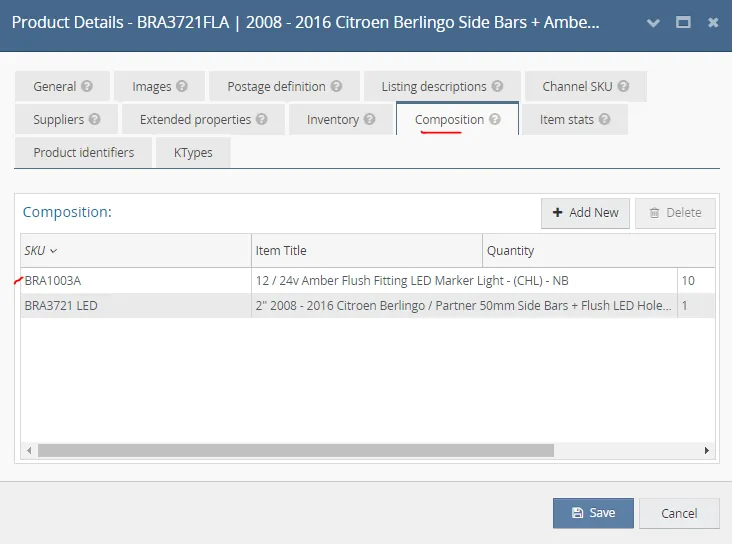
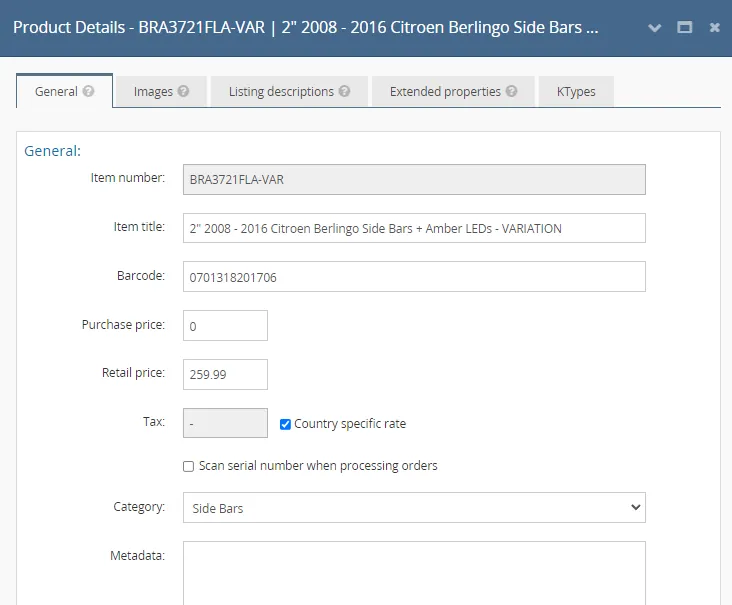
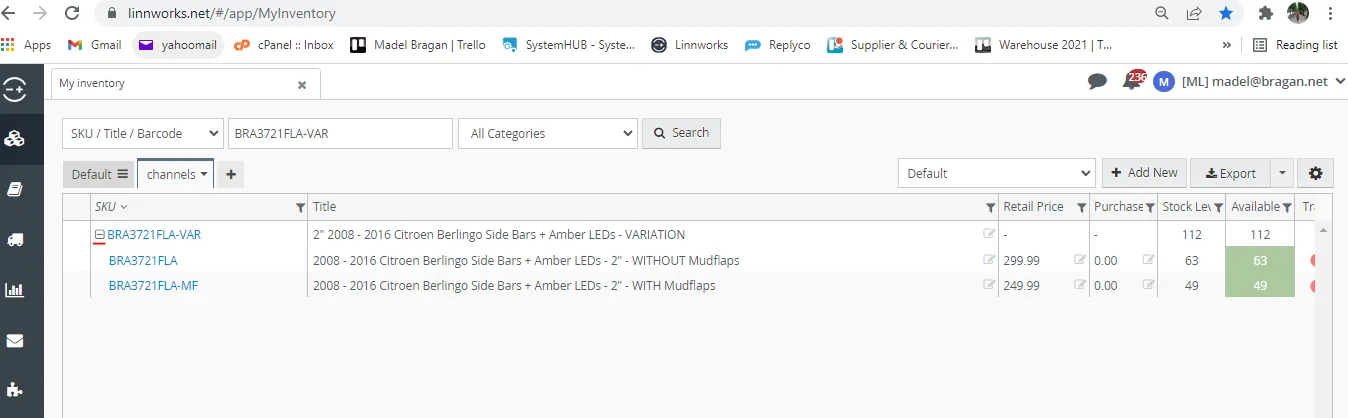
If you click on the product detail page and you cannot find the supplier and composition tab like the one in Figure 11, then the item is a variation SKU. It means that there are 2 or more parent items. You will also know that it is a variation SKU when you have VAR on the SKU, example BRA3721FLA-VAR. In this case, you need first to identify the parent SKU.
To do this, search the variation SKU in My inventory tab and then click the "+" sign to show the parent items. Once you have the parent item you can now get the child item and can now search the supplier.
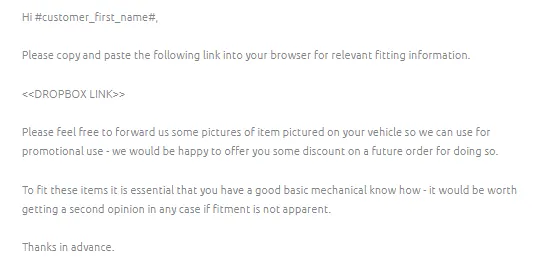
- Once supplier gives the fitting instruction or video save it to correct folder (see SOP on Handling Fitting Guide Request from Customers to know how to do this). Send it to customer using Macro 201.
Contact Previous Customer#
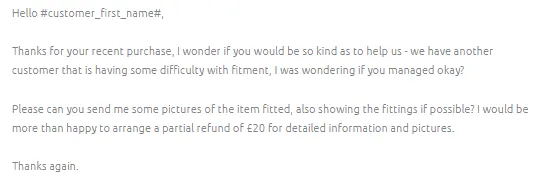
- Supplier takes time to reply, therefore while waiting, you can contact the customers who had purchased the same item and request for fitting advise/photos. You may contact 2-3 customers but ensure that they were not the ones who also had contacted us for having the same issue. Use Macro 215.
Note:
Again, ensure that helpful additional information gathered from previous customers should be saved on Internal Additional Fitting Information or be applied on our listing (subject to management approval).
To know how to check for previous customer who ordered the same item. Follow these steps.
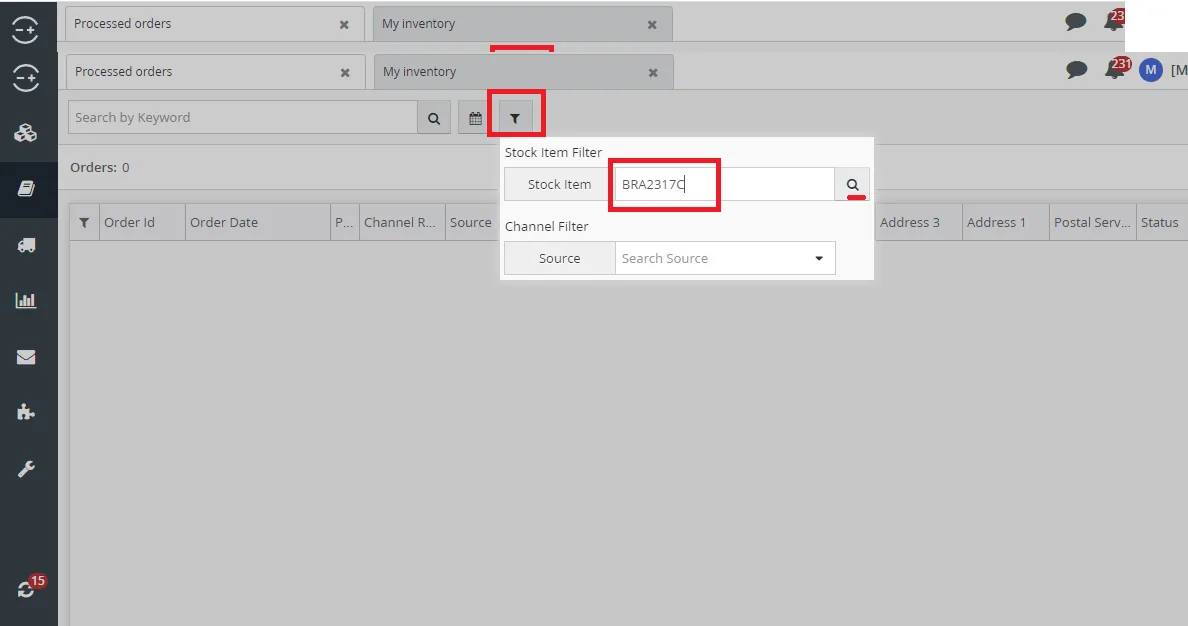
6.1 Go to Linnworks > Orders > Processed Orders
6.2 Click on the filter icon and then type the SKU of the item then click search.
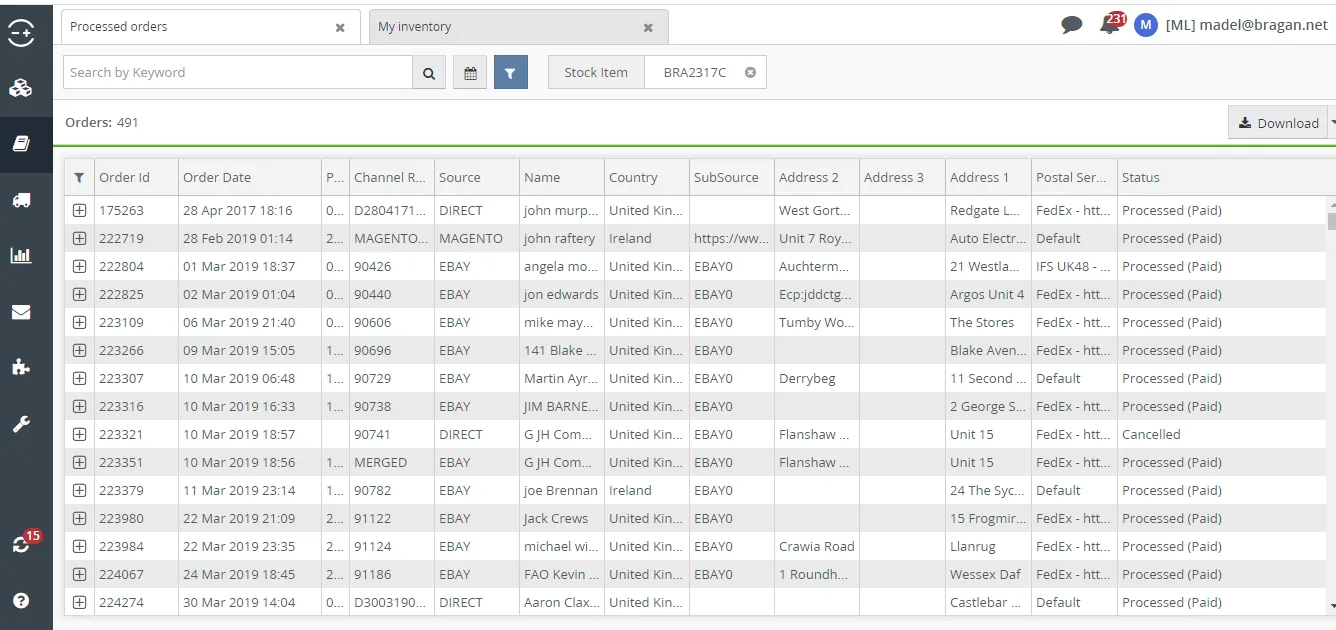
6.3 Choose from previous customers, click order ID and look for their email address. Create a ticket and send Macro 215. Make sure to indicate in the message the SKU and item name since sometimes the customer bought many items. You need to specify so customer will know.
Request for Management Intervention#
- Ask Management to do a test fit to ensure compatibility. You will rarely get to this stage as most of the time, the issues are resolved when contacting the supplier. However, this still depends on the availability of the vehicle model (if vehicle model is not available then it would be impossible to do a test fit).
- If test fitting can't be done, then try to convince again the customer to alter it to fit their vehicle or keep & sell locally. Important to avoid a return whenever possible. But if customer won't accept. Ask approval for collection of item.
- Update customer of management's decision.
Note:
Any request for change/update on the item information MUST NEED TEAM IRL APPROVAL. All replacements we sent must have an SKU. Team IRL approval is a must before sending a replacement.
Sample Scenario#
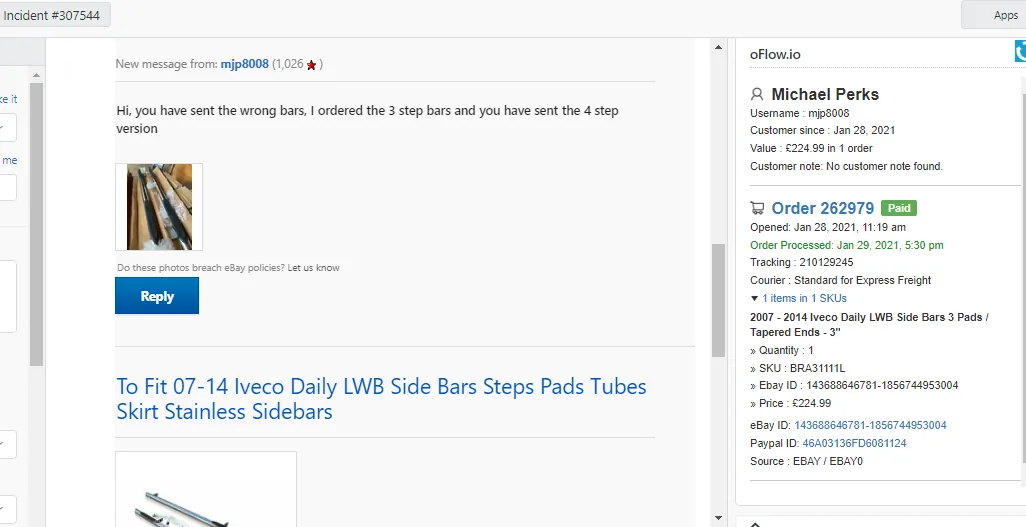
- As per the process, we must obtain the following:
Picture of everything they have received. Picture of the item label or any document inside. Picture of the customer’s vehicle.
Picture to show the issue. Send a copy of the fitting guide
All of these again can be obtained by using MACRO 214. But in the email of the customer, he already sent a picture of what he received, therefore we must request the other information required (just edit out in the macro the information you already have received).
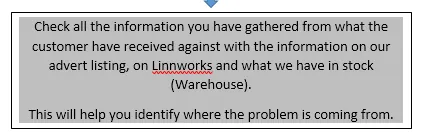
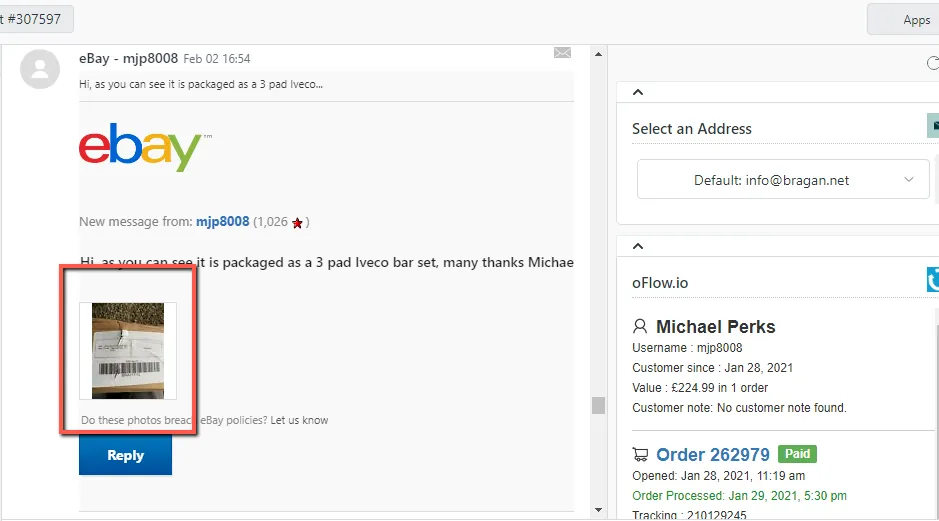
- Assess the received picture. In the picture of the label, it shows that the SKU is correct but the item is not. The SKU of BRA31111L is for sidebars with x3 Step Pads and what the customer received is sidebars with x4 Step Pads.
In this case, we need to request with our Warehouse Team if the remaining stock also have the same issue. Follow the SOP on Warehouse Queries for Customer Related Concerns. Post the query on Warehouse/Customer Service Question Skype Group along with the link of the Trello card. We need to know if this an error from Warehouse Team or with the supplier.
Since the Warehouse Team confirmed that this is an error from them, no need to send a Supplier Claim.
You can offer a 5% partial refund to the customer to keep this if he won't accept ask for approval to offer him a 10% refund just to keep the item. If still won't accept then ask for approval to collect the item so we can arrange replacement upon return.
Update the customer about the solution and ensure that the cause of error has been fixed to prevent same issue on the future.
Note: All replacement order must need Team IRL approval.
Notes#
This section is important so Adhoc points and issues can be logged. Also, Q&A can be logged for suggestions for potential issues encountered. Also, log important notes needed for this system. Additional Notes:
Key Points#
Do not immediately conclude that the item they received is incorrect just because the customer said so. Everything must be checked to efficiently handle this type of issue. Use Macro 214 to obtain necessary pictures/information.
Using Macro 214– you will be reminded to send them a copy of the fitting guide.
Ensure to tag the email as product problem. This will help us identify product that often to have issues so we can review if we have to discontinue.
Ensure that helpful additional information gathered from the supplier should be saved on Internal Additional Fitting Information or be applied on our listing (subject to management approval).
Again, ensure that helpful additional information gathered from previous customers should be saved on Internal Additional Fitting Information or be applied on our listing (subject to management approval).
Any request of change/update on the item information MUST NEED TEAM IRL APPROVAL.
All replacement we sent must have an SKU.
Ensure to put correct Action and Folder on the left pane.
Team IRL approval is a must before sending a replacement.
Potential Issues:
1 - ISSUE ENCOUNTERED: Stuck on Loading
RESOLUTION: Refresh Browser
2 - ISSUE ENCOUNTERED: Broken Links
RESOLUTION: Get the external link as this will allow other people to access the SOP without the need for login credentials and avoid broken links.
Attachments#
Handling_Fitment_Issue_Flow_… 16/12/2025
List_of_Suppliers_-_Jan_2021.… 16/12/2025