Handling Missing Item Complaints
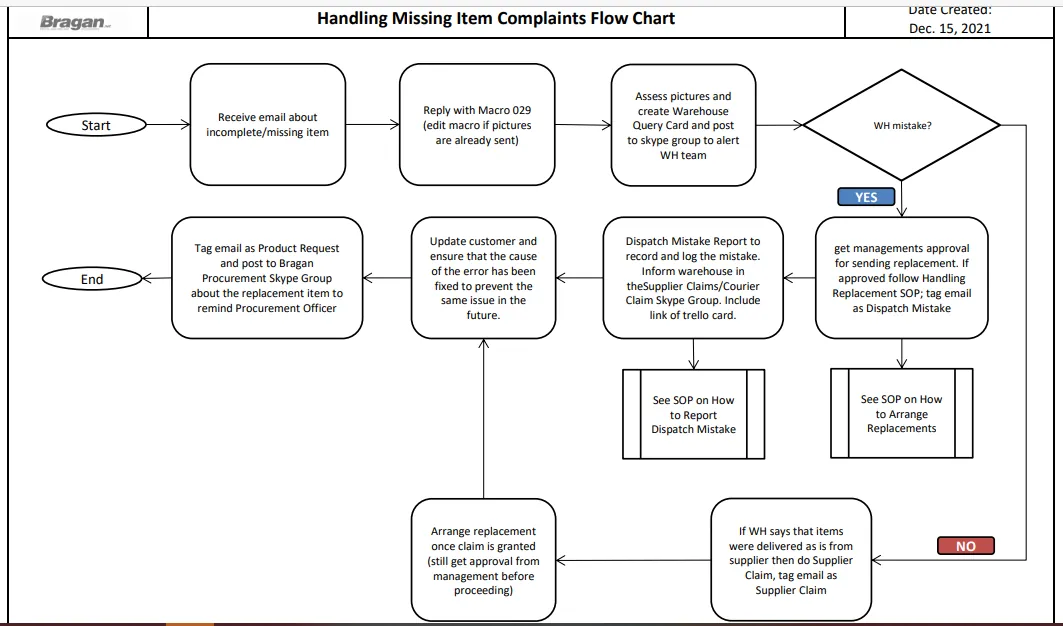
The purpose of this document is to show how to handle emails with missing items
Overview#
Purpose: The purpose of this document is to show how to handle emails with missing items complain efficiently.
Scope: This process applies to all Customer Service Members both Team PH & Team IRL.
Responsibility: It is the responsibility of each employee to ensure the process set out in this procedure is followed.
Objective: The objective of this material is to standardize the process on how to handle customer emails complaining about receiving incomplete items. This will allow us to efficiently handle the situation and resolve the issue for customer satisfaction.
Process Flow#
Procedure#
Note: Do not immediately conclude that the item they received is really missing parts/pieces just because the customer said so. Everything must be checked to efficiently handle this type of issue. It is imperative to check where the problem is coming from so we can identify how to fix this and avoid same problems in the future.
- After receiving an email about incomplete or missing items, reply using Macro 029. If the customer already send pictures of the item received and the labels then edit this part out of the macro.
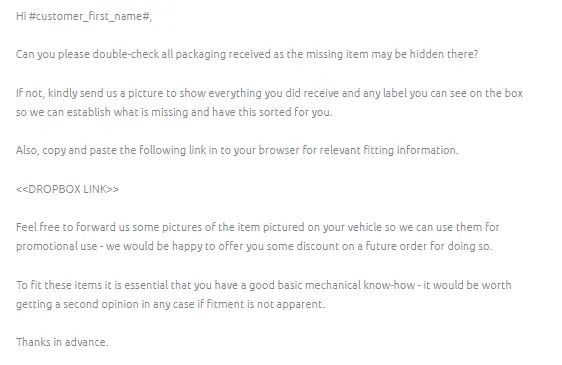
- Why there’s a need for customers to double-check all the items they received?
There are customers who tend to send us an email right away complaining that their order is incomplete or have some fitting pieces or parts missing without checking the package thoroughly. Yes, this does happen, and having them double-check the parcel – will save both of your time - the fastest way to resolve the issue. Some fitting bags are taped on the side of the box or could have been being attached to the item itself so they might not have seen this right away.
- Why did customers need to send a picture of everything that they have received?
To ensure that this issue will be resolved in an efficient and timely manner, it is best to request photos so you can easily identify and confirm the possible missing item on his order. You will need these photos to further checking the possible reasons why they are missing and have them fixed to prevent the same issue from happening again.
- Why we also need a picture of the label/barcode of the item they received?
This is needed to ensure that they have received the correct item and you will also need this in further checking the cause of the issue.
- Why we have to send a copy of the fitting guide?
The customer indeed needs a fitting guide but in this scenario, having the customer review the fitting guide will allow them to check what they have received against what should come with their order. As sometimes, there are
items that do not come with fitting brackets as they mount directly to the mounting points using the existing nuts and bolts
- Assess received information from customer.
2.1 Check if the item received by the customer matches the information in our listing.
2.2 Check if the SKU of the item received by the customer matches the SKU or the composite SKU on Linnworks.
2.3 Check also if what he ordered is an auction listing. Auction items are missing brackets and some fitting kits.
2.4 Check if the item and the component parts matches to what was in the fitting instruction. If everything are good then inform the customer and inform that there are no missing items
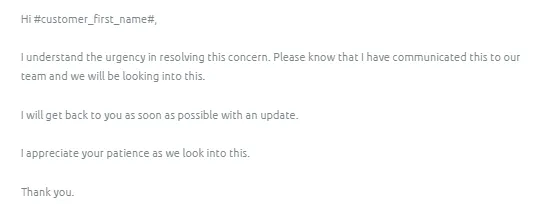
Note: In the meantime use Macro 506 to reply to the customer while you are doing the investigation.
- If you see there is a missing item or unsure of your finding, you can request with the Warehouse Team to confirm and check the remaining stocks if they are complete - no missing items (to prevent the same issue) and if there are spares that we can send as a replacement. Follow this SOP in doing a Warehouse Query.
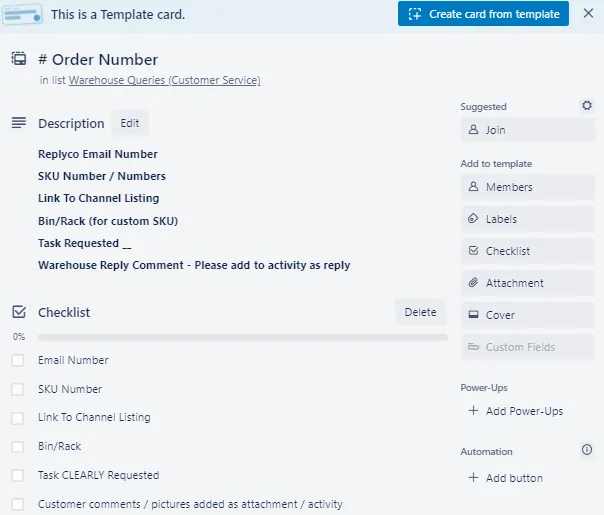
- If warehouse confirms that there is indeed a missing item caused by WH not sending the other parts or components, seek approval from management to arrange replacement. See SOP on How to Arrange Replacement. Then tag the email as Dispatch Mistake. See SOP here on how to Report Dispatch Mistake.
- If warehouse says that item was delivered to us from supplier with missing parts (example: The item is boxed and sealed and we did not open it when we delivered the item, this means that inside the box is an incomplete set) then proceed to supplier claim. Make sure to tag the email as Supplier Claim. See SOP on Supplier Claim.
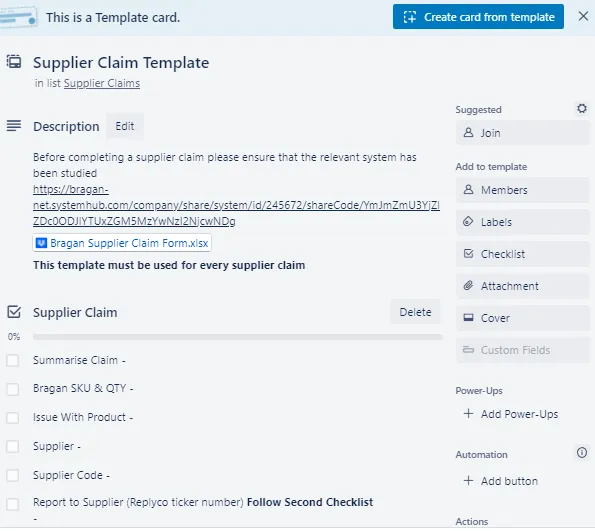
- Once supplier granted the claim. You can seek approval from management to arrange replacement of the item.
Note:
After the cause of the issue has been identified, ensure that this has been corrected before sending a replacement to the customer.
Whether it is a supplier claim or dispatch mistake, tag also the email as Products Requested. Then post in the Bragan-Procurement Skype Group about the requested replacement item. We need to carry spare pieces and new inventory - this is a way to remind procurement officer.
Sample Scenarios#
Example
Hello
My package is missing the left and right parts of the upper grille (the 3rd)
Please keep me informed
Gregory
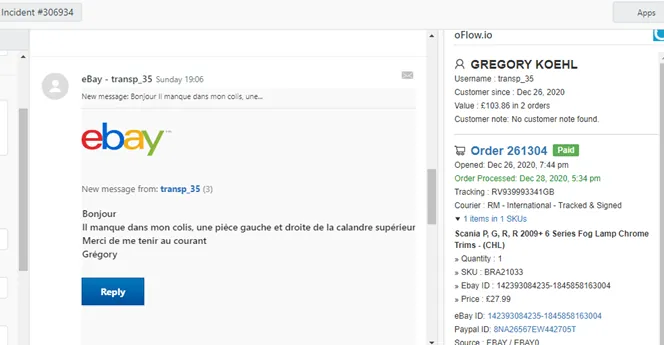
Note: Read the email a few times to ensure that you have understood the customer’s issue.
Step 1
To resolve the issue efficiently, ensure to achieve the following:
The customer has double-checked the package. To send pictures of everything that he has received. To send pictures of the label on the box. Send a copy of the fitting guide.
This can all be easily achieved by using Macro 029 in your reply.
Step 2
Check the photo that has been sent and identify where the problem is coming from. In this scenario, the customer is missing the middle trims.
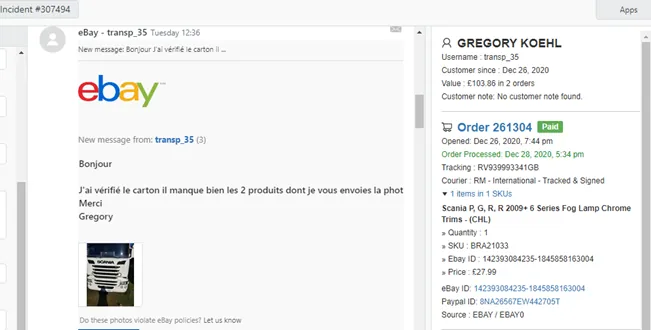
Check the item information in our listing and on Linnworks against what the customer had received.
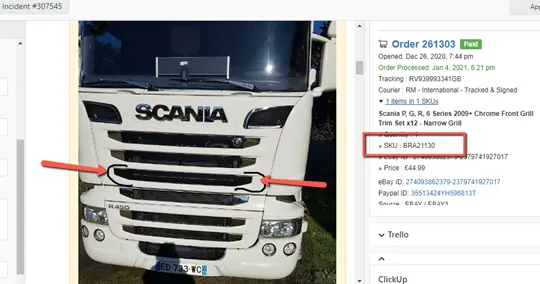
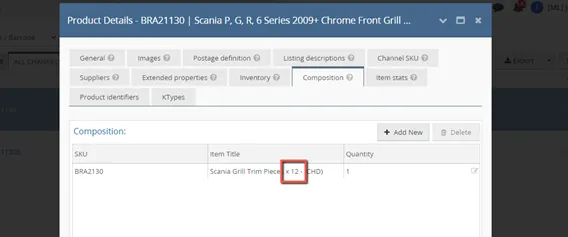
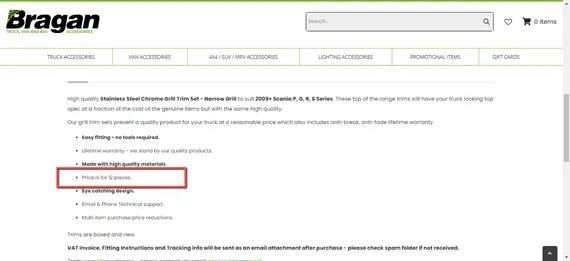
(It clearly states that BRA21130 should come with x12 trim pieces and the customer has received x10 trim pieces only.)
Check the cause of the discrepancy.
(Since the information on the listing description and on Linnworks matched, then we have to check if it also matches the items we have in stock.)
Step 3
Contact Warehouse Team by creating the Warehouse Query card and post it query on Skype Group together with the link of the trello card.
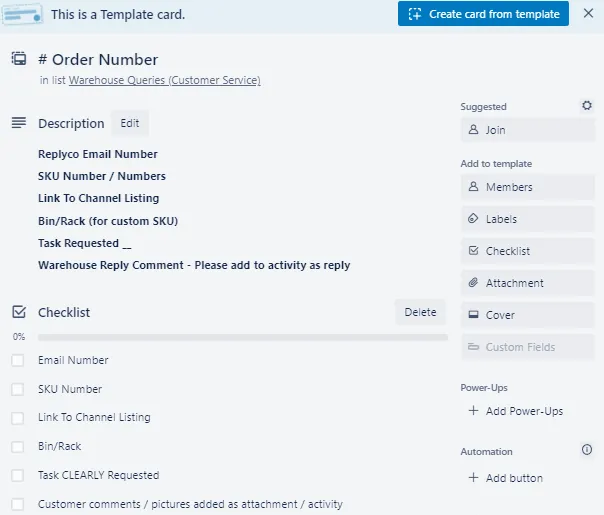
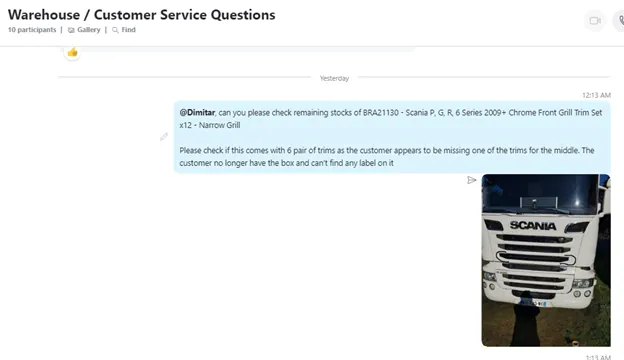
include it.
If Warehouse answers that this item comes in a box as is from supplier and they did not open it. This means that it is a supplier claim. Supplier delivered to us an incomplete item.
Step 4
A supplier claim must be sent so they can send us a replacement for a new complete set or get refunded. Arrange a replacement for the customer (Ensure to obtain approval from Team IRL before doing so)
Provide a solution to the customer based on managements advice and ensure that the cause of the error has been fixed to prevent the same issue in the future.
Notes#
This section is important so Adhoc points and issues can be logged. Also, Q&A can be logged for suggestions for potential issues encountered. Also, log important notes needed for this system. Additional Notes:
It is imperative to check where the problem is coming from so we can identify how to fix this and avoid the same problems in the future. All replacements we sent must have an SKU. Team IRL approval is a must before sending a replacement. Ensure any discrepancies must be amended to prevent the same issue. Whether it is a supplier claim or dispatch mistake, tag also the email as Products Requested. Then post in the Bragan-Procurement Skype Group about the requested replacement item. We need to carry spare pieces and new inventory - this is a way to remind procurement officer.
Potential Issues:
1 - ISSUE ENCOUNTERED: Stuck on Loading
RESOLUTION: Refresh Browser
2 - ISSUE ENCOUNTERED: Broken Links
RESOLUTION: Get the external link as this will allow other people to access the SOP without the need for login credentials and avoid broken links.
Attachments#
Handling_Missing_Item_Compl… 16/12/2025