Handling Order Cancellation Request
The purpose of this SOP is to give an idea of how to handle order cancellation
Overview#
Purpose: The purpose of this SOP is to give an idea of how to handle order cancellation requests.
Scope: This process applies to all Customer Service Members (Team PH & Team IRL) and Accounts Team.
Responsibility: It is the responsibility of all Customer Service Members (Team PH & Team IRL) and Accounts Team to follow the standard operating procedures in handling order cancellations.
Objective: This process is made to ensure clear communications between the Customer Service Team and with the Warehouse Team to prevent any errors in sending orders that will cause a loss of revenue.
INDEX:
- Check Order Status
- How to Put Orders On-Hold in Linnworks
2.1. Update Warehouse
2.2. Update Customer
- eBay Cancellation Request
- Arrange Refunds
- How to Edit Orders in Linnworks

Process Flow#
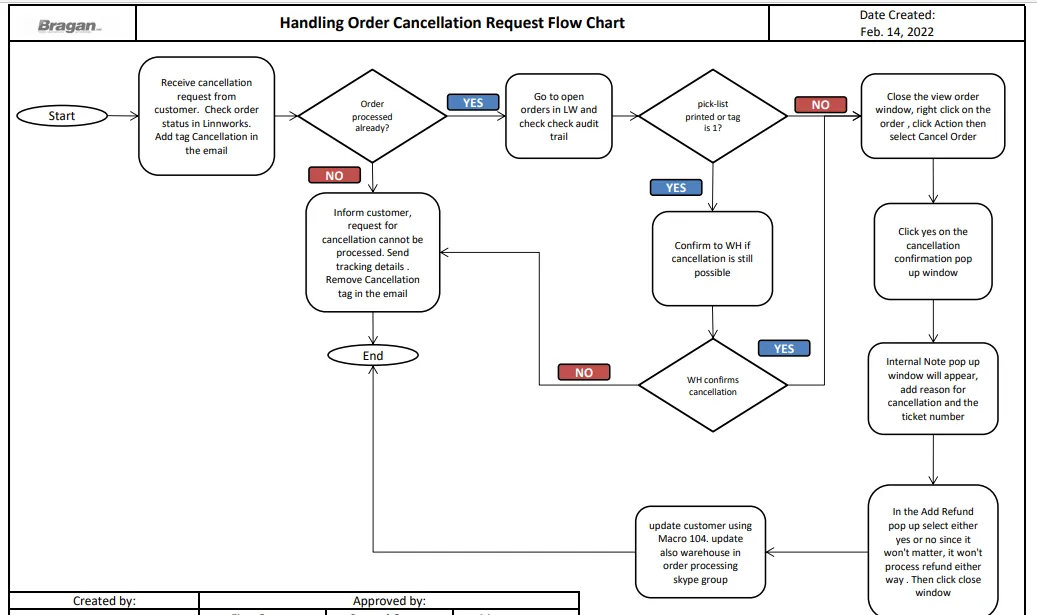
Procedure#
This material contains processes on how to handle each order cancellation request scenario effectively and in a timely manner. This must be strictly followed to prevent any errors that could lead to dissatisfaction of the customer and company loss of revenue.
When you receive an email from customer requesting to cancel his order, regardless of the reason, the following steps below MUST be checked first. Do not proceed to immediately cancelling the order. But you can tag the email as Cancellations.
- Check Order Status - Copy the order number from the order details in Replyco or Zendesk then check it first in the processed order tab of Linnworks.
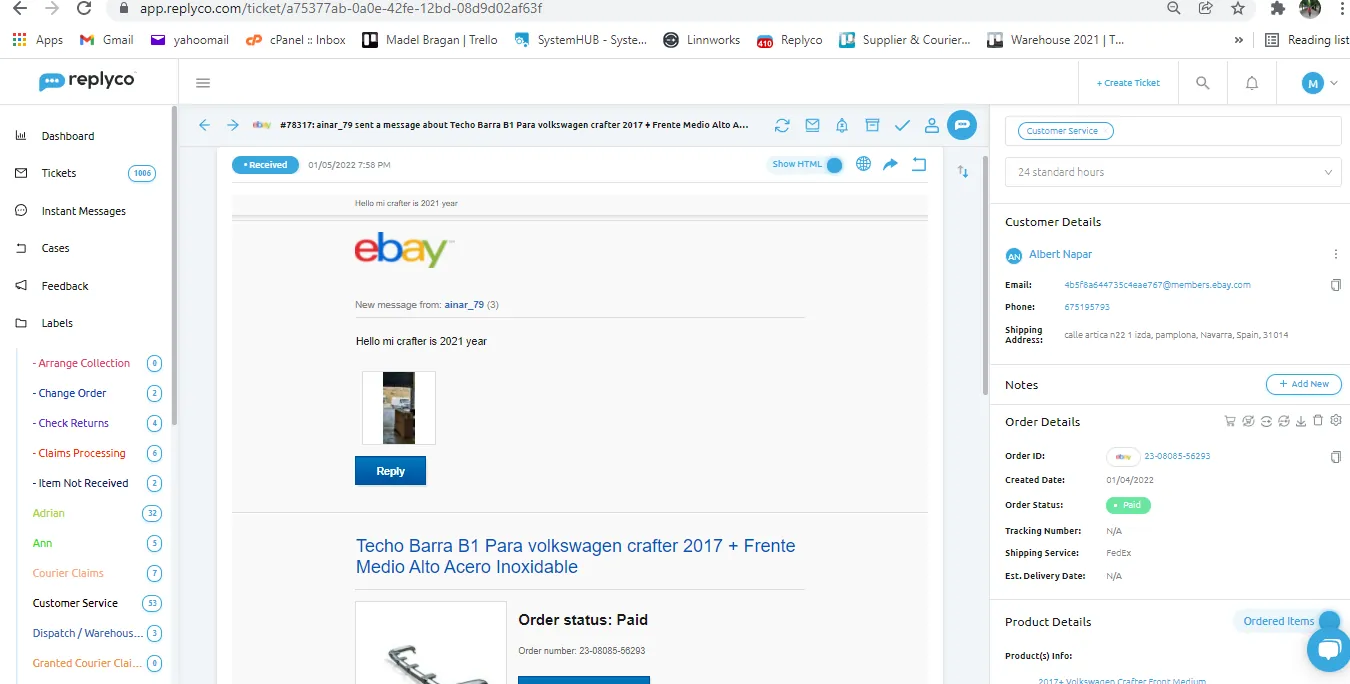
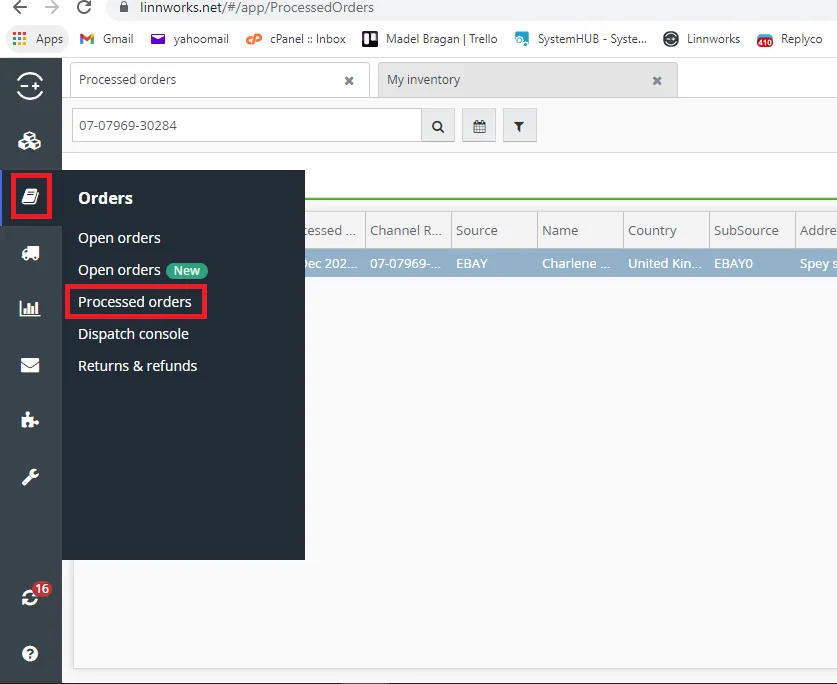
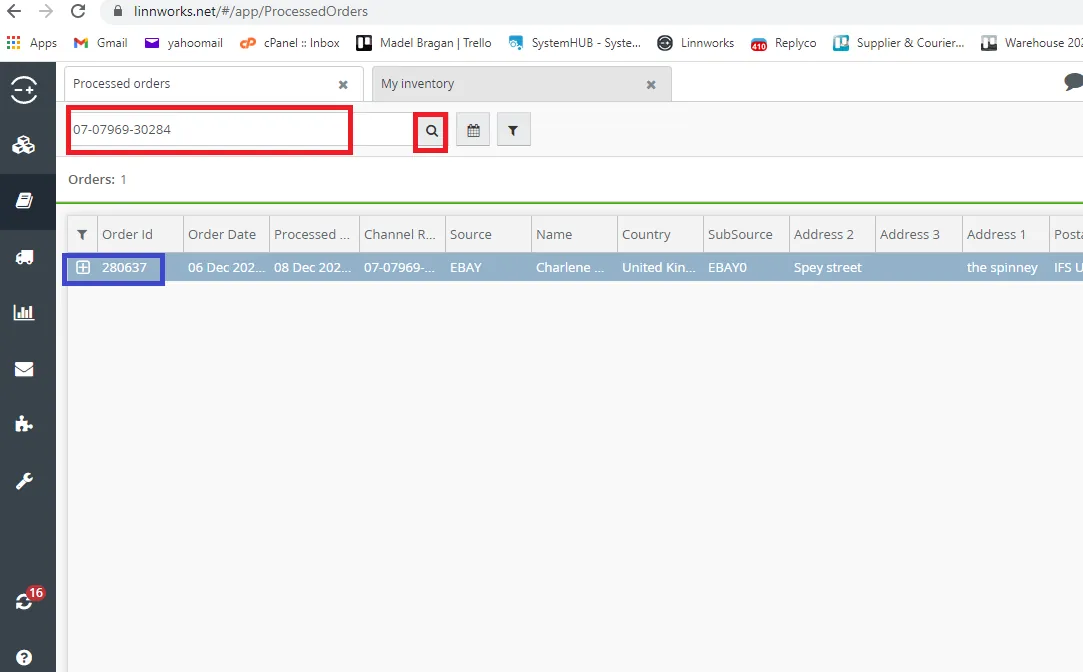
- If the order was already been processed off, you can no longer cancel the order and must inform the customer. Provide the tracking information as much as possible when replying to the email. Remove the Cancellation tag since it is not possible now to cancel the order.
- In rare cases, if there’s a customer who insist in cancelling the order and mentioned of refusing the delivery or could leave a negative feedback, you may contact the courier immediately to return this back to us. Advise the customer that you will try to cancel this with the courier. Refund can only be done when the courier confirmed that this will be returned to us.
- If the order is not found in the processed order tab then check it in the open orders tab. Then double click on the order.
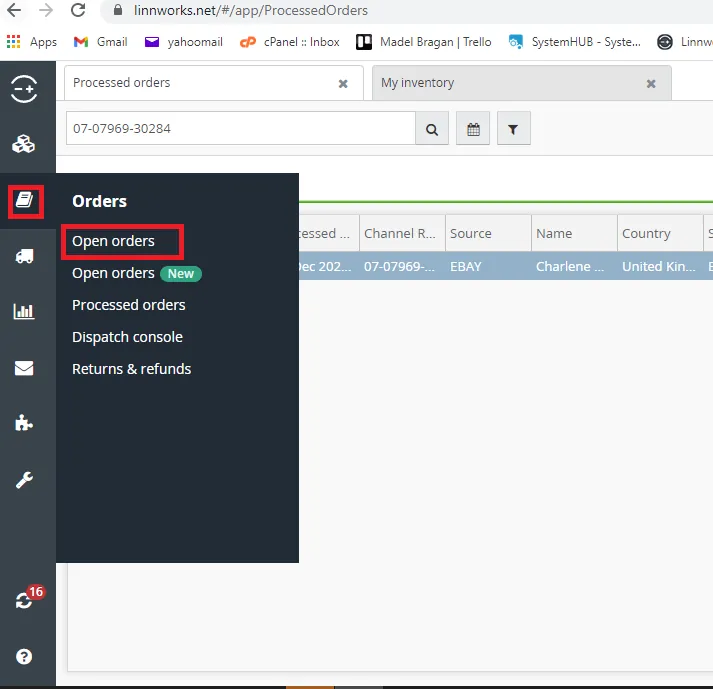
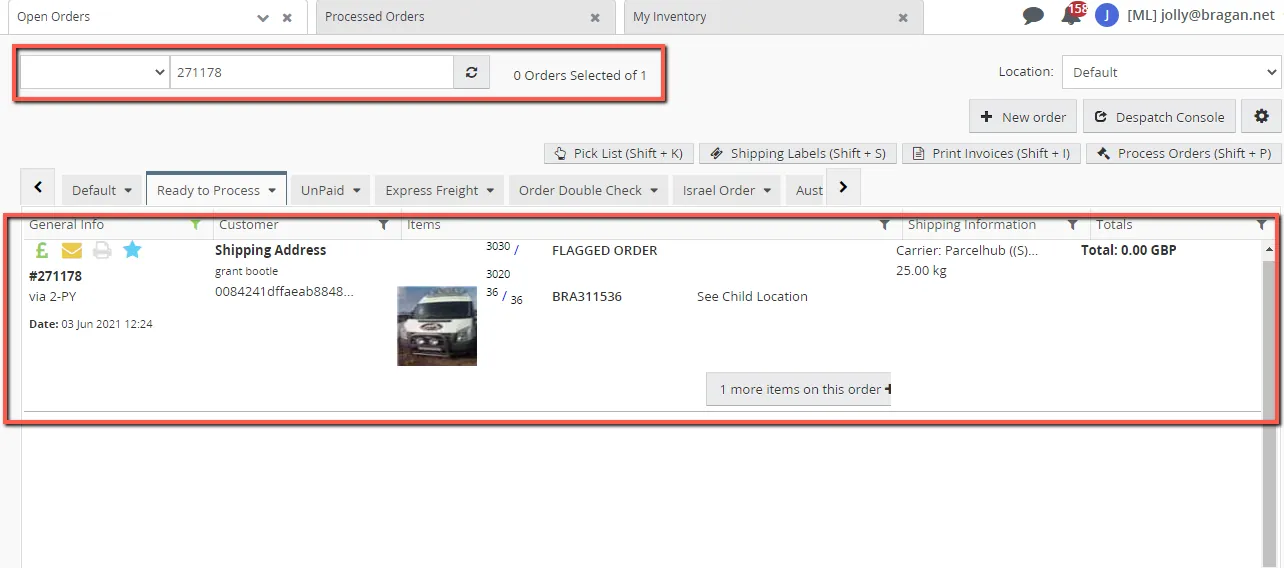
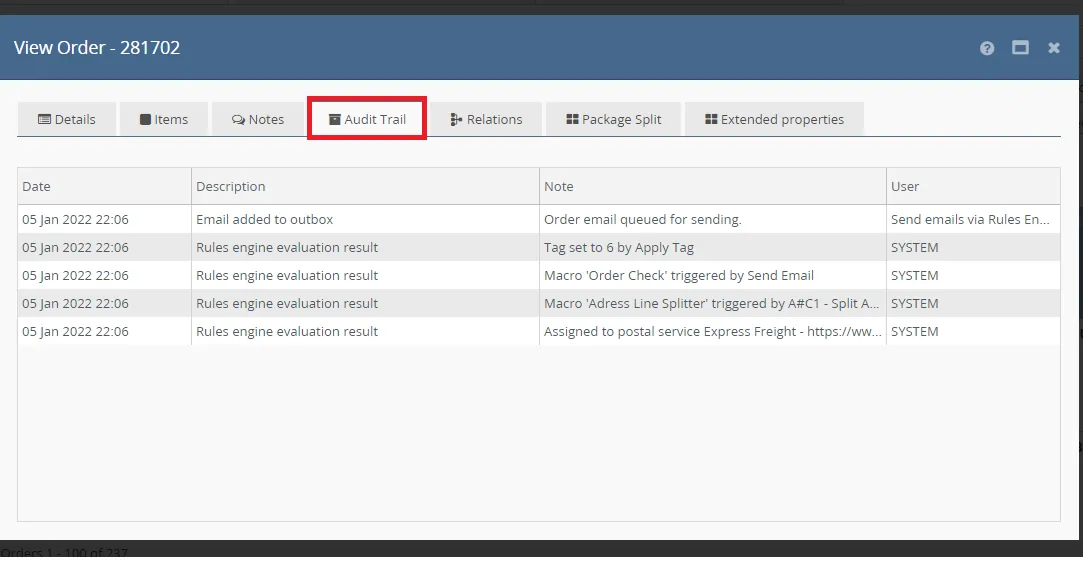
- Then CHECK IF PICKLIST HAS BEEN PRINTED. Picklists are internal documents of all items that needs to be pick by the Warehouse Team. Go to Audit Trail Tab. In the sample below, the pick-list is not yet printed therefore you can proceed in cancelling the item. See Process below on how to cancel the order. Once it is cancelled, tag the email to Accounts, -Arrange Refund, Name of the Accounts Personnel (if website order), Management (if eBay or Amazon order) then add in the internal note the refund amount. Do not resolve the email since accounts or management will be the one to resolve it once the refund is processed.
- If the Picklist has been printed, any changes on the order will no longer be seen by the Warehouse Team so it is a MUST that you notify them in the Bragan-Order Processing Skype Group. Confirm with the Warehouse Team on Skype Group if this has been sent or not. If this was not yet sent, inform them that the customer wants to cancel the order and do not send it. Then proceed to putting the order on hold on Linnworks.
clear inquiry + Linnworks order number + courier + name of customer + item SKU & description + ticket number
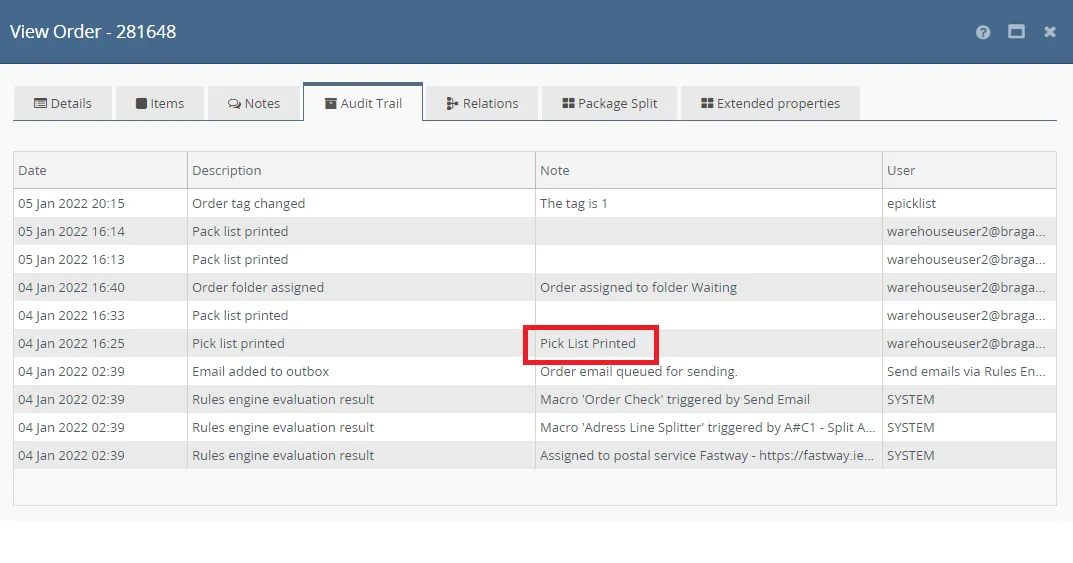
- If the order has been sent, then advise the customer that it cannot be cancelled and provide tracking information. Note: Usually, if Tag1 is found in the audit trail, the order is most probably with the courier already, but you can still confirm this with warehouse just to be sure, especially if there is no tracking number found for the order. 2. How to Put Orders On-Hold in Linnworks Please note that you can only hold an order if it is still an open order and not yet sent to courier. If pick-list is already printed, you can hold the order but you need to inform warehouse team in Bragan Order Processing Skype Group.
Step 1. Search the order in the open order tab, right click on the order then select Action > Bulk Change > Change Status > Lock Order.
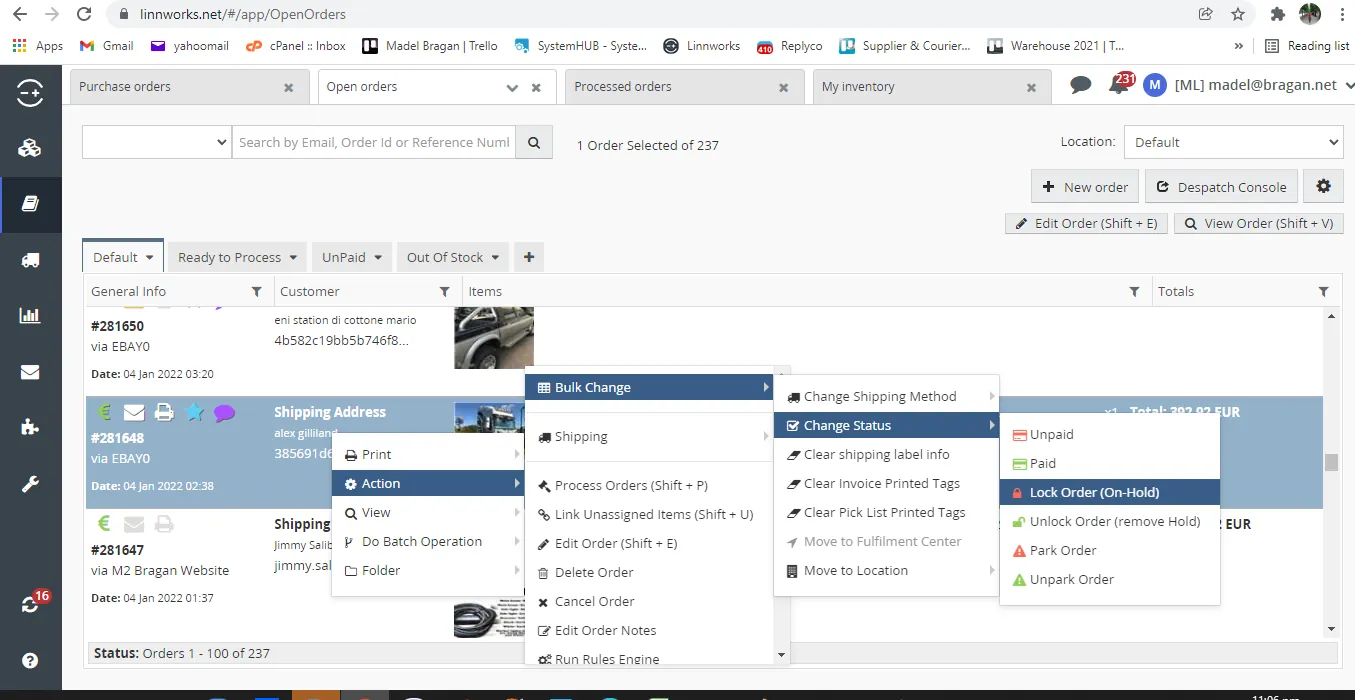
Step 2. Locked orders cannot be edited or cancelled. If customer advise to proceed with the order then unlock the order and update warehouse team in Bragan Order Processing Group to proceed with the order. to unlock, right click on the order select Action > Bulk Change > Change Status > Unlock Order.
2.1. Update Warehouse
Once you cancel an order inform Order Processing Skype Group that you cancelled the order, tag the personnel and management if eBay or Amazon order. When informing the team make sure to include the following details:
Linnworks order number + courier + name of customer + item SKU & description + ticket number
2.2. Update Customer
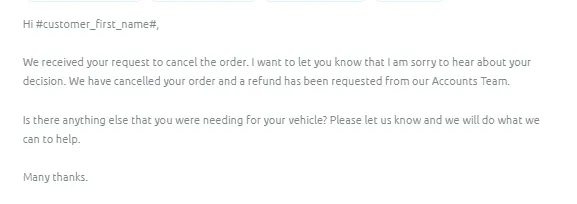
Once order was cancelled, update the customer using Macro 104. Make sure to label the email with the following: Cancellation, Accounts, -Arrange Refund, Name of the Accounts Personnel (for website orders) or Management (for eBay & Amazon Orders). And do not forget to add in the notes the total refund amount.
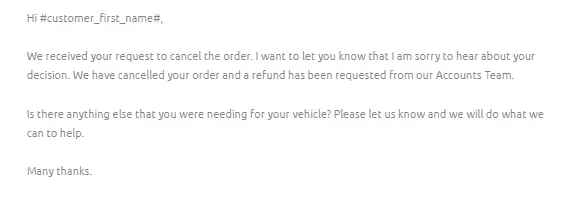
- eBay Cancellation Request
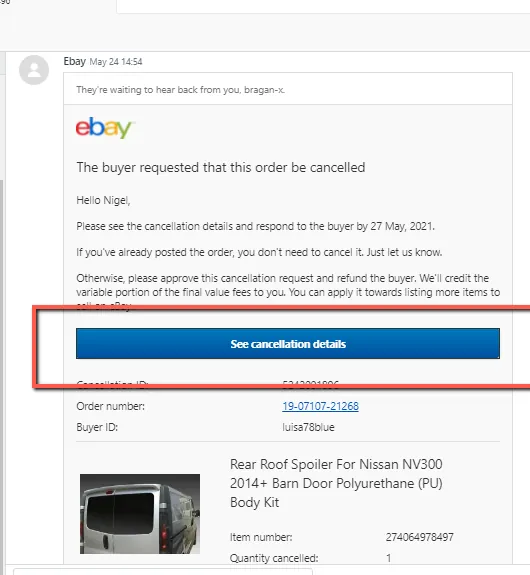
Step 1. You will see this notification on Zendesk Main Folder. See fig below. Then click on “See Cancellation Details”
Step 2. This will redirect you to eBay site wherein you can see the option to cancel the order. You will need log in credentials for this from management.
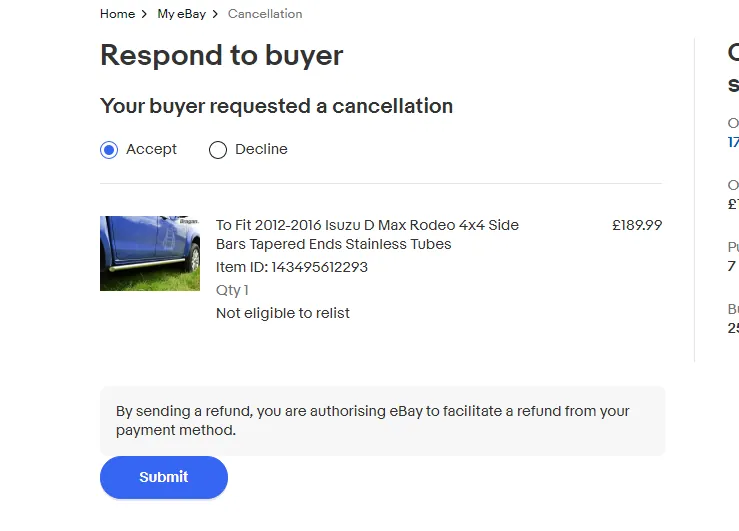
Note: You need to notify management before you will log in to eBay.
- Arrange Refunds To arrange a refund all Customer Service agents must fill out the Customer Refund Request Trello Card which can be found on the Customer Service Trello Board
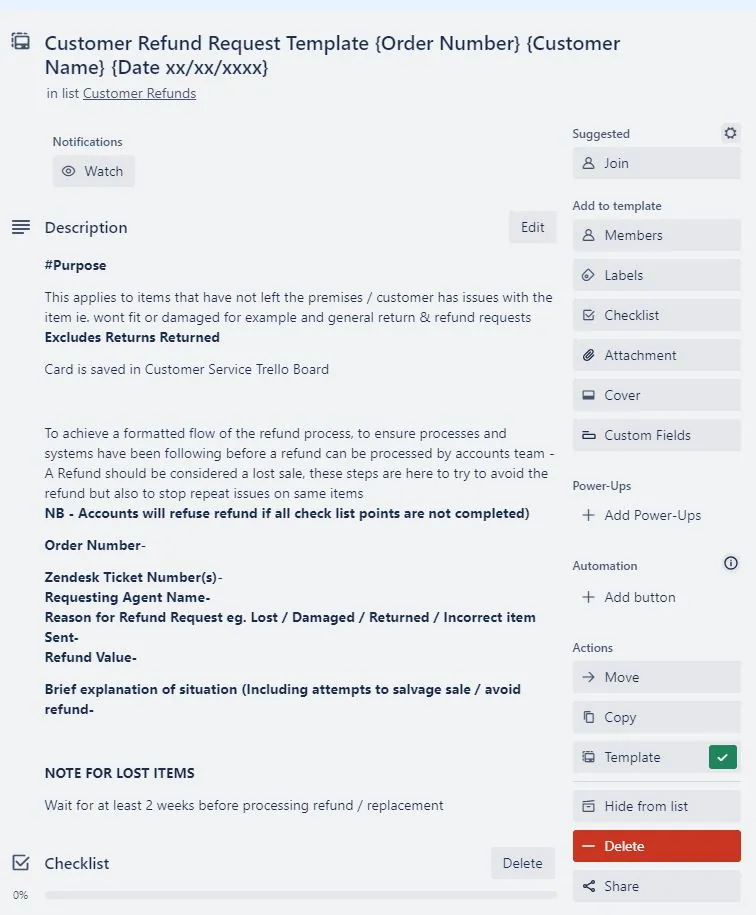
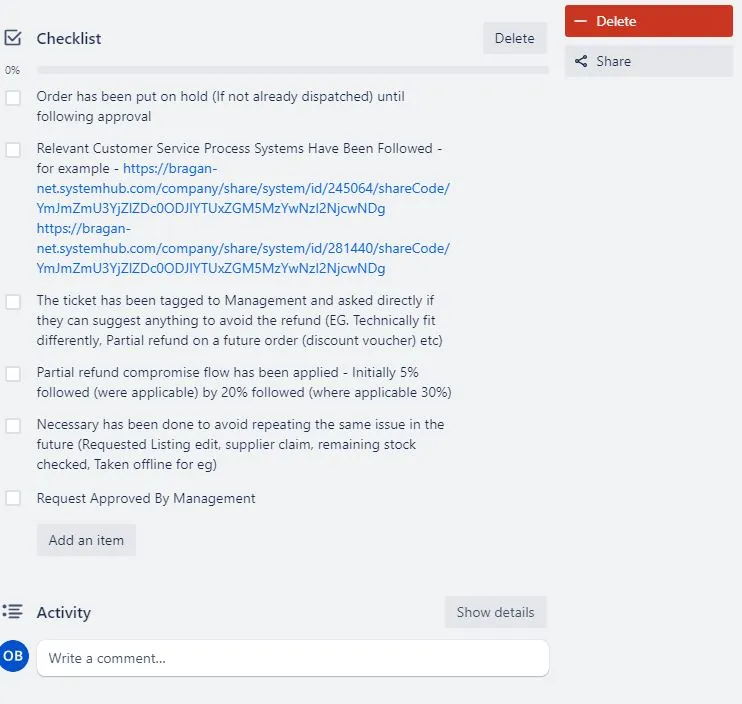
The Customer Service Agent must make sure that all of the checklist has been followed and completed before requesting approval from management for a refund. The CS Agent Must work with the customer in order to salvage the sale before a refund can be agreed.
Once all of the steps have been followed the CS Agent must tag management and ask for approval of the refund. Accounts will then follow up with a refund for the customer.
- How to Put Orders On-Hold in Linnworks
There are cases wherein you need to hold orders. This is when customers are still inquiring about their ordered item asking if it is the correct one for their vehicle. While doing the checking you can hold the item so it will not be sent. Please note that you
can only hold an order if it is still an open order and not yet sent to courier. If pick- list is already printed, you can hold the order but you need to inform warehouse team in Bragan Order Processing Skype Group.
Step 1. Search the order in the open order tab, right click on the order then select Action > Bulk Change > Change Status > Lock Order.
Step 2. Locked orders cannot be edited or cancelled. If customer advise to proceed with the order then unlock the order and update warehouse team in Bragan Order Processing Group to proceed with the order. to unlock, right clock on the order select Action > Bulk Change > Change Status > Unlock Order.
Step 3. If customer wants to cancel this follow the order cancellation process above.
- How to Edit Orders in Linnworks For eBay customers any changes to order details is not allowed due to eBay
Overview#
Policy: . It is only allowed when the change is just to correct the spelling of a name or the address. Editing orders usually happen when there is a need to correct postcodes or shipping address details. Sometimes warehouse will inform you that the postcode/city is incorrect and they cannot process the order. In this scenario, you contact first the customer for the correct detail then do the edit. For customer request to change the color of the LED of the bar they purchased, inform customer that what is in the listing should be followed and if they want different color of the LED they need to purchase the additional. Orders must be sent as per listing For website customer requesting to change shipping address we can accommodate this as long as the order is still an open an order and not yet
picked-up by courier. If audit trail shows tag1 then confirm with warehouse since most probably this is collected already by the courier.
6.1. Check order status – see No. 1 above on how to do it.
- If the Pick list has been printed, any changes on the order will no longer be seen by the Warehouse Team so it is a MUST that you notify them in the Bragan-Order Processing Skype Group. Confirm with the Warehouse Team on Skype Group if this has been sent or not. When inquiring to the skype group make sure to tag WH personnel and that it includes the following details:
clear inquiry + Linnworks order number + courier + name of customer + item SKU & description + ticket number
a.1. If WH confirmed that this was not yet sent and gives you approval to update, then proceed on editing the address. See steps in Figures 22-24 below.
- If there’s no “Pick List Printed” showing in Audit Trail, proceed on editing the address in Linnworks. See steps in Figures 22-24 below.
b.1. Make sure to update the warehouse team of the edits made in Order Processing Skype Group. Format should be:
edit made + Linnworks order number + courier + name of customer + item SKU & description + ticket number
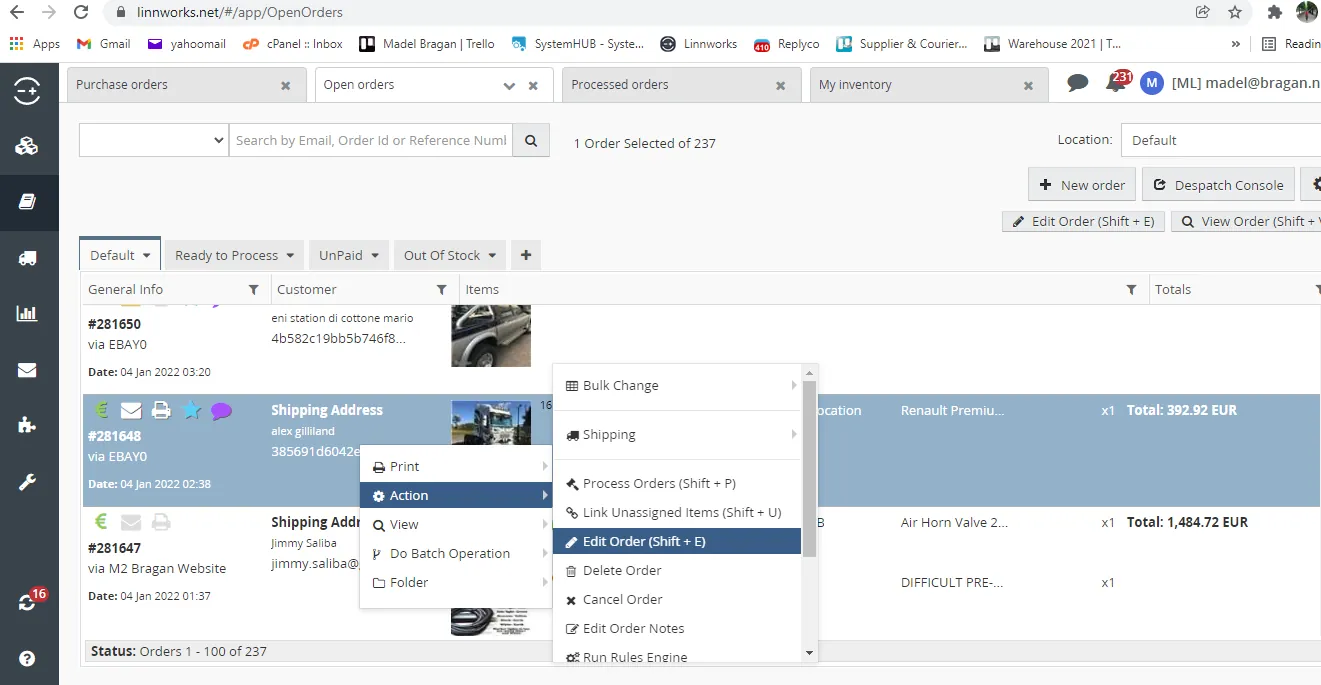
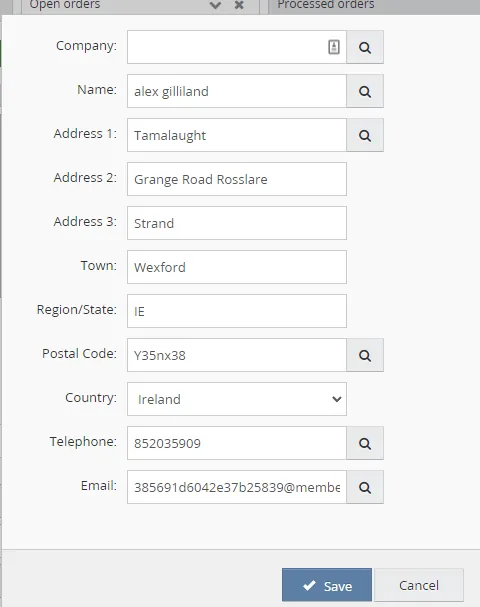
Step 1. Right click on the order, click on Action > Edit Order
Step 2. To edit shipping address details, click on the pen icon (red box). Then update necessary details.
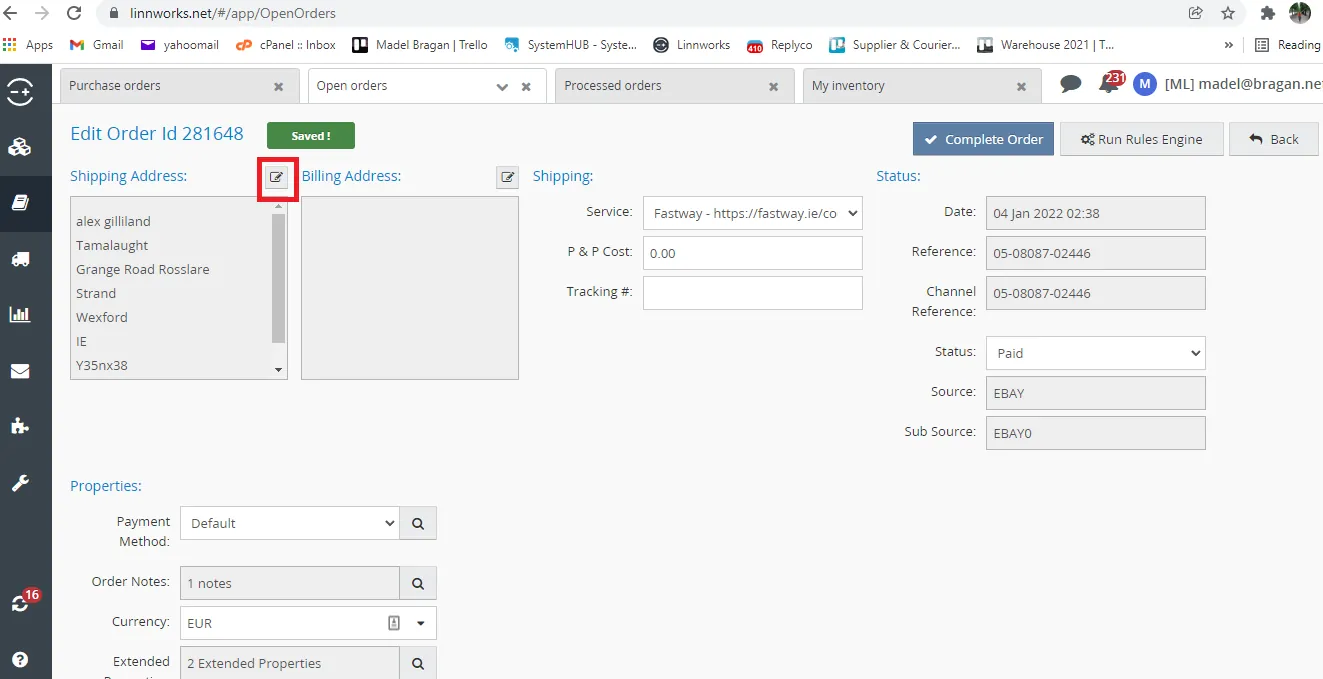
Step 3. Click Save.
Video & Media#
🎥 Cancelling and Putting Orders on Hold in eBay and Linnworks
Notes#
This section is important so Adhoc points and issues can be logged. Also, Q&A can be logged for suggestions for potential issues encountered. Also, log important notes needed for this system. Additional Notes:
Key Points
You need to notify management before you will log in to eBay. Always ensure to communicate clearly with the Warehouse Team when requesting not to send the order. Ensure to cancel the correct order. Always try to offer other products or offer the correct item. Always use Macro 104 when the order has been canceled.
Macro 104 Content
Potential Issues:
1 - ISSUE ENCOUNTERED: Stuck on Loading
RESOLUTION: Refresh Browser
2 - ISSUE ENCOUNTERED: Broken Links
RESOLUTION: Get the external link as this will allow other people to access the SOP without the need for login credentials and avoid broken links.
Attachments#
Handling_Order_Cancellation_… 16/12/2025