Handling Queries for Out of Stock Items
This process explains how to handle emails from the customer looking for items that
Overview#
Purpose: This process explains how to handle emails from the customer looking for items that are out of stock or not available yet. Do not confuse Items that are out of stock and Items not available. Items not available are not yet in our product catalogue.
Scope: This applies to all customer service representative personnel.
Responsibility: It is the responsibility of the customer service representative to know to handle queries for out-of-stock items and Items not available.
Objective: The objective of this procedure is:
- to guide employees on how to know to handle queries for out-of-stock items and Items not available.
Process Flow#
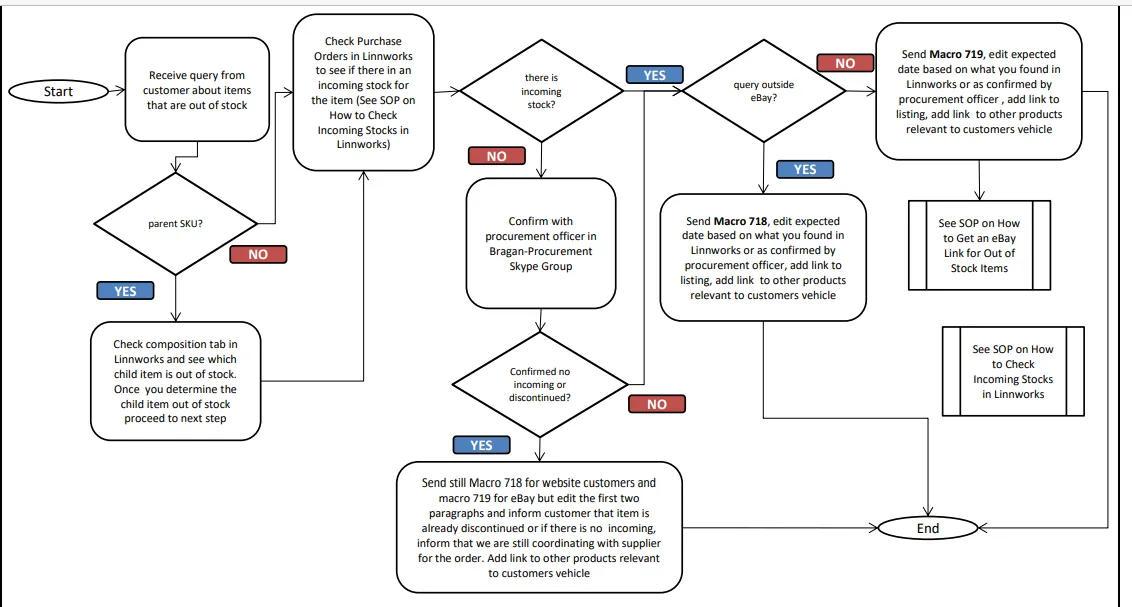
Procedure#
If you receive customer inquiries about our items that are out of stock, or if there are customer looking for an item and upon checking our inventory it is out stock, follow the steps below.
- Check Purchase Orders in Linnworks if we have an incoming of the item. See this SOP on How to Check Incoming Stocks in Linnworks.
Note:
If item out of stock is a parent item, check the composition tab and see which child item is out of stock.
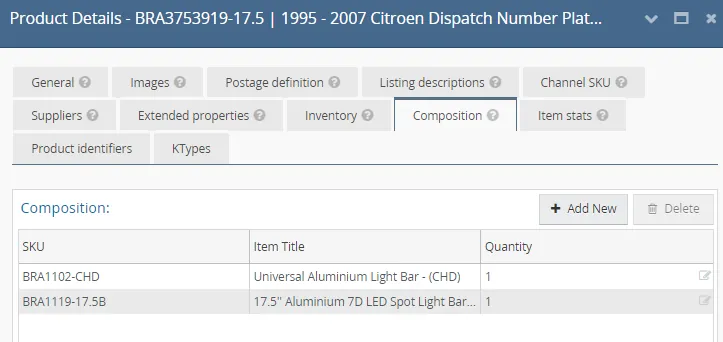
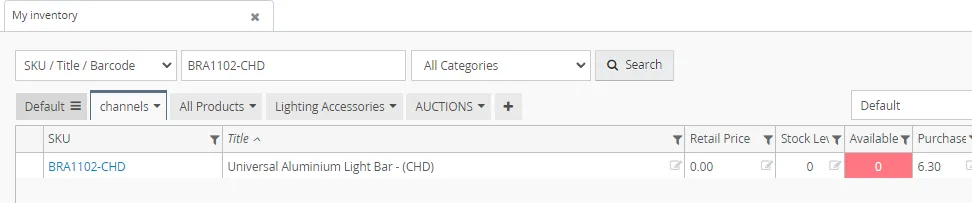
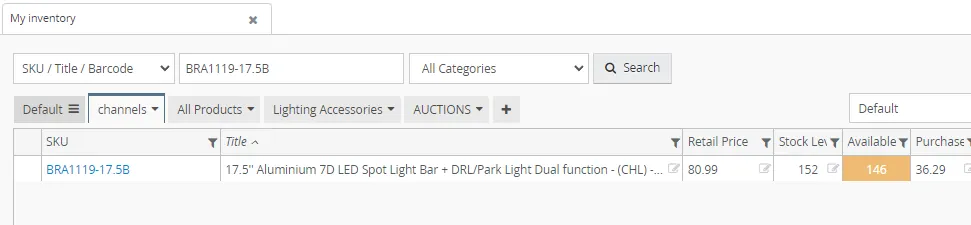
Copy the SKU of the child item, search it in My inventory tab to see available stocks. From this example, you can see that BRA1102-CHD is the one out of stock in the bundle. Once you now which child item is out of stock, check if there is an incoming for this child item.
- If there are no incoming stock of the item, confirm with Procurement Officer in the Bragan - Procurement Skype Group if there is really no incoming stock of the item. Sometimes procurement will inform that the item is already discontinued or there is issue. Make sure to wait for procurements confirmation before updating the customer.
- Once you know if the above information check if the query is from eBay or outside eBay (example from website). Ensure you do NOT to provide a website link to eBay message.
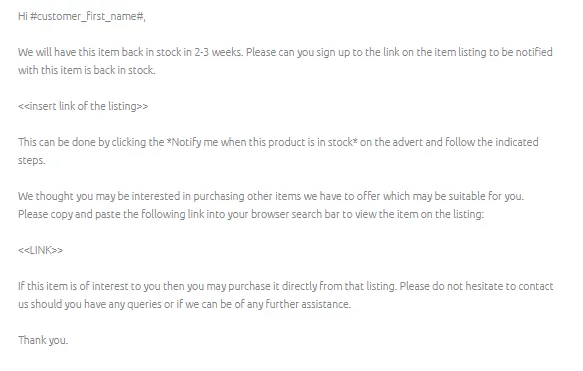
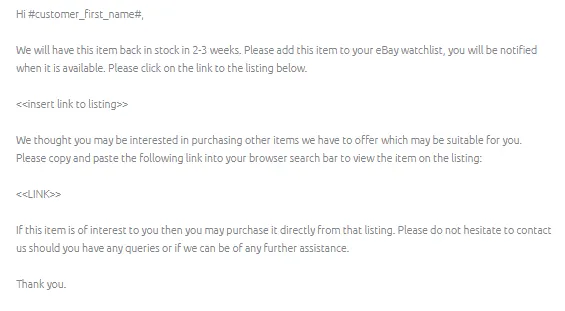
- For website customers send Macro 718 and for eBay customers send Macro 719. Make sure to edit the expected date of arrival based on what you searched in Linnworks or what the procurement officer confirmed.
If the item is already discontinued or we will not be ordering anymore of the item, edit the first two paragraphs and inform instead that the item is already discontinued then offer the relevant links.
If there is really no incoming stock edit the "We will have this item back in 2-3 weeks" and say that We are still coordinating with supplier for the order.
Note:
Always ensure to offer link to other products that might interest them.
Ensure as much as possible to offer items that are relevant to their vehicle.
Also ensure to send broad links to these relevant items.
- Make sure also to add the link to the listing. However, out of stock items are not searchable on eBay and if you need to add the link of the listing please follow the steps in this SOP.
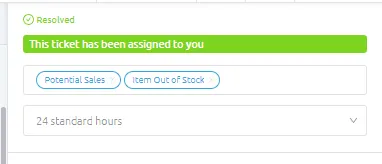
- Then label the email as Potential Sales and Item Out of Stock. Add also in the internal note the item and its status so it is easier to keep track.
Notes#
It is important to know how to check and to know the difference between Items that are out of stock and Items not available.
This section is important so Adhoc points and issues can be logged. Also, Q&A can be logged for suggestions for potential issues encountered. Also, log important notes needed for this system. Additional Notes:
Ensure you do NOT to provide a website link to eBay message. If item out of stock is a parent item, make sure to check composition to see which child item is out of stock. Sometimes there are 2 or more child items that are out of stock.
Potential Issues:
1 - ISSUE ENCOUNTERED: Stuck on Loading
RESOLUTION: Refresh Browser
2 - ISSUE ENCOUNTERED: Broken Links
RESOLUTION: Get the external link as this will allow other people to access the SOP without the need for login credentials and avoid broken links.
Attachments#
Handling_Queries_for_Out_of_… 16/12/2025