Handling Tracking Query v1
The purpose of this SOP is to give an idea about tracking queries.
Overview#
Purpose: The purpose of this SOP is to give an idea about tracking queries.
Scope: This applies to customer service representative staff and all personnel.
Responsibility: It is the responsibility of all staff to follow the standard operating procedure of handling tracking queries.
Objective: The objective of this procedure is:
- to guide employees on how to deal with tracking queries.
Tracking queries
Note: duplicate - click here for the final SOP
Dispatch and Delivery Time#
DPD - next day delivery - i.e. Dispatched Monday - Out for Delivery Tuesday
IFS/FedEx - 48hrs (2 working days)- i.e. Dispatched Monday - Out for Delivery Wednesday
FedEx - FedEx international delivery times can vary - 7-10 working days.
Note:
Next day dispatch does not mean next day delivery. The standard is to one day dispatch. (Weekends are not counted).
Normally, delivery would only take 2-3 working days (UK and Ireland) and 5-7 working days (International) from the day of dispatch.
IFS/FedEx –
For IFS/FedEx (UK deliveries) – when checking the tracking always check the IFS website first - ship.ifsgroup.com - log in & click track then enter the tracking number.
It will have all the info regarding the delivery.
Firstly, it will show ‘Shipping label created’ & ‘Shipment Info sent to carrier’ – this is the date the label was printed.
Secondly, it will say ‘Package 1 received & Package 1 loaded to route’ – this will show when the parcel has been collected from us. NOTE: If multiple labels it will show ‘Package 1 received’, ‘Package 2 received’ as separate lines.
Thirdly it will show ‘Departed Carrier Location’ which is when it is at the FedEx Hub in England.
Fourthly it will show ‘At local carrier facility – at the local FedEx hub.
Fifthly it will show ‘On carrier vehicle for delivery’ – which means the item is on the vehicle for delivery.
Sixthly (& hopefully finally) it will show ‘Delivered’ – that the parcel is delivered to the customer.
In some cases, you will get a line saying ‘Delivery Exception (Customer not available or business closed)’ – this is where the courier has attempted to deliver but has been unsuccessful.
Also, you may be faced with something along the lines of ‘Delivered to an address other recipient’ – which normally means it has been delivered to a neighbour
Use Macro – 409 – Inserting the relevant Links for Courier and Tracking Number -
For IFS concerns and follow-ups - send an email to [email protected]
Delivery info will also show on the FedEx website - tracking.html ie/tracking.html by entering the tracking number but it will only show the tracking info from when it has been received from FedEx (Goes with IFS first)
So, if something departs us on Monday 1st – tracking will show on IFS that it has departed (which will be due with the customer Wednesday 3rd but the info will not be shown on FedEx website until Tuesday 2nd - until it arrives on Tuesday in the FedEx hub).
Tracking follows the same premise as others – out for delivery / delivered etc
NB: For FedEx international orders you simply for the same process as above but search directly on the FedEx website. Follow the same process as above.
Fastway
For Fastway Tracking, you will need the Customer Order Number from Linnworks
Log in to Fastway Dashboard using– [email protected] the Password will be stored in Lastpass -
From here – Select Track – View Shipped – Search (use the Order number from Linnworks)
This will give you the Consignment Number – this the Tracking number the cust needs.
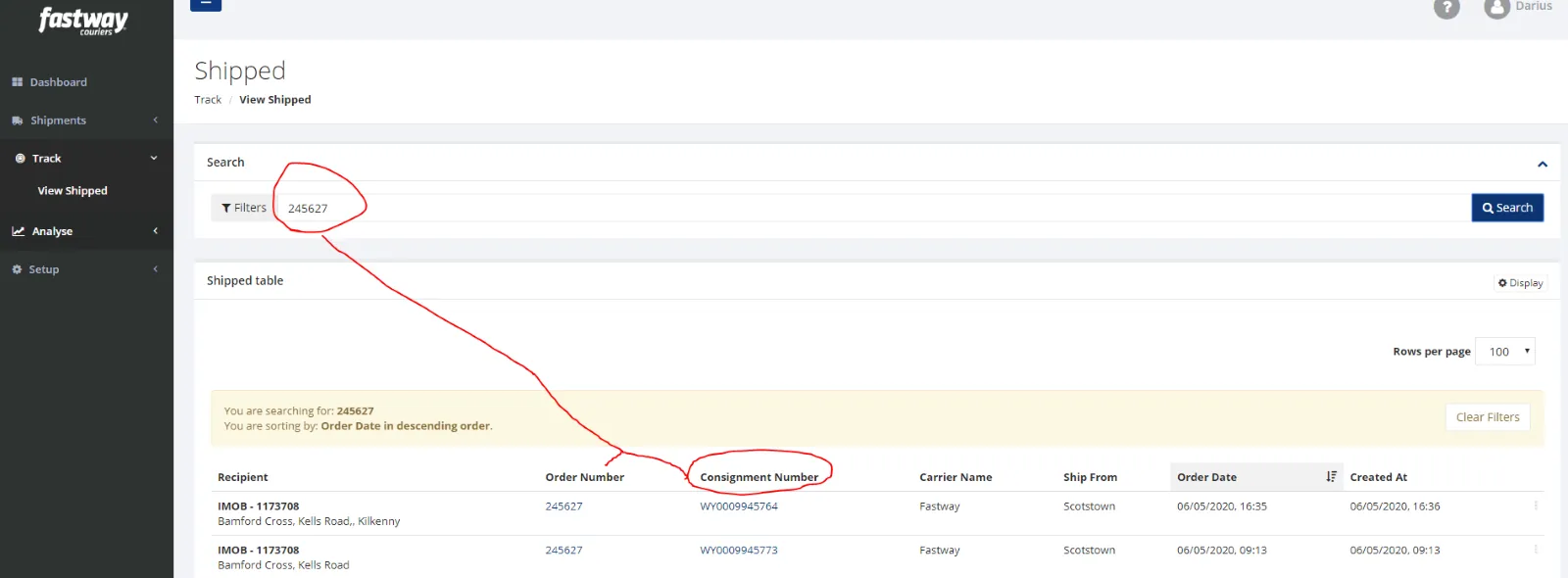
The Following Steps will be shown in Fig.2 with time stamps of when the Parcel is -
Picked up from Us Parcel Loaded on Van (out for delivery) Delivered (usually showing signature)
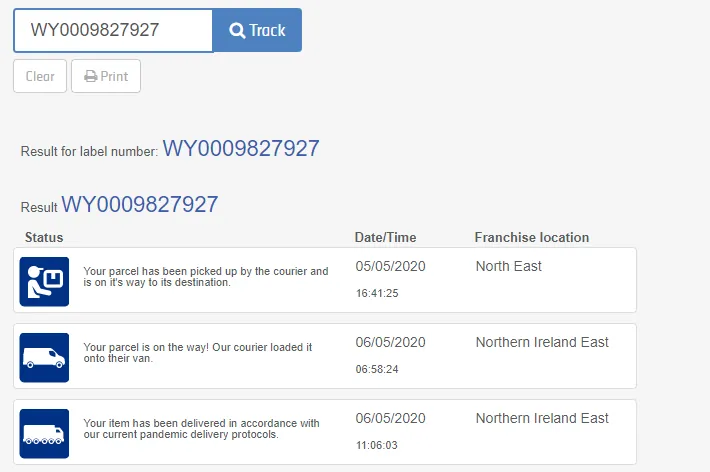
Use Macro 409 when supplying cust the tracking info as in IFS process
DPD –
Please watch the recording on the following dropbox link - - need to update the link.
For DPD tracking queries – log in the site
Enter the Username & Password
Click Parcel Tracking
Enter Consignment Number into the box – (Consignment number can be found from the DPD manifest – Saved in drop box – insert path Pat)
Click Track it
If info says ‘Data Received’ – it is still in our warehouse
When info says ‘Received into HUB’ – this has been dispatched (will be delivered the following day – i.e. if says ‘Received into HUB’ on Tuesday 2nd – it will be due for delivery on Wednesday 3rd)
When info says ‘Out for delivery’ – obviously this is out for delivery
When info says ‘Delivered (Name)’ – then this means it has been delivered
In some cases, it may say ‘Delivery Attempted – Card Left’ or ‘Goods Held’ – in this case, you would advise the customer to call their local DPD depo with the tracking number. The Depot number will be on the tracking info i.e. Depot 42 is Monaghan Depot
When faced with a tracking query always include their delivery tracking number, courier & brief explanation. Email reply example below
Macro – 409 -
Hello
Please copy and paste the following link Into your browser to check your order delivery status - (ENTER DELIVERY LINK)
Please allow a day or two (working days) for your order to appear live.
For delivery changes / queries please contact your courier local depot, you can find this by doing a google search.
Thank you
If the customer is adamant that the parcel has not been delivered or signed for email [email protected] with the consignment number as the subject title & say: ‘Please advise driver to return the property as customer is claiming non-receipt’
And communicate to the customer from there.
Updated – Nick – 07/05/2020
Notes#
This document is very important because this gives an idea of how to deal with tracking queries.
This section is important so Adhoc points and issues can be logged. Also, Q&A can be logged for suggestions for potential issues encountered. Also, log important notes needed for this system. Additional Notes:
The agent suggesting the update should be the one to carry through the edit. The suggestions for edit should be confirmed in real-time in the group and for the card to be cleared the same day. Creating a new version will break the link for systems that are linked to training/onboarding Trello Cards. This will also affect the systems linked to some email macros. Do not create a new version this will overpopulate the SystemHub. Editing the current system is the best practice to avoid potential issues. IFS is an agent (it uses main courier like XDP and FedEx) and not a courier,
Potential Issues:
1 - ISSUE ENCOUNTERED: Stuck on Loading
RESOLUTION: Refresh Browser
2 - ISSUE ENCOUNTERED: Broken Links
RESOLUTION: Get the external link as this will allow other people to access the SOP without the need for login credentials and avoid broken links.