How to Contact a Courier
Contacting a courier is vital in finding out the status of a customers order.
Overview#
Purpose: Contacting a courier is vital in finding out the status of a customers order. This will allow Bragan to communicate clearly to the customer the reason why the order is either being delayed/returned by obtaining details directly from the courier.
Scope: This procedure applies to the Customer Service Team.
Responsibility: It is the responsibility of each employee to ensure the process set out in this procedure is followed.
Objective: The objective of this procedure is:
-Ensure that CS team is familiar with the steps needed in drafting an email to a courier
-Ensure that all necessary information is provided to the courier to avoid any delays in getting an update
-Ensure that the customer is kept in the loop and thus provide a better overall customer experience
(Bragan logo will always remain on top as standard.)
Procedure#
This material contains processes on how to contact and draft an email to each courier effectively and in a timely manner. This must be strictly followed to prevent any errors that could lead to dissatisfaction of the customer and company loss of revenue.
If the customer is only tracking the order, please refer to "Handling Shipping Tracking Queries SOP".
Macro Commonly Used for Tracking Queries
These are the macro that you may commonly use for handling this type of query. Familiarize yourself with these macros for work efficiency.
Macro (number) Title
Hi there,
We would like to apologize for the late arrival of your order due to inevitable circumstances.
We always prioritize the complete satisfaction of our customers and make sure that the products reach them within the specified time limit. However, I will be bringing this up with (insert courier) and rest assured that I'll provide you an update as soon as I hear from them.
Once again, on behalf of the courier, we are sorry for all the inconveniences. We appreciate your patience and understanding while we sort this out.
Thanks!
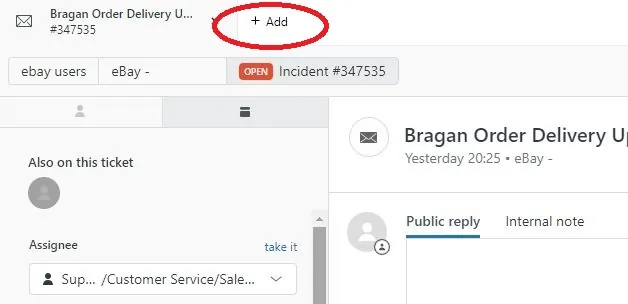
Step 1.
Click the plus icon at the top left portion of Zendesk to create a new e-mail
Notes#
This section is important so Adhoc points and issues can be logged. Also, Q&A can be logged for suggestions for potential issues encountered. Also, log important notes needed for this system. Additional Notes:
This System must be strictly followed to prevent any errors that could lead to dissatisfaction of the customer and company loss of revenue.
Potential Issues:
1 - ISSUE ENCOUNTERED: Stuck on Loading
RESOLUTION: Refresh Browser
2 - ISSUE ENCOUNTERED: Broken Links
RESOLUTION: Get the external link as this will allow other people to access the SOP without the need for login credentials and avoid broken links.
Attachments#
Attachments_and_Recordings… 16/12/2025