Identifying Faulty Stock / Supplier Claim
The purpose of this SOP is to give an idea about Identifying Faulty Stock / Supplier
Overview#
Purpose: The purpose of this SOP is to give an idea about Identifying Faulty Stock / Supplier Claim.
Scope: This applies to customer service representative staff and all staff personnel who is in charge of this process.
Responsibility: It is the responsibility of all staff to follow the standard operating procedure on Identifying Faulty Stock / Supplier Claim.
Objective: The objective of this procedure is:
- to guide employees on Identifying Faulty Stock / Supplier Claim.
Identifying Faulty Stock/Supplier Claim
This SOP will outline the procedure on how supplier claims/faulty stock is dealt with.
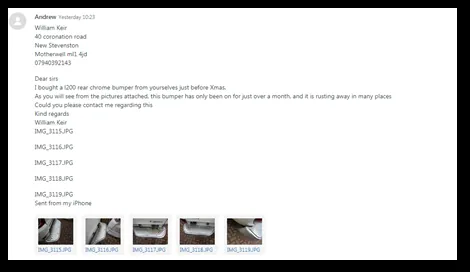
- Contact from customer regarding a faulty item/issue with a product. In this example we have a rear bump with rust appearing. Bumper was sold 2 months ago. Let the customer know we will review this with the tech team and contact our supplier in reference to their case.
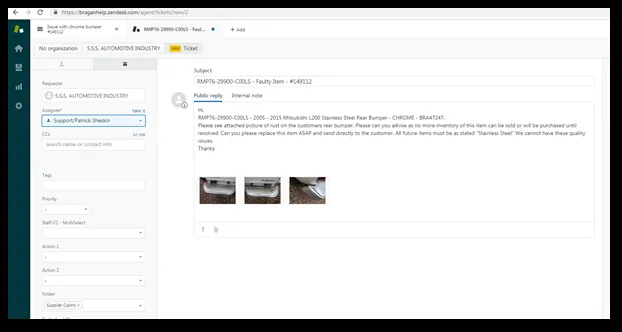
- We will then need to identify the supplier using the SKU and open a new ticket to this supplier referencing the customers e-mail. Please ensure Supplier SKU/Bragan SKU & Reference to Customers Zendesk ticket is in the title of the email. Fully explain the issue attaching images sent from customer. ALWAYS ENSURE “SUPPLIER CLAIMS” FOLDER IS SELECTED.
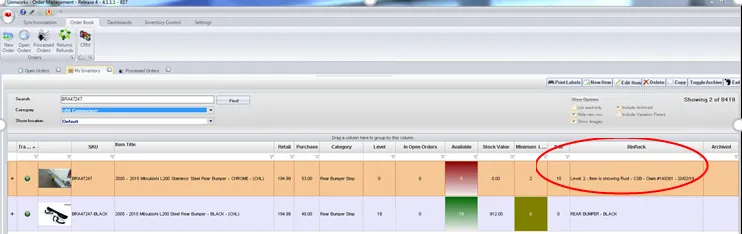
Our next step in on Linnworks, you would ZERO level the current stock and add a note in the BinRack column, include “Current level, Fault, Supplier - Claim Ticket number – Date – Initial”.
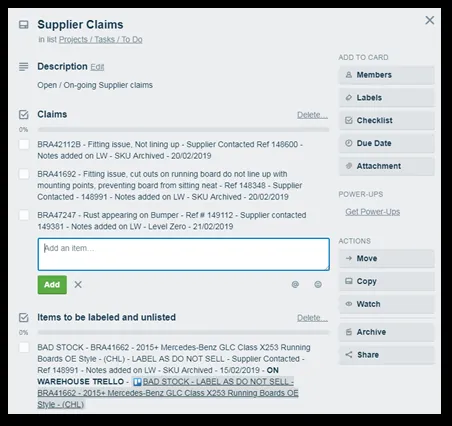
- Next step would be to record this claim on Trello appropriate Trello Card - RX6k9EGT..
- At this point we would need to wait for the supplier response, we have requested a replacement be sent to the customer ASAP and we have requested that future stock be examined before this is sent to us.
- If the supplier is not able to resolve the situation, we would contact the customer and offer a partial refund to have the item painted/treated. Deal with this with expected sales responses.
- If we were no longer going to purchase this item and the remaining stock is to be removed, we would have to follow two steps. Management Approval Needed.
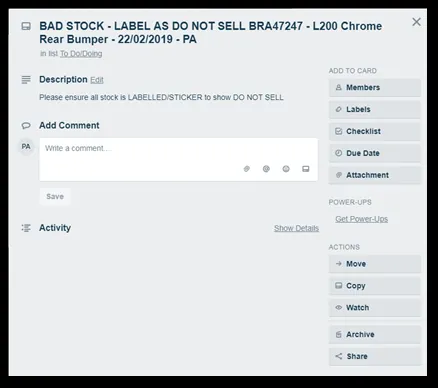
Warehouse Trello would need to be updated to indicate to the Team that remaining stock be removed and labelled as faulty stock – Management will determine what is done with this stock - trello.com
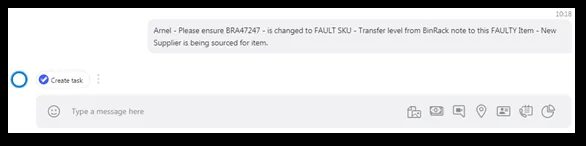
Team PH (Arnel) would need to be updated made aware that this product is to be discontinued. If we have remaining stock a FAULT SKU would be created for this item. Allow the original SKU to be used once we receive new inventory from another supplier.
Notes#
This section is important so Adhoc points and issues can be logged. Also, Q&A can be logged for suggestions for potential issues encountered. Also, log important notes needed for this system. Additional Notes:
This document is very important because this gives an idea of how to deal with the process of Identifying Faulty Stock / Supplier Claim.
Potential Issues:
1 - ISSUE ENCOUNTERED: Stuck on Loading
RESOLUTION: Refresh Browser
2 - ISSUE ENCOUNTERED: Broken Links
RESOLUTION: Get the external link as this will allow other people to access the SOP without the need for login credentials and avoid broken links.