IFS Queries
The purpose of this SOP is to give an idea about IFS Queries
Overview#
Purpose: The purpose of this SOP is to give an idea about IFS Queries
Scope: This applies to customer service representative staff and all staff personnel who is in charge of this process.
Responsibility: It is the responsibility of all staff to follow the standard operating procedure of IFS Queries.
Objective: The objective of this procedure is:
- to guide employees about IFS Queries.
Tracking Instructions
1.
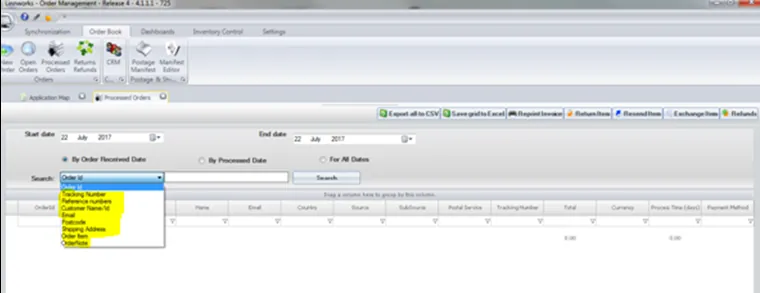
Locate customer order in Linnworks processed orders using order id, delivery postcode or customer name.

- Scroll down until you find the tracking number.
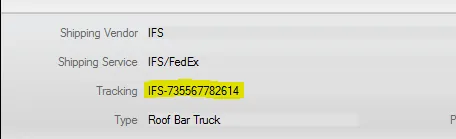

- Enter tracking into Fedex website as below and select track. (https://www.fedex.com/apps/fedextrack/? action=track&tracknumbers=735567785680&locale=en_GB&cntry_code=gb)

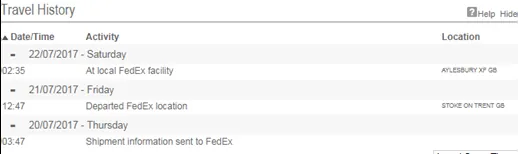
Reply to customer with the information showing by the tracking and send them the tracking number also.
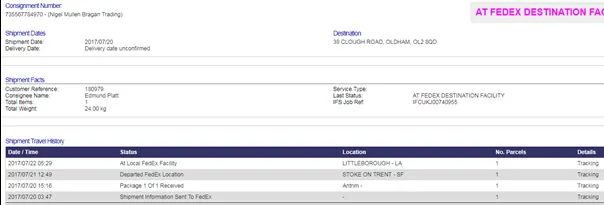
- If tracking information can’t be located using the FEDEX website you can use IFS tracking. Select History and search by postcode or shippers reference.
- (https://www.ifseservices.co.uk/CourierUK/tracking.php? awb=763500&gw=FXD)
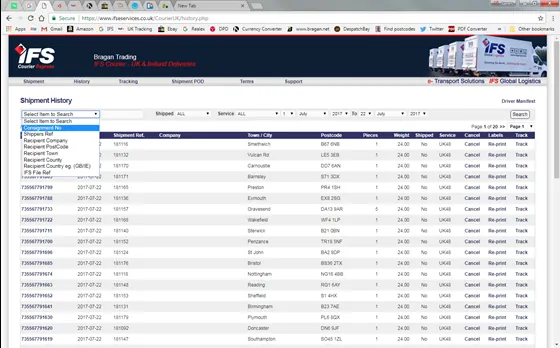
- Send customer relevant information:
Video & Media#
Notes#
This section is important so Adhoc points and issues can be logged. Also, Q&A can be logged for suggestions for potential issues encountered. Also, log important notes needed for this system. Additional Notes:
This document is very important because this gives an idea about IFS tracking queries to know the status of the shipment.
Potential Issues:
1 - ISSUE ENCOUNTERED: Stuck on Loading
RESOLUTION: Refresh Browser
2 - ISSUE ENCOUNTERED: Broken Links
RESOLUTION: Get the external link as this will allow other people to access the SOP without the need for login credentials and avoid broken links.