Important Information Regarding Shipment Instructions
The purpose of this document is to show the important information regarding d, Scope, Responsibility, and Objective were added by the uploader
Overview#
Purpose: The purpose of this document is to show the important information regarding Shipment Instructions.
Scope: This applies to all assigned Bragan customer service representatives.
Responsibility: It is the responsibility of each employee to ensure the process set out in this procedure is followed.
Objective: The objective of this procedure is:
- to guide new and current CSR employees regarding Shipment instructions.
Important Information Regarding Shipment#
Instructions#
Open the email from IFS and copy the tracking number into the processed order in Linnworks which will bring up customer details.
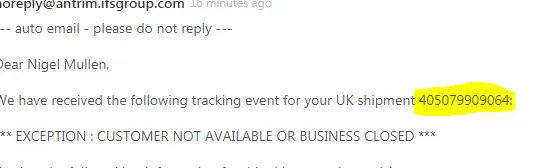
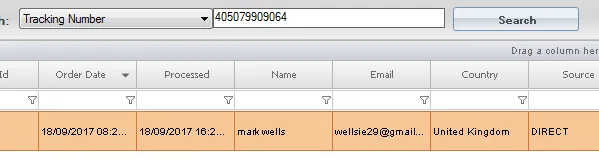
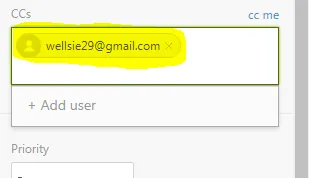
Copy and paste the customer email address into the email from IFS. Remove any other CCs included in the email.
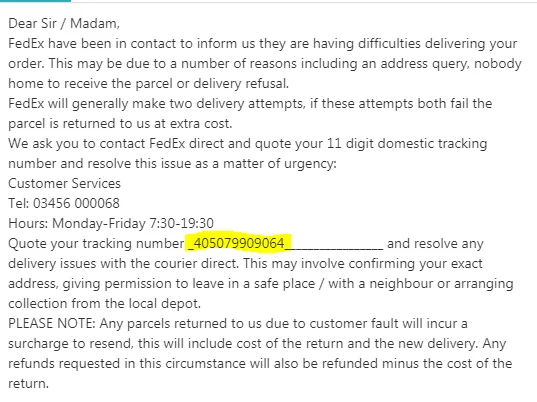
Then select apply macro at the bottom of the email and insert “Address Query- Courier cannot make delivery CONTACT FEDEX”c
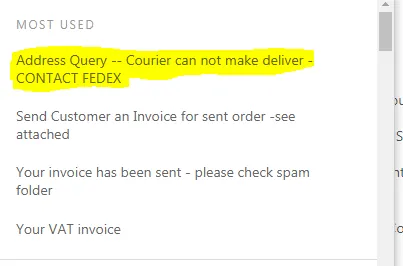
When the email is inserted add the customer tracking number to the email in the space provided and send as solved.
Notes#
The reference file from Dropbox is in 'File Attachments'.
Overview#
Purpose: d, Scope, Responsibility, and Objective were added by the uploader temporarily. This is an old file version, May still need some updates/revision by the owner.
This section is important so Adhoc points and issues can be logged. Also, Q&A can be logged for suggestions for potential issues encountered. Also, log important notes needed for this system. Additional Notes:
The agent suggesting the update should be the one to carry through the edit. The suggestions for edit should be confirmed in real-time in the group and for the card to be cleared the same day. Creating a new version will break the link for systems that are linked to training/onboarding Trello Cards. This will also affect the systems linked to some email macros. Do not create a new version this will overpopulate the SystemHub. Editing the current system is the best practice to avoid potential issues.
Potential Issues:
1 - ISSUE ENCOUNTERED: Stuck on Loading
RESOLUTION: Refresh Browser
2 - ISSUE ENCOUNTERED: Broken Links
RESOLUTION: Get the external link as this will allow other people to access the SOP without the need for login credentials and avoid broken links.
Attachments#
Important_Information_Regar… 16/12/2025