Magento Customer Groups Standard Operating Procedures SOP
The purpose of this procedure is to provide a detailed overview of how Customers
Overview#
Purpose: The purpose of this procedure is to provide a detailed overview of how Customers were a group in our website orders.
Scope: This SOP covers the following software applications Magento and Fooman Connect. This applies to the Customer Service and Accounts department as it enumerates areas about customer groups and tax conditions.
Responsibility: Roles and Responsibilities:
- SOP Author is responsible to draft SOP in consultation with the intended users, correct SOP according to feedback, make SOP available to intended users, amend SOP if required, and format it to SystemHub
- The developer of the application will be responsible for to Magento backend and Xero integration
- Customer Service and Xero Accounts Assistant ensure that accounts are in order and helps in mapping data
Objective: The important objectives of this SOP
- To learn the detailed procedure on Magento customer group and how to assign customer group
- Be familiar with Bragan’s customer Groups and Xero Tracking Categories
- To Support synchronization from Magento Website to separate Companies in Xero

Customer Group#
Customer groups determine which discounts are available and the tax class that is associated with the group. The default customer groups are General, Not Logged In, and Wholesale.
Magento Customer Group feeds to Xero the integrated transactions with Xero Categories
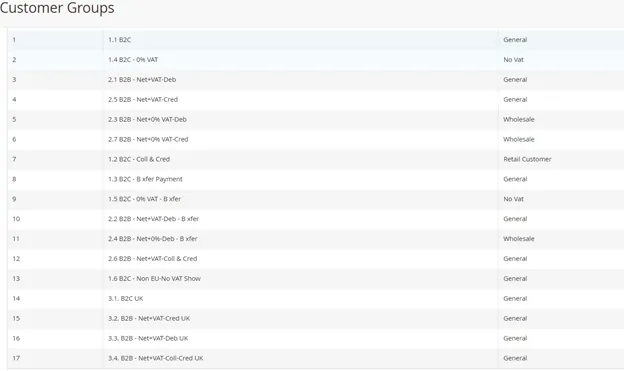
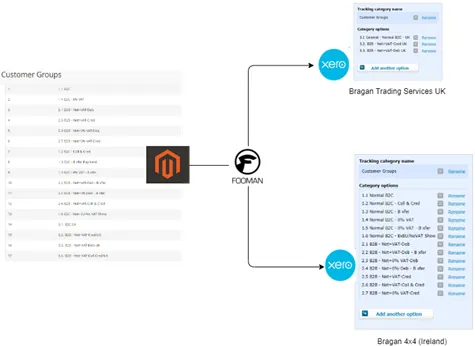
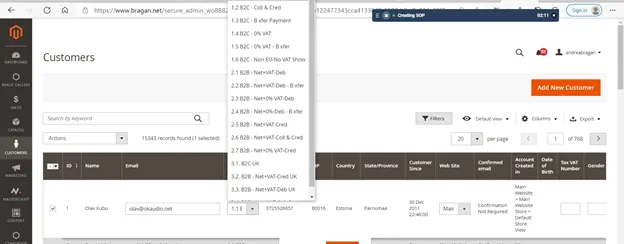
Diagram 1: Customer Group from Magento
*Group 1.1 to 2.7 Irish Registered Business and is considered Bragan 4x4 Customers (IRL and rest of the world)
**Group 3.1 to 3.4 UK Registered business or customers and is considered Business Bragan Trading
Default 1.1 B2C Standard VAT rate of 23%
1.2 B2C Coll & Cred: Customers on Account or Paying on Credit
1.3 B2C B Xfer Payment:
Indicate B2C Sales Bank Transfer.
Deferred Sales, Bank Transfer, “Pending” Status, May need to reconcile with Accounts the Magento /Xero to confirm payments already cleared in the bank.
1.6 B2C Non-EU -No VAT= Non-Vat Registered/Exempt.
You can also refer to FedEx Delivery tracking on delivery address. And validate VAT numbers.
2.1 B2B -Net+VAT-Debit=Northern Ireland/EU wholesale. Mostly Irish customers. These customers must check out with payment to complete the transaction as he is "Debit" account
2.2 B2B Net+VAT-Deb Bank Transfer= Same as 2.1 but deferred sales. Will Show pending in Magento before processed
2.3 B2B Net+0% VAT-Debit=Wholesale. No Vat. EU Customers zero-rated
2.4 B2B Net+0%-Deb Bxfer= same as 2.3 except on bank transfer. Double-check with accounts for a copy of bank payments/proof.
2.5 B2B Net+VAT credit= On credit. They send a credit application to Bragan.
For sending an invoice and remind Accounts of Statement of accounts at Month-end
2.6 B2B Net+VAT Coll&Credit=Collect means the customer is allowed to collect on- site
2.7 B2B Net+0% VAT-Credit= Zero-rated VAT; wholesale; Shipping option on credit.
Filter customer groups#
On the Admin sidebar, go to Customers > Customer Groups.
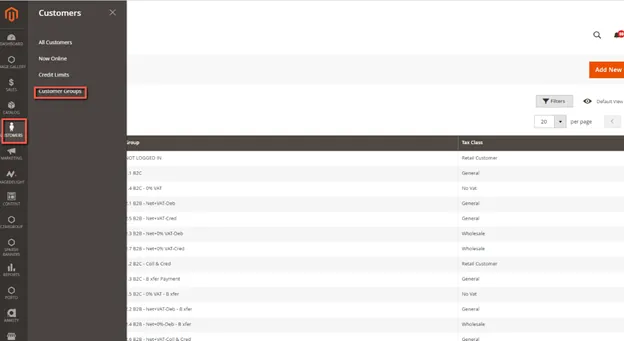
The page displays the subset of filtered customer groups.
Click Filters. Enter criteria for searching groups, including a range of IDs, groups, or tax classes. When complete, click Apply Filters.
Update or Edit a customer group#
This is done so that the next time the customer logs in to our website the account information is updated and they are now on the right customer group. This however does not apply to previous orders only on succeeding orders
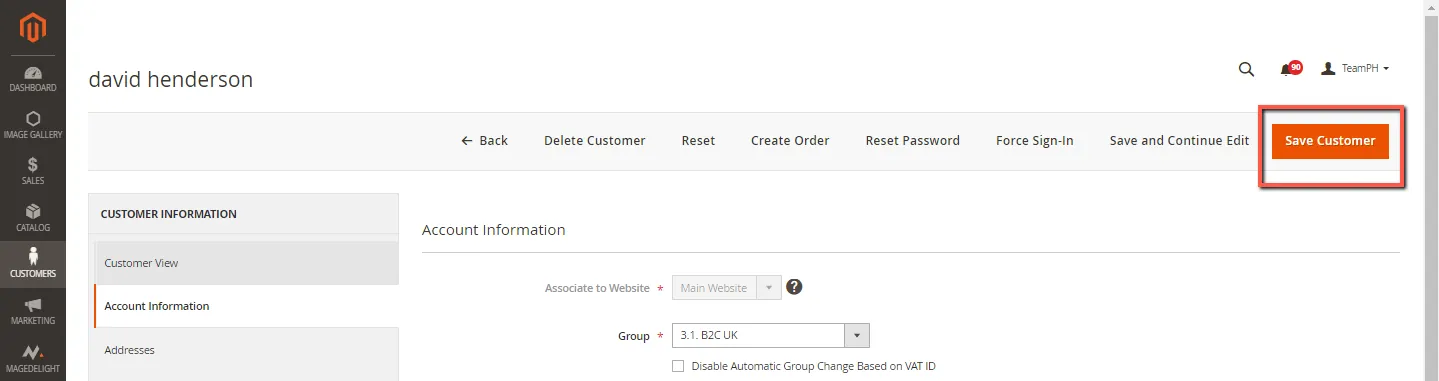
1.) On the Admin sidebar, go to Customers > All Customers.
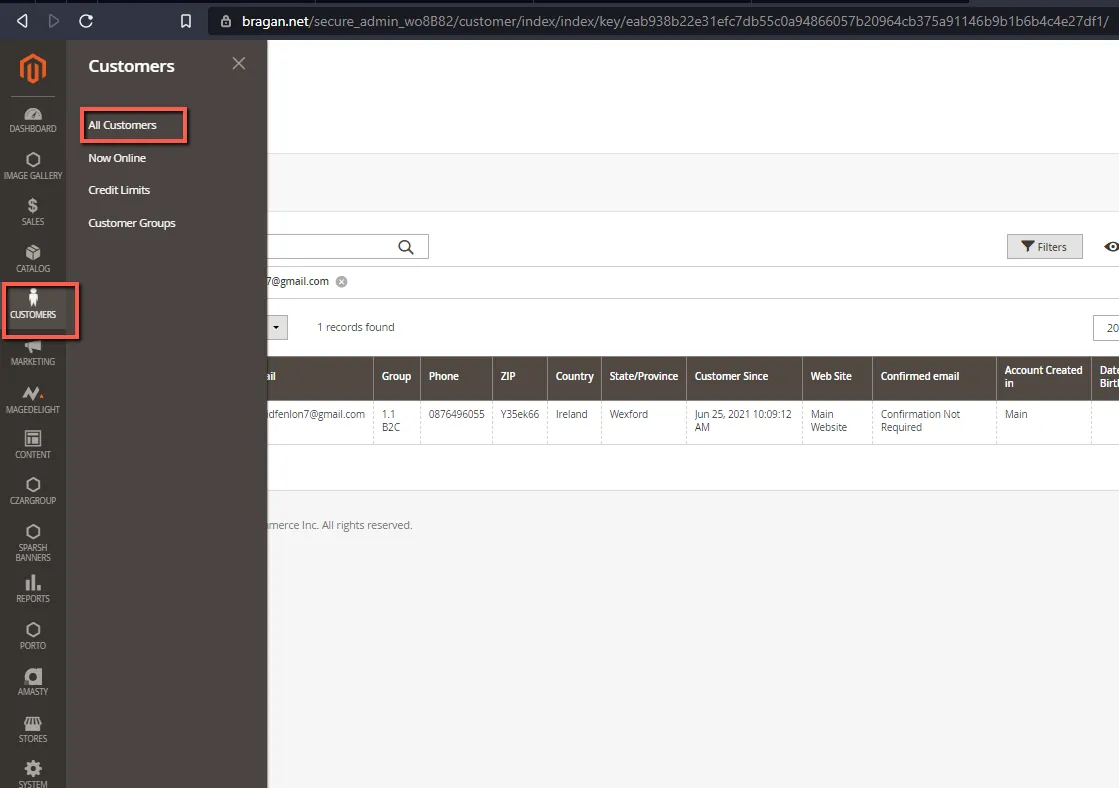
2.) Search in Keyword or name of the customer previously set up. You may also type in the email address.
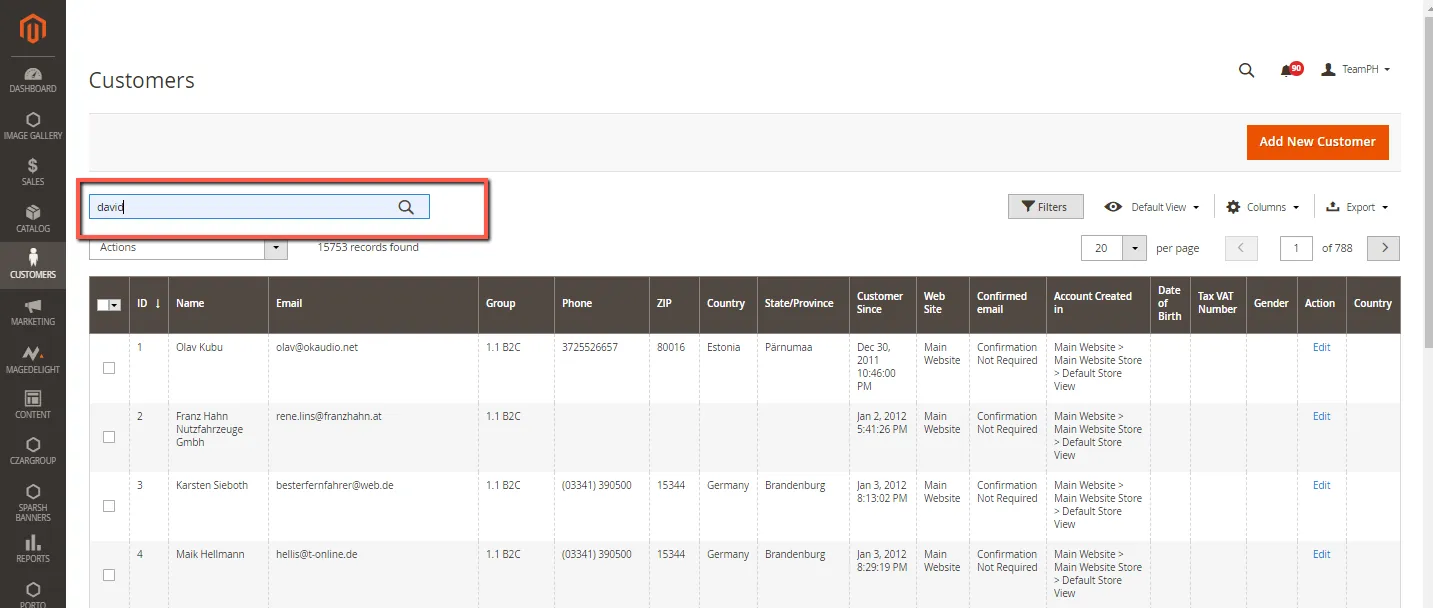
3.) In the right end column, select EDIT action. Open the record in edit mode.
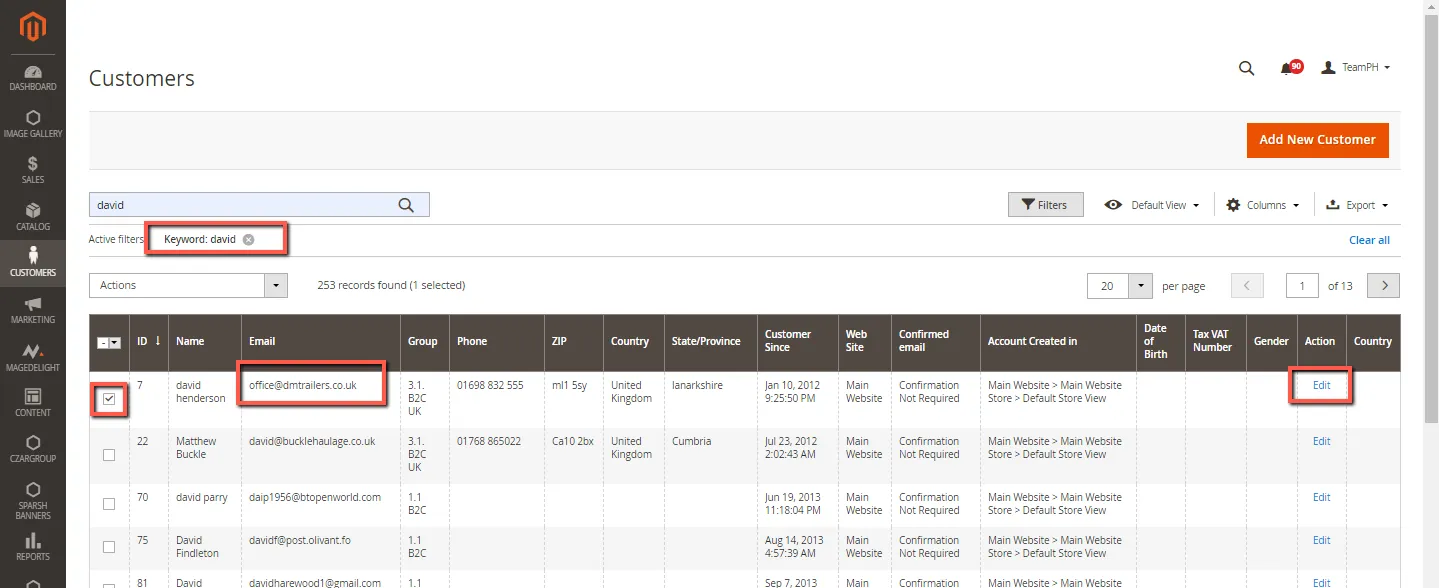
4.) Review the customer profile in the CUSTOMER VIEW.
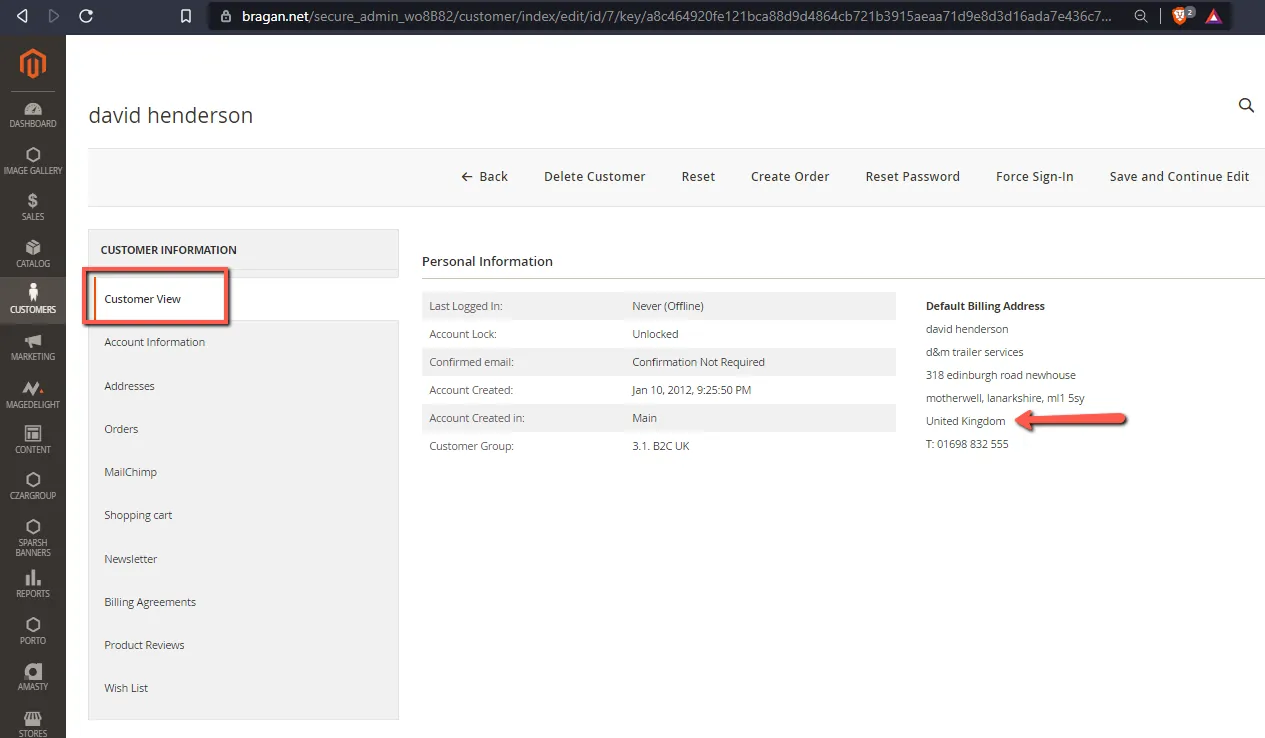
5.) From the customer information menu, click ACCOUNT INFORMATION. Always Confirm with management what customer group this customer belongs to. Make the necessary changes.
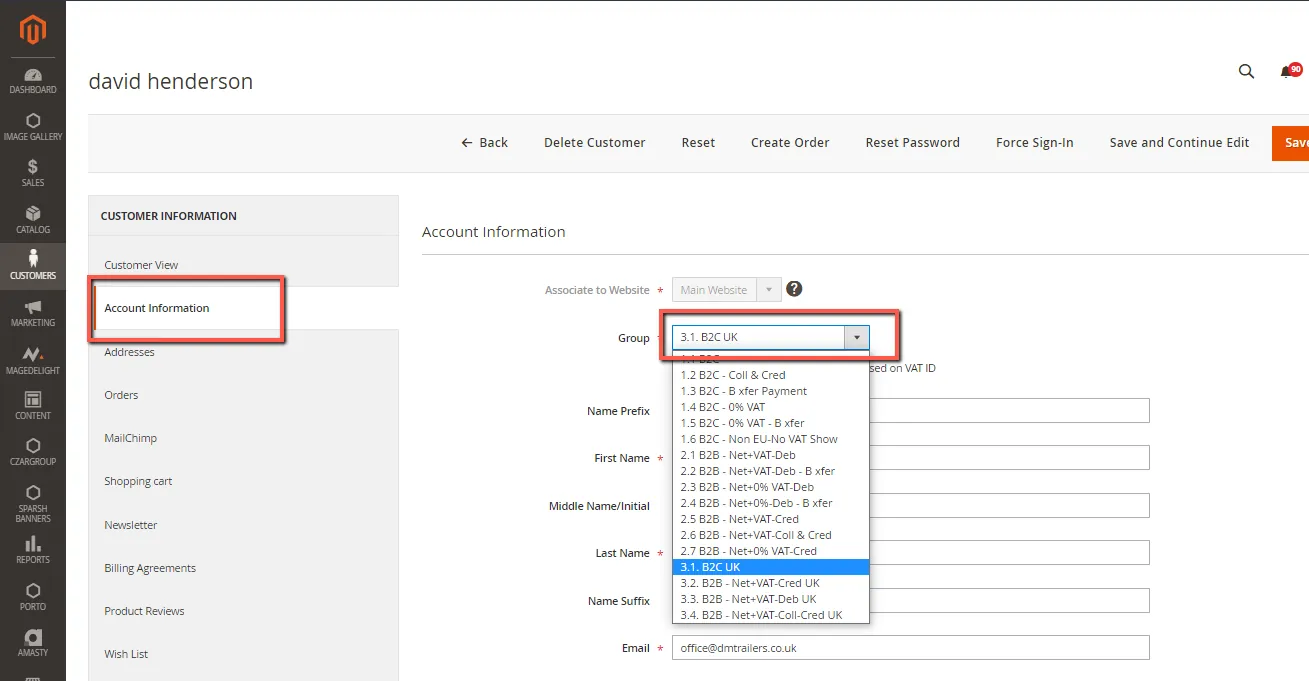
6.) When complete, click Save Customer.
Assign a customer to a different group#
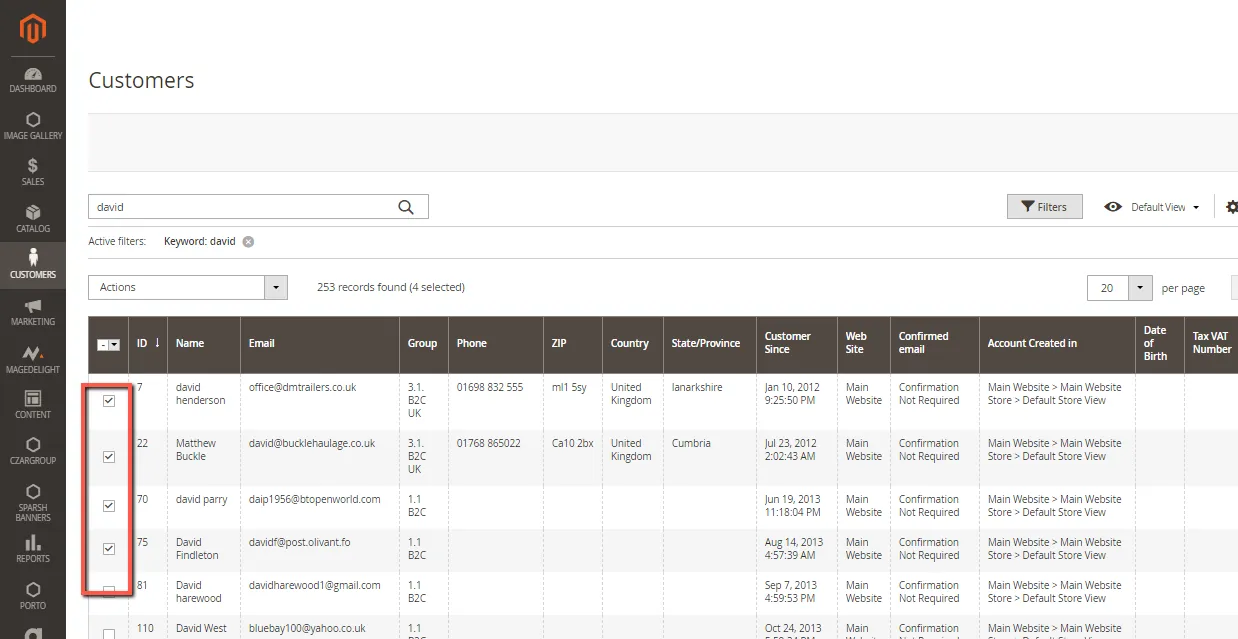
1.) On the Admin sidebar, go to Customers > All Customers.
2.) Find the customer in the list and select the checkbox in the first column.
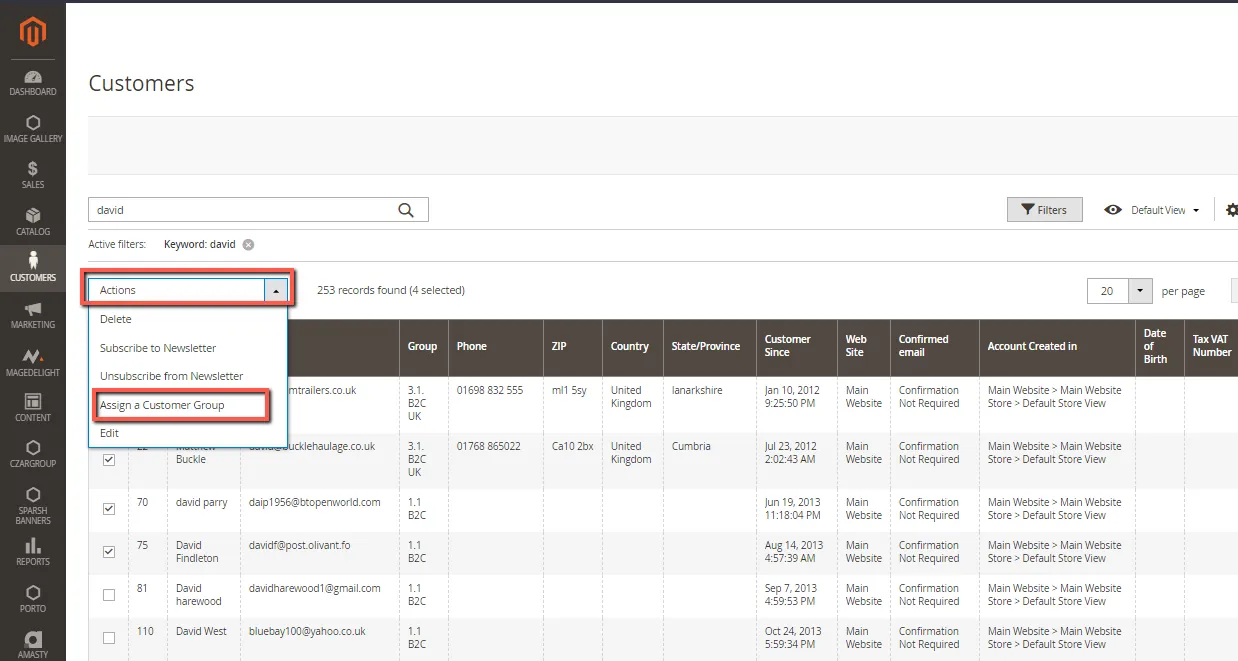
3.) Set the Actions control to Assign a Customer Group.
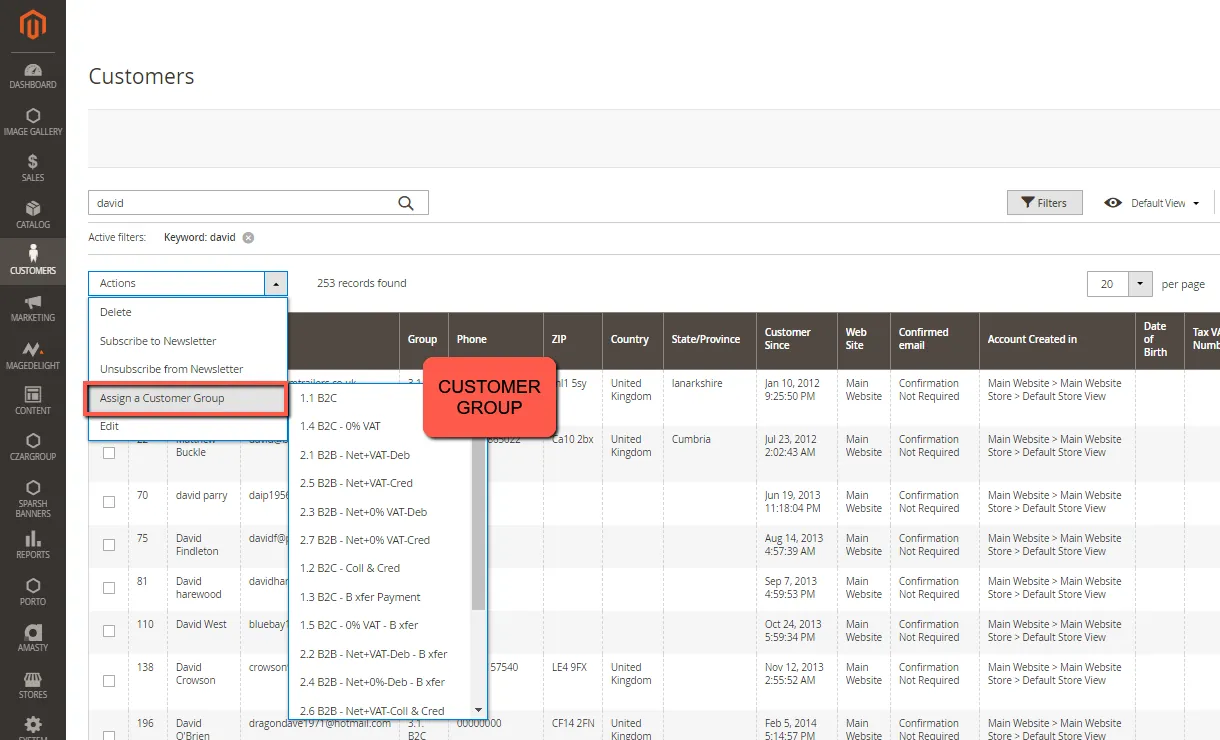
4.) Set the Group control to the new group. When prompted to confirm, click OK.
Associate a group of customers with specific#
discounts
1.) On the Admin sidebar, go to Marketing > Promotions > Cart Price Rules.
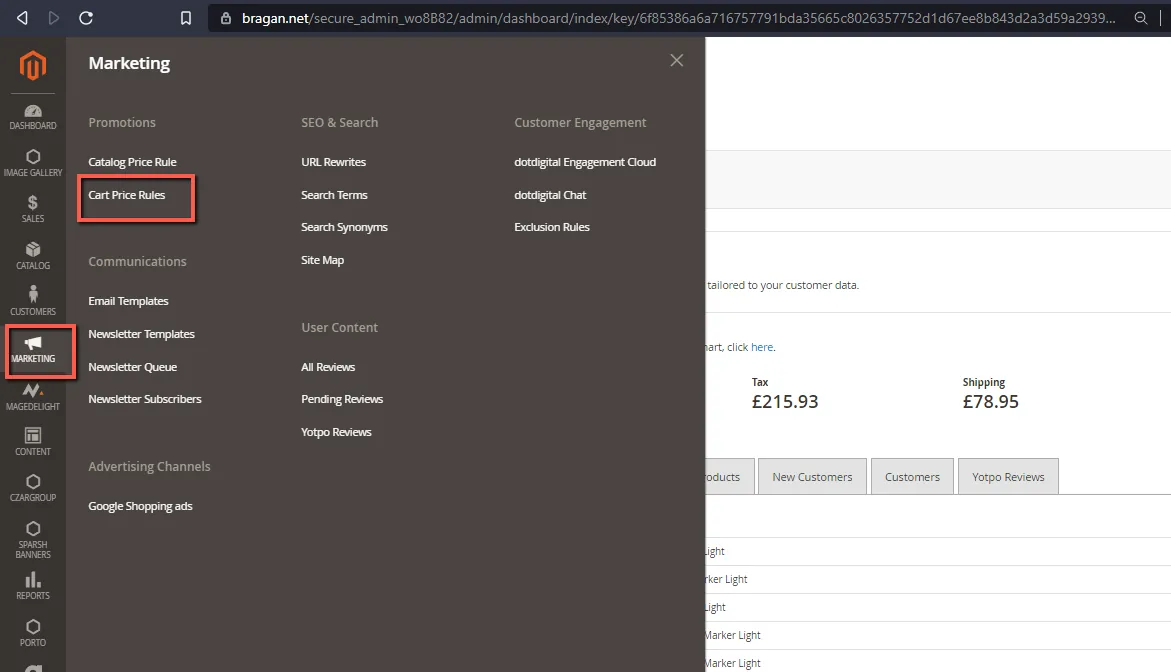
2.) Select the cart price rule with the discount to apply, or create a new price rule.
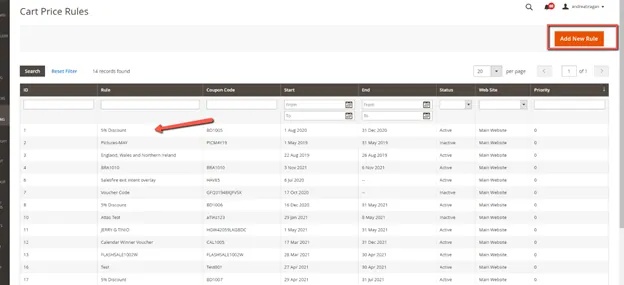
3.) Select the customer groups the rule will apply to.
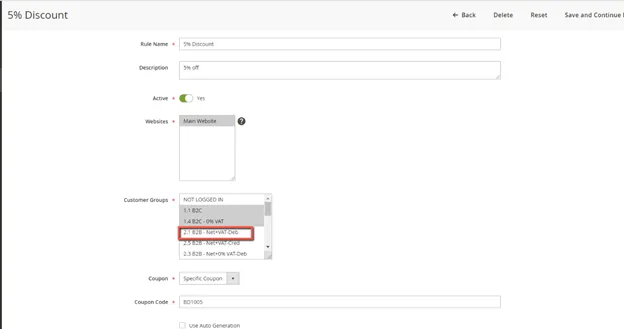
Customer Group to Specific Discounts
4.) Click Save.
To View Customer transactions in Magento#
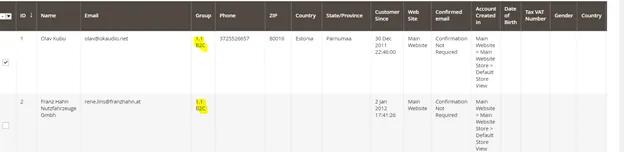
When you view Sales/Orders on the Magento dashboard you will see the customer group, and this should match Xero Tracking Categories relevant to the Sales Invoices and its corresponding tax conditions.
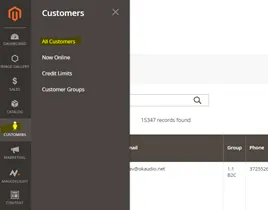
Select Customers>>All Customers
Notes on VAT#
UK & NORTHERN IRELAND
Customers in the UK & N.I – VAT rate is 20%. There are no exceptions to this rule – 20% VAT rate needs to be applied to all invoices. Bragan is a registered company in the UK (Trading).
REPUBLIC OF IRELAND
Customers in the Republic of Ireland pay 23% VAT. Companies & average joes all pay 23% VAT. Because these items are coming from our warehouse in Monaghan & delivered within the Republic then 23% VAT must be paid.
There are a select few that are exempt from VAT as they have VAT exemption from the Revenue – i.e. Combi Lift & Harte Peate are examples.
EUROPEAN
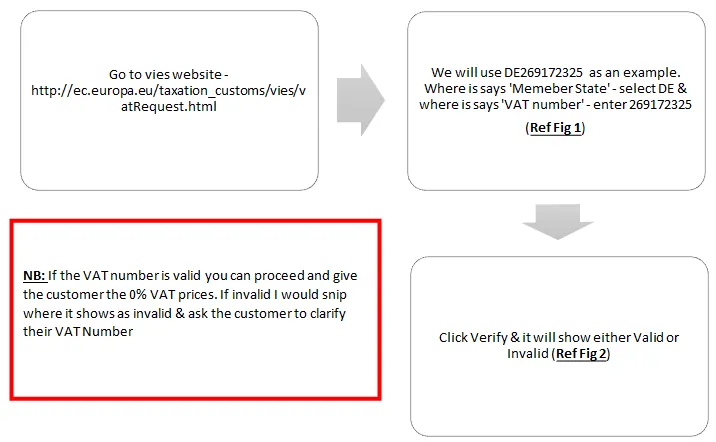
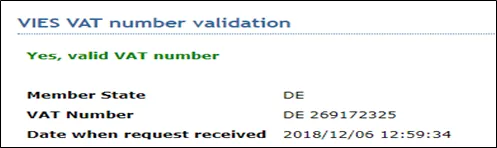
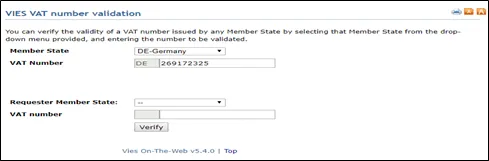
Companies in the EU can offer a VAT number (which is to be checked through VIES). If the VAT number is valid then the customer can get the order at 0% otherwise there is 23% VAT on the order.
Average joe customers in Europe pay 23% VAT.
The reason for this is because all Sales to EC & Worldwide come from Bragan Transport our Irish company.
OUTSIDE EU
Customer outside the EU (i.e. Estonia/Australia / Japan etc) can get their order at 0% VAT as this would be a NON-EU EXPORT. Proceed with the order at the full RRP price however the VAT rate on the order is 0%, the RRP price does not change. The full RRP is kept by us - no vat is indicated to these customers on checkout, this additional revenue is a cushion to us to absorb shipping discrepancies.
EU Countries Subject to VAT#
Countries are Charged 23% - UK Sales are Charged 20%
EU Countries NOT Subject to VAT#
Switzerland Norway Bosnia-Herzegovina Serbia Kosovo Albania Macedonia Ukraine Moldova Iceland Belarus Russia Turkey
VIES VAT Number Validation#
Confirming Valid VAT Numbers#
(IF the process outlined below does not validate the VAT number you can ask the customer to email a current copy of their VAT certificate, prior to zero-rating the invoice).
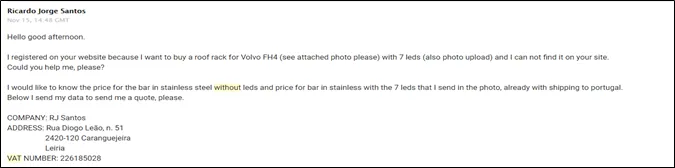
Here is an example email where you would be required to check out the VAT number,
A customer from Portugal looking to provide a VAT number & order without VAT
Please check the Video Attachment for reference.
Process#
Video & Media#
🎥 Editing Magento Customer Group 🎥 Checking VAT Number
Notes#
Overview Company Profile#
BRAGAN TRUCK, VAN, AND 4X4 ACCESSORIES LIMITED (refer to as Bragan 4x4 in this SOP) is
Bragan4x4 is the main/parent company servicing Ireland, Europe, and the rest of the world.
The main trading Currency used is Euro (€).
BRAGAN TRADING SERVICES LTD (referred to as BTS in this SOP)
BTS basically service United Kingdom Customers.
The main trading Currency used is pounds-GBP/STG (€).
*Bragan4x4 and BTS shared a physical warehouse located in Monaghan, Ireland.,
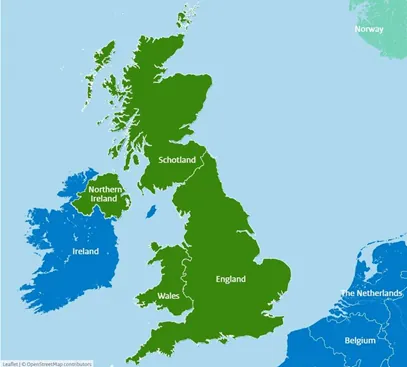
The United Kingdom (UK) is made up of England, Scotland, Wales and Northern Ireland.
Note: See Video Attachment.
Attachments#
Bragan_CS_Magento_Custome… 16/12/2025