Sending Potential Sales email to Customer v1
Potential Sales is designed to grow our Company's Sales by ensuring to send email to
Overview#
Purpose: Potential Sales is designed to grow our Company's Sales by ensuring to send email to all Potential Customer (Interested in our product). The purpose of this document is to show the procedure how to send a Potential Sales Email to customers.
Scope: The SOP applies to Team IRL, Trainees, and Team PH. All will have reference to the Tasks and steps for completing them.
Responsibility: It is the responsibility of each one of us to represent Bragan. Often you will be the first contact a Customer has and you will never get a second chance at this. You should think of each action as if it were coming from your pocket!
Objective: The objective of this document is to format procedures and examples on how to send potential sales emails to customers.
(Bragan logo will always remain on top as standard.)
Sending Potential Sales email to Customer#
Zendesk -> Settings -> Manage -> Views -> Potential Sales
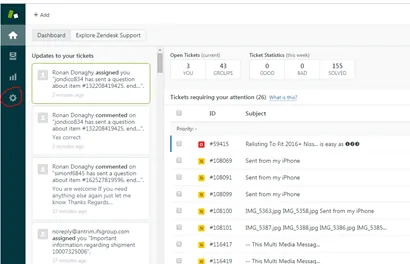
A
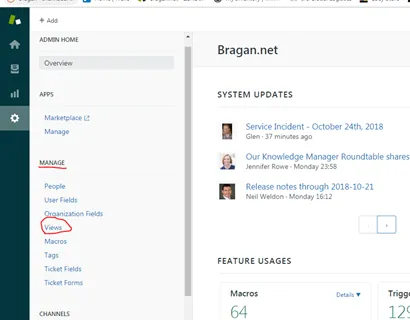
B
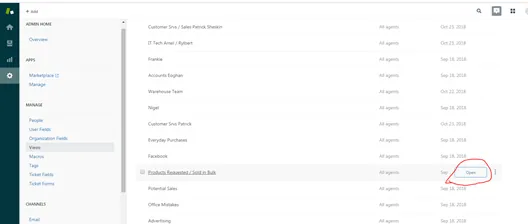
C
Messaging the customer
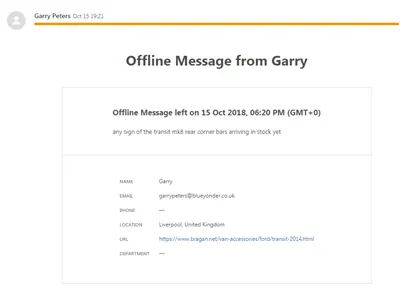
Message all customers from the 16th of the previous month to the 15th of this month.
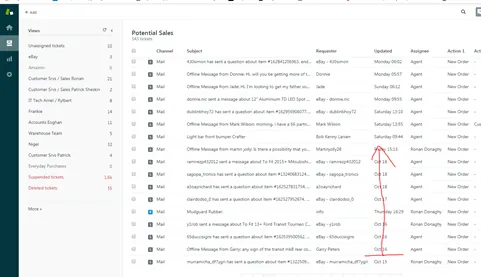
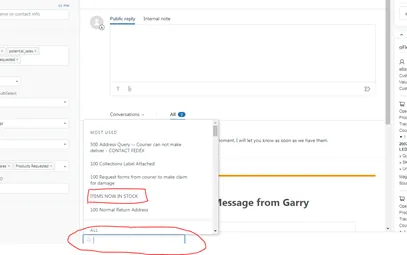
Use macro: ITEM NOW IN STOCK. if the item is back in stock.
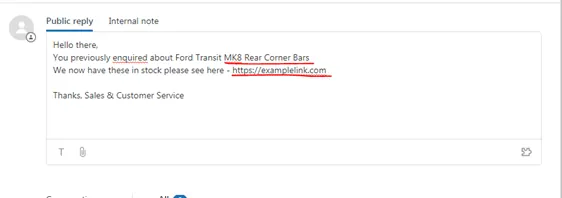

Submit as Solved
Notes#
This is an old file, may need some updates/revision by the owner.
Attachments#
Sending_Potential_Sales_ema… 16/12/2025