Potential Freelancer Hiring Process
Finding the best person to hire takes considerable time and effort.
Overview#
Purpose: Finding the best person to hire takes considerable time and effort. Screening candidates, reviewing multiple resumes and employment applications, listening intently to what candidates have to say (and what they don’t say) and deciding which person to hire is time consuming and challenging. But consider it an investment in the future. Consider what it costs to hire a new employee, from the time the position opens until the employee becomes a contributing member of the team. Time invested in following these structured hiring procedures will save time in the long run by helping you avoid a “bad hire” and will help increase your odds of attracting, hiring and retaining good employees.
Scope: This procedure applies to management/team lead position in charge of hiring process for freelancers.
Responsibility: It is the responsibility of each employee to ensure the process set out in this procedure is followed.
Objective: The objective of this procedure is:
to standardize the process of hiring freelancers
to save time in screening applicants
- Job Descriptions
1.1 Product Lister
Product Listing
Handles all aspects of listing which includes:
- SKU creation / listing live on channel (template preparation using SOP checklist).
- SKU / listing update - description update, price change, image update, composite update, etc.
- Resolve listing issues
Listing time for single SKU = 30 - 45 mins for entire process until checking of live listing Bulk listings = listing time depends on the number of SKUs to list
1.2 Customer Service Representative Customer Service
Leading customer service efforts across Phone and Email Monitoring and double-checking problematic orders with customers before dispatch Monitoring Amazon Account Health and Performance Assisting in Picture Editing Tasks Assisting HR by renewing open positions on Indeed and Onlinejobs.ph Reviewing and responding to customer reviews on Trustpilot Email campaigns Customer Service Role will be shared with another role like CS/Social Media Manager or CS/SEO Specialist
1.3 Accounts
Xero Accounting
VAT Returns (UK) Payroll (Brightpay) Supplier Payments Facebook/Instagram/Twitter/LinkedIn Customer Statements
1.4 Sample Job Post
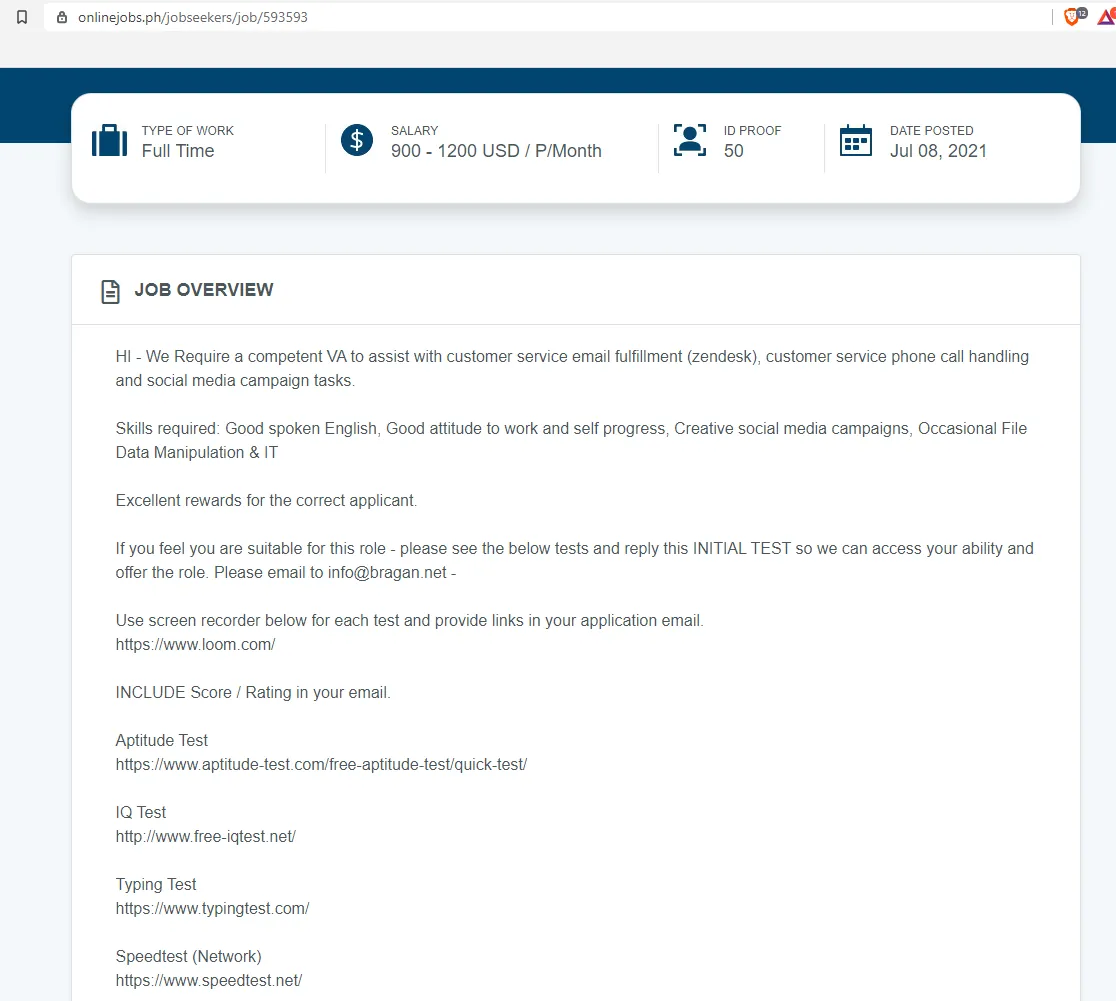
Example of Listing from Onlinejobs.ph
- Applicant Assessment Process
Note: Tests mentioned below are found /included in the job post. Steps below shows how to assess results offered by applicants.
2.1 Applicant will email the Initial Test we require, below are the benchmarks for these Tests.
- Aptitude Test
- is a systematic means of testing a job candidate's abilities to perform specific tasks and react to a range of different situations.
- Passing Score is 65 % and up.
- IQ Test
- An Intelligence Quotient is a total score derived from several standardized tests designed to assess human intelligence.
- Passing Score is 110 and up.
85 - 114 > Average
115 - 129 > Above Average
130 - 144 > Gifted (2.3% of test takers)
- Typing Speed - 40WPM and up
- Internet Speed Test - 5mbps and up
Note: We need to assess speed / progression – one of the loom videos can used as reference (approximate time to get to point A-B on the material recorded)
2.2 If all above criteria are met, depending on the Role, send relevant macros (email template)
- Product Lister
Using Zendesk Email - 602 Recruitment & HR - Product Lister Training Links
When the applicant reply, send:
Using Zendesk Email - 603 Recruitment & HR - Product Lister Exercise
- Accounts
Using Zendesk Email - 604 Recruitment & HR - Accounts Agent Test
- Customer Service
Using Zendesk Email - 605 Recruitment & HR - Customer Service CS Test
2.3 Applicant will send their answers. Passing Score will then be assessed depending on the role
- Product Lister - Passing Score: 14/19 74% Answer key: Product Lister Knowledge Check Answer Key
- Accounts - Passing Score: 5/7 71% Answer key: Accounts Test Assessment Guide
- Customer Service - Passing Score: 24/32 75% Answer key: CS Exam Answer Key
- Trello Test - Passing Score: 18/25 72% Answer Key: Trello Assessment Guide
Notes:
Assessment should be in Internal note of the email thread. Must include score, percent score, and comments.
This job requires constant initiative to act proactively, attention to details, communication, respect, asking questions and giving ideas to improve the process.
2.4 If Applicant passes the given exam, Team PH Lead will do Intro Call with the applicant. This is in form of a video call. The call should cover: Brief background of candidate
Previous work experience – why they left or not in the previous job anymore
Experience on tools related to the position:
Work Management Tools – Trello, ClickUp
Order Management Tools – Linnworks, Magento
Email Management Tools – Zendesk
Accounts Management Tool - Xero
Candidate’s knowledge about the company
Opportunities in Bragan and how Bragan invests in right people
Work hours preferred
Hourly Rate Preference
Why should we give Candidate the Job?
Questions from candidate
Closing remarks: “We will update you after this call”
2.5 Management will call the applicant for final interview.
2.6 If applicant has been approved for 1 Week trial, Bragan accounts will be provided by the trainer.
- Bragan Skype
- Bragan Email
- Zendesk (if Applicable)
- Time Doctor Invite - by management
2.7 Once Skype account is created, Management will need to add the candidate to relevant previous Training Discussions in one or more of the following.
- PH Onboarding & HR
- Bragan Product Lister / Accounts / Customer Service Training Group
- Training Call Group Only
- [Candidate Name] Training Group
Trello board should be offered to candidate at a later stage – he / she should migrate content of his temporary board. Link to the Dummy Trello Board shall be given as well to correct minor mistakes made in temporary board.
- Rejection
If a candidate fails to pass in any of the tests above, the candidate is not suitable for the position and will be informed that they did not get the job position. Send this macro:
Using Zendesk Email: 908 Job Not Qualified
Using Replyco Email: 610 Recruitment & HR - Agent / Applicant Not Qualified for job offered
Failure to follow instructions to any of the tests will result in an Auto Fail and will be sent this macro:
Using Zendesk Email: 908 Job Not Qualified
Using Replyco Email: 610 Recruitment & HR - Agent / Applicant Not Qualified for job offered
- Headhunting Process
If a job posting is not getting enough views or applications and the job position is needed to be filled immediately, assigned employee must actively headhunt for potential candidates in onlinejobs.ph. This should be weekly task of assigned agent to enquire from management if this is needed (Friday). The goal is to send offers to a minimum of 10 candidates per specific role.
4.1 Go to onlinejobs.ph – ask Management for credentials
4.2 View all job posts
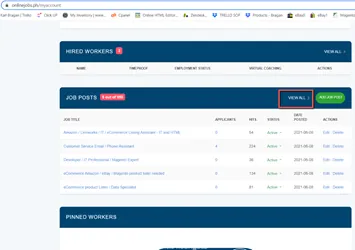
4.3. Filter to all active Job Posting and go to the link of the Job Posting that needs to be boosted. (Maximum of 10 active Job posting is allowed in Online Jobs PH)
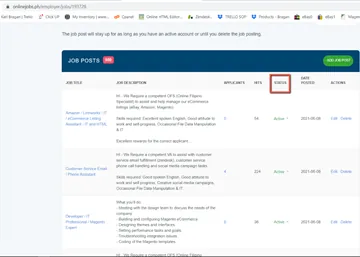
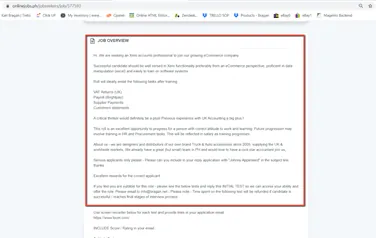
4.4. Once in the Job listing page, review the Job Overview and identify possible keywords to use in searching for candidates. For this example, let’s use the Xero Accounts role. Possible combination of keywords are: Xero, UK, Vat, Brightpay.
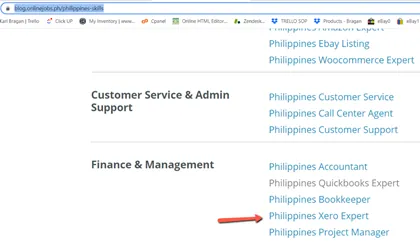
4.5. Go to blog.onlinejobs.ph - and pick a skill that is most relevant for the job position. For the example, we will select Philippines Xero Expert
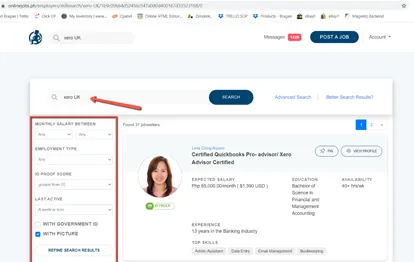
4.6. You will use the search bar to input different combinations of the keywords you have previously identified. All possible combinations must be searched in order to maximize the results.
You will also have to refine your search. You can apply the filter for “Last Active” to “a week or less” to ensure that applicants that will be searched are the ones who are actively Job hunting as well.
Examples for keywords to search: (Xero UK) (Xero UK Vat) (Vat UK) (Xero Brightpay) (Brightpay UK) (Xero Vat)
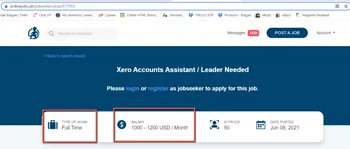
4.7. Select candidates that you will send the Job Ad to. Cross-reference their profile with the Job Ad and select only the ones that you think has a high chance of applying. Making sure that it matches or is close to the parameters the Job Ad is looking for (Salary, Work Hours)
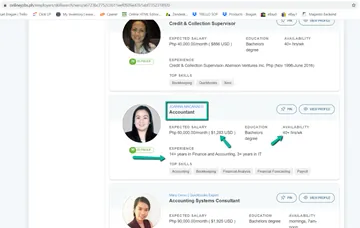
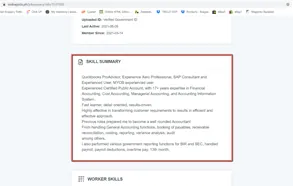
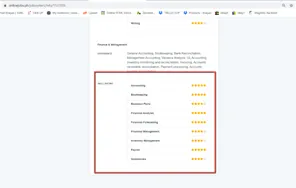
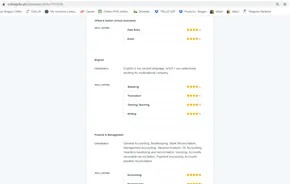
4.8. When you’re on the profile of the candidate you should check the Skill Summary and Worker Skills if they have experience or rated their skills high enough.
You should also be looking for the keywords you have searched and see what the candidate wrote about it.
Should also check their English skills as well because this one of basis to know how well a candidate can communicate. We will accept minimum of 3 Stars indicated in their Worker Skill.
4.9. If candidate is able to meet the requirements above, we can send them now a message
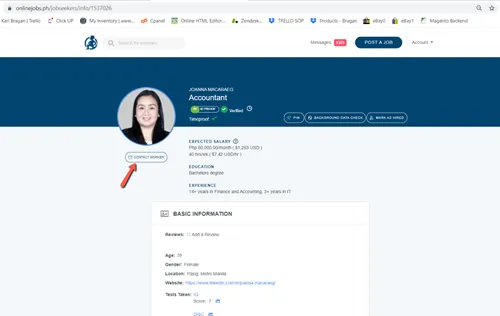
4.10. In sending a message to the candidate, you can use the latest template created for the job position (11) and rename the subject to the next number (12). Scroll down on the message and make sure to update the link of the Job Ad that we want to send. Tick on the Save email template box so that it will reflect on your next messages. This will serve as reference as to how many messages have already been sent. Then click on send.
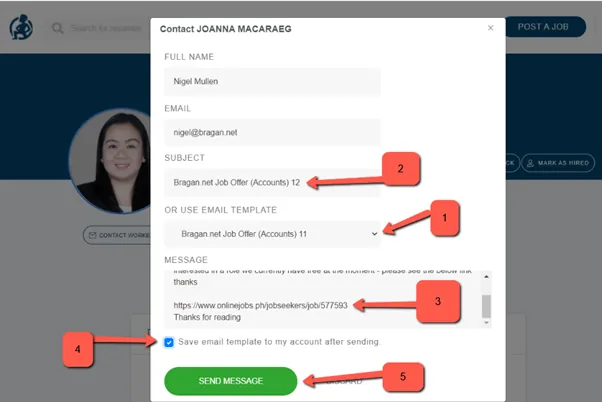
4.11. You will repeat steps 6 – 10 until you are able to send offers to around 10 – 30 candidates.
Notes#
This section is important so Adhoc points and issues can be logged. Also, Q&A can be logged for suggestions for potential issues encountered. Also, log important notes needed for this system. Additional Notes:
All Bragan employee should format a Trello card – this will include contact / personal details – next of kin, and also onboarding check list – this will include letter of offer has been sent – policies etc. – also a log of performance related comments (NOI, / bonus / deductions history) .
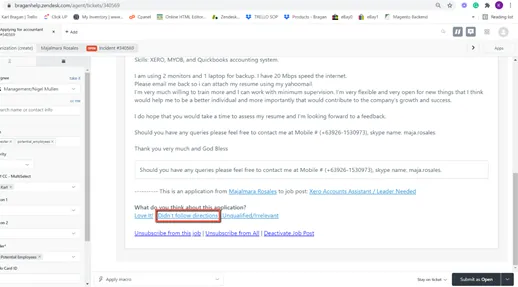
If a candidate applied through Online Jobs PH and not through email, a “Didn’t Follow Directions” function offered by Online Jobs PH can be used. This can be found in the Zendesk ticket of the application. This will automatically archive the message of the applicant in our online jobs ph account.
Potential Issues:
1 - ISSUE ENCOUNTERED: Stuck on Loading
RESOLUTION: Refresh Browser
2 - ISSUE ENCOUNTERED: Broken Links
RESOLUTION: Get the external link as this will allow other people to access the SOP without the need for login credentials and avoid broken links.