Generating List of Stock Item Inventory
The purpose of this document is to guide each personnel on how to generate the
Overview#
Purpose: The purpose of this document is to guide each personnel on how to generate the latest list of stock inventory.
Scope: This procedure applies to all Bragan Personnel.
Responsibility: It is the responsibility of each employee to ensure the process set out in this procedure is followed.
Objective: The objective of this procedure is: to guide employees on generating the latest list of stock item inventory.
Procedure
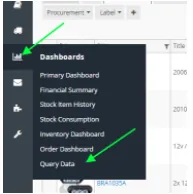
- Download Stock Item (with levels) and Composite Export through Query Data.
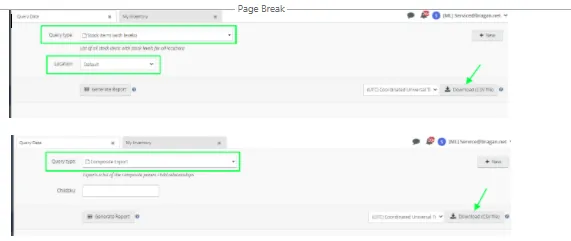
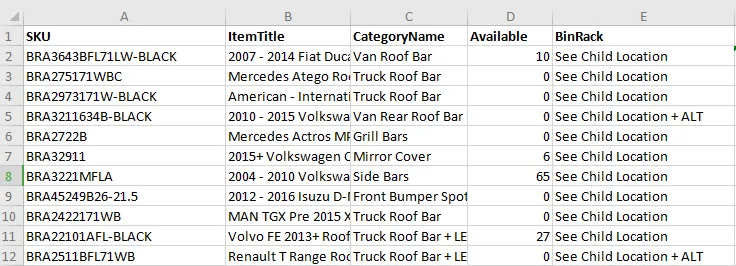
Take only the following column from Stock Items (with Level) report.
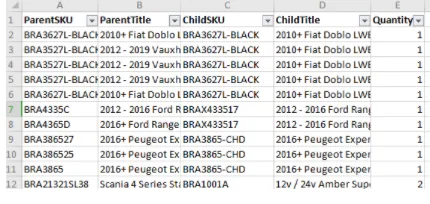
Composite Export
- Filter Child Stock Items
Lookup the SKUs in Stock Item (with Level) from the ParentSKU column in Composite Export to filter only all child SKUs using =vlookup() function.

Filter only the rows with #N/A. These rows are the child stock items in inventory.
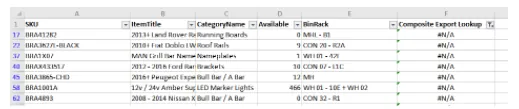
- Remove unnecessary SKUs.
Remove all services category
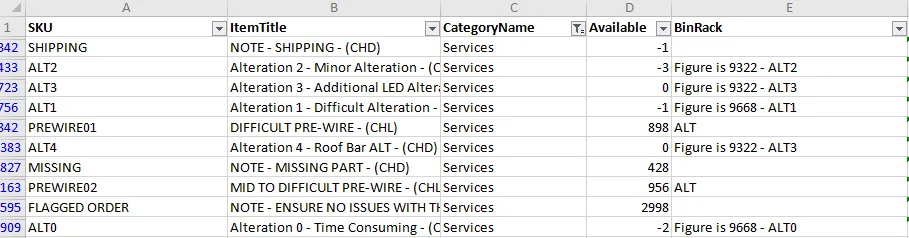
Remove also SKUs with archived, damaged, and (PP) in item titles and arranged remaining items by category or by binrack. Save the file.
Video & Media#
Notes#
This section is important so Adhoc points and issues can be logged. Also, Q&A can be logged for suggestions for potential issues encountered. Also, log important notes needed for this system.
Additional Notes:
This shows how to generate a list of stock items in Linnworks. Attached is a sample video on how to get a file of SKUs with stock levels from Linnworks. Shows how to pull report of skus with stock level from linnworks. Go to Dashboards > Query Data > Stock Item with Level > Download - to pull report.
Potential Issues:
1 - ISSUE ENCOUNTERED: Stuck on Loading
RESOLUTION: Refresh Browser
2 - ISSUE ENCOUNTERED: Broken Links
RESOLUTION: Get the external link as this will allow other people to access the SOP without the need for login credentials and avoid broken links.
3 - ISSUE ENCOUNTERED: "Type Text Here"
RESOLUTION: "Type Text Here"