How to Add Extended Properties
The purpose of this SOP is to guide newly hired Product Lister agents in adding
Overview#
Purpose: The purpose of this SOP is to guide newly hired Product Lister agents in adding information about the product in the extended properties in the Linnworks Tab.
Scope: This procedure applies to all Product Listers.
Responsibility: It is the responsibility of all employees to ensure that the process set out in this procedure is followed.
Objective: 1. To serve as a guide to agents on what information to add in the extended properties.
- To give a better understanding of what extended properties are in a listing.
- To give details about the other use of extended properties.
Process Flow#
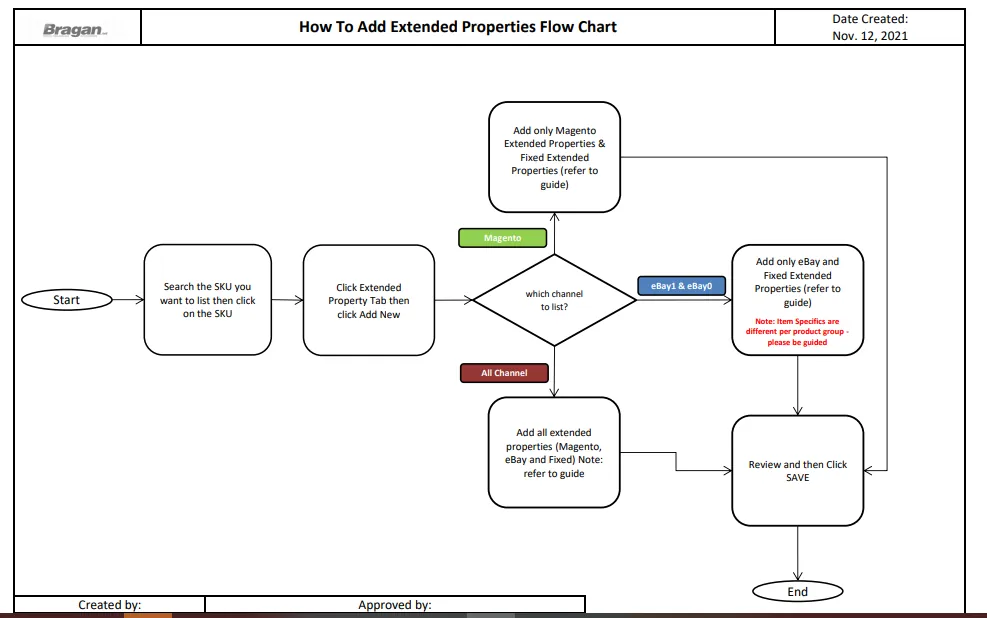
- Overview
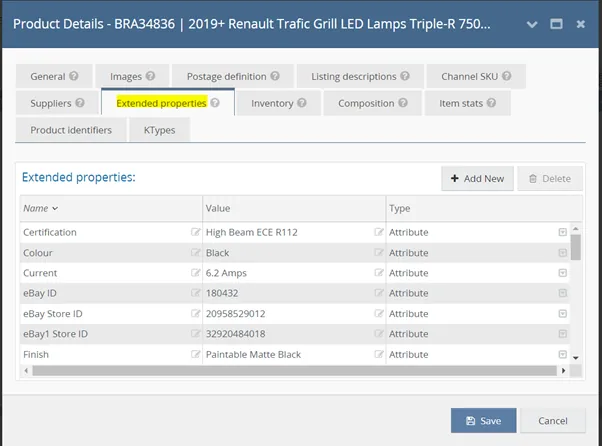
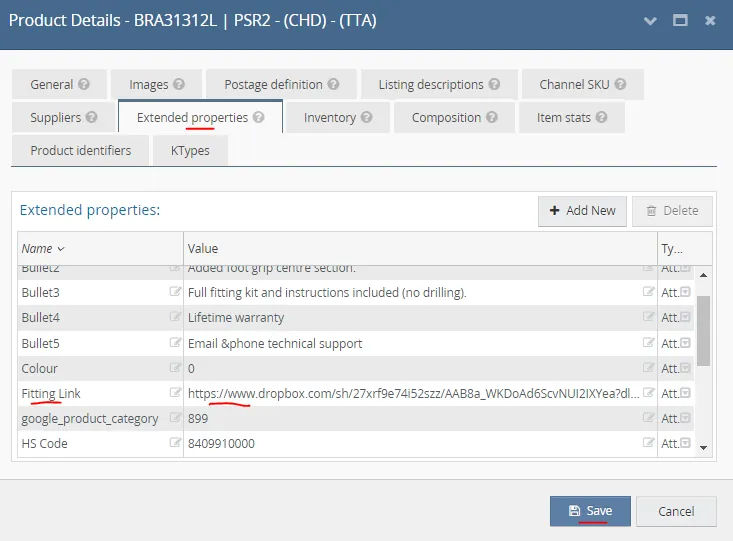
1.1 What are extended properties? Extended properties on listings are used to define the product specifications of an item. Mainly, these are the details/specifications that will be added to the listing templates. Extended Properties allow adding item details like item condition, brand, model, material, shipping prices, variation attributes like size, colour, etc. These are added in the Extended Properties tab of Linnworks Product Detail Page. See Figure 1.
1.2 Uses/Importance of Extended Properties
To add specifications to listings (Make, Model, Brand, etc).
To add categories to listings for eBay and Mageno.
To submit customs details to couriers (e.g Tariff - HS Codes).
To add values to use as conditions for filtering SKUs.
Very helpful especially for product lister agents when doing a bulk listing update. You may create and add the extended property of your own that can be used to filter the SKUs that you are updating.
- Extended Properties Per Channel
2.1 Magento Extended Properties
- Magento Short Description - This is the short description to be displayed on the Bragan Website. It is the 5 important bullet points in the listing description. The format for adding this is: Mag_Short_Description for the extended property name and for the value description should be in HTML format. To know how to add the value for magento short description see this How to Add Magento Short Description SOP.
- magento_shipping - The shipping group of the item. To check for the value download the attachment Magento Shipping Group Guide. If still unsure of the value, confirm with trainer/senior lister.
- magento_shipping_ALT - Value is either YES or NO. If the product has alternations then value is YES, otherwise it is NO.
- Mag IDs - These are the category structure to be added for the Bragan Website. These are a set of root categories for the item to organize the products in a way for visitors to find products easily. In this example: BRA34836, Van Accessories > Renault > Trafic 2014+ > LED Grill Spot Light.
This will be added in the extended properties by (MAG ID, MAG ID 1, MAG ID 2, and MAG ID 3) as the extended property name and add the corresponding values for the category. See SOP on How to Search eBay and Magento ID Categories.
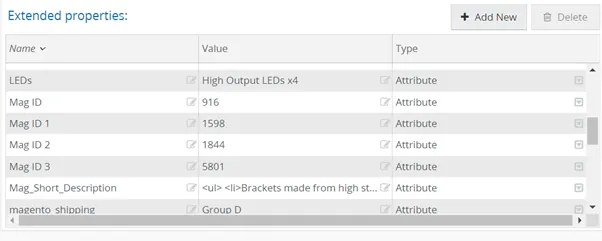
Note: There are instances that the category structure for the item has more root categories. Additional Mag IDs should be created.
2.2 eBay Extended Properties
- eBay Item Specifics - these are product details that helps the customer find the details of the product. It gives better visibility for Bragan products on the eBay platform and helps the customers find what they are looking for easily. This is what it will show in the eBay listing once it is listed live.
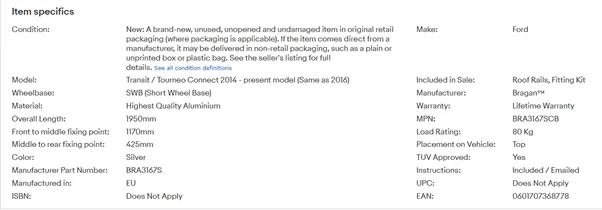
These are the usual set of Item Specifics (Bonnet Guards, Sun Visors, Window deflectors, and Mirror Covers.)
a.1 Make - Brand of the car.
a.2 Included in Sale - It is the product/s being listed.
a.3 Manufacturer - Bragan™
a.4 MPN - SKU code
a.5 Placement on Vehicle - The position to where the product will be installed.
a.6 Fitment Type - It is either Bolt On, Heavy Duty Adhesive Tape, Vehicle Body Fixing, and etc.
a.7 Instructions - Included / Emailed.
a.8 Model - It is the Specific Vehicle.
a.9 Material - The product material.
a.10 Manufacturer Part Number - SKU code.
a.11 Manufactured in - EU.
a.12 Brand - Bragan™
a.13 Colour - Colour of the item.
a.14 Finish - Value is:
Diameter of bar (applicable to bars)
These are the fixed extended properties values that should be present to every listing:
eBay ID
eBay Store ID
eBay1 Store ID
Fitment Type
google_product_category - 899
HS Code - 8409910000
Mag_Short_Description
magento_shipping
magento_shipping_alt
ManufactureCountryCode - IE
Max Dispatch Time - 1
Chrome Mirror Polished - applies to chrome accessories and items made of SUS 304 Stainless Steel
Paintable Matte Black Finish - if the item indicated is BLACK
Tinted / Smoked - for acrylic items
a.15 Warranty - for a more detailed guide for warranty for each category please see attachment on Warranty Guide.
most commonly used value is:
Lifetime Warranty - applies to all stainless items, Wind deflectors and Acrylic items. applies to ALL Bars with no composite.
Stainless Lifetime Warranty - applies to all bars that has composite items such as LEDs and SPOTS
1 YEAR Warranty - applies to all Running Boards and Light Accessories except for LAZER GRILL.
5 YEAR Warranty - applies to LAZER GRILL items
Notes:
- Additional Item specifications might be needed depending on the type/category of product you are listing. It is best to use as many attributes as possible because you never know what the customer could type in the search bar. You don’t want to miss a sale because you haven’t been specific enough in your product listing.
- Brand and Manufacturer differ for Bullbar items. There is a Non EC Approved Bullbars and an EC Approved Bullbars. You will know it is EC Approved if the SKU contains EC. For example: BRA4125EC, since there is EC at the end of the SKU it is an EC Approved Bullbar.
For Non EC Approved Bullbars - Brand and Manufacturer should be the Supplier Name (can be found in the Suppliers Tab of the Product Detail Page of Linnworks.
For EC Approved Bullbars - Brand and Manufacturer should be Bragan™
Additional Item Specifics for Lighting Accessories ( Lazer Grill LED Lamps, Spot Lights, Beacons, Fog Lamps, LED Bulbs, etc)
a.16 Current
a.17 Voltage
a.18 Working Life
a.19 Certification
a.20 Power Consumption
Additional Item Specifics for Roof Rail Products
a.21 Load Rating
a.22 Overall Length
a.23 Dimension
a.24 Placement on Vehicle
a.25 Wheelbase
a.26 TUV Approved
a.27 Other relevant information about the item
Here are some of the additional specifications needed for these item categories:
Roof Bars - Cab type, Wiring, and Diameter of bar Side Bars - Wheelbase, Bar Length, Diameter of Bar, and Wiring Running Boards - Dimensions Wheel Trims - Depth Perimeter Kit - Cab Type and Wiring Grill Bar - Dimensions and Wiring Tonneau Covers - Waterproof, Bed Type, Cab Type, Dimensions, Tonneau Cover Type, and Lockable Bumper Guard - TUV Approved, Diameter of Bar, Rear Corner Bars - Diameter of Bar and Dimensions Spoiler Bar - Wiring, Diameter of Bar, and Dimensions Bull Bar - Diameter of Bar, Wiring, and Certification
- eBay ID - an extended property for eBay that is used to map the specific item in the eBay Store under a specific category. This is to organize the products in a way for visitors to find products easily. This is the main category for the item. It is the type of accessory for a specific product.
- eBay Store ID - This is the secondary category for the item on the eBay Store. For bts_trading store. For eBay0 Channel.
- eBay1 Store ID - This is the secondary category for the item on the eBay Store. For Bragan-x Store. For eBay1 Channel
Note: To know how to get the value for Mag ID, eBay ID and eBay Store ID. Refer to the How to Search eBay and Magento ID Categories SOP.
2.3 Fixed Extended Properties These are extended properties that have fixed values and should always be present in all listings.
| Name of Extended Property | Value |
|---|---|
| HS Code | 8409910000 |
| Max Dispatch Time | 1 |
| google_product_category | 899 |
| Manufactured in | EU |
| ManufactureCountryCode | IE |
2.4 Fitting Link Extended Properties
This is added to add the fitting instruction of the item. The Name should be Fitting Link and for the value it should be in the Dropbox link where the fitting guide was saved. Fitting guide or instructions are saved in the Fitting Folder. You can request to management to give you access to this folder.
This extended property is for Child items only. If the item to be listed is a parent item then there is no need to add this extended property. To know what are child and parent item, see this SOP.
Note:
If there are no fitting guides found, please request to supplier. See this SOP on Handling Fitting Guide Request from Customers under Section - How to Request to Supplier. Usually this is a task of customer service agent, you can request the CS agent to do this unless you have access to Replyco and can email supplier directly.
For items designed by Bragan, suppliers won't have a fitting guide for this since they were just the one who manufactures it but the design and fitment is originally from Bragan, therefore there is no need to contact suppliers for the fitting guide. Below are the list of items designed by Bragan (but not limited to):
2" Side Bars
All truck and van roof bars
All Truck Visor Bars
All truck Grill Bars
All truck under bumper bars
All truck side bars
All truck perimeter Top Strips
All truck rear roof bar
All truck chassis bar
All truck step bars
Transit Bull Bar
4x4 Roll bar (with LED marker light)
4x4 Rear quarter bar
4x4 & Van rear roof bar (DAF Visor bar)
How to search for the fitting guide in the Dropbox folder
- Go to the Fitting Folder and search the SKU. Just copy and paste the SKU in the search tab to look for the matched folder. Open the folder to check if it has the right content. Each fitting guides has a different file format.
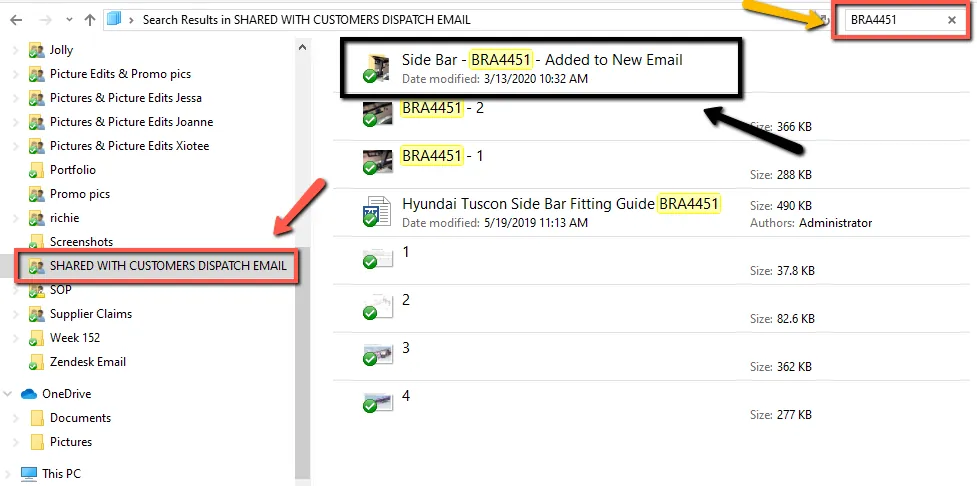
NOTE:
Please check the content of the folder before copying the link to ensure the correct fitting guide is being used and also if the content is really a fitting guide since sometimes there are folders that only contain pictures of the components but no fitting instructions
The snipe above is an old one (different folder) but the process of searching the fitting guide in the folder is still the same.
- If content is correct, go back to the folder and then copy the link of the folder. It should be the folder and not the individual files inside the folder.
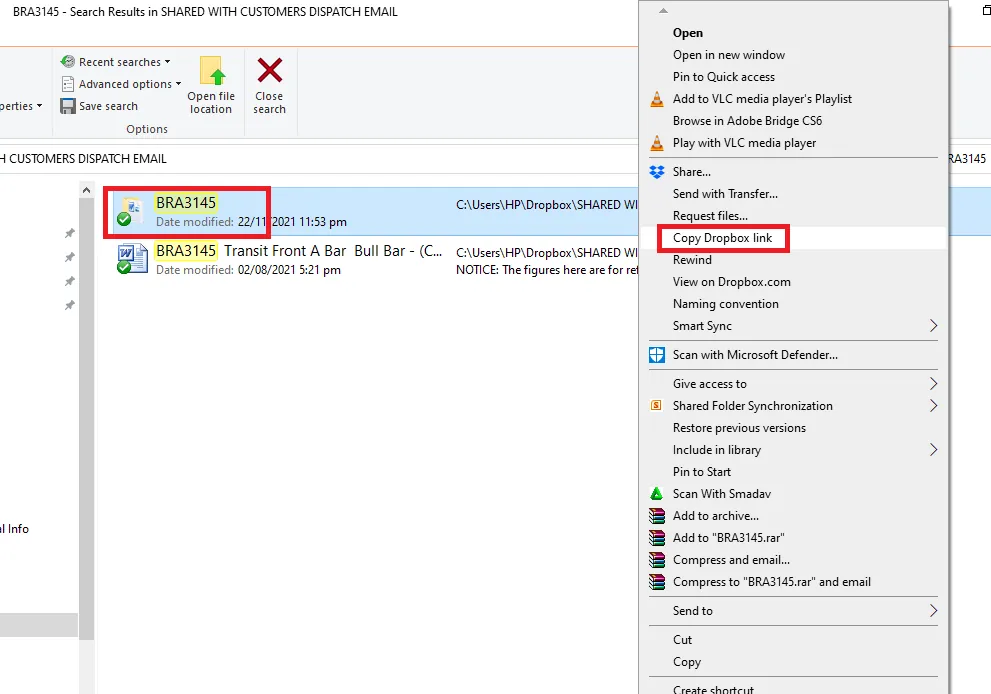
- Paste this copied link as the value for your fitting link extended property.
- If you cannot find the fitting guide of the child item in the Dropbox folder (this usually happens when the item is a new one) you can request the fitting guide to the supplier. To do this please check this SOP on Handling Fitting Guide Request from Customers, and see sections on How to Check for the Supplier of the Item, How to Request to Supplier and Saving Fitting Guide from Supplier. 3. How to Add Extended Properties to Linnworks
Note: This process is for new listing. For listing updates see SOP on How to update website listing in Linnworks.
Step 1. Know which channel you are going to list the item
You can know which channel to list based from the product listing trello card given to you.
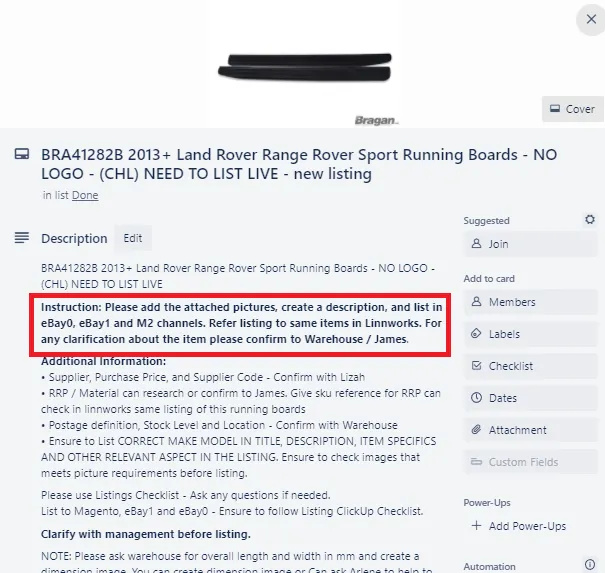
This is important so you will know what extended properties you are going to add. Refer to Section 2 as your guide.
If the SKU is to be listed in Magento only then add only the Fixed and Magento Extended Properties.
If it is going to be listed to all 3 channels (eBay1, eBay0 and Magento) then add all extended properties. Make sure that for eBay Item specifics choose appropriate item specifics of the item.
If it is going to be listed in eBay1 only then there is no need to add eBay Store ID.
If in eBay0 only then do not add eBay1 Store ID.
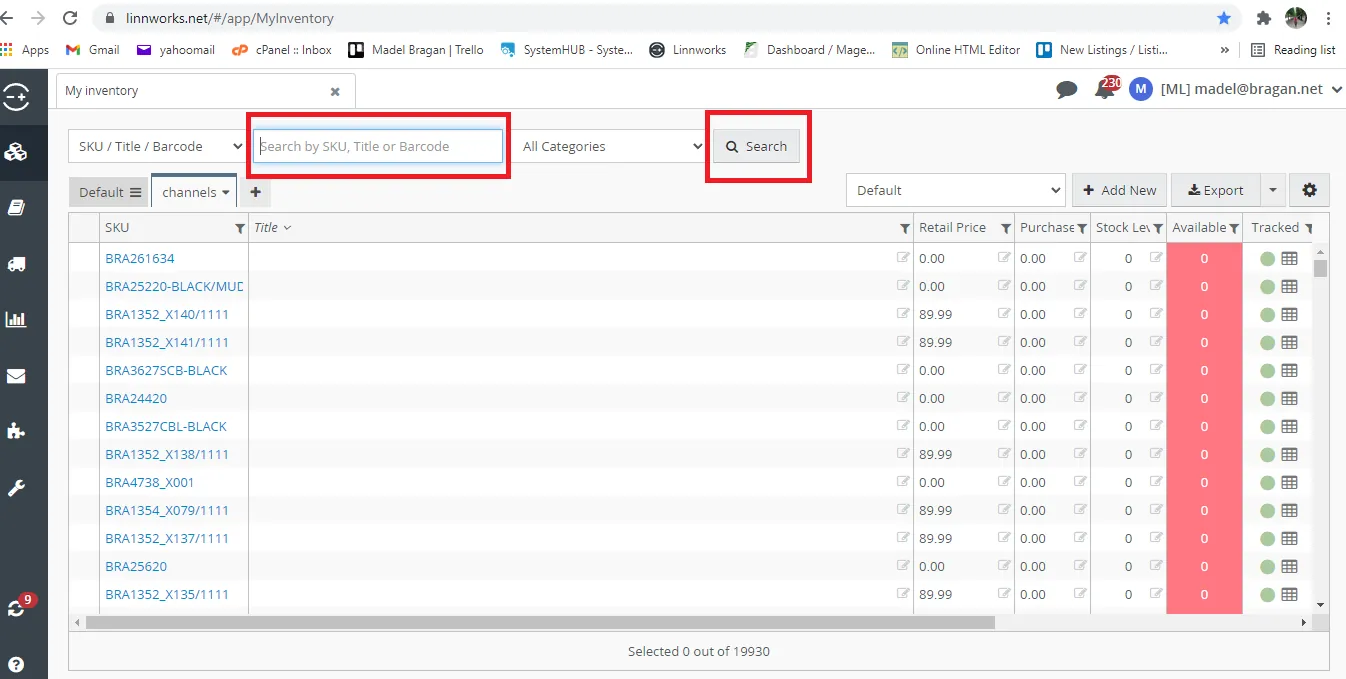
Step 2. Type the SKU of product to list in the Search Bar of Linnworks then click Search.
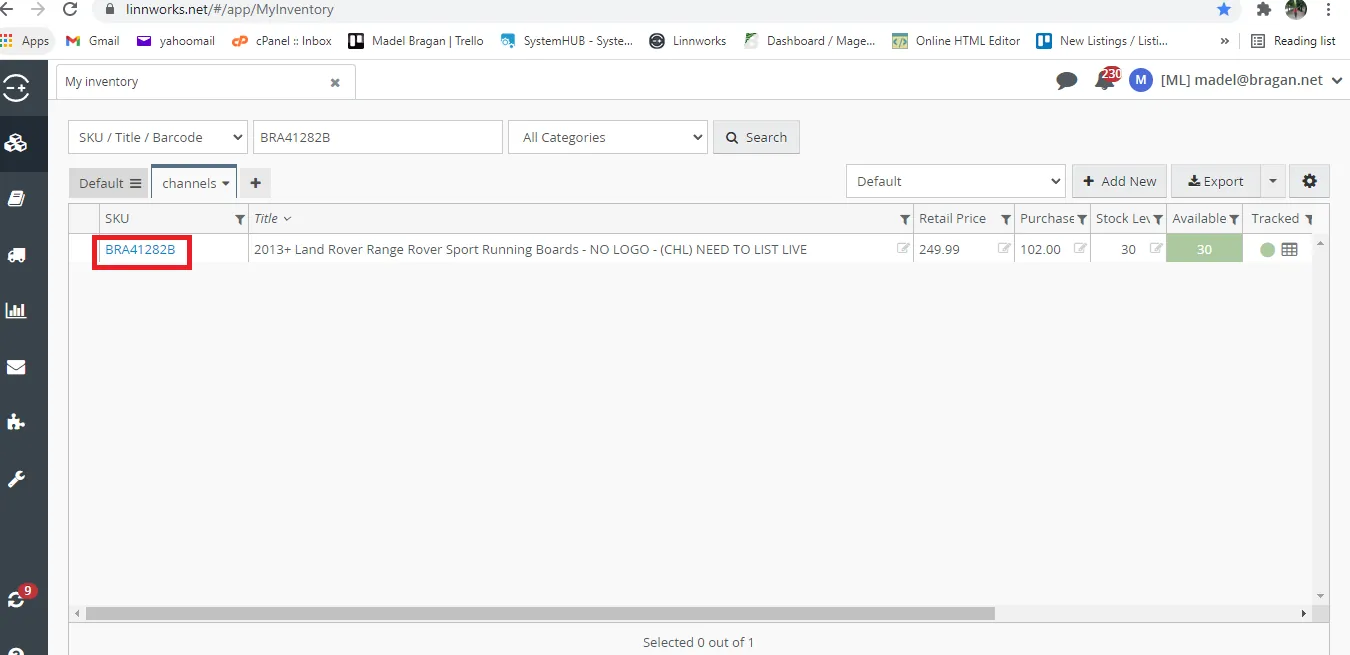
Step 3. Click on the SKU code
Step 4. On the Product Detail Page, click the Extended Properties Tab then Click Add New. Add the needed extended properties and its values. Review it and then click Save.
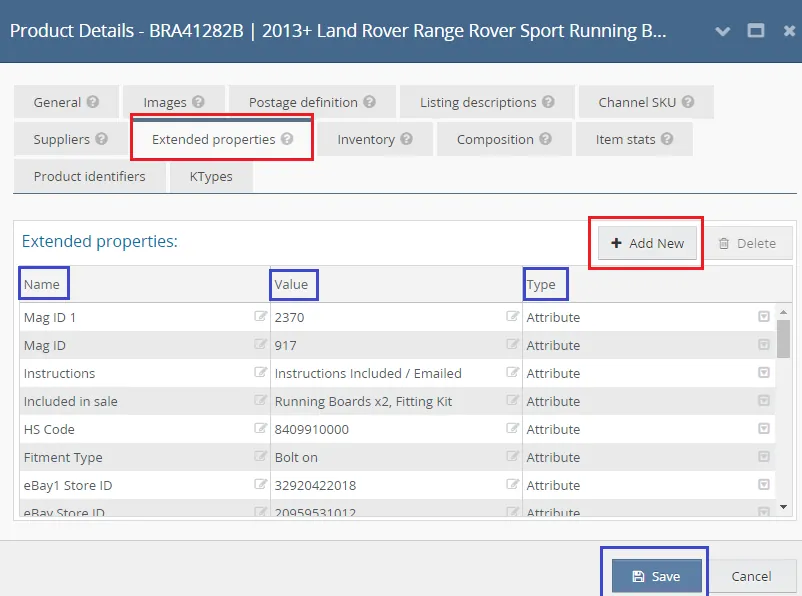
Extended Properties Tab in Linnworks is divided into three columns:
NAME – The Name of the extended property, eg. Brand. Note: The Property Name limit is 50 characters, and one SKU cannot have two extended properties
with matching names. The extended property will be highlighted in red if it is already a duplicate. VALUE – This is the actual value of the property, e.g., Bragan™.
TYPE - For item specifications and information for shipping, this needs to be Attribute.
.
Notes#
This section is important so Adhoc points and issues can be logged. Also, Q&A can be logged for suggestions for potential issues encountered. Also, log important notes needed for this system. Additional Notes:
If you have difficulty navigating with the excel file for the M2 Categories. You may check the Magento backend for easier navigation.
All agents must ensure that the correct categories for eBay and Magento are used for the listing. This is to avoid potential errors in product mapping for eBay and Magento websites.
Ensure that the Mag_Short_Description is in HTML format to avoid potential errors with it showing on the BRAGAN website.
Ensure correct values for each extended properties are added, if unsure confirm to trainer/senior product lister.
For Non EC Approved Bullbars - Brand and Manufacturer should be the Supplier Name
For EC Approved Bullbars - Brand and Manufacturer should be Bragan™
You will know it is EC Approved if the SKU contains EC.
Potential Issues:
1 - ISSUE ENCOUNTERED: Stuck on Loading
RESOLUTION: Refresh Browser
2 - ISSUE ENCOUNTERED: Broken Links
RESOLUTION: Get the external link as this will allow other people to access the SOP without the need for login credentials and avoid broken links.
2 - ISSUE ENCOUNTERED: Input incorrect extended properties & already listed in the channels
RESOLUTION: do update listing process ( How to update website listing in Linnworks)
Attachments#
How_to_Add_Extended_Proper… 02/02/2026
Magento_Shipping_Group_Gui… 02/02/2026
Warranty_Guide.xlsx 02/02/2026