How to delete extended property like filter in Linnworks
Standard Operating Procedures are the clear and concise documents that will serve
Overview#
Purpose: Standard Operating Procedures are the clear and concise documents that will serve as the guiding principle in every task in this business. The purpose of this document is to outline to new and existing employees how to delete extended property.
Scope: This procedure applies to all Bragan Personnel.
Responsibility: It is the responsibility of all employees to ensure the process set out in this procedure is followed.
Objective: The objective of this procedure is:
To help employees delete extended properties in Linnworks like Make, Model, Included in sale and Filters added in extended property used for bulk new listing and bulk update listing to ensure these filters are remove after every task is done.
How to delete extended property like Make, Model,
Included in sale, and Filters in Linnworks used for#
bulk new/update listings added to extended
property.
Steps
- Create a csv file and upload in Linnworks
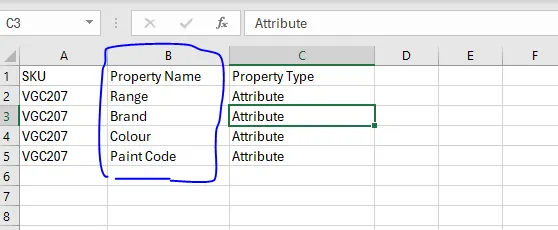
Property type and Attribute are fix and no need to change.
- Upload the csv file in Linnworks
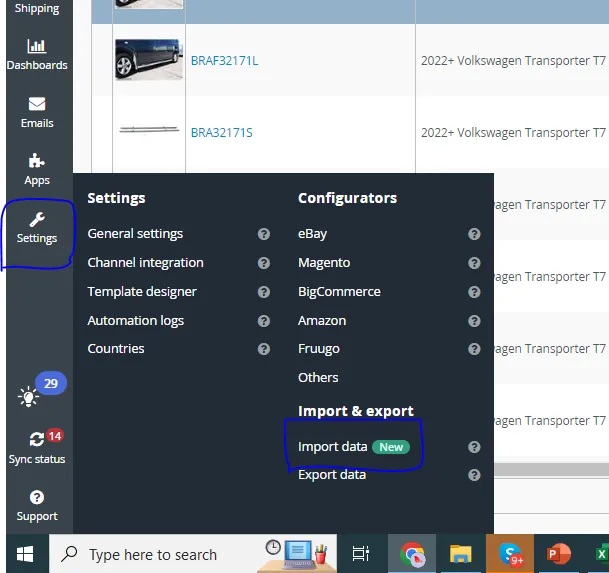
Go to Linnworks, mapp and upload the csv file.
SETTINGS>IMPORT & EXPORT>IMPORT DATA NEW>IMPORT TYPES>DELETE>DELETE EXTENDED PROPERTIES
Choose Delete import type and then Delete Extended Property. Mapp the file then run.
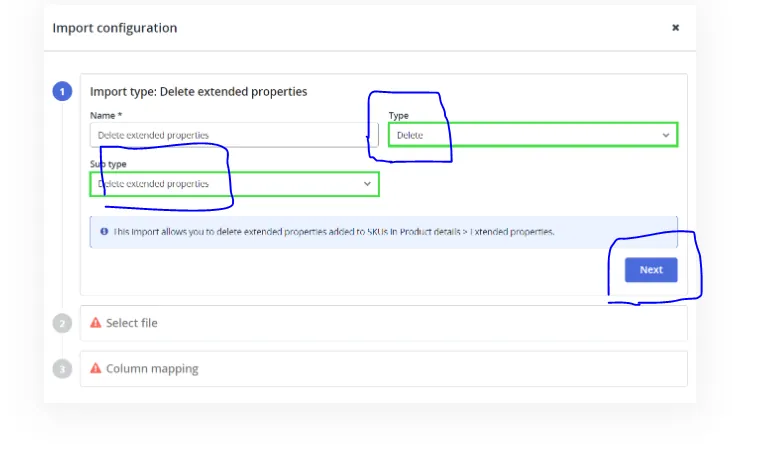
If deleting make, model except filters, you need to the revise listing by doing - revise attribute so that the deleted make, model etc. will be successfully removed in extended property in eBay listings item specifics.
Notes#
This section is important so Adhoc points and issues can be logged. Also, Q&A can be logged for suggestions for potential issues encountered. Also, log important notes needed for this system. Additional Notes:
"Add important notes here" "Add important notes here"
Potential Issues:
1 - ISSUE ENCOUNTERED: Stuck on Loading
RESOLUTION: Refresh Browser
2 - ISSUE ENCOUNTERED: Broken Links
RESOLUTION: Get the external link as this will allow other people to access the SOP without the need for login credentials and avoid broken links.
3 - ISSUE ENCOUNTERED: "Type Text Here"
RESOLUTION: "Type Text Here"
Attachments#
DeleteExtendedProperties-Sa… 15/01/2026