How to Mark Discontinued / How to Zero Stock SKUs in Linnworks
The purpose of this document is to outline new and existing staff on how to mark
Overview#
Purpose: The purpose of this document is to outline new and existing staff on how to mark discontinue SKUs in Linnworks - TBD.
Scope: This procedure applies to all Bragan personnel.
Responsibility: It is the responsibility of each employee to ensure the process set out in this procedure is followed.
Objective: The objective is to standardize the way to mark discontinued skus in Linnworks - TBD and to zero stock skus in Linnworks to all of staff and have the knowledge to do this efficiently and correctly.
How to mark discontinued skus in Linnworks
Process#
- Go to Linnworks > My Inventory and search the SKU that needs to add mark discontinued. We add 'TBD' after the title of the SKU, means after the stock are all sold, the company will no longer order for restocking.
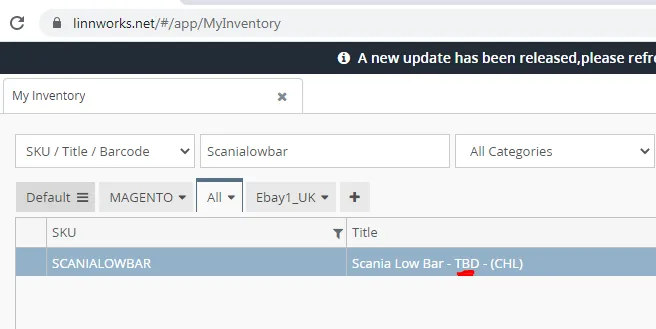
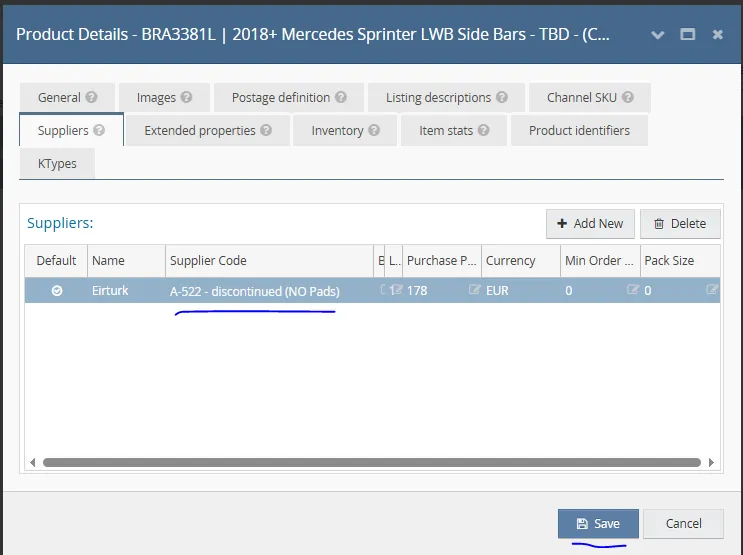
- After adding the 'TBD', go to Suppliers tab > then after the supplier code add the note add the reason - discontinued, then save.
To zero stock SKU in Linnworks, add a reason in the bin rack and who requested for it and add the old quantity before changing to zero stock in Linnworks.
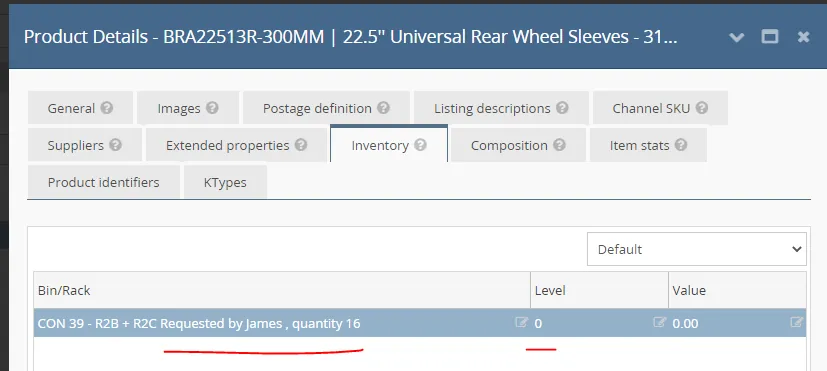
Same for adding TBD ( To be discontinued) and Archiving SKU in Linnworks, before adding TBD and before archiving SKU in linnworks, add the reason why?, person who requested, and date of request in location / bin rack under the Inventory Tab.
Video & Media#
🎥 How to mark discontinued skus in lW
Notes#
This section is important so Adhoc points and issues can be logged. Also, Q&A can be logged for suggestions for potential issues encountered. Also, log important notes needed for this system. Additional Notes:
Add TDB in Linnworks title for discontinued products. Add the discontinued and reason in Suppliers tab and add after the supplier code. This document is very important because this shows the process to new and existing staff on how to mark discontinue SKUs in Linnworks - TBD. We add 'TBD' after the title of the SKU, means after the stock are all sold, the company will no longer order for restocking.
Potential Issues:
1 - ISSUE ENCOUNTERED: Stuck on Loading
RESOLUTION: Refresh Browser
2 - ISSUE ENCOUNTERED: Broken Links
RESOLUTION: Get the external link as this will allow other people to access the SOP without the need for login credentials and avoid broken links.
3 - ISSUE ENCOUNTERED: Don't know the reason why the product was discontinued.
RESOLUTION: Add reason in bin rack for discontinued products.