Picture Re-edit Request
When pictures in the Edited Folder still need to be reworked and need to add
Overview#
Purpose: When pictures in the Edited Folder still need to be reworked and need to add dimensions image before listing, there are steps that you have to follow. This document aims to show how to properly edit images and request image edits.
Scope: Applies to Listing Team and Picture Editors.
Responsibility: It is the responsibility of each employee to ensure the process set out in this procedure is followed.
Objective: The objective of this procedure is:
To make sure Picture Folder is up to date and prevent double working in the future. To guide Bragan Personnel on the correct way of requesting image edits.
Process Flow#
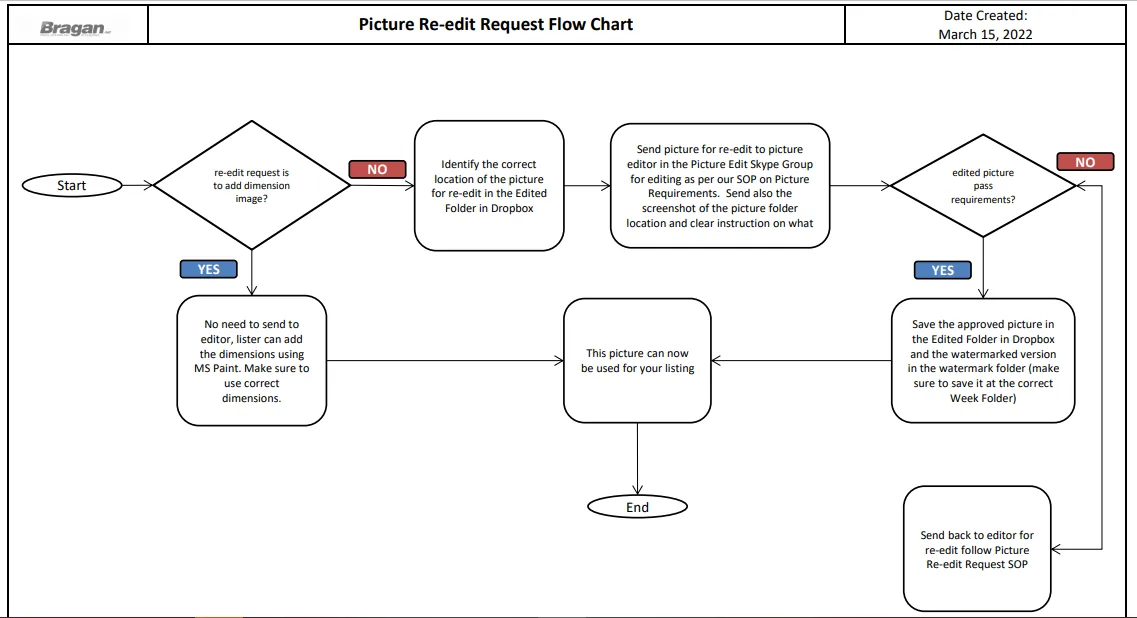
Procedure#
- Identify the accurate location of the Picture file.
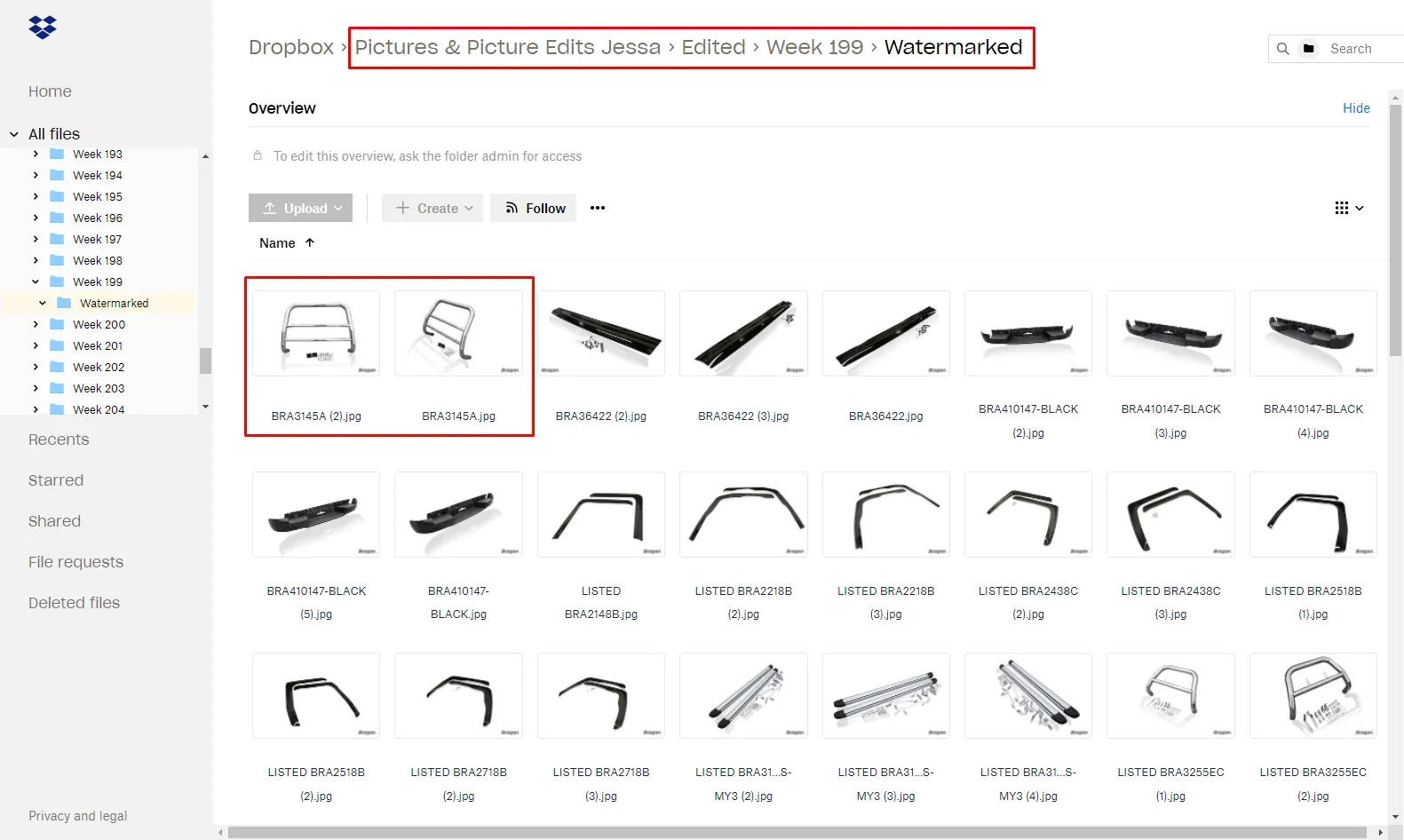
To make a Picture Edit Request, the first step is to identify the correct location of the picture(s) that is/are subjected for re-editing.
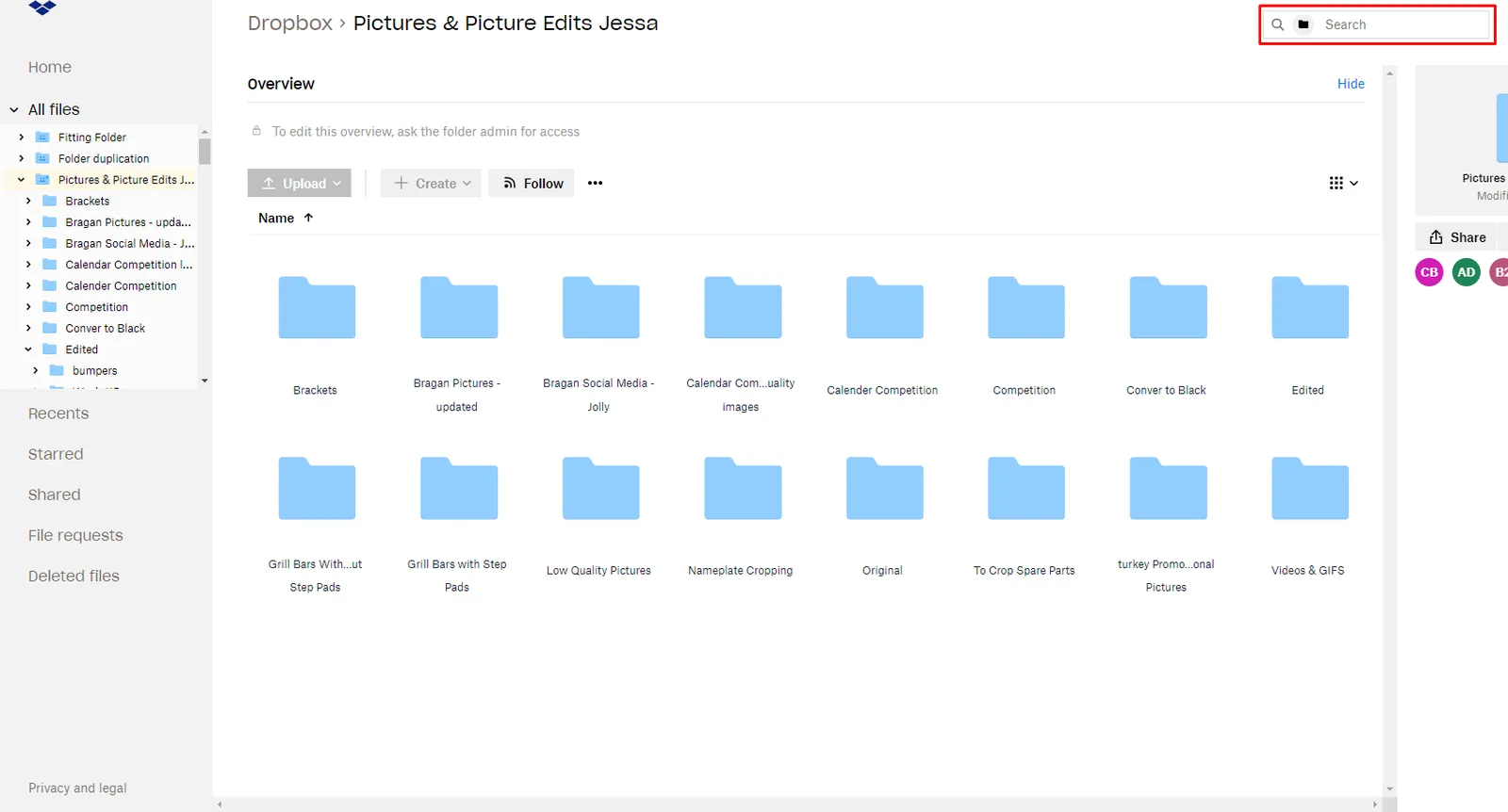
Go to the "Pictures & Picture Edits Jessa" folder in Dropbox and enter the exact picture file name that you're looking for on the search bar. For example, “BRA3145A”. See Figure 2.
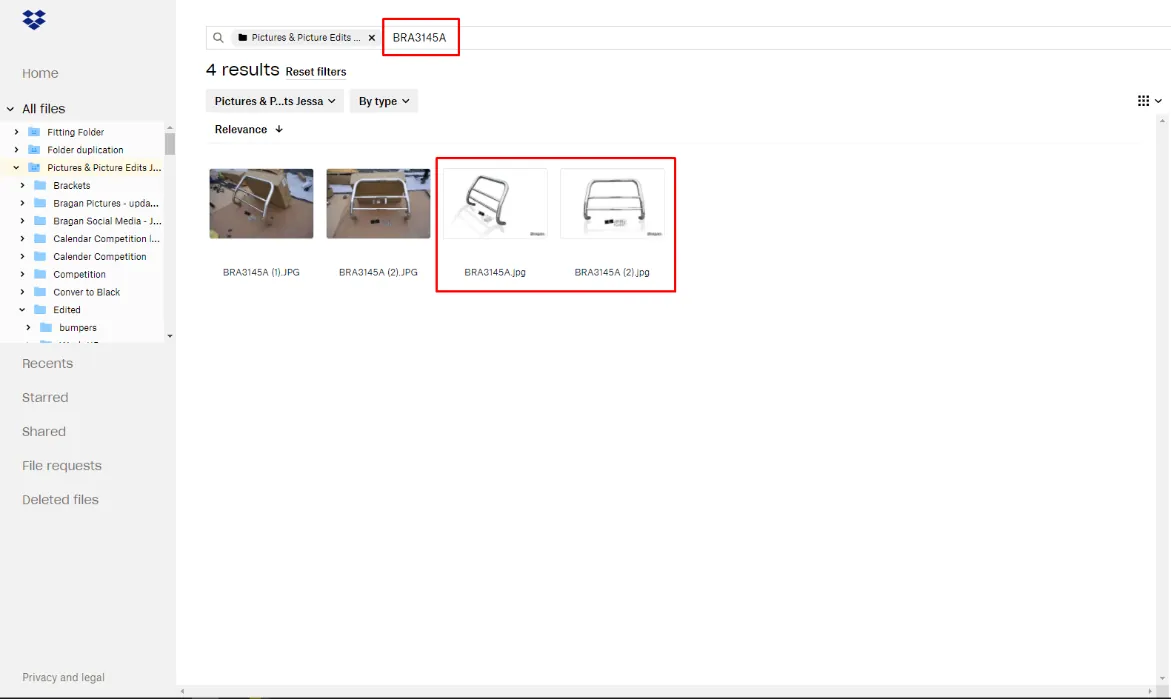
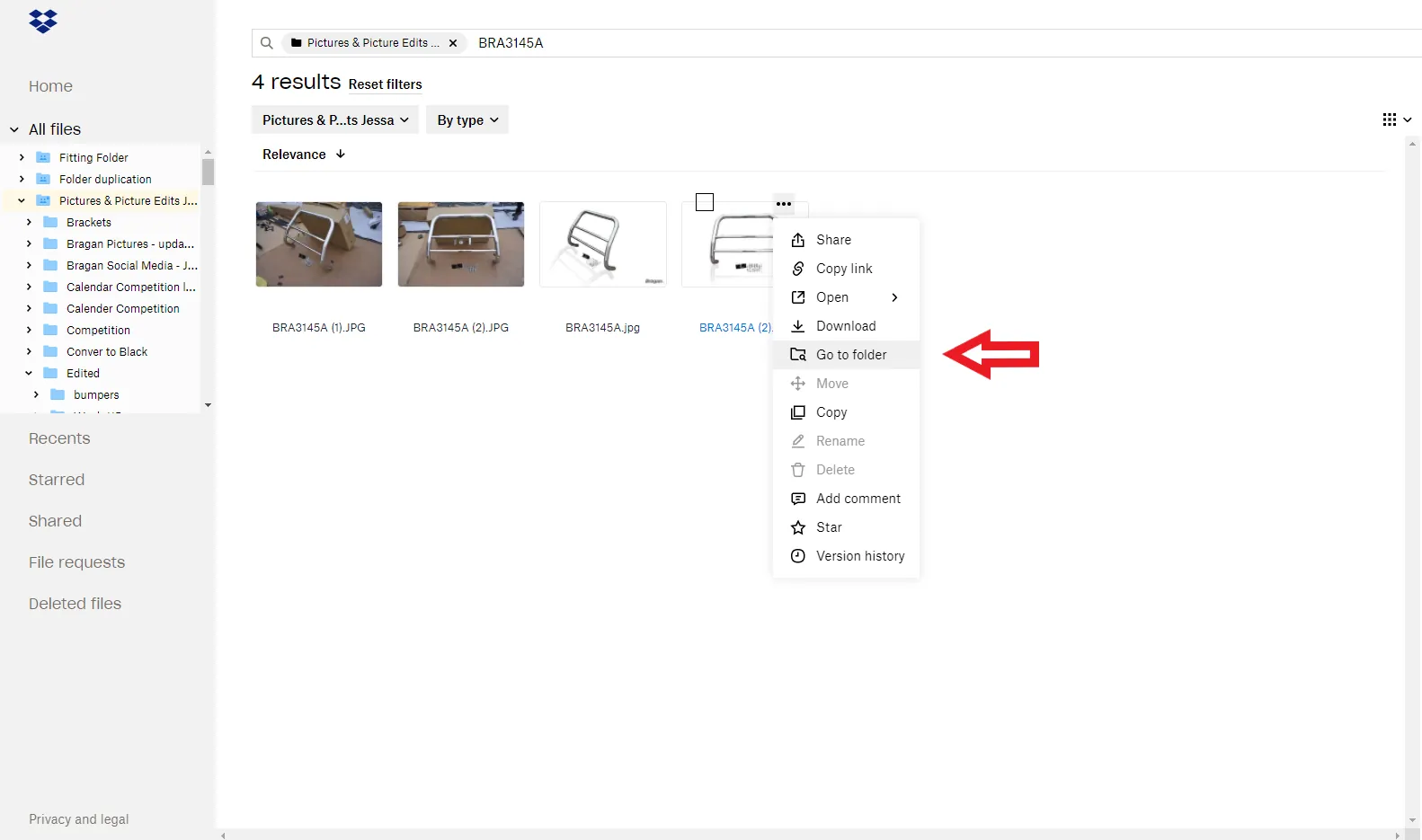
- Right click on the edited image then click “Go to folder”. Reedited images are the one that already has the Bragan logo, the white background. Do not choose the raw or original image since this SOP is for re-editing images. Editing original image is covered in How to Request for Listing Pictures SOP.
- You're now on the correct folder location. After identifying the location of the Picture(s) subject to be edited, you're now going to make a request in the Picture Edit Skype Group. The request shall have the following format including the necessary information (See Figure 5):
A screenshot marking the file location and picture(s) with file name subjected for re-edit. Clear instructions for the Editor regarding the request.
Please note that the skype group for picture edit would differ. It usually starts with the name of the picture editor. For example the skype group would be Paul Picture Edit and then this would change if we will have another picture editor.
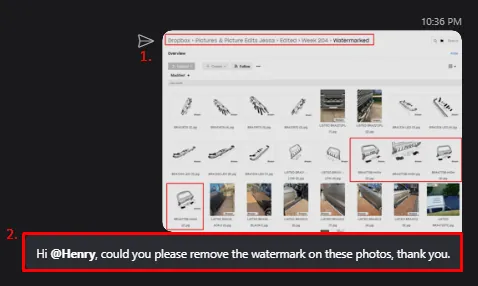
- If Editor believes he/she had met the expected output of the Requested Picture(s), Editor may now send an example in the Picture Edit Skype group while tagging the
Lister(s) responsible for the request(s) to check and get the Lister(s) approval or for any objections. Please note the Picture Requirement SOP should be considered in approving this reedited pictures.
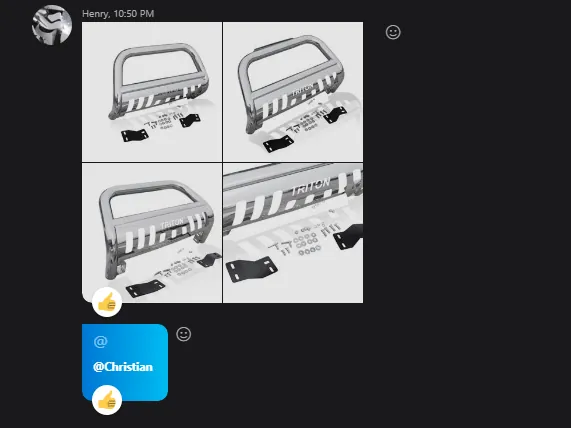
- If picture has been approved and considered done, editor can proceed in saving the re-edited picture(s) and be sure to save it in the correct folder. Take the file names into consideration to avoid confusion. You may ask if unsure. But sometimes editor are not given access to these Dropbox folder so the lister will be the one to save it.
The approved re-edited picture shall be then saved on the same folder where it came from originally, or in other words, replacing the previous version as this is considered an update of that picture(s).
But if the edit request is just to remove the watermark of the picture, then the edited picture(s) will not be saved on the watermarked folder as it is not watermarked anymore, hence it will then be saved outside the watermarked folder.
Adding Item Dimension Image#
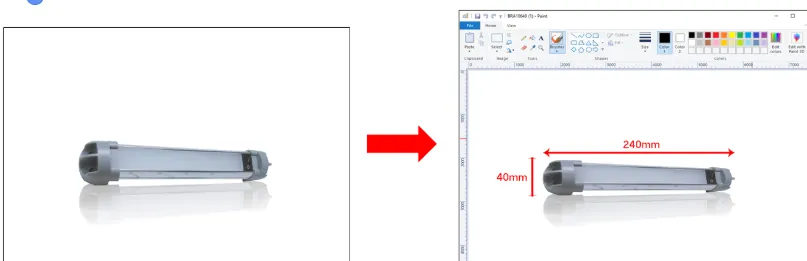
Request to add dimension image is not always requested to the picture editor. Listers do not always need to ask the picture editor for these edits, especially If it is simple one, listers can do it by using MS Paint.
(see figures below for example).
Notes#
This section is important so Adhoc points and issues can be logged. Also, Q&A can be logged for suggestions for potential issues encountered. Also, log important notes needed for this system. Additional Notes:
It is important to know the process of how to send a request to re-edit an image to the photo editor.
Listers do not always need to ask the picture editor for picture edits, especially If it is simple edits like dimension image, listers can do it using MS Paint.
When requesting image edits, make sure to identify the correct location of the Picture(s) that is/are subjected for re-editing.
The approved re-edited picture shall be then saved on the same folder where it came from originally, or in other words, replacing the previous version as this is considered an update of that picture(s).
For request to remove watermark in the picture. the edited picture(s) will not be saved on the watermarked folder as it is not watermarked anymore, hence it will then be saved outside the watermarked folder.
Potential Issues:
1 - ISSUE ENCOUNTERED: Stuck on Loading
RESOLUTION: Refresh Browser
2 - ISSUE ENCOUNTERED: Broken Links
RESOLUTION: Get the external link as this will allow other people to access the SOP without the need for login credentials and avoid broken links.
Attachments#
Picture_Re-edit_Request_Flo… 16/12/2025