Procurement (Accounts) / Packlist & Commercial Invoice For Custom Clearance SOP
Procurement is a vital process on the supply chain because it is where the process
Procurement (Accounts) / Packlist & Commercial Invoice For Custom#
Clearance SOP#
Overview#
Purpose: Procurement is a vital process on the supply chain because it is where the process of maintaining stock inventory begins. The purpose of this document is to outline to new and existing accounts members the part of the procurement process that involves the accounts department.
Scope: This procedure applies to Accounts Personnel.
Responsibility: It is the responsibility of each employee to ensure the process set out in this procedure is followed.
Objective: The objective of this procedure is:
to standardize the procurement process for accounts
Procedure#
Accounts#
- China orders
Must consolidate with the majority supplier at their factory, i.e. the supplier with the highest CBM. Containers must be booked according to CBM as above. Kestrel/IFS/Transglobal/Vinoy must be contacted with the container size and master supplier contact and booking date. All orders for China must be sent at the same time, so all items can be finished on time and shipped together. Again additional care must be taken here for orders in North China.
- Illumiled (MATRO)/VEPRO/SRI/
Collection must be booked with our Transport partners when the order is nearly finished and a completed production time is received. Ask Illumiled to note the dimensions of the shipment, sealed pallet etc, and also send this to Transport Partner. Ask Transport Partner for and ETC and ETD (estimated time of collection and estimated time of delivery to us)
Suppliers must send a commercial invoice and pack Lists for each container as soon as the container is loaded so they can be reviewed (FOC is never allowed on commercial invoice). Once packlists are received they must be saved in the incoming folder of the supplier on Dropbox.
-Dropbox\Supplier Region\Supplier Name\Year\Procurement\Incoming & Pack Lists
Sample Link :
PL / CI (Packlist / Commercial Invoice) needs to be updated and formatted correctly, Custom Clearance PL / CI Procedure. – see Section 3. Accounts are notified by shipping agent for payment of Vat and Duty container arriving in advance, Accounts must pay this as a priority and when doing so ask shipping partner for a date and time that container will be cleared from the port. Once container is through Tax clearance at Port haulier must be contacted to transport container to our warehouse
Make Warehouse aware of when the container will arrive and provide them with packlist and packlist testing sheets asap. Once container is on the road to warehouse office staff must update the stock on Linnworks – Deliver Linnworks PO created. – SOP > When Pack list tests are completed, they are then is then returned to Office for inspection. If quantities are not correct, office staff needs to adjust this on Linnworks. Nigel to be made aware immediately of any issues (Missing stock, damaged stock) encountered Notify supplier claims staff in the Supplier Claims/ Courier Claims group to process supplier claims - provide information like SKU, quantity affected and PO number.
- Customs Clearance PL / CI Procedure
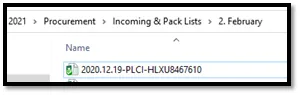
3.1 Open PL / CI from the supplier. (FIG 15)
e.g. Winbo PL / CI 2020.12.19-PLCI-HLXU8467610
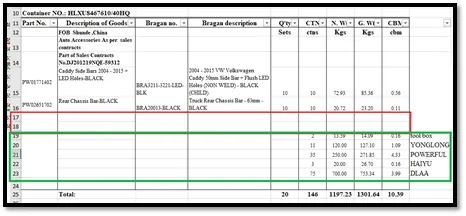
3.2 Remove spaces (in red) and notice the blank spaces at the bottom of the list where other supplier is noted. These are the fields we need to update. (FIG 16)
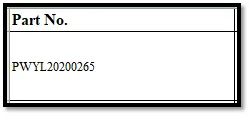
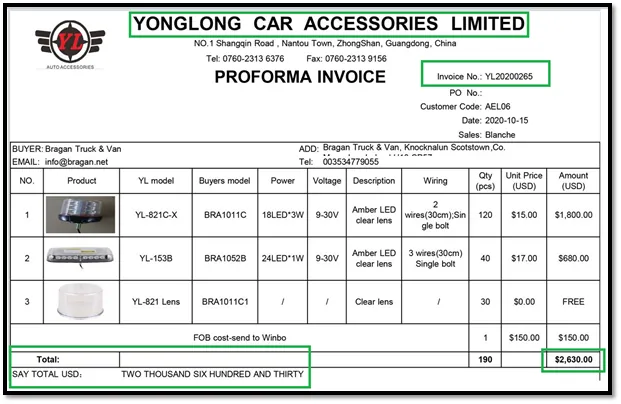
3.3 Under Commercial Invoice Tab, update Part no. , this is the supplier code – for Winbo PL / CI, start with PW + Order Invoice Number. For other supplier that doesn’t start with standard Supplier Code (PW for example), use the 1st line supplier
code in their PI (PI of the appropriate supplier, not the main supplier that booked the container)(FIG 17)
e.g. Yonglong – PI # YL20200265 → PWYL20200265
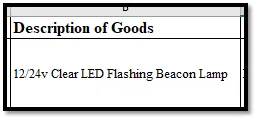
3.4 Update Description of Goods - 1st line item description in the supplier's PI (as close to actual goods as a possible- but broad category - Truck Spot Light Lamps or 12/24v Clear LED Flashing Beacon for example). This is applicable with other suppliers other than Winbo. (FIG 19)
e.g. Yonglong – PI # YL20200265 → 12/24v Clear LED Flashing Beacon Lamp
3.5 Update Bragan no. - 1st line SKU but replaced the last letter or add where applicable. This is applicable with other suppliers other than Winbo. (FIG 20)
e.g. Yonglong – PI # YL20200265 → BRA1011C becomes BRA1011D
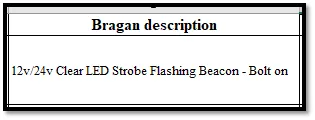
3.6 Update Bragan description - Add more detail based on the 1st line product in the PI. This is applicable with other suppliers other than Winbo. (FIG 21)
e.g. Yonglong – PI # YL20200265 → 12v/24v Clear LED Strobe Flashing Beacon - Bolt- on
3.7 Do not update the Qty column. This is applicable for all supplier’s PL / CI.
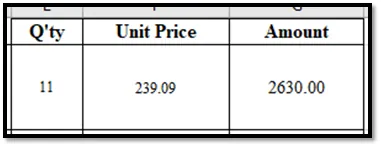
Update Unit Price and Amount. This is applicable with other suppliers other than Winbo. (FIG 22)
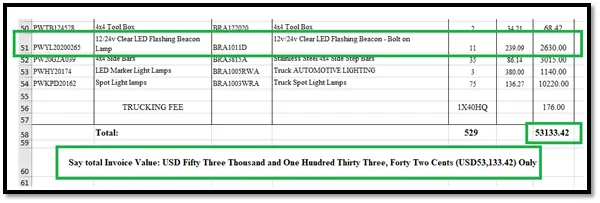
Amount - Supplier PI Amount Unit Price - Equals Amount divided by quantity ( =2630/11 = 239.09) e.g. Yonglong – PI # YL20200265
3.8 Update amount in words against figures amount (check wording vs figures in amounts). This might not be present for all containers but always check and update accordingly.
Before the update. (FIG 23)
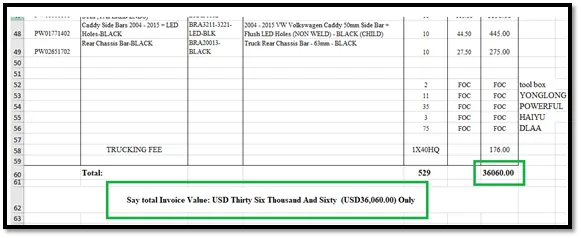
After update. (FIG 24)
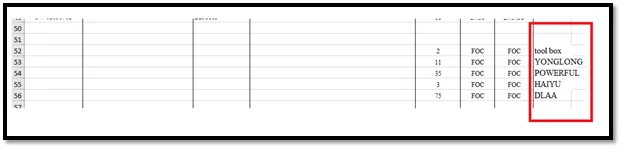
3.9 Remove other supplier names in the PL / CI. (FIG 25)
e.g. YONGLONG etc.
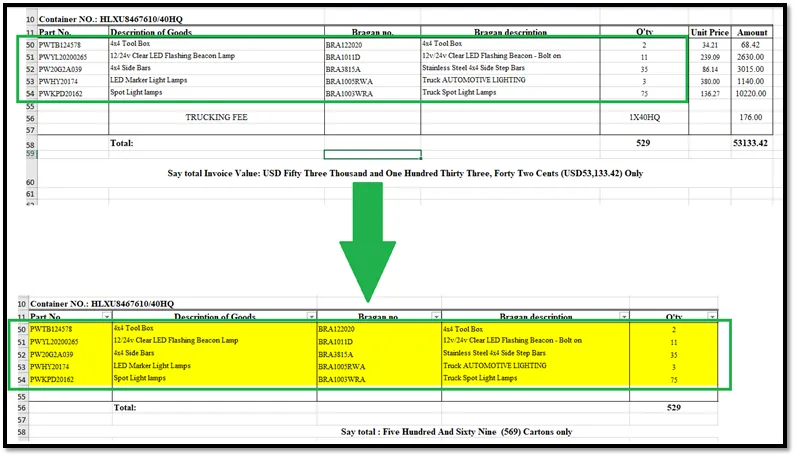
3.10 Check these parameters and copy all updated field values (except amount in words, figures, and unit price to the Packlist tab).
Ensure no spaces for each item. Ensure FOC is removed (not allowed) and the cost is the total for all suppliers. Add credible values (check shipment's supplementary supplier invoices). Remove FOC/Supplementary supplier’s names. (Fig 26)
Notes#
This section is important so Adhoc points and issues can be logged. Also, Q&A can be logged for suggestions for potential issues encountered. Also, log important notes needed for this system. Additional Notes:
The procurement process starts on the 1st day of the month or the next working day (LW data does not update until the 1st of the month) All orders must be signed and be in production 2 days after the order has been sent.
Potential Issues:
1 - ISSUE ENCOUNTERED: Stuck on Loading
RESOLUTION: Refresh Browser
2 - ISSUE ENCOUNTERED: Broken Links
RESOLUTION: Get the external link as this will allow other people to access the SOP without the need for login credentials and avoid broken links.