Product Knowledge & Use of the Website
Product knowledge is a key aspect to every single task or job you need in this
Overview#
Purpose: Product knowledge is a key aspect to every single task or job you need in this business but there are some tools that will help you. The purpose of this document is to explain how the website can be useful as one of our tools and resources to search or locate a certain product.
Scope: This procedure applies to all assigned Bragan Personnel.
Responsibility: It is the responsibility of each employee to ensure the process set out in this procedure is followed.
Objective: Using the website efficiently and effectively is so important. The objective of this procedure is to help Bragan employees to maximize the usefulness of the website as one of our resources in searching and locating products.
Navigating Categories#
Navigating the category in the website is very helpful for us to check a certain product; this is effective especially for customer service and sales calls let say the customer is ringing for “Scania Topline Roof Bar” you can hover website category menu and look for a certain product (please see figure below).
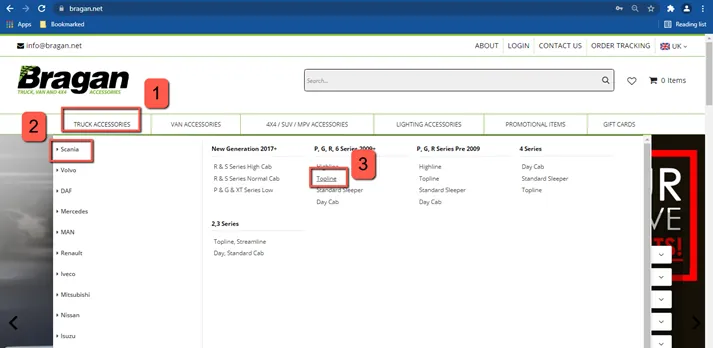
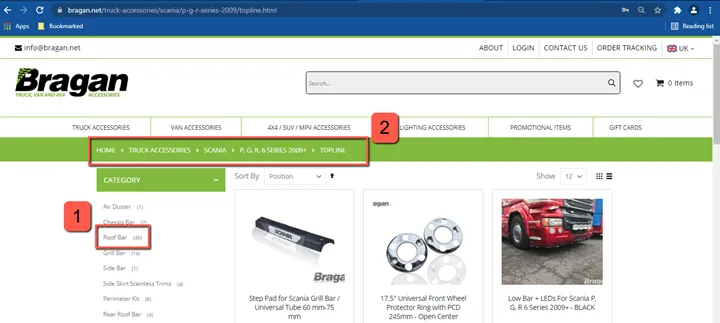
Click on the model which is “Topline” it will lead you to the next page (please see figure below) in the next page you can now choose certain accessories on the left side part of the page (see box #1). You can also able to check that you are on the right path please (see box #2).
Search Product#
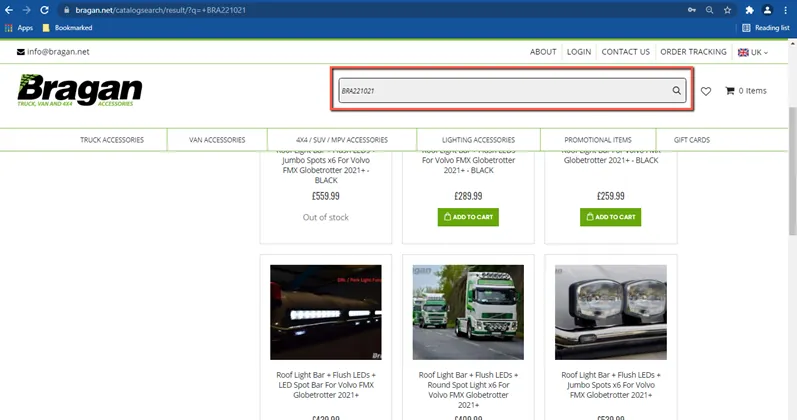
Searching is the quickest way on how to look at a certain product, You can search using SKU code directly to the search bar and don’t need to type the exact title, please note search will show you all products related to the SKU code, make sure to pick the right product listing. (Please see figure below).
Product Page#
The product page is where you can able to see the live listing product. This page will show you all information about the product including SKU code, Warranty, Material, Included in sale, etc. (please see figure on the next page)
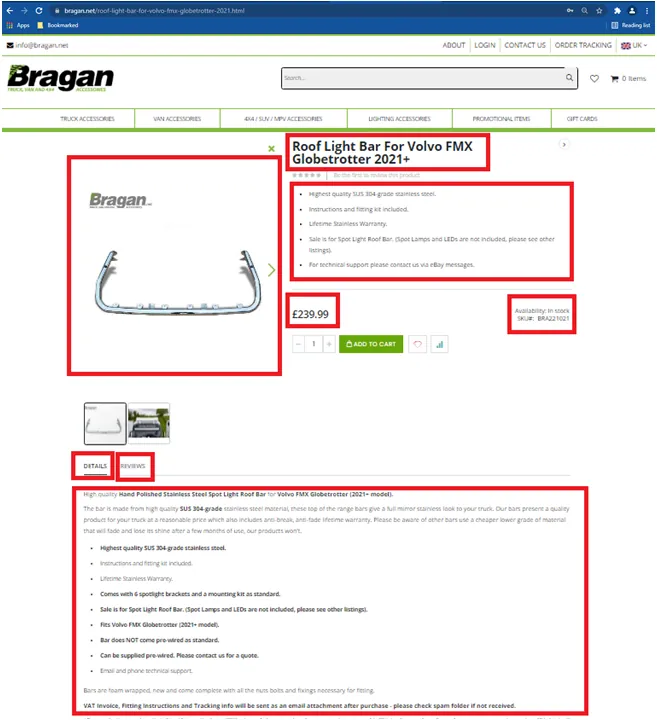
Take note: if you want to check the product specifics you will able to find it in the description body.
Notes#
This section is important so Adhoc points and issues can be logged. Also, Q&A can be logged for suggestions for potential issues encountered. Also,
log important notes needed for this system.
Additional Notes:
You really need to make an effort to learn about the products – this will make doing the job so much easier. Knowing what we can do with our bars, i.e. add additional LEDs – what spotlights, etc can go with whatever bar, will help you in all aspects of the job in the long run. "Add important notes here"
Potential Issues:
1 - ISSUE ENCOUNTERED: Stuck on Loading
RESOLUTION: Refresh Browser
2 - ISSUE ENCOUNTERED: Broken Links
RESOLUTION: Get the external link as this will allow other people to access the SOP without the need for login credentials and avoid broken links.
3 - ISSUE ENCOUNTERED: "Type Text Here"
RESOLUTION: "Type Text Here"