SKU Code Creation Guide
Standard Operating Procedures are the clear and concise documents that will serve
Overview#
Purpose: Standard Operating Procedures are the clear and concise documents that will serve as the guiding principle in every task in this business. The purpose of this document is to outline to new and existing employees how to create SKU Code.
Scope: This procedure applies to all Bragan Personnel.
Responsibility: It is the responsibility of all employees to ensure the process set out in this procedure is followed.
Objective: The objective of this procedure is:
To help employees create SKU codes for all Bragan products and variation. All SKU Code should be created/referenced from the SKU creator file.
Procedure#
Open SKU Creator Formatting Guide excel file#
See this link to access the file. This will be your guide on how to create SKU codes. The table below shows a summary of the starting keywords for the SKU of each items. So when you see an item with SKU BRA32322, you will know that this is for a Van/MPV. Item with SKU of BRAX37712, you will know that it is a bracket.
But notice that for Mudflaps it only starts with BRA which covers all other items, it has no extra distinguishing letter or number. So when looking for mudflaps it is better to check description and not rely on code only. Creating SKU code for mudflaps is a bit tricky so please make sure to check properly the process detailed in below sections.
| Item | SKU Starts With |
|---|---|
| Lights | BRA1 |
| Truck | BRA2 |
| Van/MPV | BRA3 |
| 4x4/SUV | BRA4 |
| Brackets | BRAX |
| Fitting Kits | BRAXH |
| Spare Parts | BRASP |
| Promotional Items | BRAPR |
| Mudflaps | BRA |
| Bolts, Spacers, Nuts etc | BRAB |
| Adhoc | BRAAH |
SKU Code Creation for Truck Items/Accessories#
Please follow this format:
BRA2 + MAKE + MODEL + ITEM + ADDITIONAL ITEM/s
For example: Create a SKU Code for this item Volvo FM4 2013 - 2021 Euro6 Short Under Bumper Bar
- First thing to do is open the SKU Creator Formatting Guide Excel File and go to MAIN sheet.
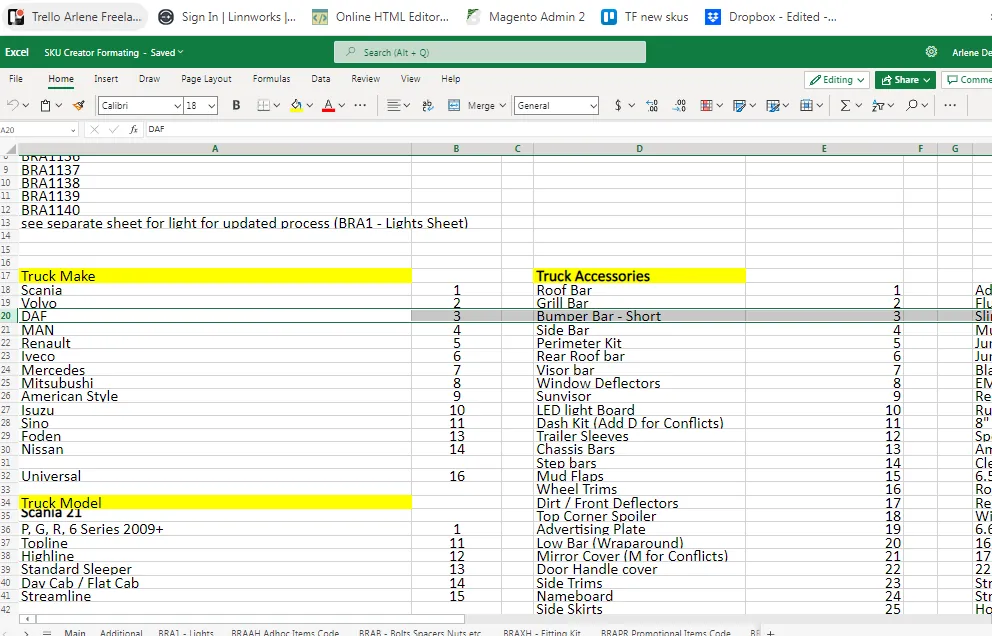
- Then scroll to Truck section. First check the truck make, our example is a short under bumper bar for a Volvo FM4 2013-2021, from the file, Volvo is number 2, so put 2 under Make column.
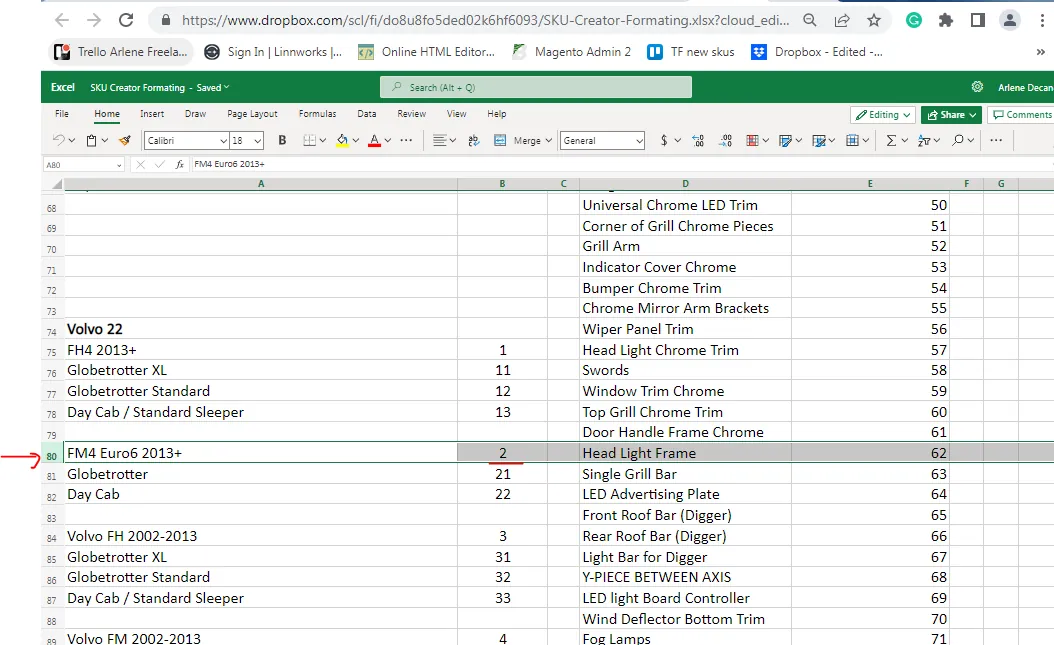
- Next is to check for the truck model, scroll down to look for Volvo trucks and check the models under it. From the file, FM4 Euro6 2013+ is number 2, so put 2 under the Model column.
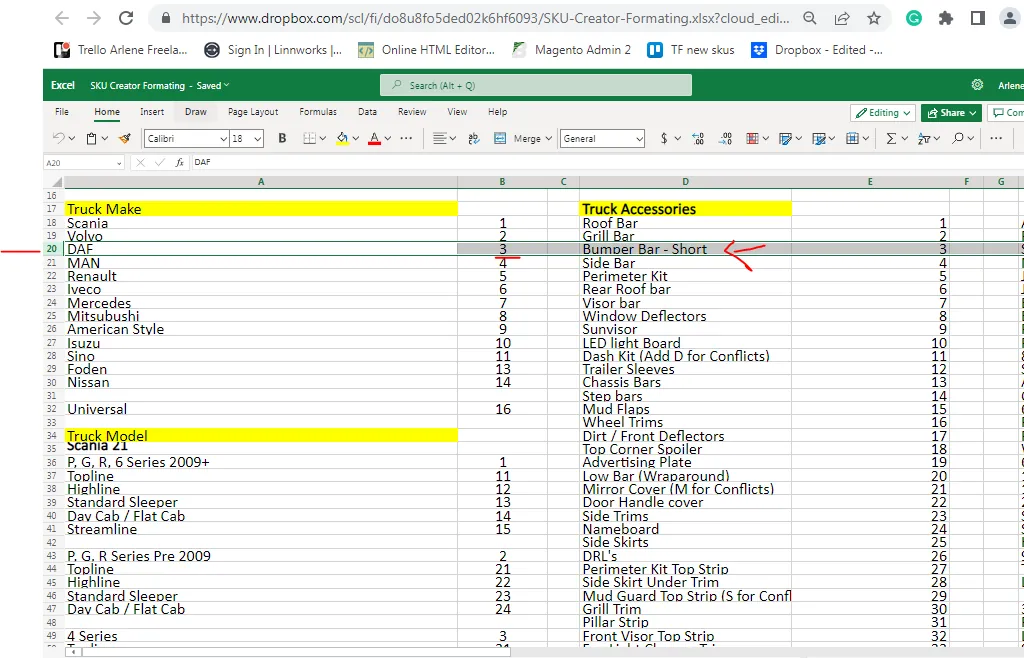
- Next is to look for the number for an under bumper bar. Check Truck accessories and look for under bumper bar or bumper bar, from the file, it is number 3. so put it under the Item column.
- Therefore for this Volvo FM4 2013 - 2021 Euro6 Short Under Bumper Bar, the SKU code is BRA2223.
| BRA2 | MAKE | MODEL | ITEM | ADDITIONAL ITEM/s |
|---|---|---|---|---|
| BRA2 | 2 Volvo | 2 FM4 2013-2021 | 3 Bumper Bar | - |
| SKU Code is: | BRA2223 |
If there are other additional item/s (meaning this SKU is sold as bundle) or you see a "+" after the main item for example: Scania P, G, R, 6 Series 2009+ Streamline Topline Visor Bar + 7 Flush LEDs. This means that it is a bundle item. When you buy the visor bar it also includes 7 flush LEDs. Another example is Mercedes Actros MP4 2012+ StreamSpace Roof Bar + Flush LED + Jumbo Spots x6 + Amber Lens Beacons (BRA27131FL71L6WB)
- To get the SKU code for Mercedes Actros MP4 2012+ StreamSpace Roof Bar + Flush LED + Jumbo Spots x6 + Amber Lens Beacons, follow the process above for the Make, Model and Item. Please note that for the model, there is no need to add 1 for Actros MP4 and then 13 for streamspace. Just choose 13 since whole model is an Actros MP4 Streamspace.
for van
For the additional items, some are easy since there is no variation like flush LEDs but for the Jumbo spots there are two. To know which one to choose, you need to confirm this with warehouse or with management on what jumbo spot is included in the composite. To know how to do warehouse query, follow this SOP. If number of spots is only one then just put 71LW.
For the order of the additional items in the SKU code, if the item has a special feature like wheelbase is specified or the type of bar (some bars are Type A, B and C
- depends on style) then put this first before the Additional Item/s codes. For example: note that long base base code is L, therefore for this item 2007 - 2014 Ford Transit MK7 LWB Side Bars + LEDs - 3'' SKU Code is BRA3111LFL. Put the L first before the FL code of flush LED.
However, if there is no special feature for the item, the LEDs should be mentioned first, then remaining items, it doesn't matter what comes next with the LEDs. So even though the title states jumbo spots first, in the SKU code, write first the LEDs.
| BRA2 | MAKE | MODEL | ITEM | ADDITIONAL ITEM/s |
|---|---|---|---|---|
| BRA2 | 7 | 13 | 1 | FL + 71L6W + B |
| Mercedes | Actros MP4 2012+ StreamSpace | Roof Bar | Flush LEDs + 6 Jumbo LED Spots + Amber Lens Beacons | |
|---|---|---|---|---|
| SKU Code is: | BRA27131FL71L6WB |
Note:
If there is a BLACK in the item, add also BLACK at the end of the SKU, use "-" before BLACK (Ex. BRA27131FL71L6WB-BLACK for Mercedes Actros MP4 2012+ StreamSpace Roof Bar + Flush LED + Jumbo Spots x6 + Amber Lens Beacons- BLACK). This rule also applies for items (usually A Bar/Bull Bar) with DETACHABLE feature, add -DL at the end of the SKU. For example: BRA3185-DL for 2018+ Ford Transit / Tourneo Custom Low Bull Bar - Detachable. For truck roof bars the jumbo spots is usually either 4 or 6. Flush LEDs are usually added as bundle to bars without LED hole while Slim LEDs are for bars without LED holes.
Bars with LED holes has item description such as this: Scania P, G, R, 6 Series 2009+ Topline Roof Bar + Flush LED Holes
To create a code for this follow the same process above but the additional item is LED, but note that there is a space before LED, therefore SKU code should be BRA21111 LED.
If an item has a type like the example below for van, add it also in the SKU. The roof bar is B1 so add B1. Type - refers to the style of the item. Roof bar B1 has a different style to Roof bar C.
SKU Code Creation for Van Items/Accessories#
Please follow this format:
BRA3 + MAKE + MODEL + ITEM + ADDITIONAL ITEM/s
This is the same process for truck, but this time it starts with BRA3. It is still in the MAIN sheet but go to the van section of the excel file.
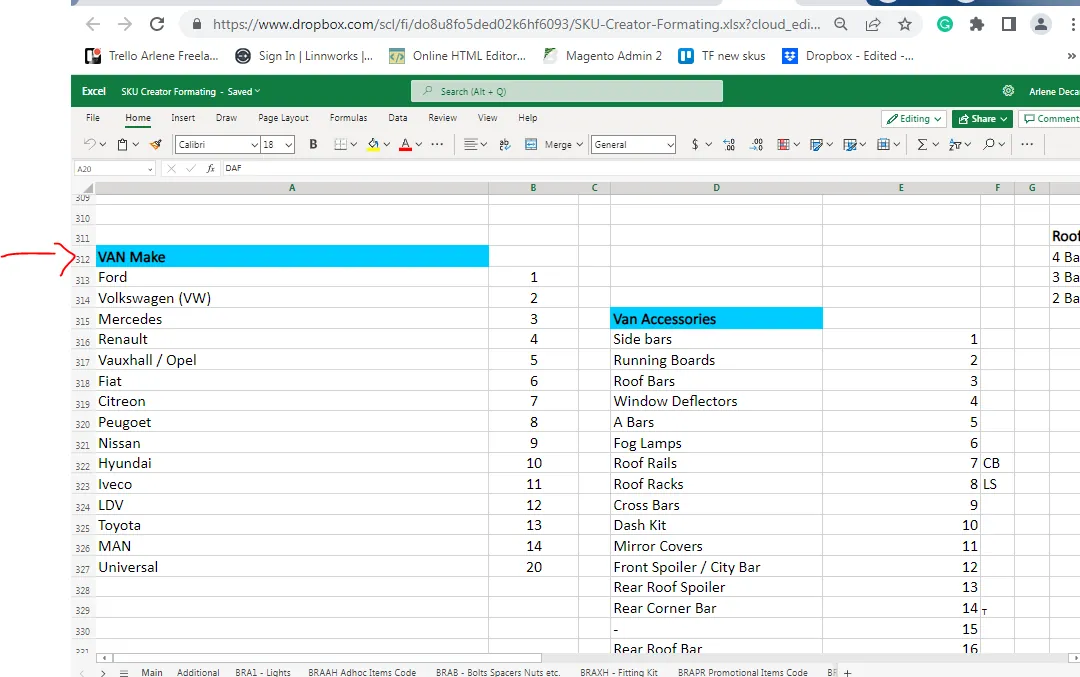
For example, we need to create SKU for this item: 2007 - 2014 Peugeot Boxer Medium High Roof Bar B1 + Jumbo Spots + LEDs - BLACK
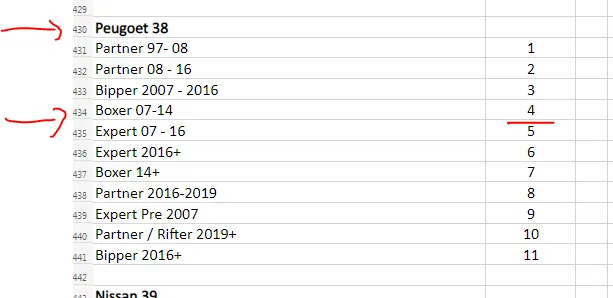
| BRA3 | MAKE | MODEL | ITEM | ITEM TYPE | ADDITIONAL ITEM/s |
|---|---|---|---|---|---|
| BRA3 | 8 Peugeot | 4 Boxer | 3 Medium High Roof Bar | B1 | FL + 71LW Flush LED + Jumbo LED spot |
| SKU Code is: | BRA3843B1FL71LW-BLACK |
Note:
If an item has a type like the example above, add it also in the SKU. The roof bar is B1 so add B1. This is also applicable to truck items and 4x4 items. Type - refers to the style of the item. Roof bar B1 has a different style to Roof bar C. This is the same with wheelbase case as mentioned above.
A is added for type A in the SKU code example BRA3843A.
B is added for type B in the SKU code example BRA3843B.
C is added for Curved in the SKU code example BRA3843C.
NL is added for NO LOGO in the SKU code example BRA3843C-NL.
L is added to SKU for Long wheelbase example SKU is BRA3411L.
S is added to SKU for Short wheelbase example SKU is BRA3411S.
M is added to SKU for Medium wheelbase example SKU is BRA3411M.
EL is added to SKU for Extra Long wheelbase example SKU is BRA3411EL.
If the SKU code is already in LW can add the supplier name first letter after BRA to make the SKU code unique example BRAV1001A if the supplier is Vanten because we have already BRA1001A in Linnworks. Another example is BRAH1003A if the supplier is Hanlin because we already SKU in Linnworks for BRA1003A.
For the order of the additional item/s in the SKU code, the LEDs should be mentioned first then the remaining items, it doesn't matter what comes next after the LEDs. So even though the title above states jumbo spots first in the SKU code, write first the LEDs.
If there is a BLACK in the item, add also BLACK at the end of the SKU, use "-" before BLACK. If DETACHABLE then add -DL at the end of SKU.
SKU Code Creation for 4x4 or SUV Items/Accessories#
Please follow this format:
BRA4 + MAKE + MODEL + ITEM + ADDITIONAL ITEM/s
This is the same process for truck and van, but this time it starts with BRA4. It is still in the MAIN sheet but go to the 4x4 section of the excel file.
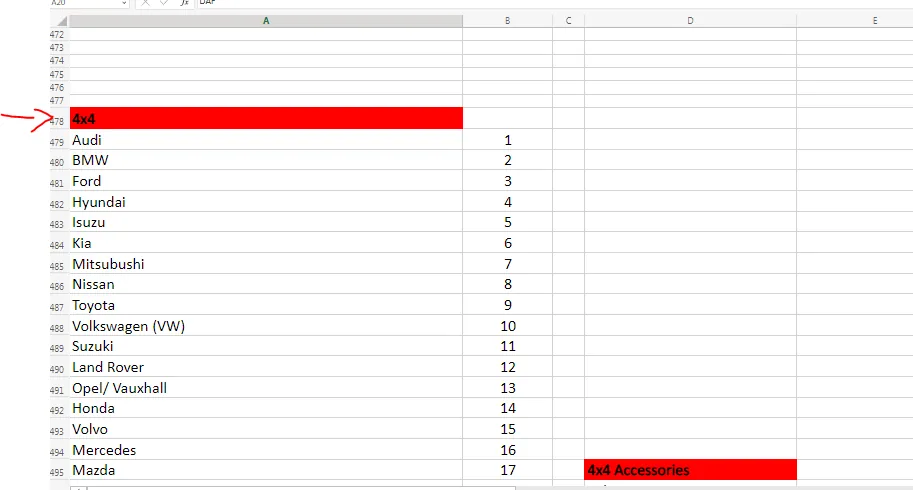
For example, we need to create SKU for this item: 2013-2017 Ford Ecosport Running Boards - (CHL)
| BRA4 | MAKE | MODEL | ITEM | ADDITIONAL ITEM/s |
|---|---|---|---|---|
| BRA4 | 3 Ford | 11 Ecosport 2013-2017 | 2 Running Board | - |
| SKU Code is: | BRA43112 |
Note:
Same rules for truck and van apply if there are additional items. If you see a CHL in the item name, this means that it is a child item. To know more about child and parent items, please see this SOP.
SKU Code Creation for Lights#
Please follow this format:
BRA1 + 001 (Series Number) + Color + "-" Other Additional Attribute (quantity, voltage, location if right or left, size)
For the other additional attribute of the light it could be the quantity, voltage, size, location in vehicle if right or left. Usually, only choose one attribute. It should be the
distinguishing feature of the lighting accessory. Like prioritize the size since there are many light accessories with the same voltage but the size is unique so use this instead.
If you have a new light product and you need to create a SKU for this, check in LW what is the last number in the series and use the next one for the new light item. The first number in the series is 001, so the first light item is the system is BRA1001. Then add the color (you can write only the first letter of the color, so if it is red then add R in the SKU) then if it has a specific voltage like it is only for 12V, you also need to add this. But if it is dual voltage like it is ok for both 12V and 24V then there is no need to include this in the SKU. See table below.
| BRA4 | Number Series | COLOR | ADDTIONAL (if applicable) |
|---|---|---|---|
| BRA1 | 004 next number in the series | R Red | 24V |
| SKU Code is: | BRA1004R-24V |
Note: Item above is for example purpose only
As of May 19, 2023 this is the last number in the series for lights. Any new lighting accessories will now have a SKU code of BRA1154.
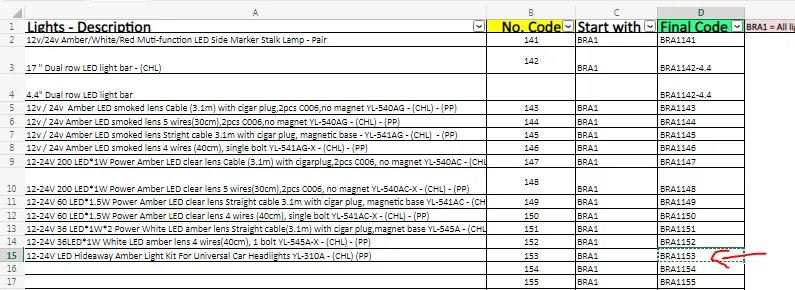
To know how to check the last light accessory so you will know what number series it is already, go to Linnworks My Inventory tab.
Note: After sorting you will soon realize that there are lighting accessories that do not follow that standard rule, there are some that starts with BRAW, BRAV, BRA3, BRA2 etc. See snipe below. Please disregard this for some of these were created before system implementation. And some are because these items are supplied by
different suppliers. See below for the process on SKU Code creation for items with more than one suppliers. Just scroll down to the last BRA1 and follow the series.
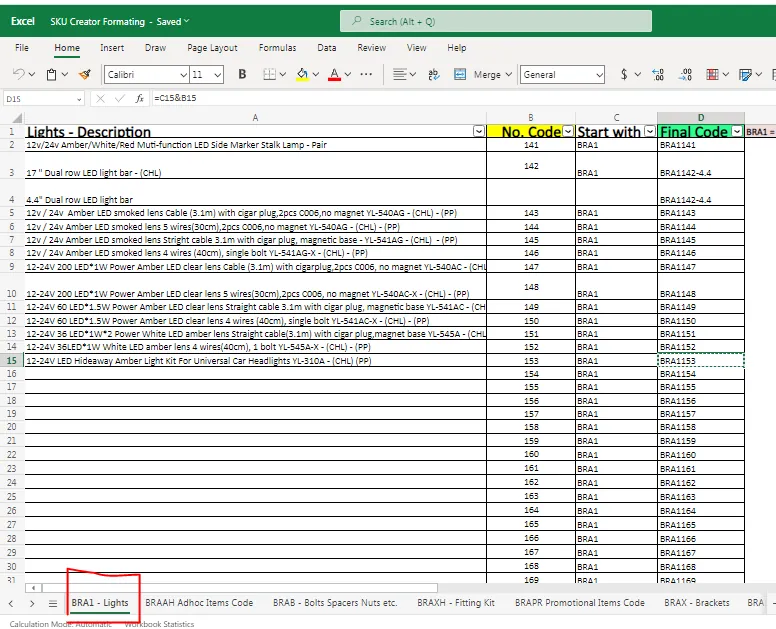
The one boxed in red, you can use this as the last in the series. So if you have a new light, the SKU code is BRA1154. Make sure to always check last number series since there are many listers and this is updating regularly. Notice I did not use BRA1301 as the last, because there is a big gap before BRA1141 and BRA1301. Let's just fill the numbers in between.
SKU Code Creation for Brackets#
Please follow this format:
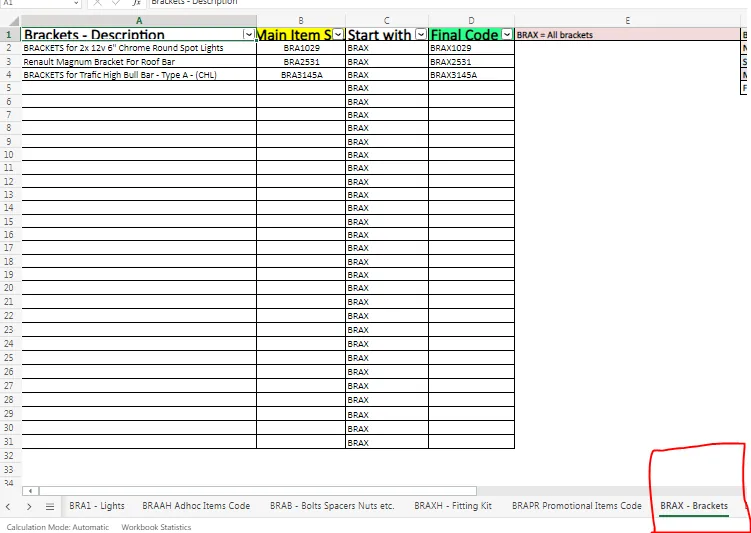
BRAX + SKU of the Main Item without the BRA
For example, you need to create the SKU code of the bracket for BRA2531 Renault Magnum Bracket For Roof Bar, the SKU code therefore of this bracket would be
BRAX2531. See other examples below (this is from the SKU Creator Formatting Guide excel file).
SKU Code Creation for Fitting Kits#
Please follow this format:
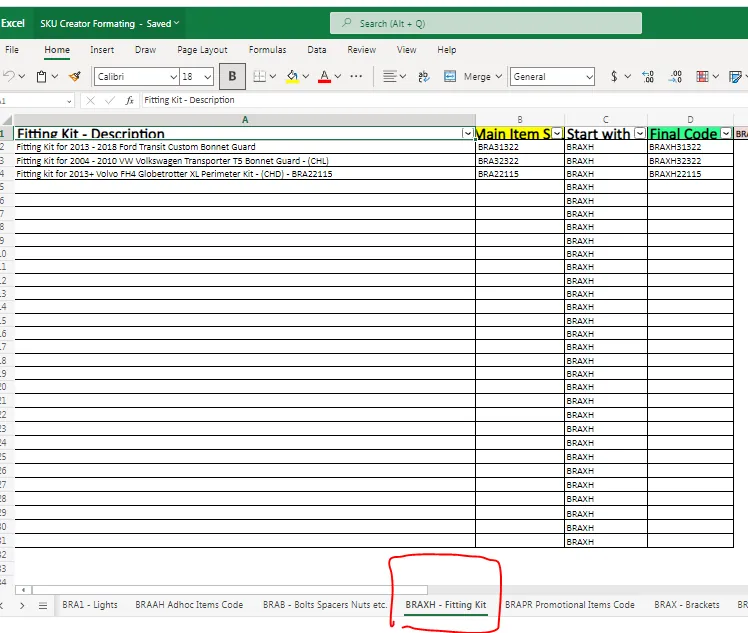
BRAXH + SKU of the Main Item without the BRA
See examples below (this is from the SKU Creator Formatting Guide excel file).
SKU Code Creation for Promotional Items#
For promotional item it also follows a number series, series starts at 001. Format should be:
BRAPR + Number Series
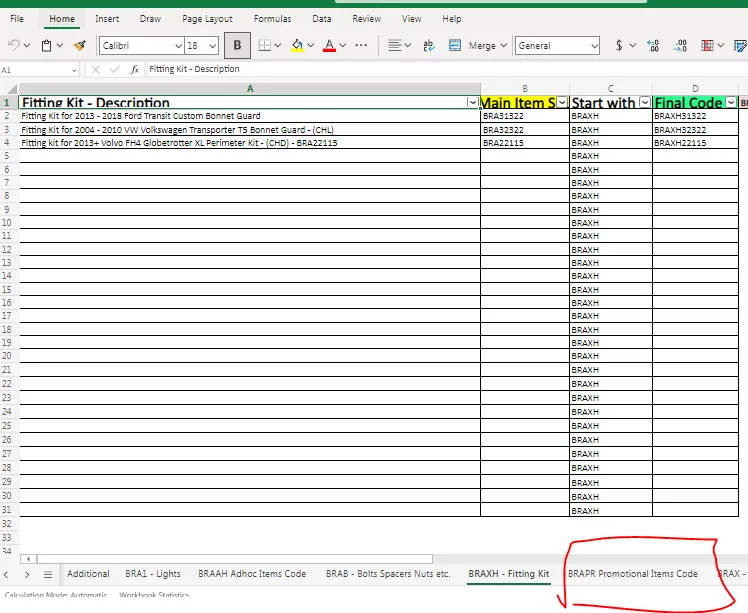
- Check SKU Creator Formatting Guide excel file what is the last number but need to confirm in LW. From the excel file, the last is 017 therefore if you have a new promo item its SKU code would be BRAPR018. But you need to confirm this in LW if the last one is really 017. It is therefore important that this file is updated. Update it in the dropbox folder where it was saved so all listers can see.
- To confirm this in LW, go to My Inventory tab, select the category Promo Items then click Search.
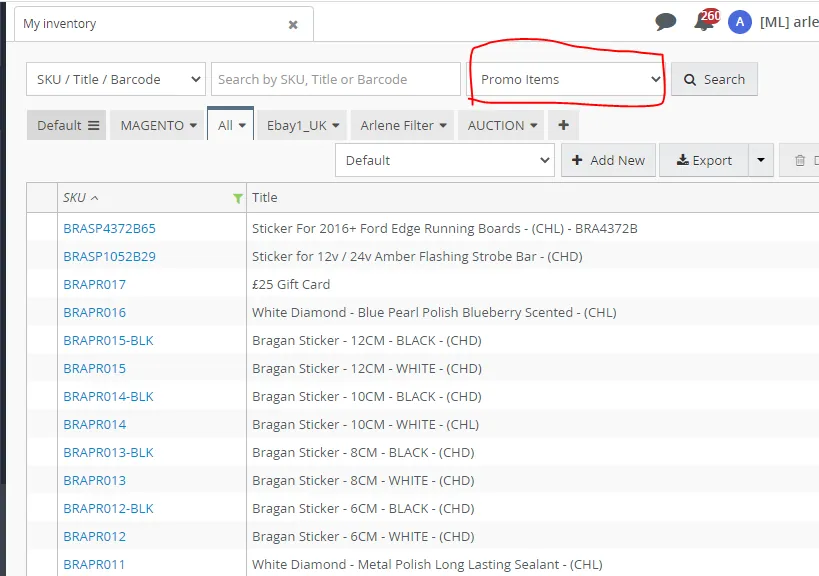
- Based on the search result BRAPR017 is really the last in the series, therefore for your new promotional item, you can use the SKU code BRAPR018.
SKU Code Creation for Bolts and Pieces#
This also includes spacers, nuts, rubbers, screws, screw cap, magnet, rivnut. Format should be:
BRAB + Name of the Part + Number Series (starts with 01)
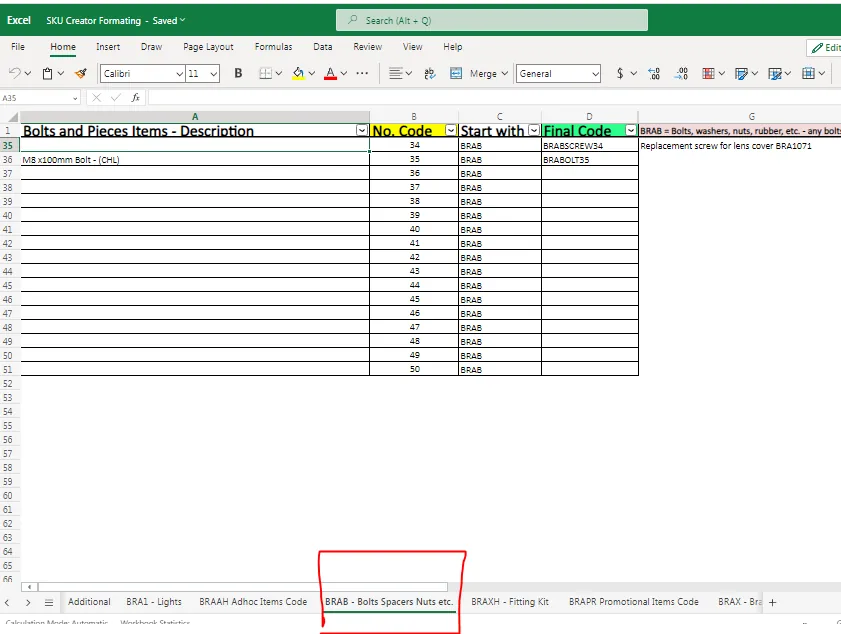
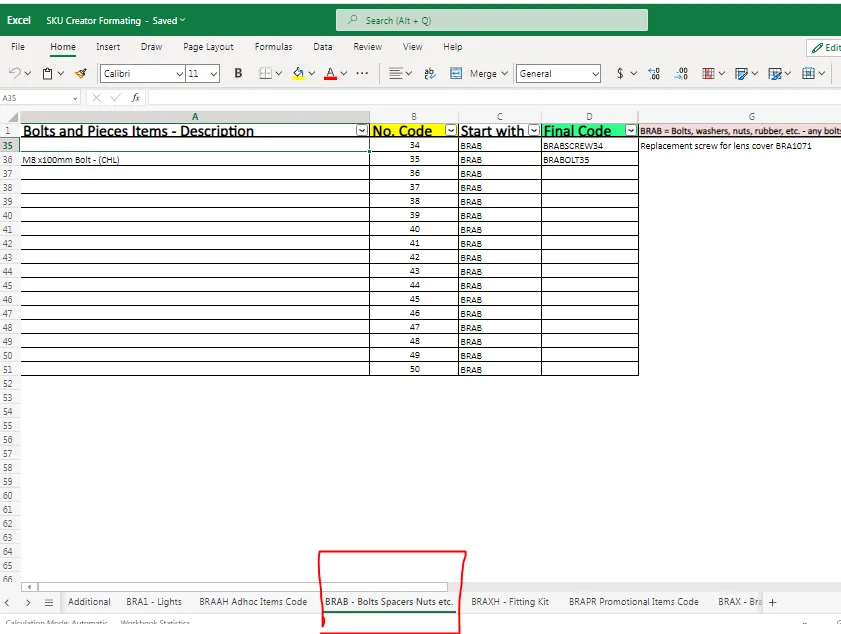
Check the excel file for the last item and just follow it. Make sure therefore that this file is updated. Update it in the dropbox folder where it was saved. Confirm also to LW. Choose Bolts and Pieces Category and check the last number if it is really 33. There are just few of these so it is easier to check.
SKU Code Creation for Adhoc Items#
For Adhoc items it also follows a number series, series starts at 001. Format should be:
BRAAH + Number Series
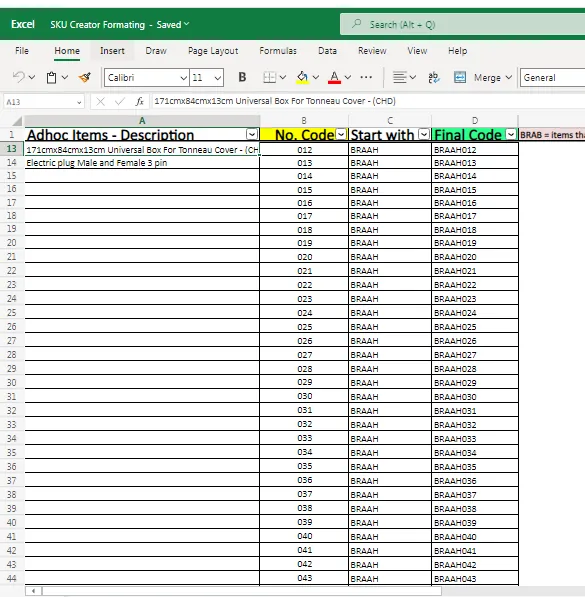
Update the excel file in the dropbox folder where it was saved so every lister will know. Make sure this file is updated to avoid double working. Again, confirm to LW if 012 is the last in the series. Search category for Adhoc Items. From LW BRAAH012 is the last, therefore if you have a new adhoc item, its SKU would be BRAAH014.
SKU Code Creation for Spare Parts#
BRASP + SKU Number of Main Item minus BRA + Spare Part Category
For the spare part category, if you need to create a SKU for another foot trim cover for roof rails of Citroen Berlingo 2019+ SKU is BRA37127S then you know that the category is 01. To record this in the excel file, just insert a row to the last Foot trim cover for roof rails. Then follow the format for the SKU code creation: BRASP37127S01.
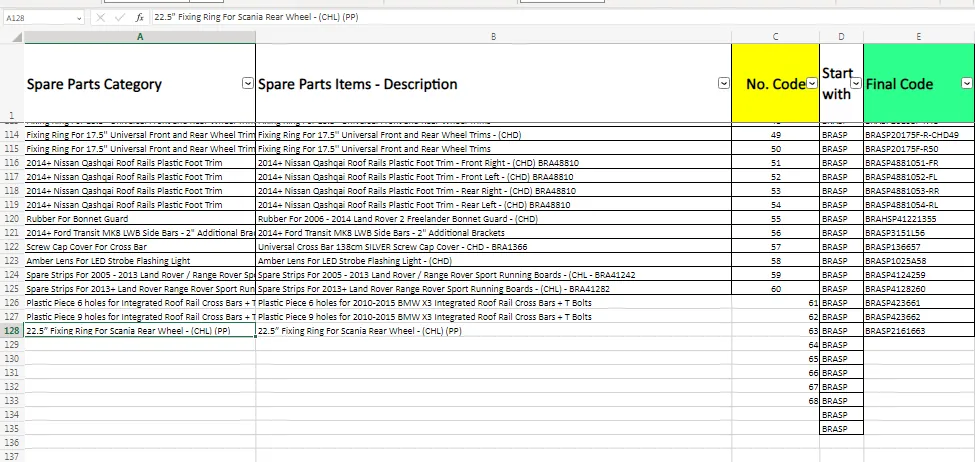
However, if it is a new spare part and not yet found in the excel file, scroll to the last part and create a new one. The spare part category of this item would now be 63 based on this file. Make sure to keep this file updated. Update it in the dropbox folder where it was saved so all listers can see.
SKU Code Creation for Mudflaps#
BRA+ Vehicle Type (van, truck, 4x4) + Make of Vehicle + Mudflap code + Print + Color + Item
For example you need to create SKU code for this item Scania Trailer Truck UV Rubber Rear Mud Flaps 240x35cm
Following the format is should start with BRA. The vehicle type is a truck so it should be 2 (3 for Van and 4 for 4x4). Then for the vehicle make it is a Scania Truck, so go the the excel file in the Main Section and look for Scania Truck, code is
- Make is not indicated so leave it blank. Mud flap code for trucks is 15.
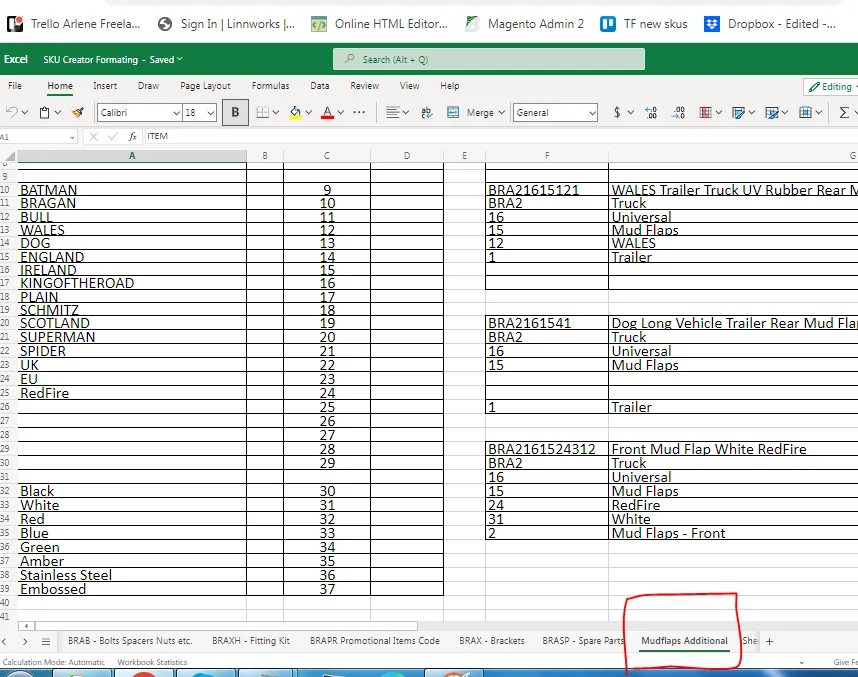
The print and color are not indicated so leave it blank. The item is a mud flap for a trailer so choose 1. Always refer to the SKU Creator Formatting Guide excel file, Mud Flaps Additional sheet.
| BRA | VEHICLE TYPE | VEHICLE MAKE | MUDFLAP CODE | COLOR | ITEM | |
|---|---|---|---|---|---|---|
| BRA | 2 | 1 | 15 | - | - | 1 |
| SKU CODE is: | BRA21151 |
Another example: Create a SKU code for WALES Trailer Truck UV Rubber Rear Mud Flaps 240x35cm
Vehicle type is a truck so choose 2, however the make is not indicated. In cases like this, it means that the mudflap is universal. If universal, use 16 for the Vehicle Make. Since mudflap code for truck is 15 then use 15. Print is WALES, check excel file and WALES is 12, color is not specified so leave it blank. And item is a trailer mud flap so choose 1. If trailer is not specified and only says rear mud flap, choose 3 for the item.
| BRA | VEHICLE TYPE | VEHICLE MAKE | MUDFLAP CODE | COLOR | ITEM | |
|---|---|---|---|---|---|---|
| BRA | 2 | 16 | 15 | 12 | - | 1 |
| SKU CODE is: | BRA21615121 |
SKU Code Creation for Items with More Than One Suppliers#
If an item has more than one supplier, the first letter of the supplier name is added after the BRA. For example for BRA1001G 12v / 24v Green Super Slim LED Marker Light, originally supplied by Hanlin but we found another/additional supplier Vanten, since the two are identical items, the SKU code should also be identical to avoid confusion but we need to have an indicator that this is from Hanlin and this is from Vanten.
Since the original item already has its SKU code in LW there is no need to change this, but the item supplied by Vanten will have a slightly different code, where we add the first letter V after BRA. The SKU code therefore for the item supplied by Vanten is BRAV1001G but item description will still be the same 12v / 24v Green Super Slim LED Marker Light.
This rule applies to all items. The original item SKU remains the same but if there is another supplier, the SKU code for that item by the other supplier should be modified to include the first letter of their name after BRA.
Product Listing#
Once the SKU code has been created Magento must be checked to ensure that the category exists if not the category must be created at the time of SKU creation. Please see the system below for category creation.
When the category is checked or newly category is created the product must be listed on all channels with a stock level of 0 at the time of SKU creation, stock images provided by the supplier can be used but the SKU must be added to the picture request list and updated once stock arrives. See the systems below for picture request file update and product listing
bragan-net.systemhub.com net.systemhub.com/company/share/system/id/279174/shareCode/YmJmZmU3YjZlZDc 0ODJlYTUxZGM5MzYwNzI2NjcwNDg bragan-net.systemhub.com net.systemhub.com/company/share/system/id/243604/shareCode/MzY0YmI4NjI4NTY wYzNiODIxMmM2NmQ5ZWJmNDJmZjQ
In creating new items title, we use abbreviations for SKU title in Linnworks.
Example: ISW Roof bar
ISW is abbreviation for Iveco S-Way
Newly created skus / items in Linnworks must listed in Magento channel while waiting for the stocks to arrive from supplier. Request promotional images, dimensions of items and details and fitting guides.
Video & Media#
🎥 Listing SKU code creation guide
Notes#
This section is important so Adhoc points and issues can be logged. Also, Q&A can be logged for suggestions for potential issues encountered. Also, log important notes needed for this system.
Additional Notes:
This document is important to know how to create SKU codes of products of Bragan.
Please note of Additional Codes. After creating the base SKU, additional codes can be filled-in after. There are certain codes that represent different items.
Sample SKU code is BRA22121FL71W – for Roof Bar + LEDs + Jumbo Spotlights for a Volvo FH4 Globetrotter. BRA22121FL71W
Make sure to update the SKU Creator Formatting Guide in the shared dropbox folder so all listers can see the changes. This is the link.
In creating new SKU codes, when introduce a new generation the older one needs to be capped, confirm to management before updating year of listings.
New category for new item should be created upon SKU creation.
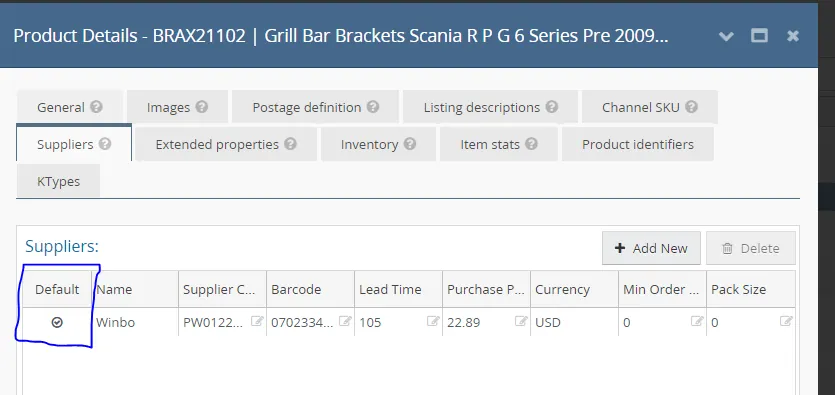
In creating / adding new SKU in Linnworks, always tick the DEFAULT in supplier tab.
In creating Linnworks title for new items, abbreviations are used.
ISW is for Iveco s-way
DXG is for Daf XG
SNG is for Scania new generation
Sample Linnworks item title:
BRAX2652 ISW Grill Bar E Bracket - (CHL)
BRA21557 SNG Eyelids For Headlights (CHL) AD4401-2S
BRA23112-BLACK - DXG Grill Bar E - BLACK - (CHD)
Potential Issues:
1 - ISSUE ENCOUNTERED: Stuck on Loading
RESOLUTION: Refresh Browser
2 - ISSUE ENCOUNTERED: Broken Links
RESOLUTION: Get the external link as this will allow other people to access the SOP without the need for login credentials and avoid broken links.
3 - ISSUE ENCOUNTERED: Wrong SKU code
RESOLUTION: Ensure to follow sop on how to create SKU code.
Attachments#
Attachments_and_Recordings… 22/12/2025