Top Selling Items Minimum Level SOP
Procurement is a vital process on the supply chain because it is where the process
Overview#
Purpose: Procurement is a vital process on the supply chain because it is where the process of maintaining stock inventory begins. Before the procurement process begins, we have to update first the minimum levels of our top-selling items. We should also identify which top-selling items are underperforming and adjust the minimum level of it as well. The purpose of this document is to outline to new and existing procurement members the process of updating minimum levels in Linnworks.
Scope: This procedure applies to Procurement Team
Responsibility: It is the responsibility of each employee to ensure the process set out in this procedure is followed.
Objective: It is the responsibility of each employee to ensure the process set out in this procedure is followed.
- to standardize the process of updating minimum levels in Linnworks.
Procedure#
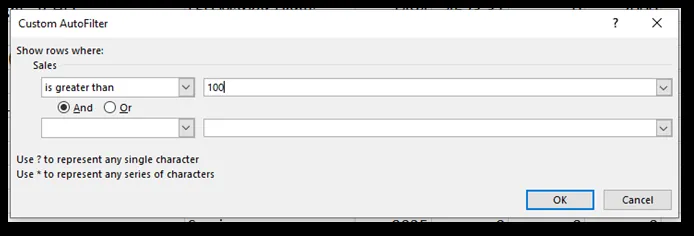
For top popular items (criteria is 100 quantity sold or more in 6 months), ensure to have enough stock that will last for at least 4.5 months (3 months period forecast order 50% addition. Can assume that we will sell the same amount within the given time period).
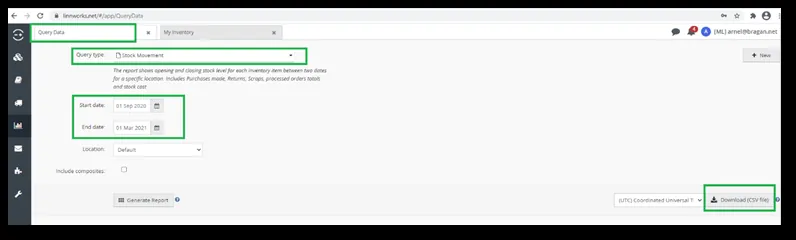
Extract Stock Movement report from Linnworks Query Data Set date range to 6 months backward (this will be revisited every 6 months).
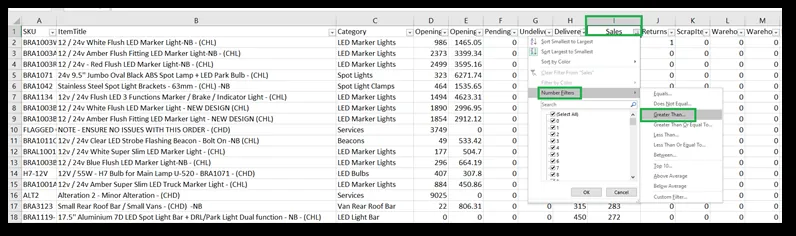
Filter products that have sold 100 or more in Column I – Sales.
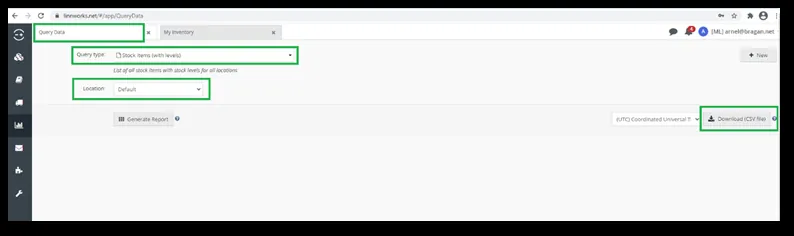
Download Stock items (with levels) – Location is Default from Linnworks Query Data.
Look up MinimumLevel to the Stock Movement file. Use Vlookup Update / Increase as needed the MinimumLevel by 50% of the current Min Level (remove any Services SKUs or Promo items e.g. Calendar). Round off any decimal points to whole numbers. Amend Linnworks Title to include – NB at the end.
For NB items that are low selling in the past 6 months, filter 15 or below quantity sold as the criteria and remove NB from the title. (Check the above steps on how to filter these items).
Notes#
This section is important so Adhoc points and issues can be logged. Also, Q&A can be logged for suggestions for potential issues encountered. Also, log important notes needed for this system.
Additional Notes:
The procurement process starts on the 1st day of the month or the next working day (LW data does not update until the 1st of the month)
All orders must be signed and be in production 2 days after the order has been sent.
Updating of minimum levels for top-selling items should be done every 6 months.
Potential Issues:
1 - ISSUE ENCOUNTERED: Stuck on Loading
RESOLUTION: Refresh Browser
2 - ISSUE ENCOUNTERED: Broken Links
RESOLUTION: Get the external link as this will allow other people to access the SOP without the need for login credentials and avoid broken links.