What is an ALT
The purpose of this SOP is to give an idea about what is an ALT and when do we add
Overview#
Purpose: The purpose of this SOP is to give an idea about what is an ALT and when do we add this in the composite.
Scope: This applies to the product listers and all personnel who is in charge of this process.
Responsibility: It is the responsibility of all staff to follow the standard operating procedure about the What is ALT.
Objective: The objective of this procedure is to guide employees on what is an ALT and when do we use this to add in the composite.
What is an ALT?#
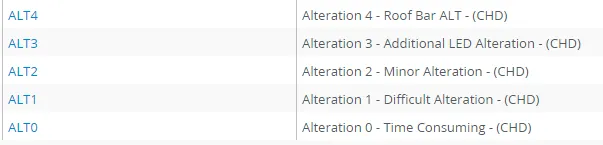
ALT means alteration. We usually add ALT to roof bars that has no led holes, the warehouse will need to add led holes to bars and this is called alteration. And also there are some bars that needs alteration because the warehouse needs to weld the brackets. If there is alteration done to and item and ALT is added to the composite. Always confirm to warehouse if needs ALT in the composite and what kind of ALT is it. We have different kinds of ALT in Linnworks that we add to composite. See table below.
Alteration Types#
Alteration Type is determined by how long it takes our engineers to complete a certain product; also, this would be reflected in the price.
ALT 0 – Time Consuming Alteration#
These are alterations that take a number of hours to complete.
Example: MAN TGL/TGM Grill Bars. These are brackets that our engineers need to measure and make up so this is time-consuming and is reflected in the ALT they have.
ALT 1 – Difficult Alteration#
These are alterations that could take close to or a little more than an hour to complete.
Example: 2.8M side bars for Mercedes Sprinter. This requires the engineers to cut the bar to size make new brackets. Not as time-consuming as the ALT0 but still more difficult than the ALT2s.
ALT 2 – Minor Alteration#
This is an alteration that will take between 5-20mins.
Example: Cutting a SLIM LED in a running board where 3 holes are to be drilled (2 for the screw & 1 for the wire). Doesn’t take very long so that is why it has ALT2.
ALT 3 – Additional LED Alteration#
This alternation involves fitting the LEDs to the bars. The bars are already altered to have LED holes and then the LEDs are added.
ALT 4 – Roof Bar Alteration#
Roof bars are altered so that it will have LED holes. Bars are bought without holes and some are altered in order for LEDs to be fitted to the bar. In this alternation, the LEDs are not fitted.
When do we add ALT in composites?#
Example:
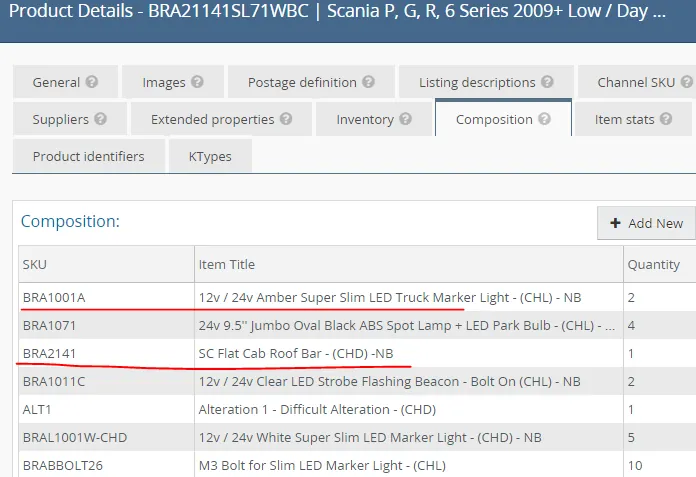
We add ALT to the composite of a Roof Bar + Slim Led for sale if the roof bar don't have a led hole. Warehouse will need to alter the bar by adding holes, so we need to add ALT in the composite. Confirm to warehouse what is the correct ALT to add in the composite. We have additional price for this - add 50 and for ALT0 in black roof bar add 100 - always confirm to management for the additional price.
Below is a sample listing of roof bar with slim led which is without led hole that is why warehouse needs to add a hole in it to fit the led. Therefore we need to add ALT in the composite.
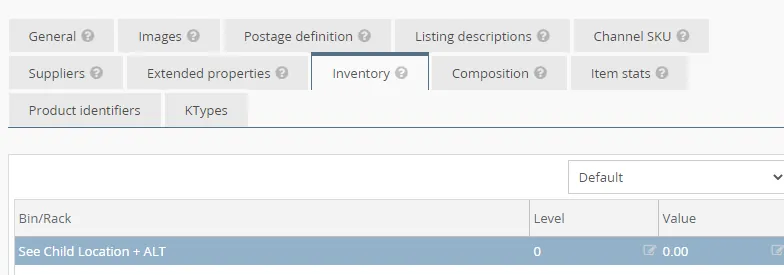
If the composite has ALT, you also need to add ALT in the Bin/Rack (location). Example: Location is Engineering room + ALT
Note:
You can't edit the bin rack location if the composition tab is filled with the composites already.
If you need to edit the Bin/Rack to add "+ALT" you can remove/delete the composites first in the Composition Tab.
But do not just delete the composites without make a copy in notepad app or Word (depends upon you). This is for your reference later.
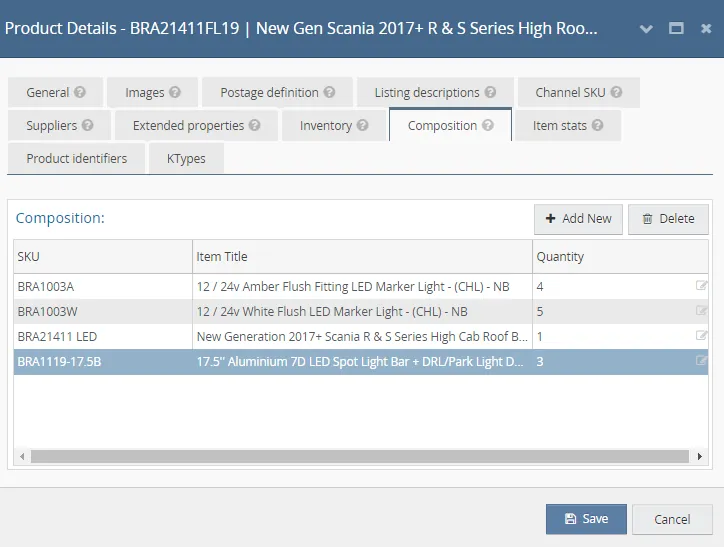
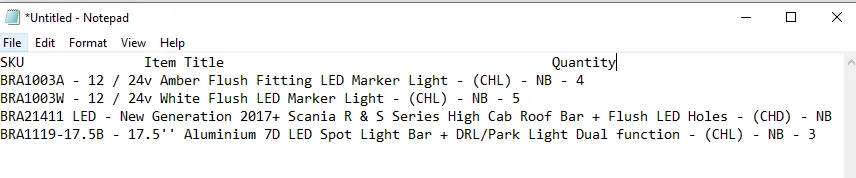
Copy the Composites in the Notepad
Once you make a copy already of the composite, you can now delete them in the Composition tab and then click Save. This will close the Product Details Screen.
Open again the Product Details Screen of the item and then go to Inventory tab and add the "+ALT" in bin rack location, click on Save
Open again the Product Details Screen and go to Composition tab and add the composites that you deleted before. Refer to the notepad where you copy them so you can add the correct composites.
Another Sample below:
Reference: Trafic 2002-2014 Sun Visor & Trafic 14+ Sun Visor
A sun visor for the 2002-2014 model comes as standard from the supplier. But we can alter this item in order for this to fit the Trafic 14+ model.
Although we use the same part for both models but because we have alteration for the 14+ model this obviously has to be more expensive as it is more time-consuming and if we didn’t it wouldn’t be financially viable to do the item. This is why the 2002- 2014 visor is listed at approx. £189.99 & the 14+ model visor is listed at approx. £279.99.
Video & Media#
🎥 Alteration-Child-Parent-Item-Processes
Notes#
This section is important so Adhoc points and issues can be logged. Also, Q&A can be logged for suggestions for potential issues encountered. Also, log important notes needed for this system. Additional Notes:
It is important to know if need to add alt in the composite. Alt requires alteration, should always confirm to warehouse if needs alt to add in the composite. It is absolutely VITAL that with items that require alteration that we are careful with regards to pricing. On ALT0 items, we would not give any discount off these items as we have to ensure that we are competitive in the market but ensure that it is still financially beneficial for us to do these items. With ALT1, we would be reluctant also to offer a discount – a similar reason as ALT0. With ALT2, because it is not difficult to do we would, at a stretch, offer 5%. Under NO CIRCUMSTANCES unless agreed with Management do you offer 10% on an ALT0 / ALT1 or ALT2 item.
Potential Issues:
1 - ISSUE ENCOUNTERED: Stuck on Loading
RESOLUTION: Refresh Browser
2 - ISSUE ENCOUNTERED: Broken Links
RESOLUTION: Get the external link as this will allow other people to access the SOP without the need for login credentials and avoid broken links.
3 - ISSUE ENCOUNTERED: No ALT in composite
RESOLUTION: Comfirm to warehouse if the listing needs to add ALT in the composite.