Winbo and Eirturk Loading List SOP - OLD PROCESS
Procurement is a vital process on the supply chain because it is where the process of this document is to outline to new and existing procurement
Overview#
Purpose: Procurement is a vital process on the supply chain because it is where the process of maintaining stock inventory begins. Part of the process is creating the tracking file for each supplier. However, a different process is involved when It comes to making the tracking file (Loading list) for Winbo and Eirturk. The purpose of this document is to outline to new and existing procurement members the process of creating Winbo and Eirturk loading lists.
Scope: This procedure applies to Procurement Team
Responsibility: It is the responsibility of each employee to ensure the process set out in this procedure is followed.
Objective: The objective of this procedure is:
to standardize the process of creating Winbo and Eirturk loading lists.
Procedure#
Creating Loading list for Winbo and Eirturk#
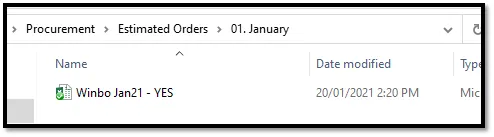
1.1 Open the latest Consumption report file. (FIG 1)
e.g. Winbo January 2021, open path → China Taiwan Thailand\1. Winbo (Stainless)\2021\Procurement\Estimated Orders\01. January
Eirturk Dropbox link (ensure Eirturk has updated the file to latest orders and status)→
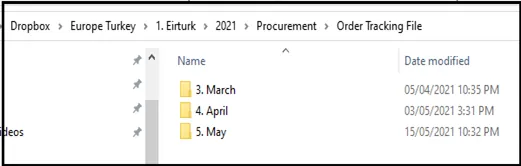
1.2 Open latest Pending file for Winbo (Order Tracking file for Eirturk )
e.g. Winbo January 2021, open path → China Taiwan Thailand\1. Winbo (Stainless)\2021\Procurement\PENDING LISTS\1. January (FIG 2)
1.3 In the Consumption file, filter these columns.
Column M > Available Lvl – 0 (or lower value e.g. -1) to 20 stock level Column K > Total Sales – remove non selling items (0 sold in the last 6 months) You paste these items to a different excel file and go back to the Consumption file and filter below. Ensure to delete copied items to avoid duplicate. Column C > Item Title – include items with NB in title, this means that these are the popular items. Again, copy these items into the new excel file.
1.4 Save this new file with the format – Supplier / Month / Year / Loading List
e.g Winbo January 2021 Loading List.
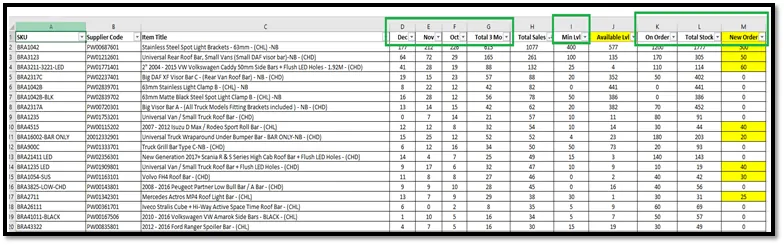
1.5 Remove not-needed columns, see image below. (FIG 3)
1.6 In the Loading list file, add these Columns header from the Pending file report.
Intransit items → Incoming items currently sailing. ALL Bragan ORDER QTY IN WINBO (stocks + online order) → All current orders both in production and in stock. STOCK in WINBO → Items done in production.
TO LOAD → Input values here for items to send on next shipment.
Pending file:
Loading list file:
For Eirturk, just add Stock in Eirturk (ready items) and To Load columns.
1.7 Look up all of the values from the Pending file to the Loading list file for the below columns. (FIG 4)
Intransit items ALL Bragan ORDER QTY IN WINBO (stocks + online order) STOCK in WINBO Tip – for Winbo, it is better to use supplier code as look up reference. For Eirturk, remove Cancelled, Delivered, and Blank items under Column C - Order Status. All of the remaining items are on order.
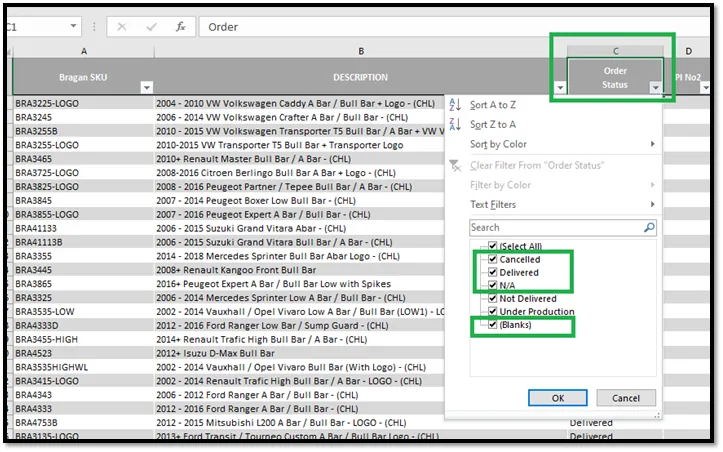
1.8 Once you have all the values copy all looked up fields and save these as special > values. This is to remove the formula used.
For Eirturk, copy all remaining items and consolidate all quantities for duplicate SKUs in the file (Eirturk is listing items by PI, so there would be the same items in different PI) We assume that all of the current orders are in production, we use this to calculate needed to load items. There will be a scenario where Eirturk will provide ready stock items, use the same steps to know what to load.
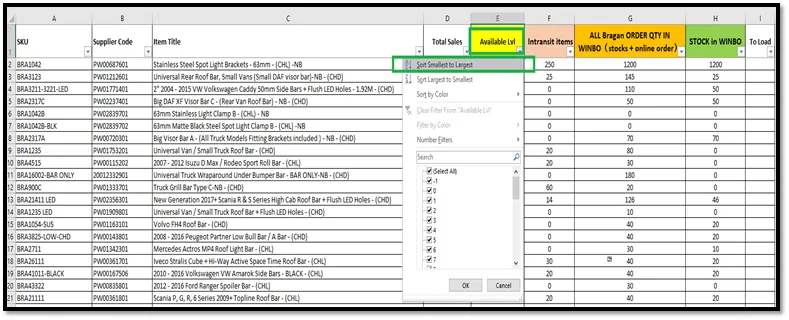
1.9 For Column E Available Lvl – Sort Smallest to Largest. (FIG 5)
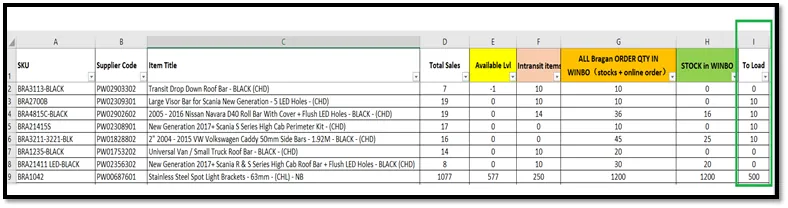
1.10 With the result of this Sort, ensure to include ALL zero to low stock items in the loading list. (FIG 6)
Refer to Column D – Total Sales (sales from the last 6 months) to see how many items have been sold. You can assume that we will sell this same quantity for the next 6 months – divide this quantity by 2 and use this value to be loaded. If there is no stock available (Column H - STOCK in WINBO), request to expedite if the item is in production. If the item intransit can cover the next 3 months, you can leave this item for now.
1.11 Once you are done with zero to low stock items, filter text NB (for popular products) to Column C - Item Title. (FIG 7)
This is to ensure all popular products are always in stock. Follow Step 4.1.10 bullets process
If ALL needed items are ready on the list, remove the below columns and items without to load quantity. Send the file to the Supplier. (FIG 8)
Column D - Total Sales Column E - Available Lvl

Notes#
This section is important so Adhoc points and issues can be logged. Also, Q&A can be logged for suggestions for potential issues encountered. Also, log important notes needed for this system. Additional Notes:
Procurement is a vital process on the supply chain because it is where the process of maintaining stock inventory begins. Part of the process is creating the tracking file for each supplier. However, a different process is involved when
It comes to making the tracking file (Loading list) for Winbo and Eirturk. The
Overview#
Purpose: of this document is to outline to new and existing procurement members the process of creating Winbo and Eirturk loading lists.
Potential Issues:
1 - ISSUE ENCOUNTERED: Stuck on Loading
RESOLUTION: Refresh Browser
2 - ISSUE ENCOUNTERED: Broken Links
RESOLUTION: Get the external link as this will allow other people to access the SOP without the need for login credentials and avoid broken links.