Consumable List
We consistently run out of key consumables each month - we need to be on top of To ensure warehouse consumable stock levels are accurately counted, recorded, and
Overview#
Purpose: We consistently run out of key consumables each month - we need to be on top of this process and ensure no items are low in stock - let alone run out of stock. The Brexit / Covid situation has added cost and timeframes onto orders- we need to be ahead of the game and ensure we buy in a timely manner, buy smart and buy from the best suppliers
Scope: This SOP covers only the process on replenishing our key consumables.
Responsibility: It is the responsibility of both warehouse personnel and procurement officer to follow the steps in this SOP.
Objective: The objective of this SOP is to ensure that we do not run out of stock of key consumable items.
Process Flow#
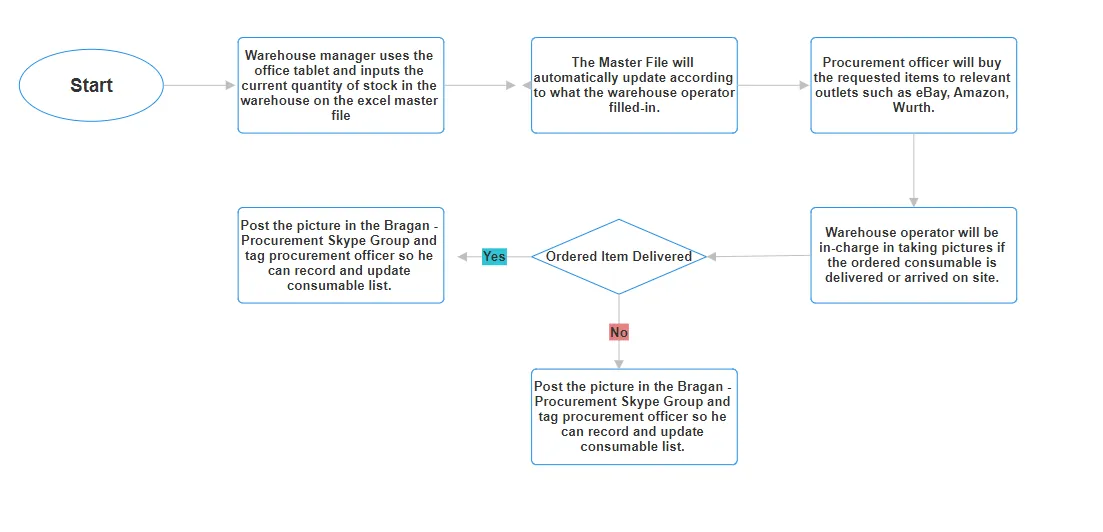
Procedure#
This process requires clear communication between Warehouse and Procurement Officer
This is a monthly task for Warehouse manager and procurement officer, done every first working day of the month.
Overview#
Purpose: To ensure warehouse consumable stock levels are accurately counted, recorded, and archived each month using the consumables master file on the warehouse tablet.
- Accessing the Tablet and Dropbox
- Wake the tablet: double-tap the screen and swipe up.
- Unlock the tablet with passcode: 052022.
- Open the Dropbox app.
- In Dropbox, tap Home (bottom left).
- Scroll down to the Stored section.
- Open the consumables folder.
- Understanding the Files Consumable list master: Main file used for all warehouse counts. Updated when new items are added. Also feeds data to an “Office use only” tab with purchasing links, minimum order quantities, and current stock values. Year/Month subfolders (e.g., 2026 → March): Contain saved copies of the master after each completed monthly count, for record-keeping.
- Opening the Master File
- In the consumables folder, tap consumable list master.
- It opens a preview in Dropbox.
- Tap Open in (bottom left).
- Select WPS Office Lite and choose Always so it opens there by default.
- Using the Correct Tab The file has two tabs at the bottom:
Office use only – for purchasing and office staff (do not edit for warehouse counting). Warehouse count – this is the only tab warehouse staff use.
- Layout of the “Warehouse count” Tab
Key columns:
Column A – Warehouse location (bin/rack/location). Column B – Item title/description. Column C – Link to item (to view what the item looks like if unsure). Column D – Current stock (this is what warehouse staff must update).
Items are grouped into subcategories (e.g. polish supplies, tools, pre-wire supplies) to make them easier to find in the warehouse or engineering room.
Note: Any items highlighted in red currently have no location set. These locations will be updated in the master file (e.g. by Richard) by adding the correct bin/rack/location.
- Counting and Entering Stock
- Start at the top of the “Warehouse count” list.
- For each item, physically count the stock in the warehouse.
- In Column D (current stock): Enter numerical values only. Do not enter text (e.g., “boxes”, “rolls”, “pallets”) or mixed formats. Convert to a pure quantity (e.g., 90 instead of “3 boxes”).
- Example: For Grey plastic bags at the top of the list: Tap the current stock cell. Change the value (e.g., to 90). Press Enter.
- Move down the list, repeating this process for each item until the full count is completed.
- Saving the Updated Master File
- Once all quantities are entered, tap the Save icon at the top of WPS Office.
- Wait until the icon/indicator grays out to confirm the file is saved.
- Archiving the Monthly Count in Dropbox
- On a computer (in Dropbox), navigate to the consumables folder.
- Confirm the consumable list master reflects the updated counts (e.g. check that an item like Grey plastic bags now shows 90).
- Click the three dots on the master file and select Copy.
- Navigate to the relevant year folder (e.g. 2026).
- Open the appropriate month folder (e.g. March).
- Click Copy to place a copy of the updated file in that month’s folder.
This stored copy serves as the official monthly record once the full count is complete.
Approved Suppliers as of 2024#
eBay Royal Mail https://shop.royalmail.com/online-mail-supplies/general-mailing- containers/grey-mailbags?options=cart Scotts Antalis ABCON Hawkes Ventamac Quinns Newcel Wurth Amazon Hub Packaging Hollands of Emyvale Ker Graphics Boylan labels
Video & Media#
Notes#
This section is important so Adhoc points and issues can be logged. Also, Q&A can be logged for suggestions for potential issues encountered. Also, log important notes needed for this system. Additional Notes:
This is a monthly task to procurement officer, make sure to do this every first working day of the month. Warehouse and procurement should have clear communication about this to ensure that we do not run out of stock for key consumables. Make sure to update Master List
Potential Issues:
1 - ISSUE ENCOUNTERED: Stuck on Loading
RESOLUTION: Refresh Browser
2 - ISSUE ENCOUNTERED: Broken Links
RESOLUTION: Get the external link as this will allow other people to access the SOP without the need for login credentials and avoid broken links.
Attachments#
Consumable_List_Flow_Chart.… 06/03/2026