Warehouse Returns & Auction
The purpose of this Standard Operating Procedure is to guide warehouse personnel
Overview#
Purpose: The purpose of this Standard Operating Procedure is to guide warehouse personnel on how to process Warehouse Returns & Auction Listings.
Scope: This procedure applies to all warehouse personnel
Responsibility: It is the responsibility of all warehouse team to ensure the process set out in this procedure is followed.
Objective: To serve as a guide on how to process returns and create Auction Listings on eBay and Magento through Linnworks.
Procedure#
Customers sometimes would return items because it doesn't suit their needs. They either want a refund or a replacement for these returned items. Any item returned directly by a customer for exchange/refund must be fully checked before it can be accepted. The customer cannot have the exchanged item or refund until the returned item is inspected and deemed to be in a resalable condition.
All returned items are either received by Smyths Transport and collected by Colm or we receive them directly. Operator 4 will carry out the returns procedure every day after order processing.
Important Note: All items, whether they are for auction, damaged, or being put back into circulation should have a barcode. Please make sure this is present and readable on the returned item. No item is to be put into any location without a barcode present.
Return Item Inspection#
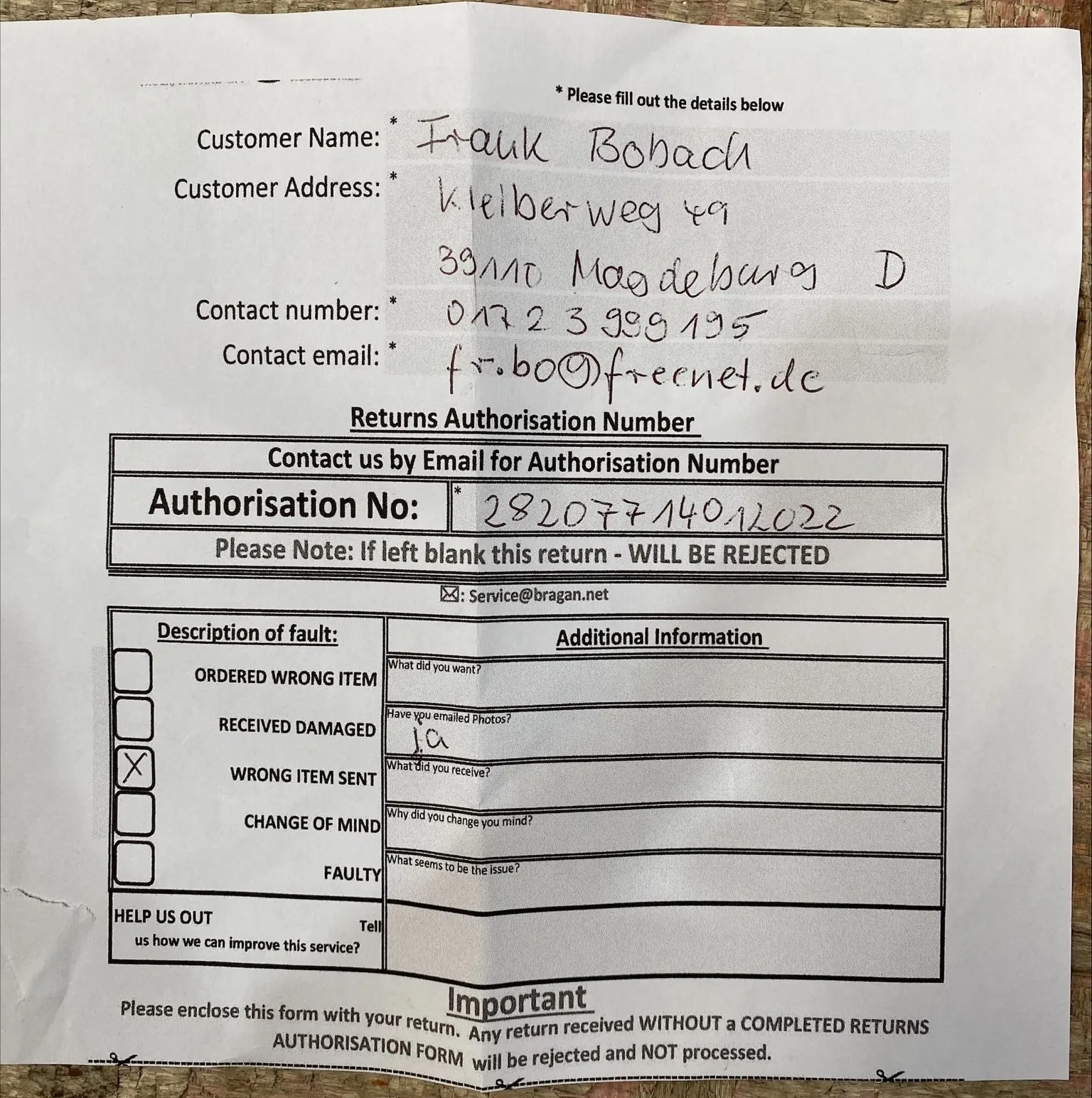
Customer service agent sends link to our Return Form to customer every time there is a request for item return. Customer will fill-out this form and send it back to us along with the item.
parcel from a customer tag customer service on Returns Group so they can provide action. @use tag so the office gets notified of these and returns can be processed efficiently.
Note: Any returns from IFS that are clearly damaged won't be accepted. Warehouse will still check fully for damages but it won't be accepted. This only refers to return to sender items, items that are not delivered to the customer and is being returned to us.
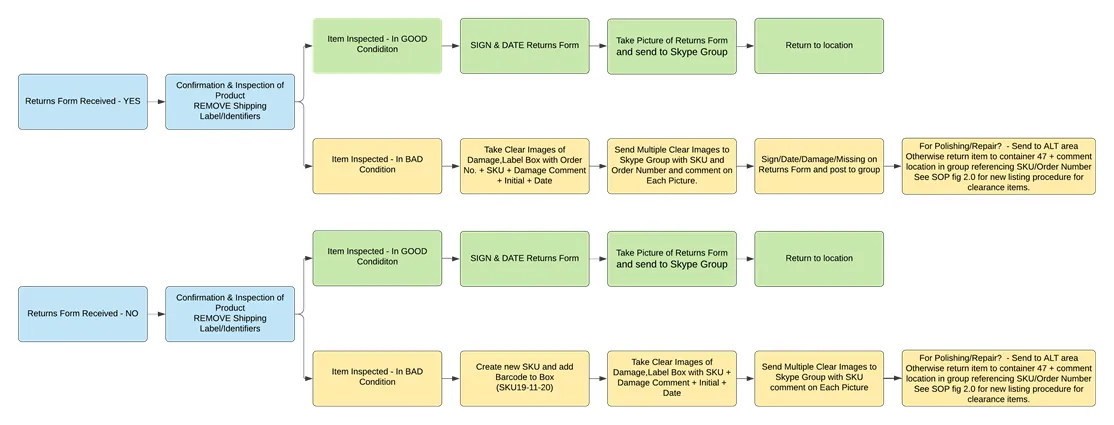
Items with Return Form
These returned items are inspected by warehouse if it is in good condition or not. Items in good condition can be sold again so it will go back to inventory and its location. The stock is updated through the Hyperstock app to reflect this item going back into circulation. All items going back to location must have all customers identification and labels removed and a location label signed by the operator.
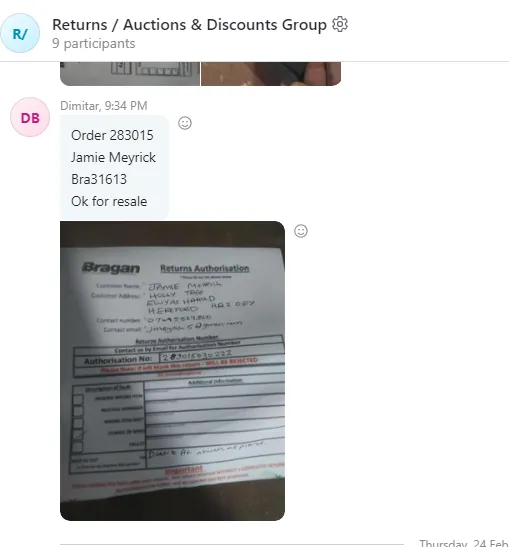
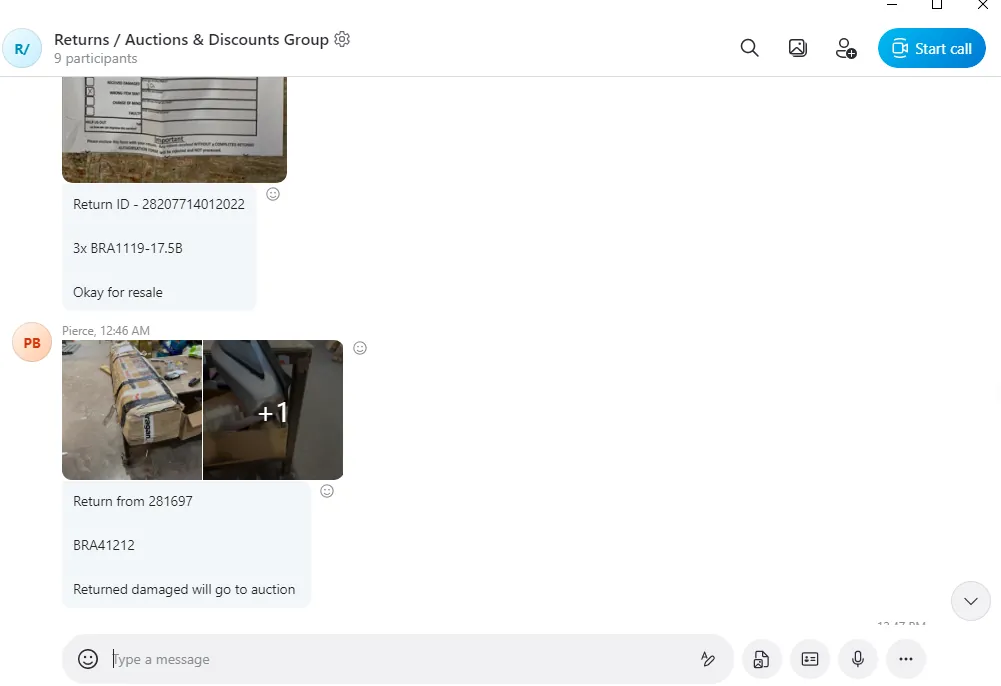
A picture is taken of the return form and is posted in the Returns Group, this should also include the following:
Linnworks Order Number
SKU Code
Customer Name
Returned to Stock (since item is in good condition and to confirm that the WH operative have updated the stock level)
Photograph of how the item was returned / condition on arrival back to us
This is to have the images easily searchable in the group chat. Customer service agents will take note of this and will process replacement or arrange the refund to customer.
However, for returned items that were damaged, either during transport or damaged by the customer this will be either put to scrap or sold as auction items (it depends on the extent of the damage). These items are not added to circulation and therefore are not added to stocks.
Damaged Items are assessed on the extent of the damage. All damaged items should be labeled with how badly damaged they are. For example, if an item is badly damaged, there should be a label placed on the item that reads ‘Bad Damage’ over the area where the damage is. If an item only has minor scratches, there should be a label that reads ‘small scratches’ over where the small scratches are.
If wheel trims are returned with minor scratches, they will be placed in the ALT room under the bench to get polished.
If the item can be sold or auction it is transferred to CON 6 to be listed for auction. If you want to know how these items are being listed for auction see this SOP on Auction Listing.
The operator doing the returns should add a label with the Order No. + SKU + Damage Comment + Initial + Date to the box of the auction item. If the item is from a parent item, make sure also to include the SKU of the parent item just for reference to be use later when populating the Auction Trello Card.
Send multiple clear images of the label and damage to the Returns Group along with the following:
Linnworks Order Number
SKU Code
Customer Name
Sent for Auction (if item has damage and Auction Trello Card is already created - See process below for the card template and on how to fill-out this trello card)
Customer service agent will then inform the customer that a refund or replacement will not be processed because it was returned to us damaged.
Items without Return Form
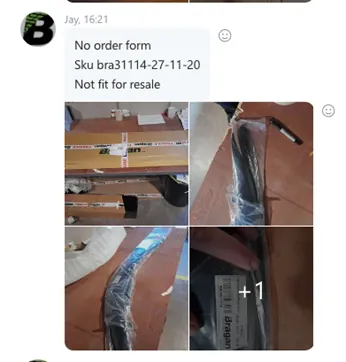
If an item is returned without a returns form and it is damaged, the operator must create a new SKU in the format Original SKU code-date inspected (dd/mm/yy), for example the item is BRA31114 then the new SKU of this damage item will be BRA31114-271120. Then place the barcode on the box.
The operator must take clear images of the damage, label the Box with the new SKU + Damage Comment + Initial + Date. If the item is from a parent item, make sure also to include the SKU of the parent item just for reference to be use later when populating the Auction Trello Card. Then send multiple clear images of the label and damage to the Returns / Auctions & Discounts Group Skype Group along with the following:
Linnworks Order Number
SKU Code
Customer Name
Sent for Auction (if item has damage and Auction Trello Card is already created - See process below for the card template and on how to fill-out this trello card)
For items without return form but is in good condition, there is no need to create a new SKU as these items will be returned to its location. Just make sure to take picture and send it to Returns / Auctions & Discounts Group Skype Group along with the following details:
Linnworks Order Number
SKU Code
Customer Name
Returned to Stock (since item is in good condition and to confirm that the WH operative have updated the stock level)
So customer agents will know what to update the customer.
Returning good condition items to stock#
If the returned stock is in good condition it must be put back into stock.
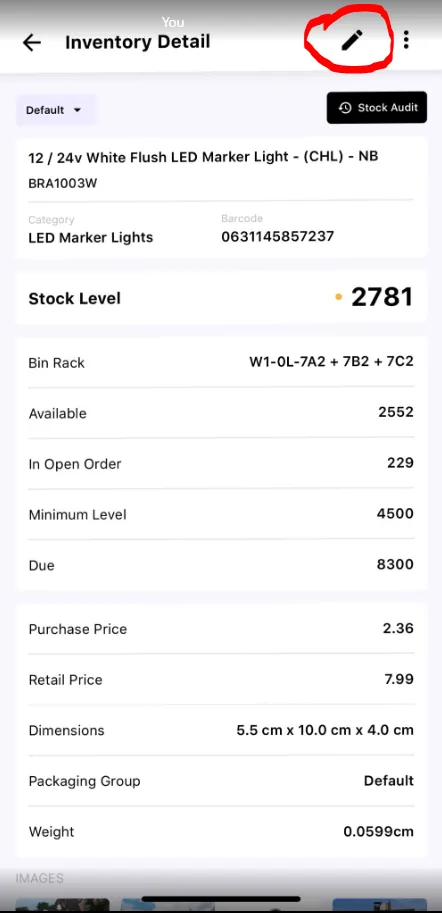
To do this first open the Stockwise App on your scanner
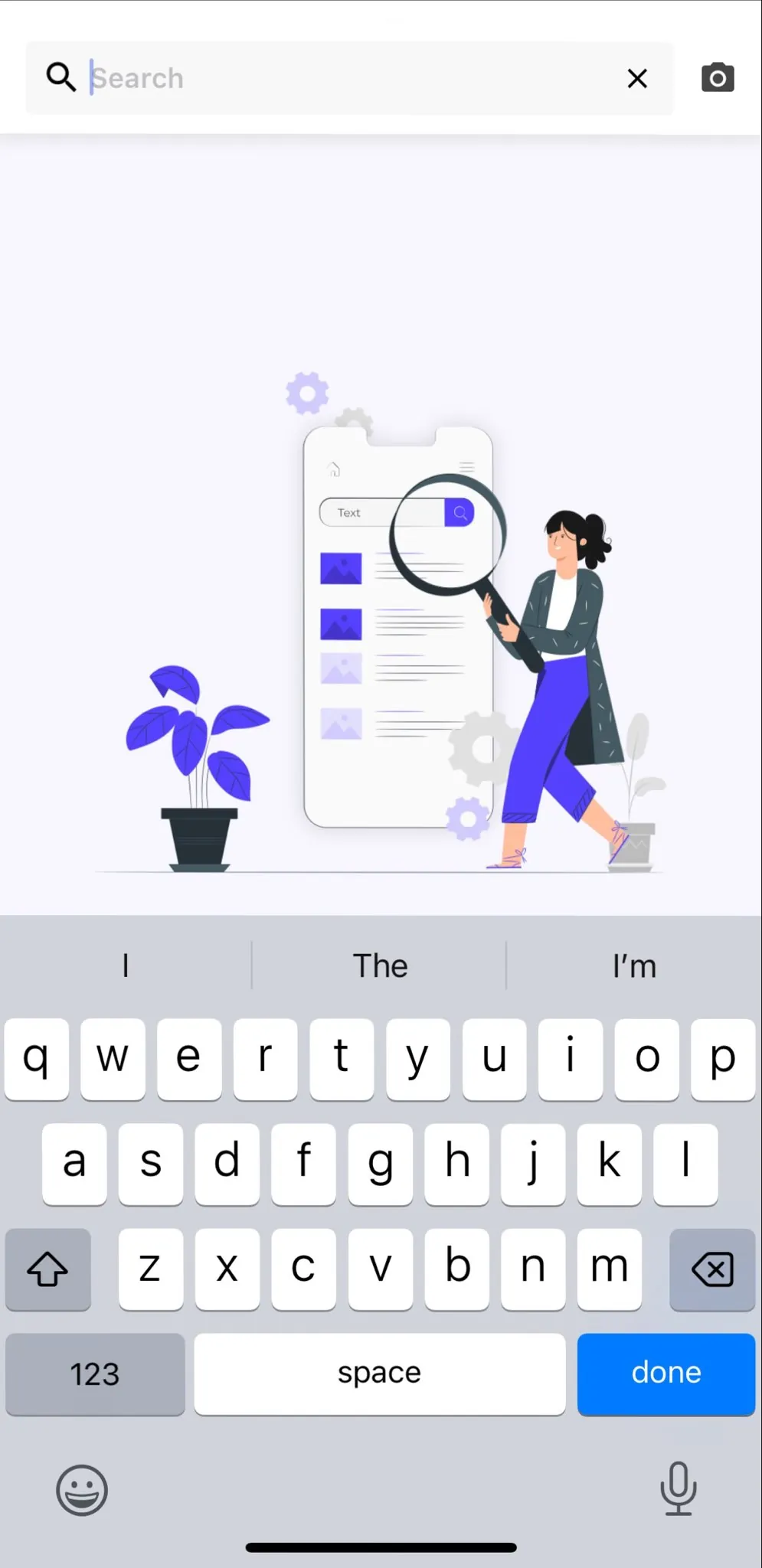
Scan the items that need to be returned to stock.
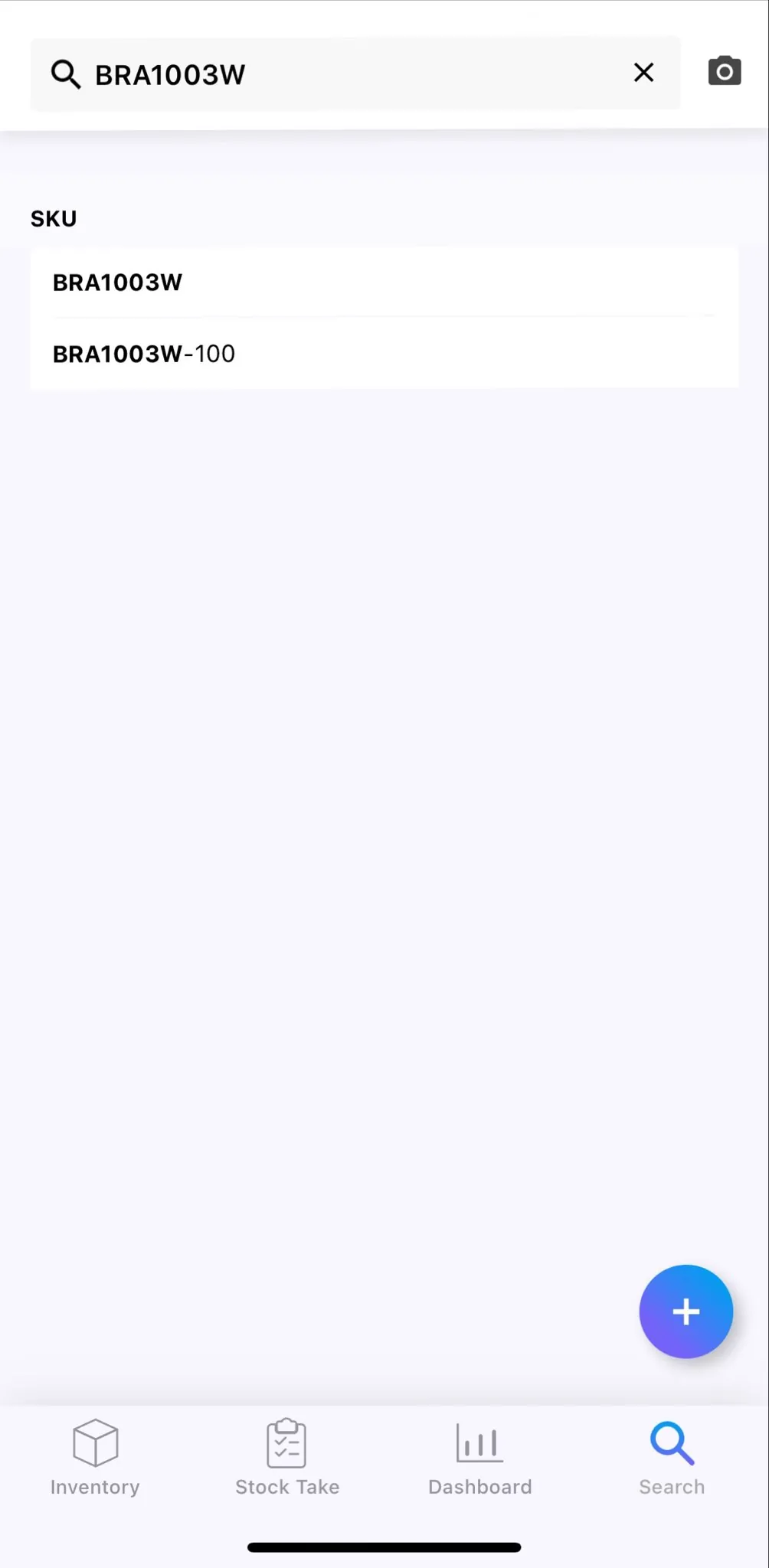
Click on the edit button
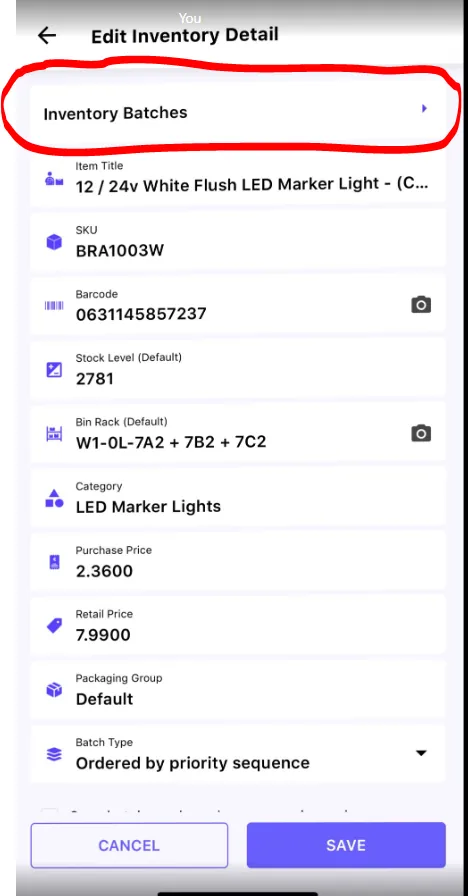
Click on Inventory Batches
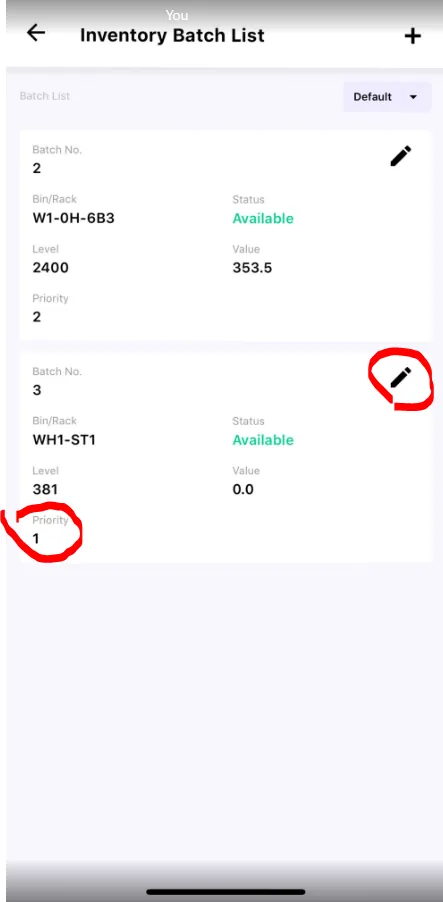
Click edit on Priority 1
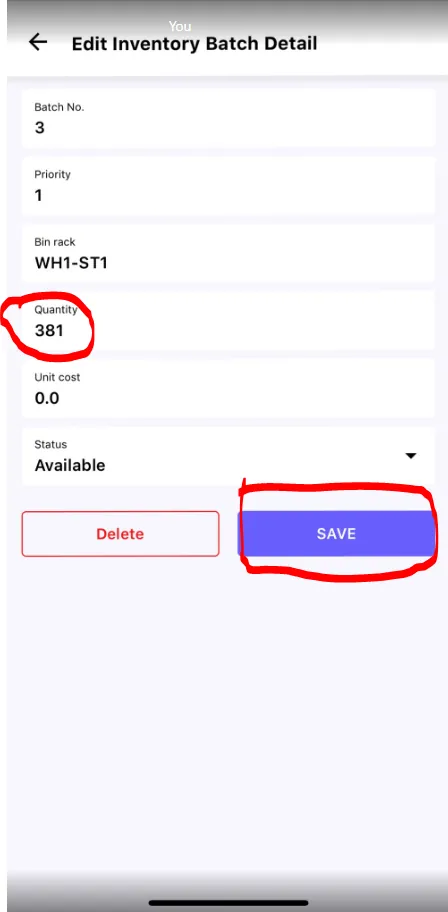
Click the quantity tab (make sure to increase by how many have been returned) and Click save.
Location Label#
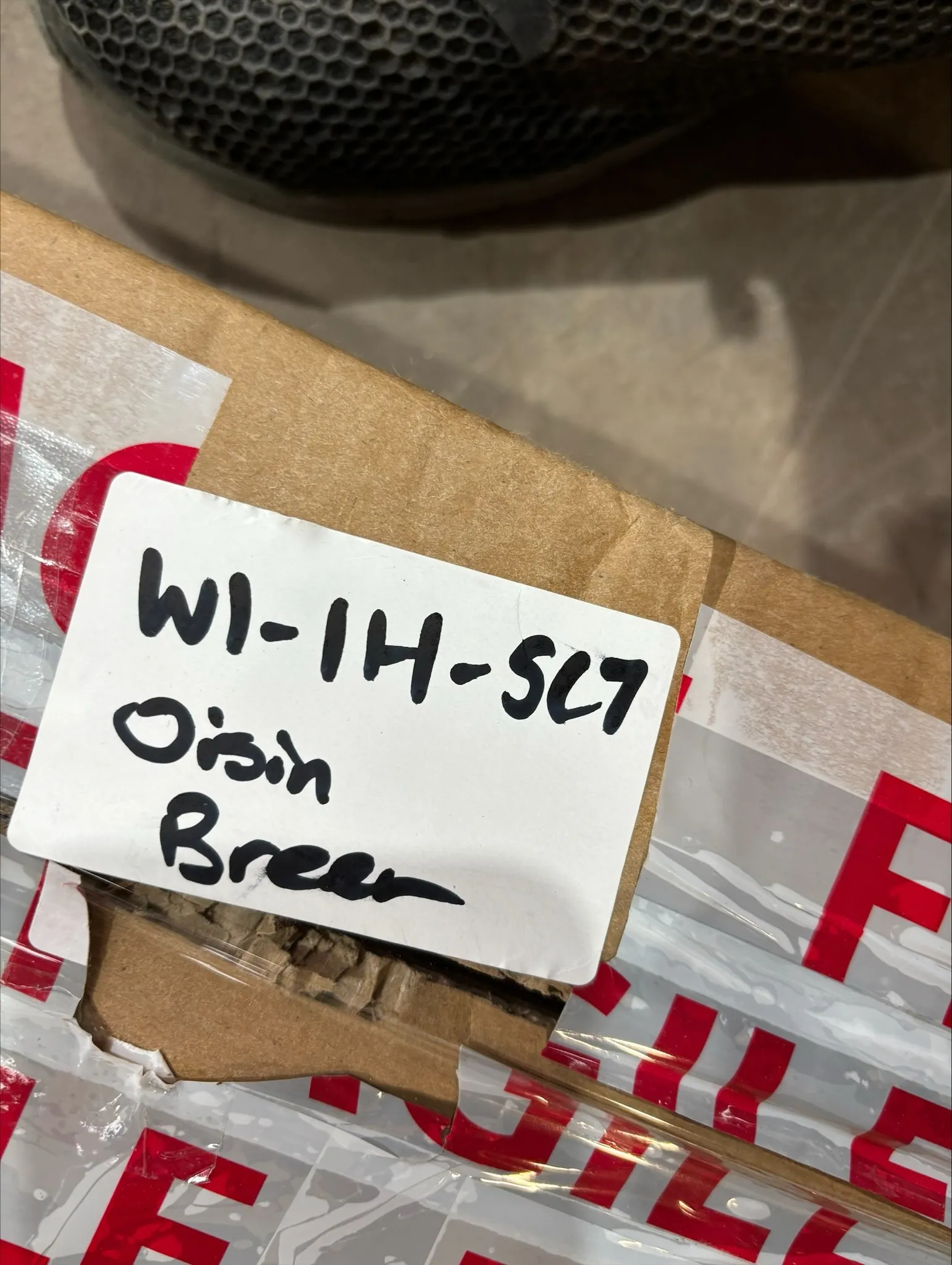
The operator doing the return should write down the location of where they have increased the stock on a white label. The operator should also include there own name and the date of the return on the white label and stick it onto the item so it can be returned correctly.
Create Auction Trello Card#
Once the item is assessed that it is for auction, create an Auction Trello card straight away. See below for the process.
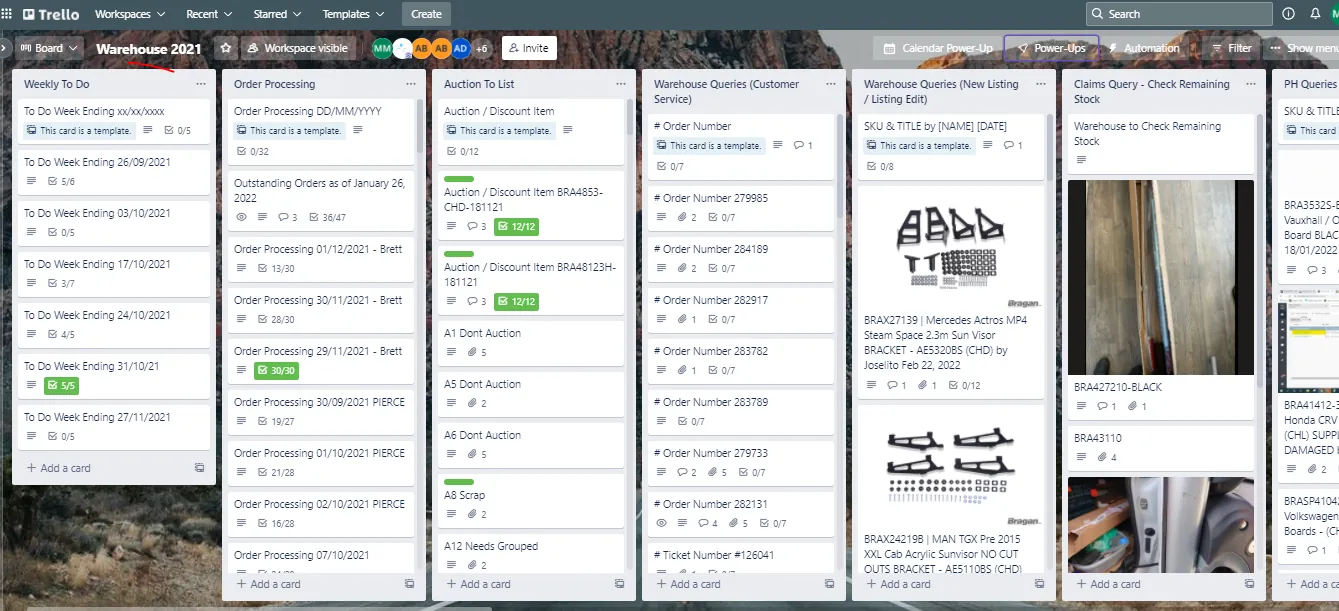
- For all auction item, it should have a corresponding Auction Trello Card. Go to Warehouse 2022 Trello Board and copy the Auction / Discount Item Trello Card Template.
Note: The Name of the Trello Board changes yearly. It is renamed depending on what is the current year. In the snipe it is Warehouse 2021 but in actual this is now Warehouse 2022.
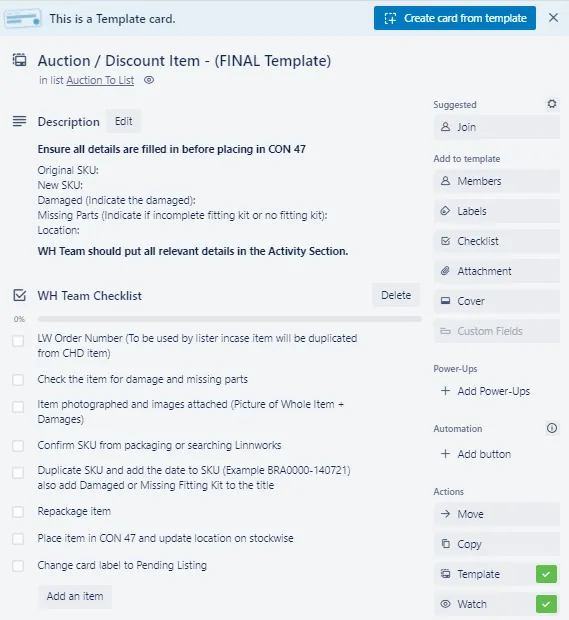
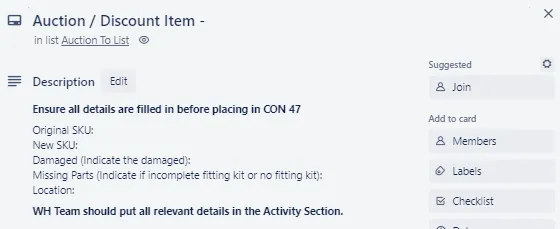
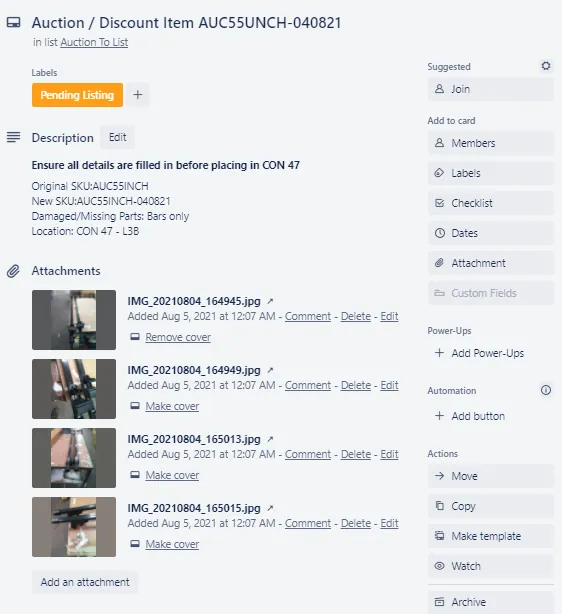
- For the Title just add the new SKU then make sure to populate the Description Section of the card. Indicate what are the damage on the item and if the item has missing spare pieces for the fitting kit or no fitting kit at all. Add also the location which is usually CON47, 8 or 6.
- There are three checklists in this template card. Warehouse will only fill-out the checklist assigned for warehouse team.
Indicate the Linnworks Order Number of the auction item. This is important for listers because it will be their guide in creating the listing so make sure to put it.
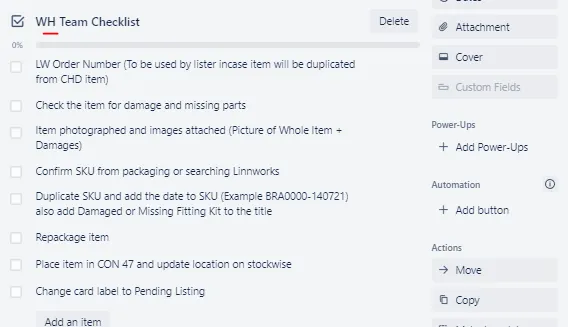
You can tick the next item in the checklist, which is checking for damages and missing parts since these were already done by the above steps.
When taking pictures for the auction item, make sure to take a picture of the item where damage is visible. This way customer can easily see the damage and will know what to expect.
Then confirm the SKU from the packaging to make sure what SKU to duplicate.
- All auction items are then assign with new SKU. The new SKU should be the Original SKU code-date inspected (dd/mm/yy), for example the item is BRA31114 then the new SKU of this damage item will be BRA31114-271120.
If this auction item is from a parent item make sure to reference it here in the Trello Card. You can put it in the Activity log as remark. This is for the benefit of the product listers. Having the parent item SKU will make it easier for them to search for listing descriptions and other details to put in the listing.

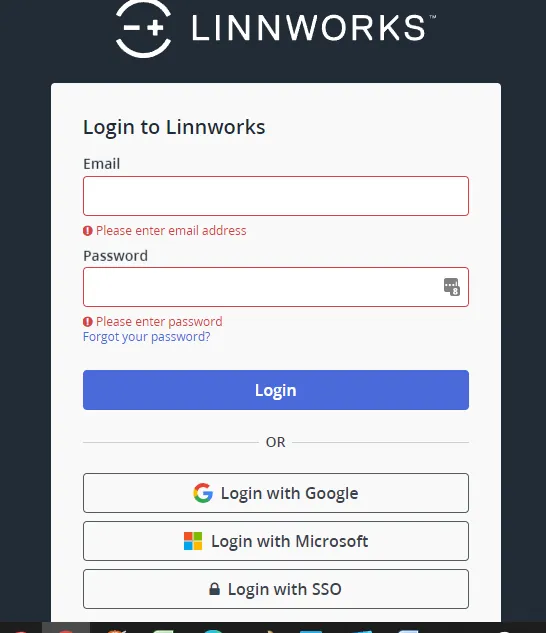
- Go to Linnworks and log in using the credentials provided by management. Go to My Inventory tab and search the original SKU. Let us use the example above BRA31114.
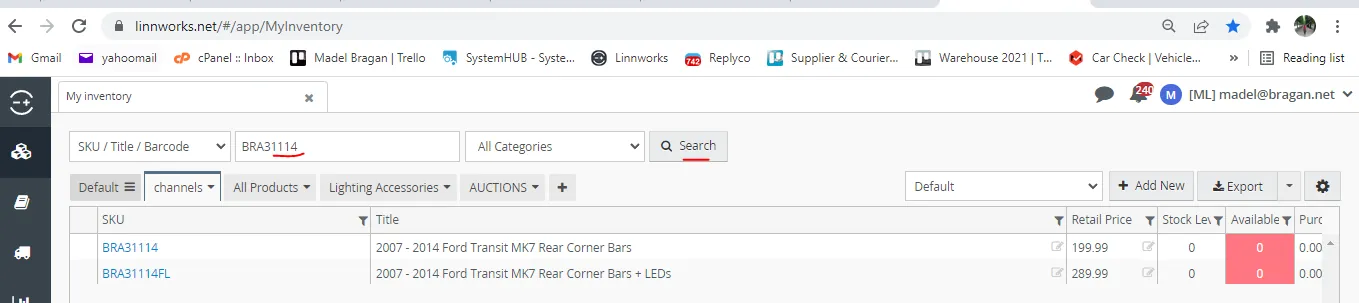
- Right click on the SKU then select Duplicate Item. Put the new SKU following the format given in Step 3 in the Item number. And them for the item title, add DAMAGED at the end of the title, then click Duplicate.
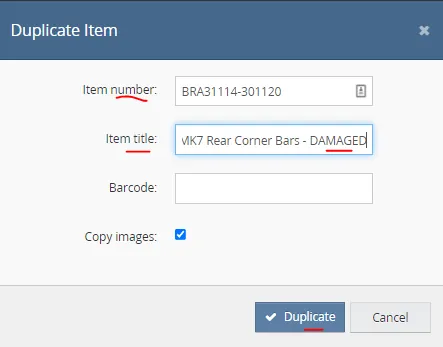
Here are other sample auction SKUs in Linnworks
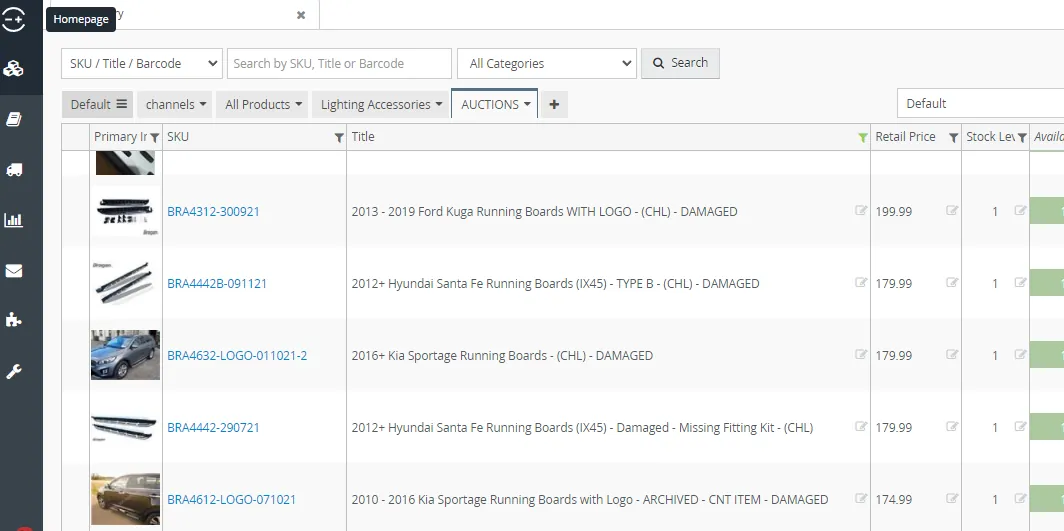
- Then repackage the auction item so that it would still be presentable when delivered to customer. Then put to container 47.
- Change the label of the Auction Card to Pending Listing. To do this, click on Labels then select Pending Listing.
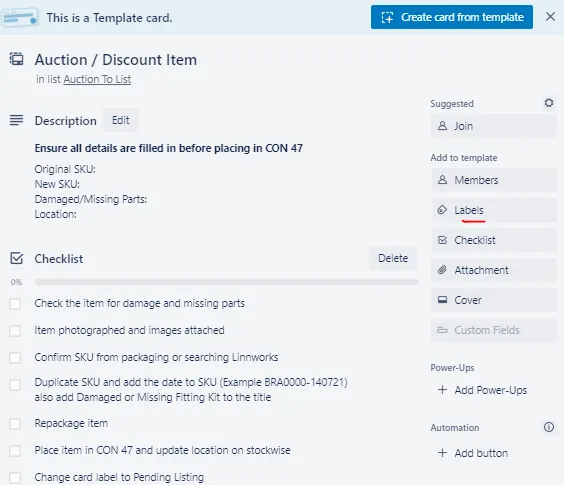
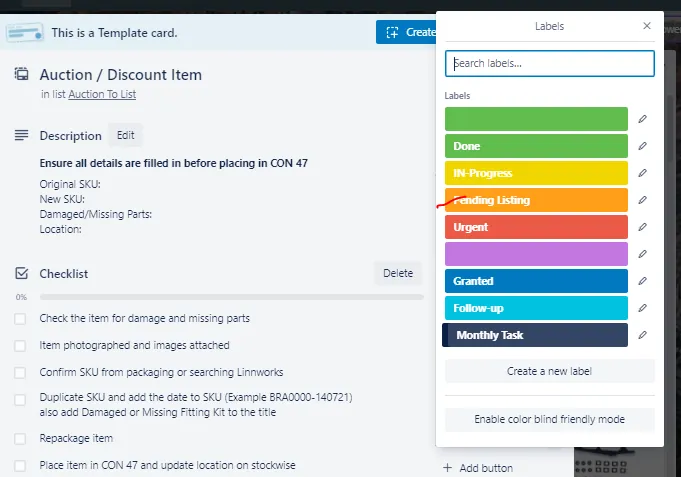
- Then attach the damaged pictures that you took by clicking attachment.
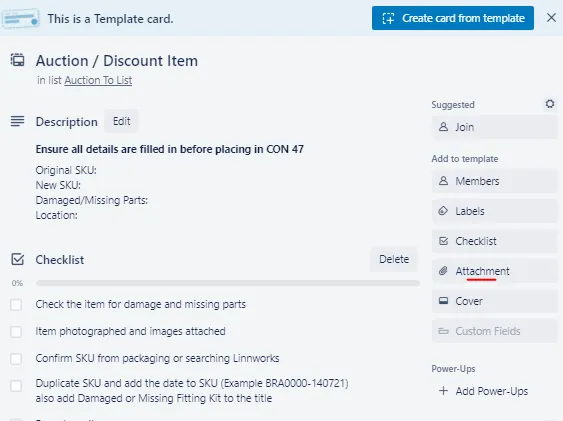
- The remaining items in the checklist are now for the product listers.
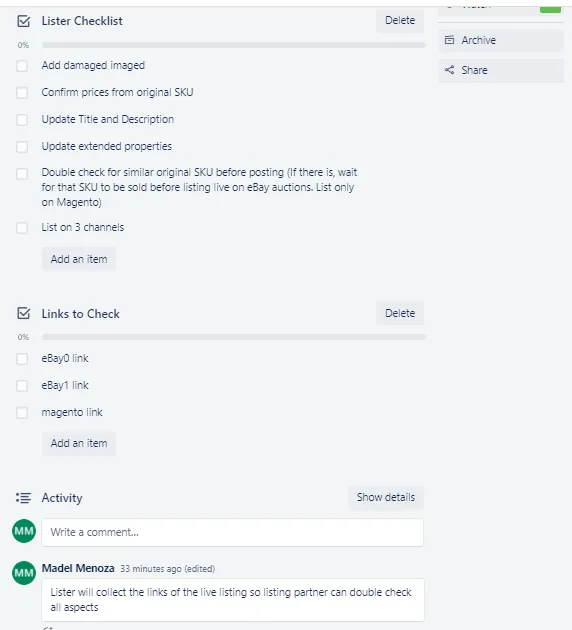
Here is a sample Auction Trello Card that is already populated. The product listers will now pick these cards for listing to channels.
Notes#
This section is important so Adhoc points and issues can be logged. Also, Q&A can be logged for suggestions for potential issues encountered. Also, log important notes needed for this system. Additional Notes:
All returns are either received by Smyths Transport and collected by Colm OR we receive them directly. In any case, this is the procedure that MUST always be
followed. Operator 4 will carry out the returns procedure every day after order processing. All items, whether they are for auction, damaged, or being put back into circulation should have a barcode. Please make sure this is present and readable on the returned item. No item is to be put into any location without a barcode present.
Make sure to create Auction Trello card for each auction item.
Make sure to inspect all returned items and update the team in the Returns Group.
Be very careful in choosing the SKU to duplicate for the auction item, make sure to double check that you are duplicating the correct SKU for the item.
Potential Issues:
1 - ISSUE ENCOUNTERED: Stuck on Loading
RESOLUTION: Refresh Browser
2 - ISSUE ENCOUNTERED: Broken Links
RESOLUTION: Get the external link as this will allow other people to access the SOP without the need for login credentials and avoid broken links.