eBay - Monitor Negative Feedback SOP 1
The higher our eBay feedback rate the more we are perceived as trustworthy by the
eBay - Monitor Negative Feedback SOP 1
Overview#
Purpose: The higher our eBay feedback rate the more we are perceived as trustworthy by the buyers, the more trustworthy we seem, the more business we’ll generate. Therefore, it is important that we maintain our eBay ratings high.
Scope: This procedure applies to all Customer Service Team both Team PH and Team IRL. Team PH will have to create a card that contains all the details that will be discussed below and Team IRL will be the one to connect to eBay.
Responsibility: It is the responsibility of customer service representatives to monitor negative feedback on eBay.
eBay - Monitor Negative Feedback SOP
Procedure#
This task will focus on how to get the Negative Feedback Removed. In this task, all eBay Channels should be checked daily for new negative feedback received so we can take necessary action immediately.
These are the ways that negative feedback can be removed:
- Change eBay Feedback through buyer revision
- Change eBay Feedback through eBay intervention. - You couldn’t contact the buyer because the email address provided was wrong. - The buyer left negative Feedback but the item is still unpaid. This applies to customers who have ordered but still waiting for payment. Normally this will show on iflow as Unpaid. This is a very rare scenario though. - There is no response from the buyer. Message a customer to resolve their feedback. If they have not replied to you in 48hrs, they will be seen as unwilling to work on things and eBay should remove them. - When the Feedback was the direct result of a program error, website issue, or systemic delay in communication. This could be an instance that the customers seem not getting our replies and maybe thought we are not willing to help them in resolving the issue. - Customer cannot blame the courier in feedback for you. As long as the order was dispatch on time and any delays in transit encountered by the courier, this will not be taken against us. - When the buyer has been suspended by eBay, in which case Feedback left within 90 days of the suspension will be automatically removed. (Manual removal via the Feedback Revision Process page is necessary past 90 days.) - When a comment is in clear violation of eBay policy, such as when it contains links to another website or seller or uses obscene, racist, or profane/vulgar language. If the customer has cursed in feedback, or in messages, eBay should remove it. - If feedback has 'avoid' or 'do not buy' we can have the review taken off for defamation. - If a customer threatens with feedback, it is called 'Feedback Extortion' and is against eBays policies. Can have removed it if the customer has been doing this to you.
When calling eBay, it needs to be done before 10:30, to give you the most chance of finding someone helpful. Email requests to remove feedback should be done Wednesday at the latest, this will give eBay sufficient time to come back before the call on Friday All cards should be 100% ready before the call to eBay done on Fridays Important to give eBay all info ASAP as they will close in customer favour if lack of info Important to continuously show we are trying to work with the customer. 5 revision requests per quarter.
As of the moment, we have eBay0 (bts-trading) and eBay1 (bragan-x) account. To check for negative feedback, please see the figure below.
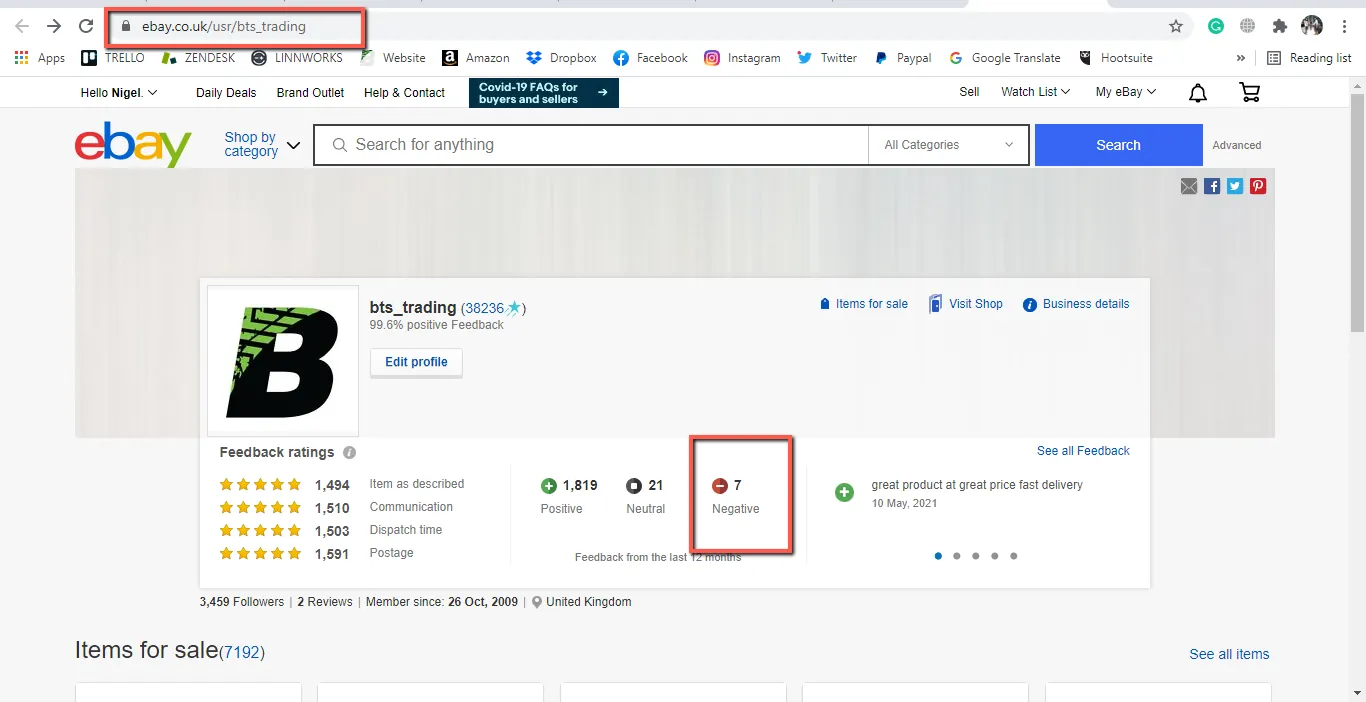
eBay0 (bts-trading)
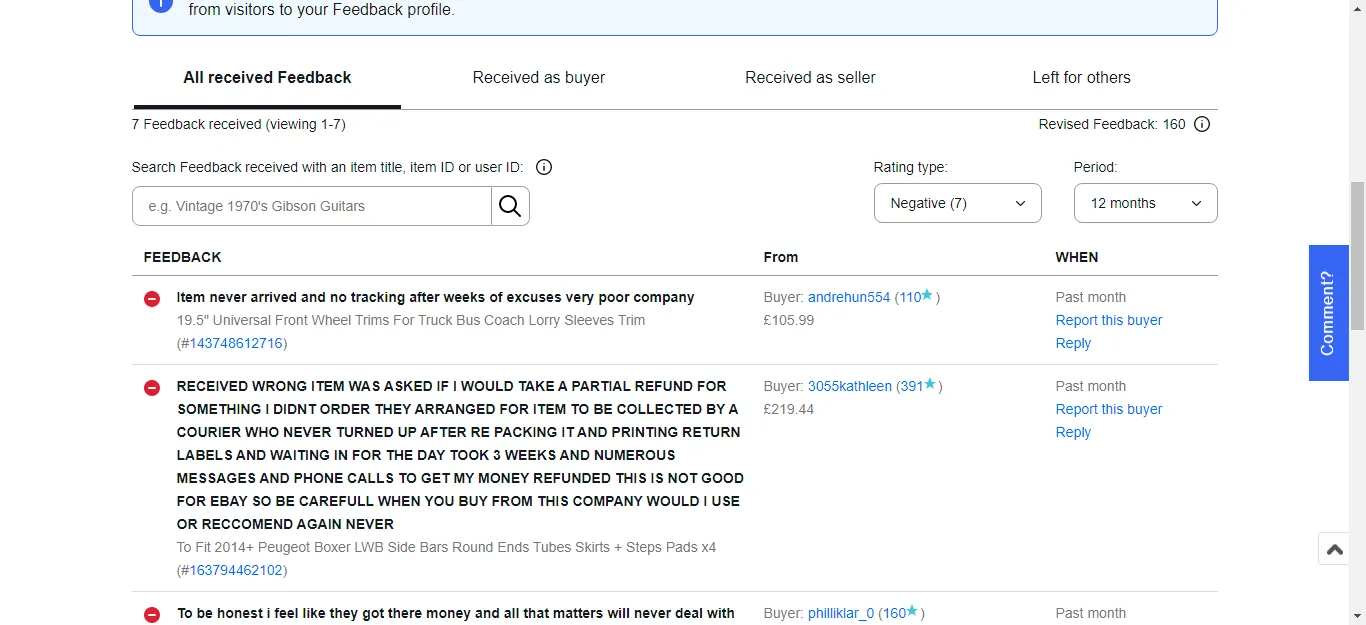
eBay0 (bts-trading)
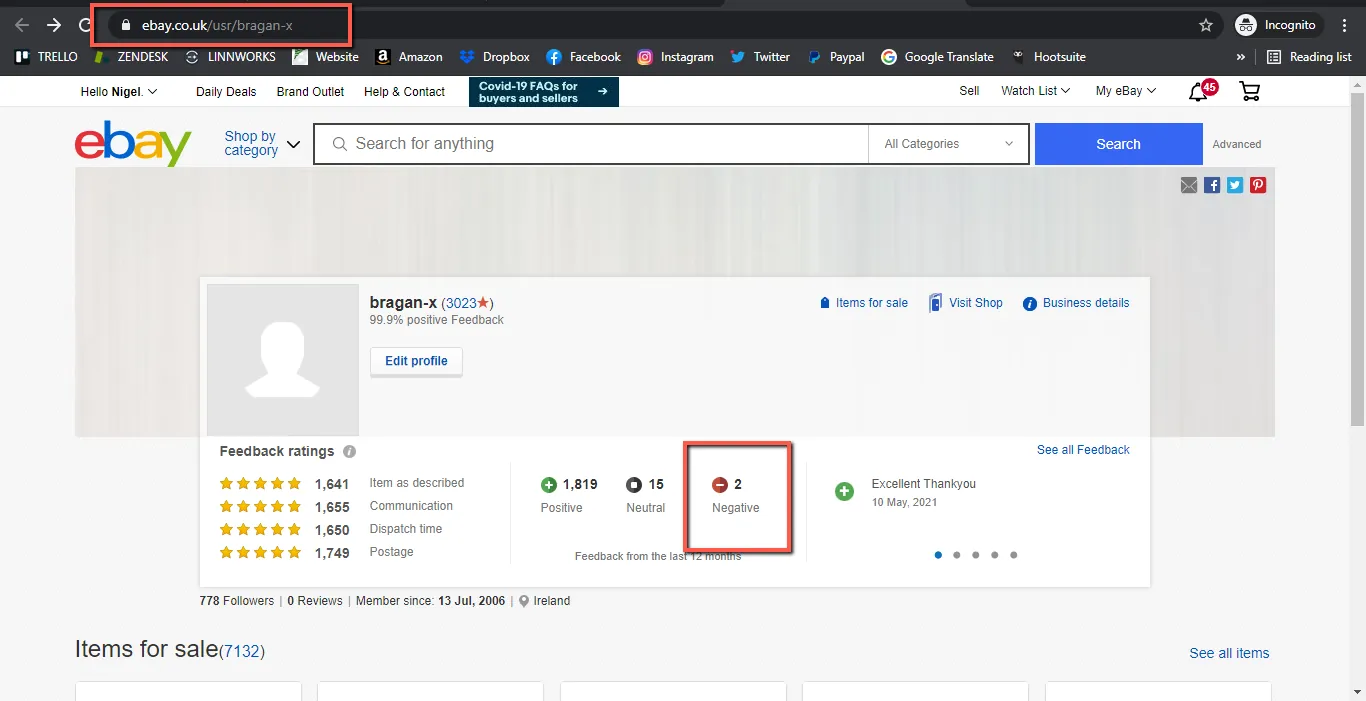
eBay1 (bragan-x)
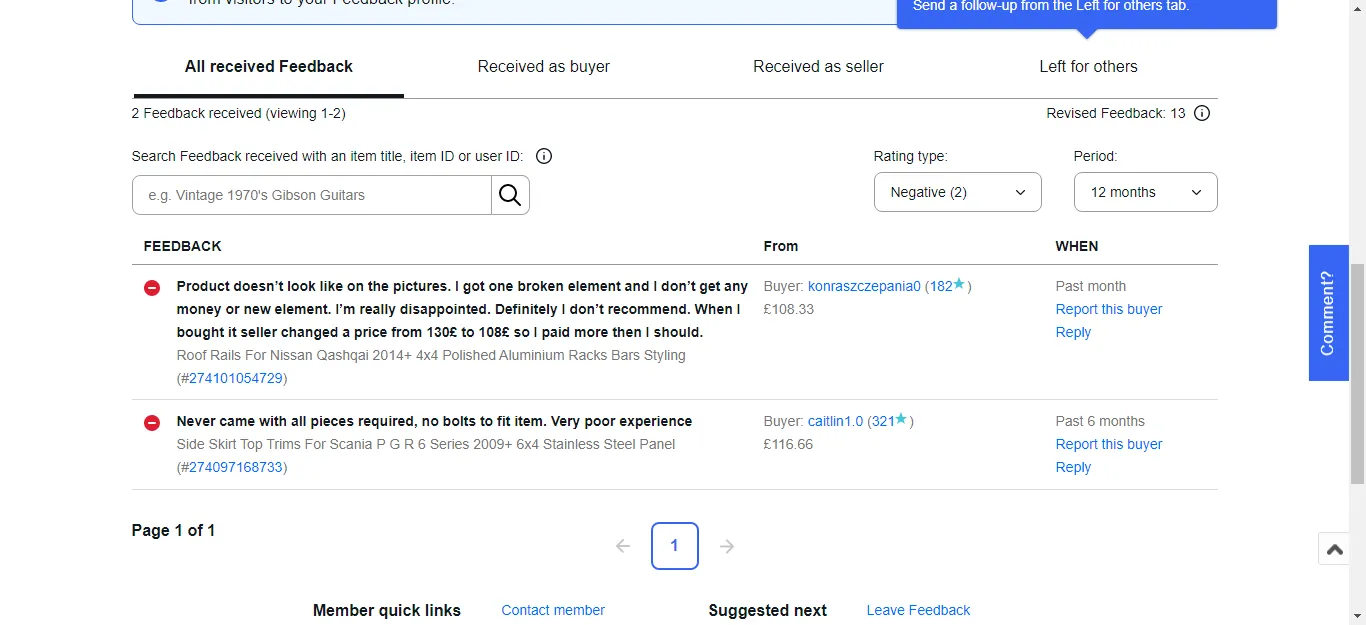
eBay1 (bragan-x)
You will need to check every negative feedback in the result. The following information should be gathered.
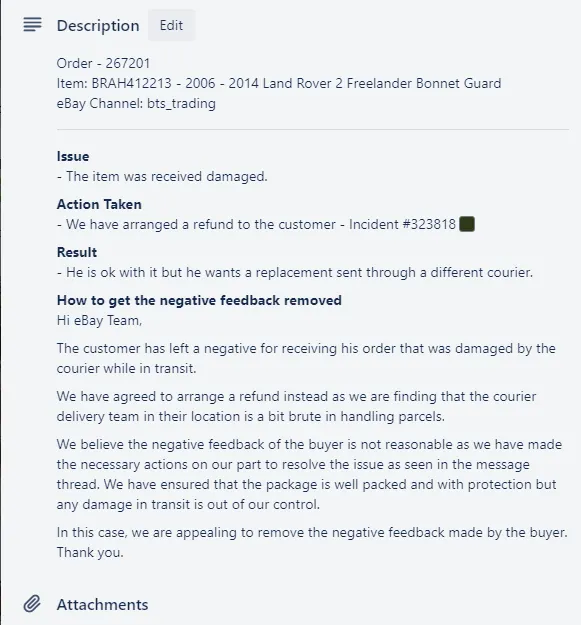
Order Number Item / SKU eBay Channel Reason for the Negative Feedback (Issue) Actions Taken (What has been done to resolve the customer’s issue) How we can get the negative feedback removed. Sample response to eBay to get the negative feedback removed
All of this information should be added to a Trello Card. This card is on Andrew’s Trello board. You will need to add a new card with this information and relevant pictures.
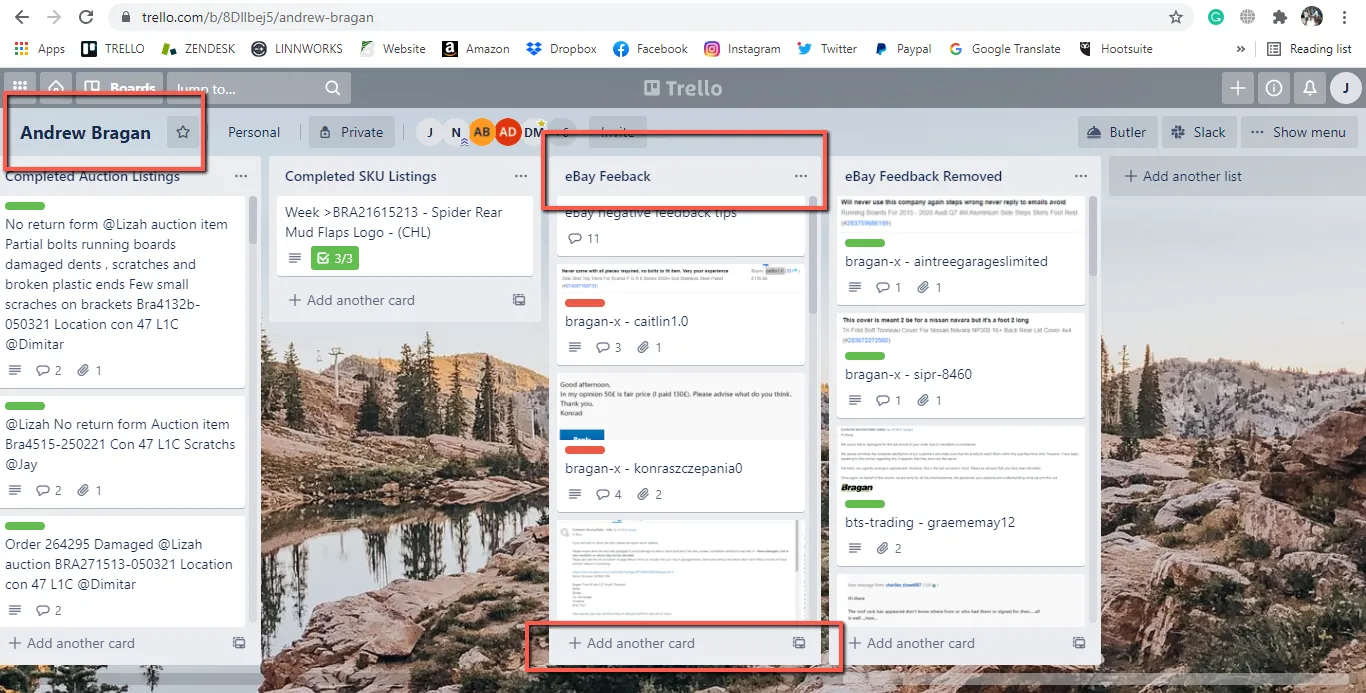
The format should be eBay Channel – Customer’s eBay username
Example: bts-trading - nigebroomhea-2
See the example scenario below.
Important Notes#
Remember that buyers are ordinary people and that their negative feedback could be due to just about anything, including:
They are extremely upset about some aspect of their purchase. They completely misunderstood your messages to them, or they freaked out when you didn’t reply as quickly as they expected.
They think submitting negative feedback will flag their problem to you, or to eBay, and help get it resolved. They are having a bad day, or a hangover, or have just been fired. They don’t understand how to use the eBay feedback system. They clicked the wrong button.
Whatever the circumstances, it’s usually worth messaging the buyer and trying to resolve the problem. Put your best customer service hat on, keep an open mind, and try to find out what went wrong. Keep the buyer informed, and let them know what you are going to do.
Revision Request#
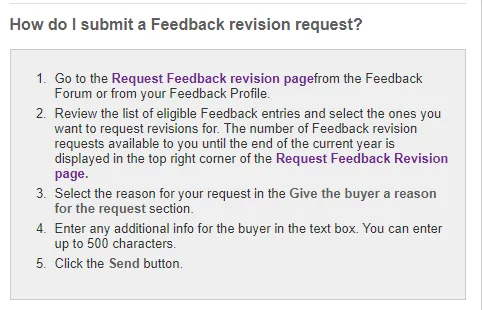
When a customer has agreed to change feedback on eBay, we need to send the customer a revision request which is very simple to do.
Click Request Feedback Revision Page – this will make whatever feedbacks that are available for revision appear (as shown below)
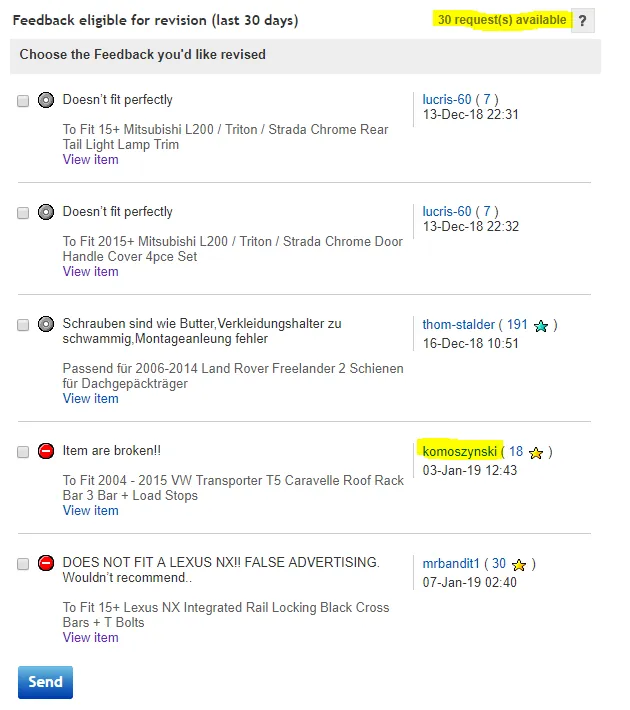
From this page also you can see how many revisions requests you have left for the year (Runs from January-December, you get 10 revisions for every 10,000 of feedback you have – i.e our score is currently 33,295 so we have 30 revisions left)
NB: It is very important to use these wisely – if possible, try and get the eBay concierge to remove them as this will not use up any revisions however it is unrealistic that eBay will be able to help with all of these. It is also vital to remember and have confidence that the buyer will change it because if they don’t change it within 7 days of the request being sent then it will expire, and you cannot send another one to the same customer unless it is for a different feedback
We will use komoszynski as an example
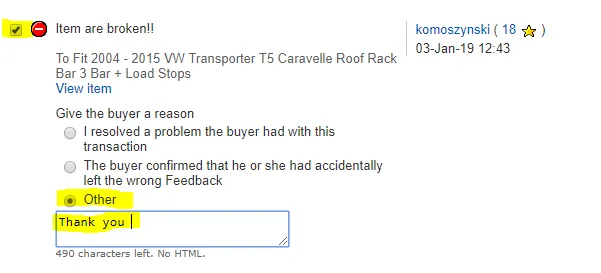
You need to write a comment – you can write thank you or if you have resolved an issue just write something like ‘Issue resolved’
Click send at the bottom of the page
IMPORTANT: When you have submitted the request ALWAYS message the buyer to advise them that the request has been sent and for them to let you know when they have removed it.
Defamation#
Please see the form in the attachment below and download the Defamation form, or Go to this link
According to English law, defamation is broadly defined as a publication communicated to someone, other than the subject, which tends to "lower him in the estimation of right-thinking members of society generally", or exposes him to public hatred, contempt or ridicule or which causes him to be shunned or avoided. Defamatory publications will include aspersions upon an individual's reputation for honor, honesty, and integrity, as well as disparagement of an individual's reputation in the trade, business, profession or office.
If we have been unsuccessful in getting negative feedback removed from our account we can file a defamation form to eBay, To do this we simply download and fill out the form then upload it to this page link.
Notes#
This section is important so Adhoc points and issues can be logged. Also, Q&A can be logged for suggestions for potential issues encountered. Also, log important notes needed for this system.
Additional Notes:
Our seller feedback score is based on a buyer’s experience with us and their satisfaction with the product they purchased. Buyers can leave feedback on any transaction that they’ve had with a seller over the previous 60 days.
A buyer’s feedback for a seller is made up of three parts:
- An overall feedback rating can be “positive,” “neutral,” or “negative.”
- A feedback comment giving a short summary of how the transaction went.
- Seller ratings (also known as detailed seller ratings or DSRs), covering four different aspects of the transaction.
The overall feedback score is calculated as follows:
+1 for each positive feedback. No change for neutral feedback. -1 for each negative feedback.
Having a positive feedback percentage is a strong signal to buyers that it’s safe to make a purchase from us. Improving our eBay feedback score and positive feedback percentage is not rocket science. We just need to:
- Get as much positive feedback as possible.
- Get as little negative feedback as possible.
- Try to get negative feedback removed
Potential Issues:
1 - ISSUE ENCOUNTERED: Stuck on Loading
RESOLUTION: Refresh Browser
2 - ISSUE ENCOUNTERED: Broken Links
RESOLUTION: Get the external link as this will allow other people to access the SOP without the need for login credentials and avoid broken links.
Attachments#
defam-form.pdf 16/12/2025