eBay Signature for Out of Office SOP
When the business is closed for holidays we need to be able to have an automatic
Overview#
Purpose: When the business is closed for holidays we need to be able to have an automatic reply sent to all eBay customers.
Scope: IT personnel.
Responsibility: Set up an automatic reply to messages on eBay.
Objective: Customers will receive a message letting them know that the business is closed and when we will reopen again, this means customers are not getting annoyed about messages not being replied to and understand why.
Email Signature Change#
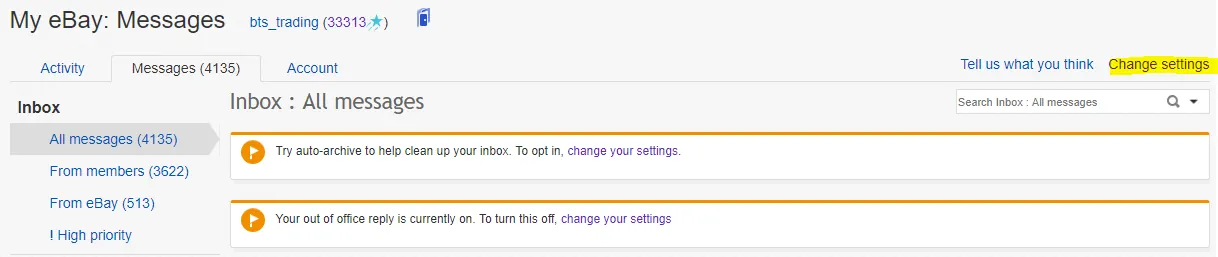
Login to eBay > Hover over My eBay > Click Messages > click change settings.
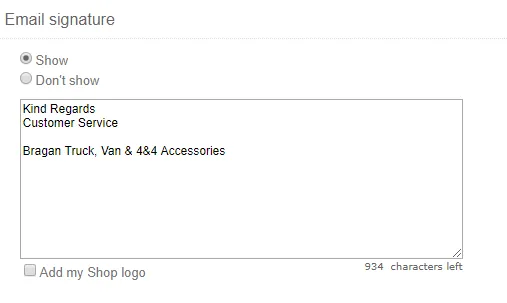
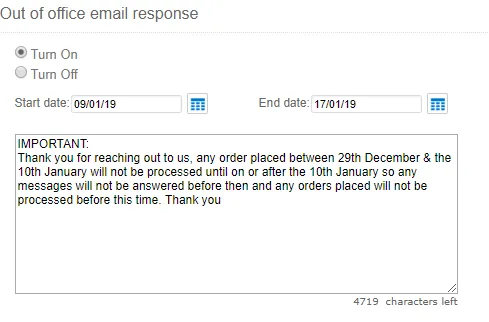
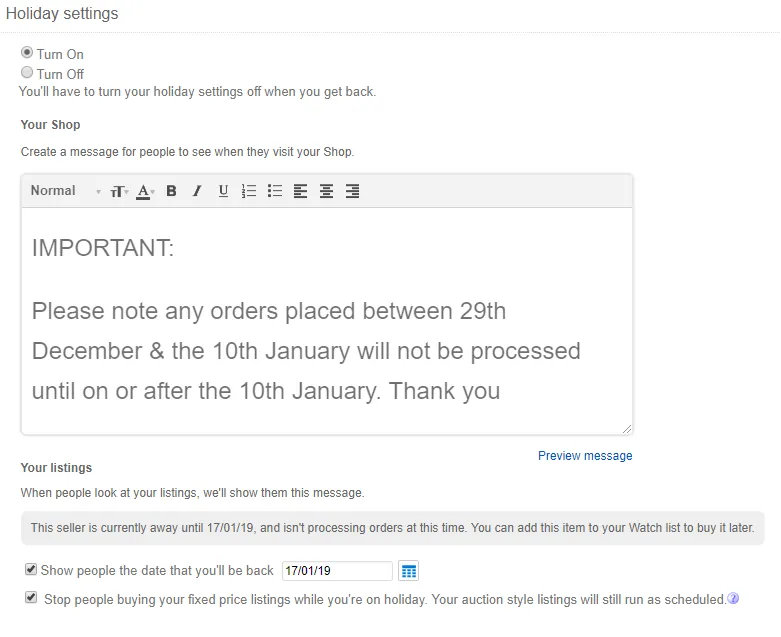
From here we can enter edit the Email Signature / Out of office email response / Holiday Settings.
Email Signature
Out of office email response
Holiday Settings
Notes#
This section is important so Adhoc points and issues can be logged. Also, Q&A can be logged for suggestions for potential issues encountered. Also, log important notes needed for this system. Additional Notes:
This system is very important when the business is closed for holidays we need to be able to have an automatic reply sent to all eBay customers.
Potential Issues:
1 - ISSUE ENCOUNTERED: Stuck on Loading
RESOLUTION: Refresh Browser
2 - ISSUE ENCOUNTERED: Broken Links
RESOLUTION: Get the external link as this will allow other people to access the SOP without the need for login credentials and avoid broken links.