Handling Phone Calls
This procedure applies to both Team PH Customer Service and Team IRL.
Overview#
Purpose: This procedure applies to both Team PH Customer Service and Team IRL. This contains a process on how to handle calls efficiently.
Scope: This applies to all Bragan personnel.
Responsibility: It is the responsibility of all Bragan personnel to follow the standard operation procedure for phone usage.
Objective: The objective of this procedure is:
- to guide employees on phone usage.
Phone Usage SOP
Setting-up the NUACOM Desktop Application#
- Go to Nuacom website. Then log in using the credentials provided by management.
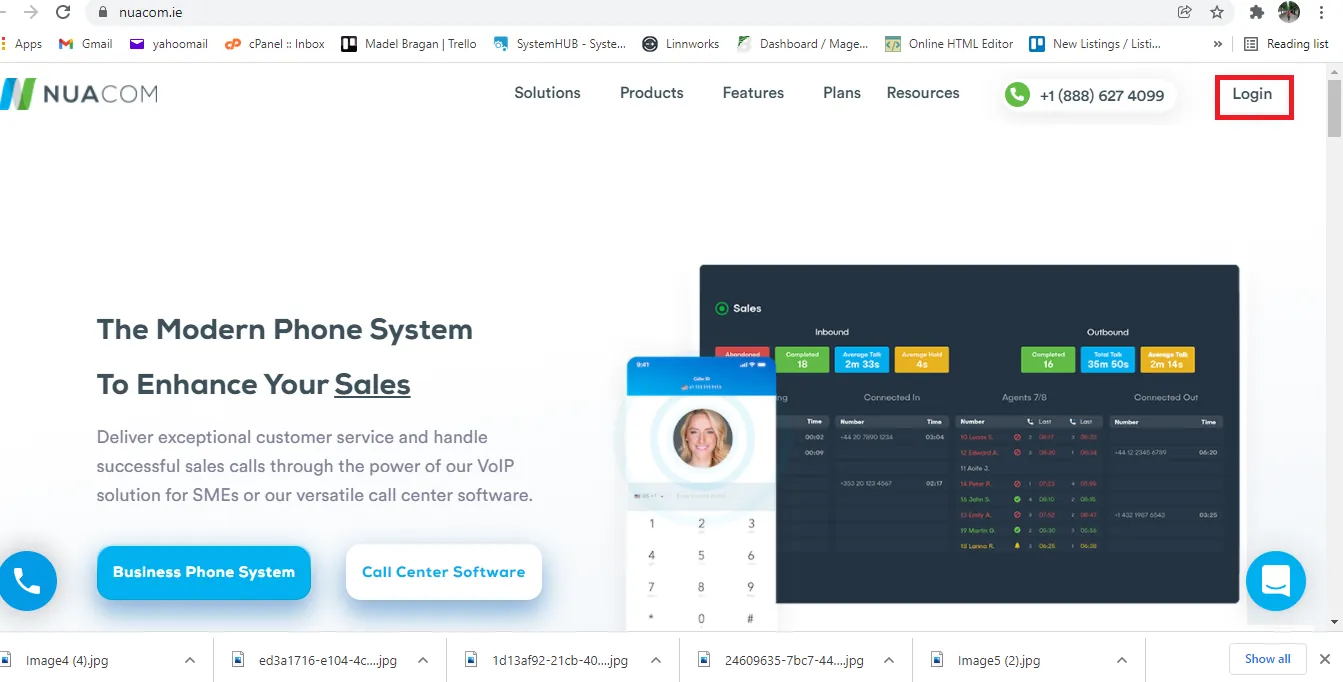
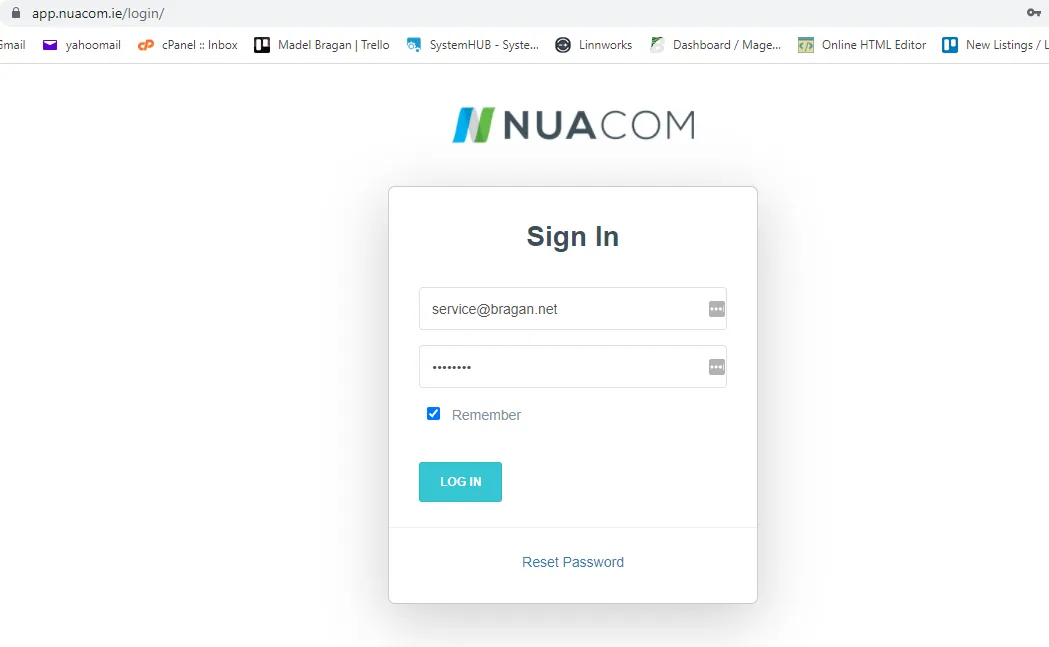
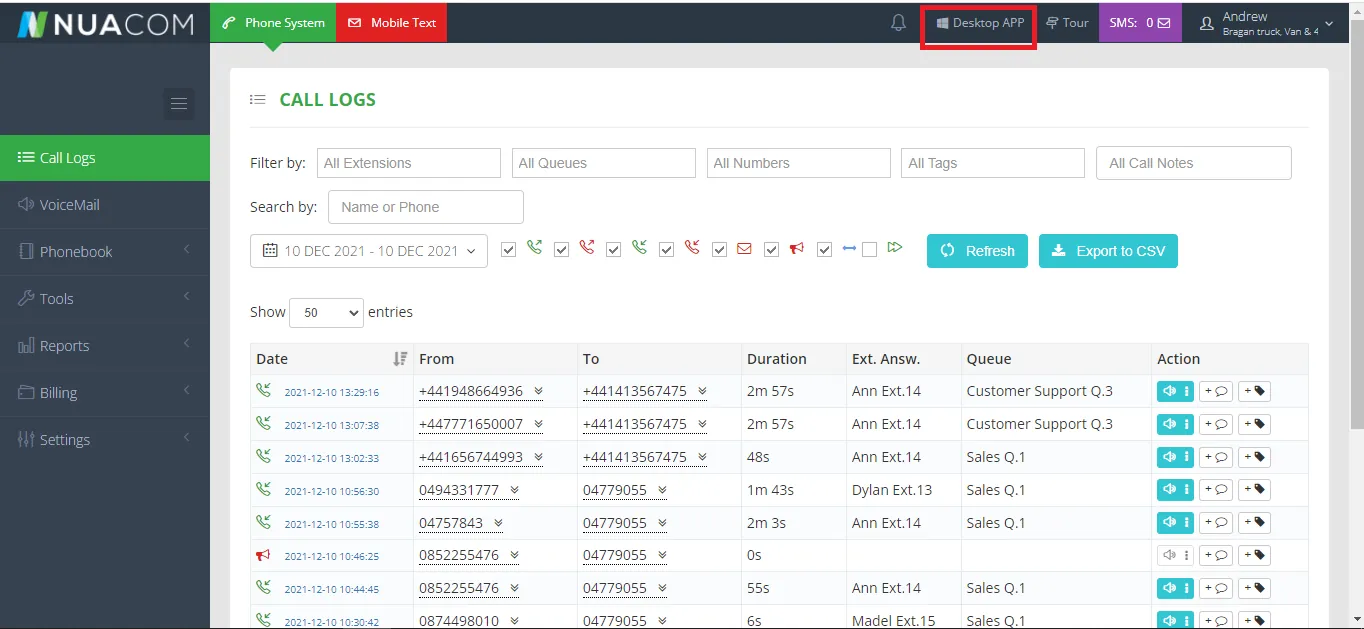
- Click Desktop APP to download the application. Then install the downloaded software.
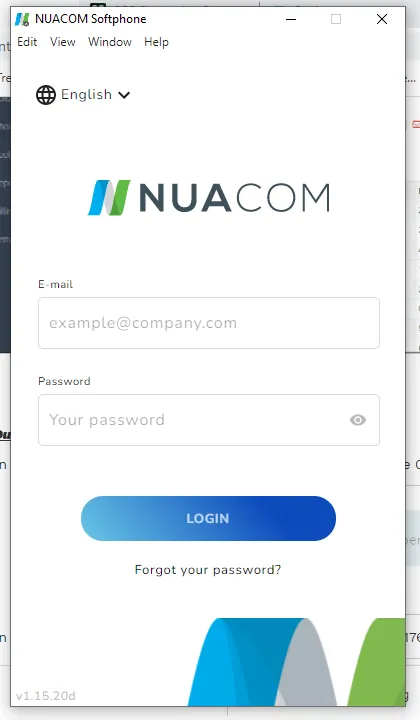
- Log-in to the Desktop Application using again the credentials provided by management. Please note that the credential for this desktop application is different
to the one used in Step 1. For the Desktop App you will be using your own Bragan email.
- Once logged-in, you are now ready to take and make phone calls.
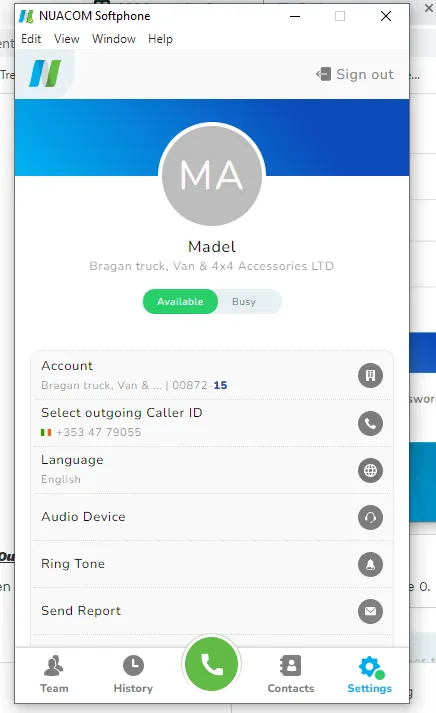
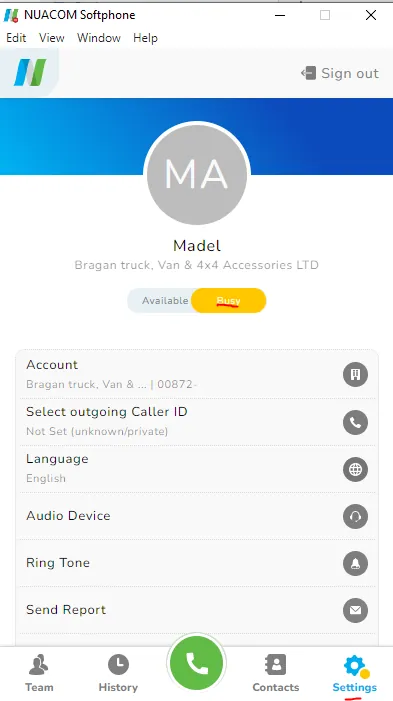
- If you want to take a short break and wants to set your phone to busy, just click Setting > Busy.
Note: If you want to set the whole company phone to busy please see steps below.
Outgoing & Transferring Calls#
- When calling a UK/Northern Ireland number enter +44 & drop the 0. i.e. 02880761051 - You dial this as +442880761051. Then click on the call button.
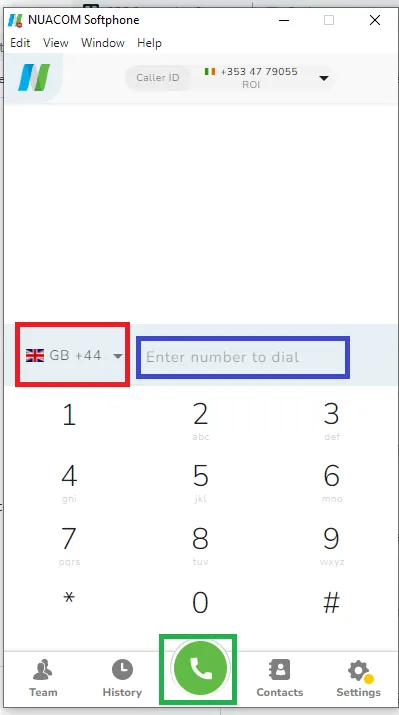
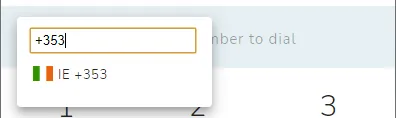
When calling a ROI number enter +353 & drop the 0. i.e 0868211176 - You dial +353868211176.
- When you have answered a call & need to transfer it to another phone (internally), simply click the transfer button then click the name of the person you are going to transfer the call.
Note: Ensure that the person on the other line agrees to take the call before transferring the call. You can chat them first in skype or call them first before transferring the call.
Setting Company Phone to Busy#
Set only with after you get permission from management. This is usually done in times when no one would be available to answer the phone, like management is on a meeting and the customer service agent is on break.
- Go to Nuacom website. Then log in using the credentials provided by management.
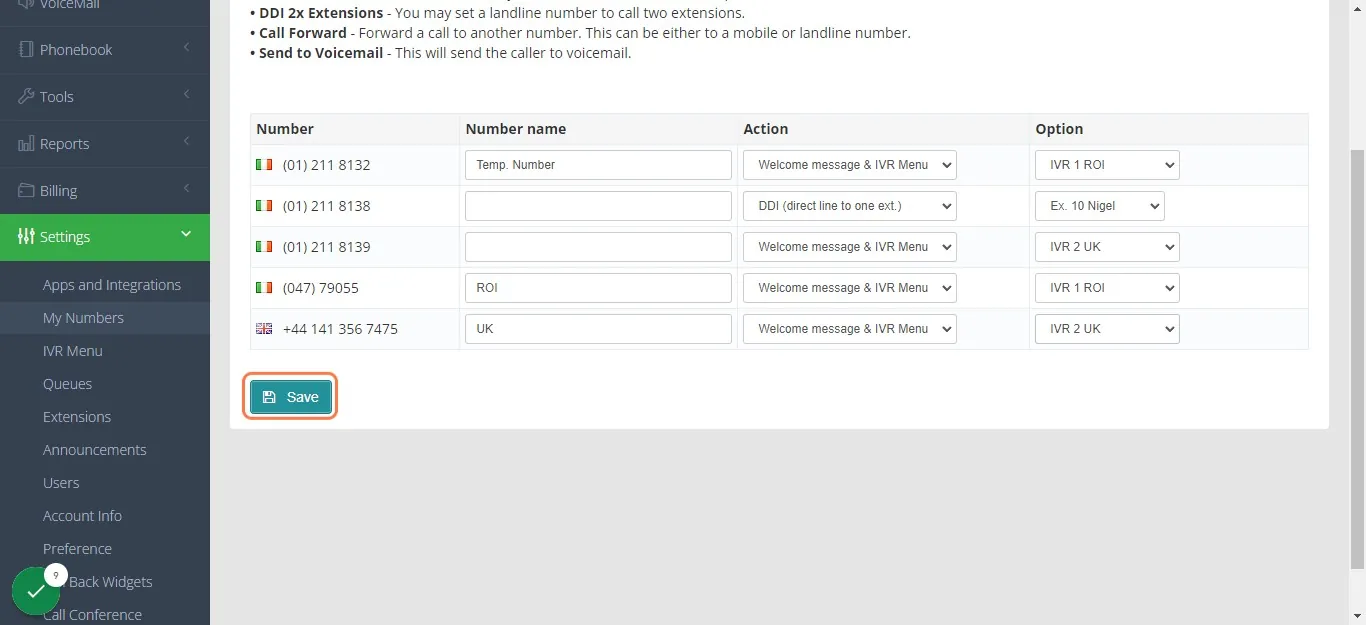
- Once logged-in click on Settings > My Numbers
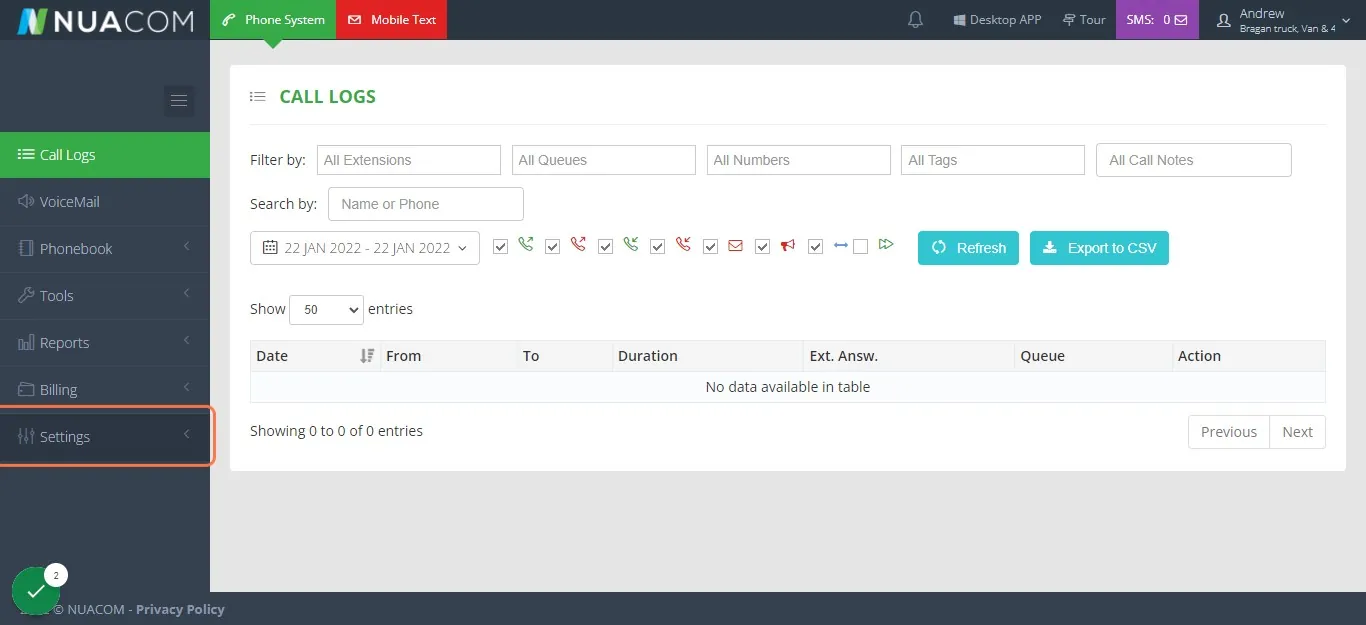
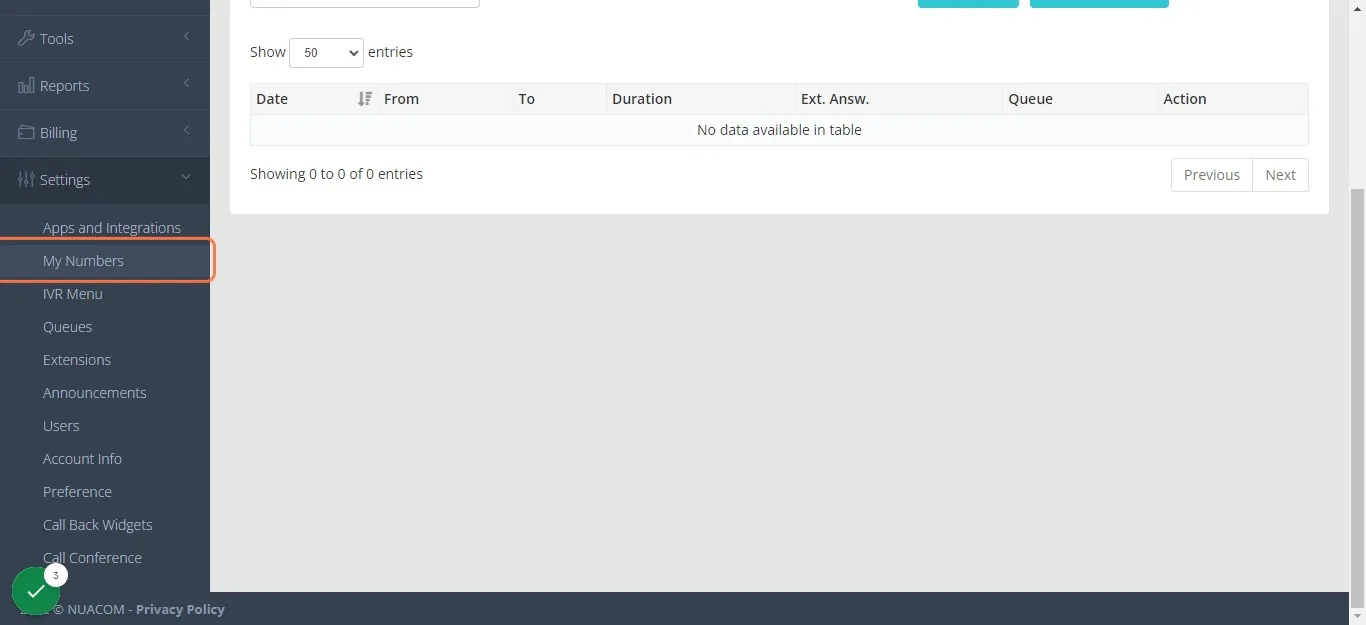
- Click the dropdown for the ROI number and select IVR 3 Busy Closed, do the same to the UK number and then click Save.
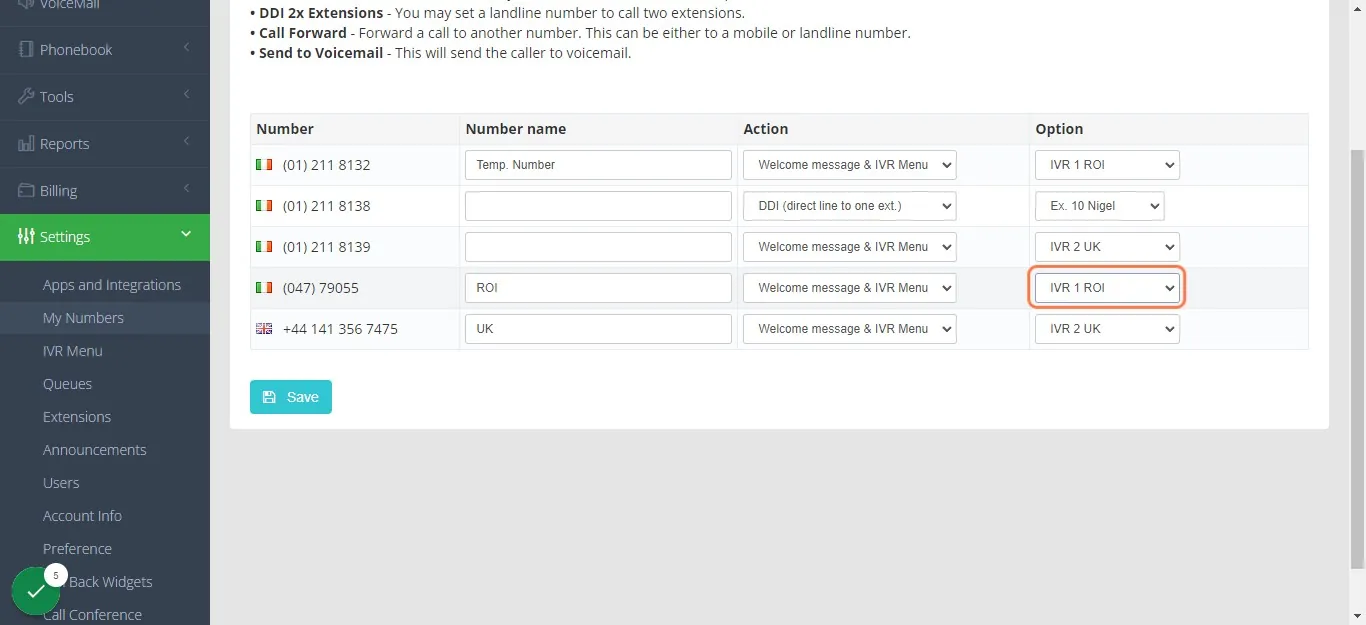
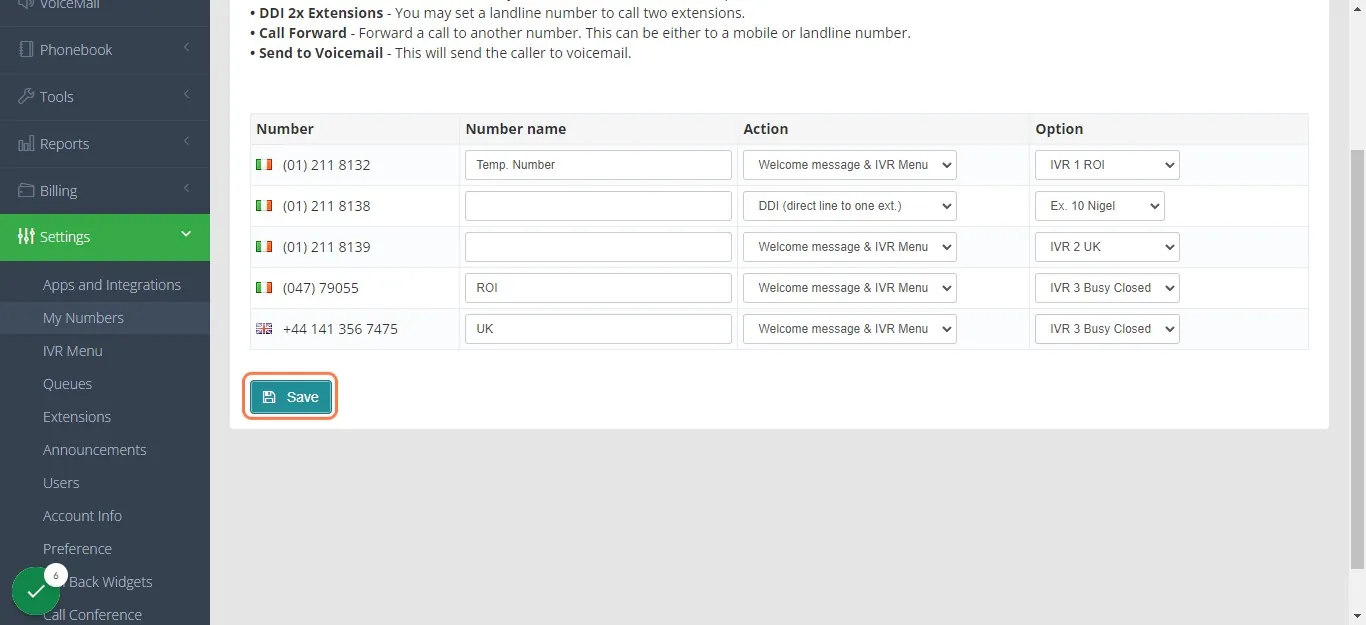
- To turn the phone back to available. Just click again on the dropdown menu and select IVR 1 ROI for the ROI number and IVR 2 UK for the UK number and then click Save.
Answering Calls#
There is a simple flow and etiquette that we must follow when handling phone calls. You need to establish first what the call is in relation to – is it a sales or technical call, is it a call looking for someone else in the office (Nigel / Accounts / Anyone from Team IRL) , etc.
The procedure should be to try to have customers contact us by email - Please can you drop us a quick email to [show the issue] [So we can track your order] [reply with a discount code (if asking for a discount) ] [Reply fitting information].
Unless it is a sales call, always direct the caller back to the e-mail - [email protected]. The reason for this is that we only want to deal with sales calls on the phone. Fitting problems, missing items etc needs to be dealt with via email so that firstly we can see the fitting issue and be in the best position to deal with it and resolve the issue - also it means that everyone is on the same page and there is no confusion.
You may need to politely explain to them that from the email contact we can see all order details and status, what was ordered what was sent, we also have details should we need to arrange return/replacement / send fitment guide when contact is made on emails.
Yes - some customers may not want to do this - we treat this as the second stage and handle it slightly differently. Please see below section for guidance to some common phone call queries.
- Opening Spiel
Answer the phone saying 'Bragan Truck Van & 4x4' (applies to all types of phone calls).
- Sales Call Inquiry
You need to be thinking that our products are the best in the world (which they are). Again, it is very important to let the customer do the talking as they have called you & establish what they are looking for. Ask the right questions i.e. if they say they model is L200 – you need to know what year it is, or if they are looking side bars for a 2016 Ford Transit Connect – you need to know if the van is LWB or SWB. Again, product knowledge is KEY, familiarize yourself with the products.
Ask the customer have they seen the item on our website/eBay store etc – this is important also if you are unsure of the item the customer is talking about. Ask them 'Can you provide the part number/ SKU / eBay item number you see on our website?' i.e. BRA26111SL - If not then direct them to the website.
Always direct them to the website/eBay so that they understand and know what they are buying - so that they see pictures of the item. Ask the customer of their email address and email the customer the link of relevant listings for his vehicle (make sure to also ask the make, model and year of vehicle). Use Macro 700 for this. Provide the link to the item they are looking for. Ensure to provide broad link.
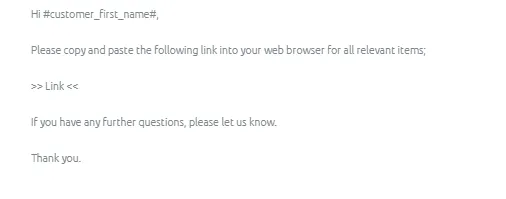
Sender should be [email protected]. Add a subject line and ensure correct tagging of Folder (Potential Sales). It is important to tag the email for potential sales so we can follow up with the customer if there’s no purchase made. See Potential Sales SOP.
It is Vital we do not miss any opportunities for new sales.
Always Upsell when a customer has agreed to initial sale, ensure you always ask is there anything else. Another option is to ask what they have on the Vehicle already. This allows you to offer items they can’t say NO to.
Always increase your product knowledge, this will make you more comfortable on the phone as well as when you are dealing with emails, if you don't know something, find out the answer, record it on your Trello board (knowledge bank) & learn it (Please see Trello SOP for Trello usage) The more you know the easier it will be and the more sales you can get.
If asked something and you are unsure of the answer, politely say 'That's something I will need to check', take their name and email address, and email them back when you have an answer.
There is no point letting on that you know what you are talking about when you don't because this could just lead to selling the wrong item, having difficulty with it, and having to get it collected, which costs money so instead of making a sale, you've made a loss.
Always push sales and try and get customers to the website, if the customer sounds unsure just say 'I can send you a link to our website, so you can have a look at it', also link other items for their vehicle as a way of up-selling. Use Macro 700 when emailing.
If customer is difficult to hear, then we can request them to email us at [email protected].
- Technical Call Inquiry
In any case, ask the customer to ‘Please send some pictures of the issue you are having to [email protected] or [email protected] & one of our technical engineers / technical team will look at & advise as soon as possible.
Inform customer that it will be dealt with in a prompt manner. Any issues will be resolved in any case. If the customer goes on a bit of a rant (running down our products etc) – Let them say what they need to say. Do not agree with them or rundown the products just reassure them that if there is an issue we will always resolve. - 'We have sold a number of these quite recently without issue but we will resolve any issues in a prompt manner'
Finish the call in a friendly manner and thank them for the call.
If customer insist that he wants to talk in the technical team/team IRL, ask the customer to hold and say you are going to check with the technical team. Just put the customer on hold for a while then get back to them and inform that technical team is not available at the moment (use alibi like gone offsite for lunch - most usual option, on a meeting, phone is down) and request them to email us with their concern so we can forward it to technical team. If they do not want to email then get their email address and inform them somebody on the team will contact them.
- Invoice Request
If the customer is calling for an invoice ask for their Order Reference Number. If they do not have this, ask for their email address or post code then also ask them when they purchased it and what the Item was. If the order is still open (not processed order), please say that you will receive an invoice when the item has been
dispatch. Tell the customer also to check their junk/spam folders. E-mails & tracking information.
If you cannot find their order on our system, tell them to send an email to [email protected] with their delivery details and our accounts team will send that across for them. Our email system has the ability to populate information of their order as long as its email address is the same email address they have entered on their order.
If a customer is requesting a copy of an invoice with changes on its details such as different billing information or changing its currency (this can only be done by Accounts), you can request the customer to send us an email so every detail is correct.
- Tracking/Delivery Queries
When answering a tracking call – always be ready and equipped to track the order whether this is through IFS, FedEx or Fastway. HAVE ALL THESE WEBSITES OPENED AND READY TO SEARCH. See Handling Shipment Tracking Queries SOP for guide.
Ask customer for their Order Number. The search it in Linnworks Open Orders or Processed Orders Tab. If you cannot find it in the system, ask for their post code. These two are the easiest and quickest way to search.
When searching the postcode it may be in the format with a space in the middle or without. Example: BT927QU or BT92 7QU – always try both and use email address given to search if neither are successful.
Ask for their email address and sent tracking details so they can check the progress of the shipment on their end.
If you still cannot find it in the system, request the customer to send us an email and include all relevant details of the product like, Shipping Address, Name, Item ordered etc so we can thoroughly check.
- Request to Speak with Team IRL
If it is someone looking for Nigel/Team IRL always get a name & what the call is in relation to then simply say 'I will check to see if they are available' then place the call on hold. Always try to have them sent an email if it is not urgent or Team IRL does not expect a call from this caller.
Notify the team member he is looking for in Skype with the complete information about the caller. If agree then transfer the call but if there is no acknowledgement then inform the caller that the person is not available and get his number so the person he is looking for can call back. You can also request him again to email.
- Location Inquiry
If asked where you are based, when it is an English customer, our response is, ‘We have a distribution centre in Scotland (Stranraer)’. The reason is because the UK market is the biggest to our business. Some people get wary about buying something if they think it comes by air or by sea and then the uncertainty of returning it back to Ireland if they need to. This can be enough to put them off from purchasing from us. They are reassured if they think it is only coming down the road from Scotland.
If asked about your accent being Irish/other foreign accent, just say that's how it goes, deflect, there are many people all over the world who lives elsewhere to where they are from. The less said in this case the better about where we are based.
If answering a call from Scotland – ‘Our warehouse is based in Northern Ireland & we have a call centre in Glasgow’.
If answering a call from Ireland – ‘We have a warehouse based along the border’. North - just along the Fermanagh border. South - just along the border outside Monaghan.
Note: Our number will appear as a Glasgow number, so if ever asked about this by Irish or Scottish Customers, just say we have a call centre in Glasgow.
In all cases, we say it is a CLOSED WAREHOUSE & all items are sent with the courier (Prices include delivery from our door to yours). There may be some requesting possibility of collection of their order on our Warehouse. We do not allow this and just say that we are not insured to have customers on the premises. Warehouse is restricted – Access is only for Bragan Employees.
- Ordering Through Phone
NO PHONE ORDERS!!! We do not process the order manually.
All orders should be pushed on our website. Trade Customer will have the ability to order products under trade prices on our website. Again, we do not process the order manually.
- Payments through phone
This is only applicable for customers who want to make a payment for orders that did not go through on our website or would like to pay for additional shipping cost, redelivery and etc as long as it does not involve adding items on an open order. This DOES NOT apply to new orders.
ALL ORDERS MUST BE DONE ONLINE. As of the moment, we only have few members who has an access to collect payment over the phone. Put the call on hold and
contact management to ask who is allowed. You may transfer the call to them and provide complete details of the order. In any case, none of them is available, you may offer a callback and post the customer’s information on Skype Group including their best callback number.
Note: It would be best though to offer to send them an invoice through Paypal. Gather their information and Paypal email and inform them that we will have our Accounts send this invoice over to them.
- Asking for Discounts
When it comes to pricing always says that the price on the website/eBay is the best that we can offer. You can also offer a future discount if they can send us pictures of the item fitted on their vehicle when they go ahead with the purchase.
- Delivery Date Inquiry
Don't promise delivery dates as there can be alterations to be made etc. Try and be a little vague 'If ordered today (Wednesday) will be with you early next week' or say 'You will receive a tracking email upon dispatch - please check your junk & spam folders also'.
Note:
Next day dispatch does not mean next day delivery. The standard is to one day dispatch. (Weekends are not counted).
Normally, delivery would only take 2-3 working days (UK and Ireland) and 5-7 working days (International) from the day of dispatch.
- Trade Customers
For existing Trade Customers, always push them to purchase on our website. They should be able to purchase the items under trade prices.
If they are new trade customers or want to be a trade customer, get their information (Name or Company Name and Email Address) and ask approval on Skype Group if we can proceed in creating a Trade Account for them. Then update the customer through email.
- Gift Card Inquiries
Check this link to see what is available then get customers email address so you can forward the link to them.
- Irate/Difficult Customers
Put them on hold and say we will check with technical team. Chat or call team IRL about the issue and ask if you can transfer the call to them. if no one is available, go back to the customer and inform that the technical team is unavailable (use alibi like gone offsite for lunch - usual option, phone lines are down, out of the office, on a meeting) and push him to email his concern. If he do not want to email then get his name, email and confirm his number and inform him somebody on the team will contact him.
- Unable to Handle Calls
If there is a sales call that you are not comfortable with - ALWAYS direct them back to the website. Alternatively if Team IRL is on another call – Please say 'XXXX is in a sales meeting now, can I take a message & I will get him to ring you back'.
Note: Be Alert for customer with strange accents and who are not Negotiating on price, looking items delivered to alternate addresses.
- Ending Call
If the customers issue has been resolved at the end of the call always finish by asking the customer if they have leave a positive feedback / TrusPilot review and to send over photos of the item fitted to be featured on our social media
Video & Media#
🎥 NUACOM Tutorials - Setting up the NUACOM desktop application
Notes#
This section is important so Adhoc points and issues can be logged. Also, Q&A can be logged for suggestions for potential issues encountered. Also, log important notes needed for this system.
Additional Notes:
For support dial 777 (Nuacom Helpline) - this will only work when dialed through them.
Potential Issues:
1 - ISSUE ENCOUNTERED: Stuck on Loading RESOLUTION: Refresh Browser
2 - ISSUE ENCOUNTERED: Broken Links RESOLUTION: Get the external link as this will allow other people to access the SOP without the need for login credentials and avoid broken links.