Right Click Chrome Extension
This extension gives you the ability to highlight content and right click and it will
Overview#
Purpose: This extension gives you the ability to highlight content and right click and it will automatically input the details into the desired field, for example, we use this for tracking information
Scope: This procedure applies to all assigned Bragan Customer Service Representative.
Responsibility: It is the responsibility of all employees to ensure the process set out in this procedure is followed.
Objective: The objective of this procedure is:
To save time and be efficient on overall tasks.
Procedure#
How to Install
1.) Go to Dropbox Bragan – SOP > Bragan Communications, Software, and Hardware Guide > Right Click Chrome Extension > Selection Content Search > Download Link
| DropBox Link: | chrome.google.com |
|---|---|
| search/kplgehmegmjifbhioeldcnphfkcfckjj |
Or See the Attachment below.

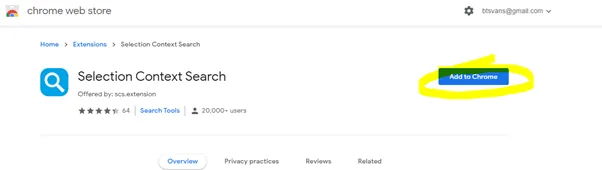
2.) Click Add to Chrome
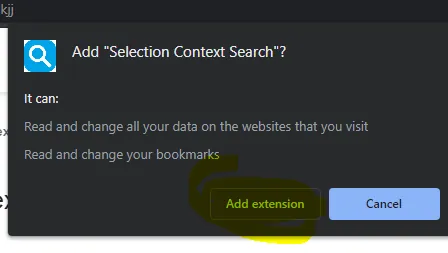
3.) Click Add extension on the pop-up window
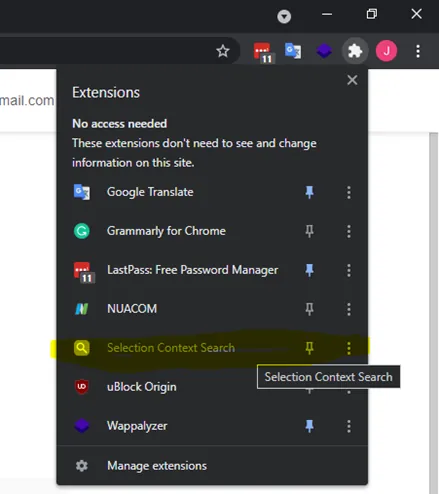
4.) You will see at the top of your browser that the extension has been added
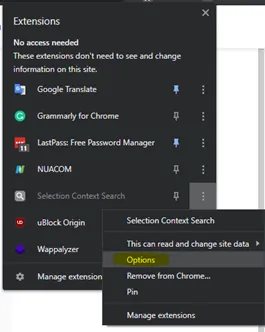
5.) Click the three dots to the right of “Selection Context Search” and click “Options”
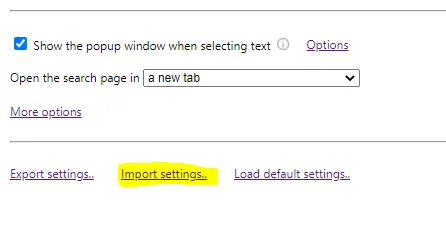
6.) At the bottom of your screen click “Import Settings”
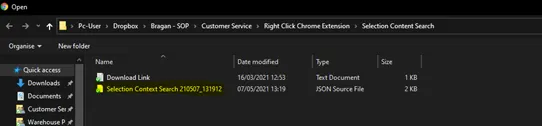
7.) Navigate to Dropbox > Bragan – SOP > Customer Service > Right Click Chrome Extension > Selection Content Search > And select the file “Selection Context Search 210507_131912 “
Selection Content Search Dropbox link:
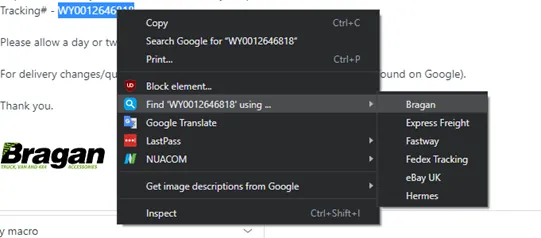
8.) You will now be able to highlight tracking information on any site including Linnworks right-click “Find” and select the courier. This will input the tracking information into the desired website and open it in a new tab on your browser.
Note: If did not reflect at all, try restarting your browser or computer.
Notes#
This section is important so Adhoc points and issues can be logged. Also, Q&A can be logged for suggestions for potential issues encountered. Also, log important notes needed for this system. Additional Notes:
This extension gives you the ability to highlight content and right-click and it will automatically input the details into the desired field, for example, we use this for tracking information. Note: If did not reflect at all, try restarting your browser or computer. *May still need some updates/revision by the owner, especially screenshot.
Potential Issues:
1 - ISSUE ENCOUNTERED: Stuck on Loading RESOLUTION: Refresh Browser
2 - ISSUE ENCOUNTERED: Broken Links RESOLUTION: Get the external link as this will allow other people to access the SOP without the need for login credentials and avoid broken links.
Attachments#
Download_Link.txt 16/12/2025