Trade File Instructions SOP
The Trade File is the company’s repository of all listed items in the website with all
Overview#
Purpose: The Trade File is the company’s repository of all listed items in the website with all relevant data including retail prices, supplier purchase prices, calculated trade prices, and other item details. An extract of this file containing the SKU, item title, trade price will be sent to the trade customers of the company via an email macro of which customer service agents are responsible for sending to the qualified trade customers.
Scope: This procedure applies to Bragan employee who is entrusted by the management to handle and update the trade file.
Responsibility: It is the responsibility of delegated personnel to ensure the process set out in this procedure is followed.
Objective: The objective of this procedure is:
to guide the personnel on how to update the Trade File.
Procedure#
Trade File Instructions
- Open trade file and entire inventory price file and have them running side by side.
- Select SKU from entire inventory price file and copy and paste into Linnworks (Inventory Control - My Inventory – Search - Find).
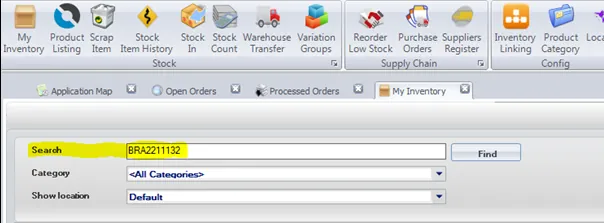
3.
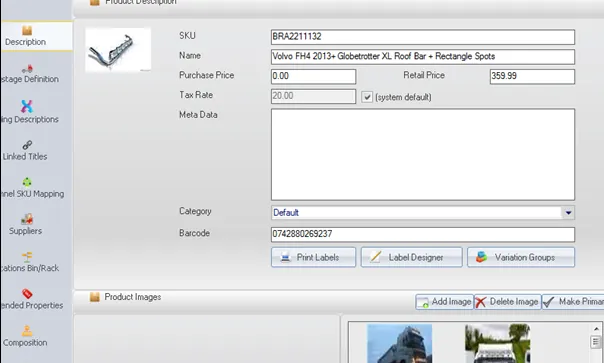
Once found item, select edit item which will bring up a description like below.
4.
Select Composition which will bring up a breakdown of SKUs.
- Copy and paste the SKU into the find option (Ctrl F) and search for it on the trade parent file. Note the shipping price and cost price as highlighted below.
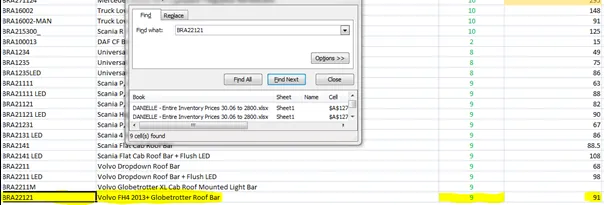
- Repeat for remaining SKU in the composite breakdown, but note there may be more than 1 in the quantity, etc (Price of BRA1032 X 6).
- Once you have all the prices total together and insert them into the entire inventory price file etc: 91 + (17.20x6) =194.20.
- Repeat same for shipping until all columns are complete.
Notes#
This section is important so Adhoc points and issues can be logged. Also, Q&A can be logged for suggestions for potential issues encountered. Also, log important notes needed for this system.
Additional Notes:
"Add important notes here" "Add important notes here"
Potential Issues:
1 - ISSUE ENCOUNTERED: Stuck on Loading
RESOLUTION: Refresh Browser
2 - ISSUE ENCOUNTERED: Broken Links
RESOLUTION: Get the external link as this will allow other people to access the SOP without the need for login credentials and avoid broken links.
3 - ISSUE ENCOUNTERED: "Type Text Here"
RESOLUTION: "Type Text Here"